1. Introducció
Welcome to the user manual for your WDYQJE R36MAX Retro Handheld Game Console. This guide provides essential information to help you set up, operate, maintain, and troubleshoot your device. Please read this manual thoroughly to ensure optimal performance and longevity of your console.
2. Producte acabatview
2.1 Contingut del paquet
En desembalar, comproveu que hi hagi tots els elements que s'enumeren a continuació:
- Handheld Game Console (R36MAX)
- Cable de càrrega tipus C.
- Funda protectora
- Protector de pantalla
- Manual d'usuari (aquest document)
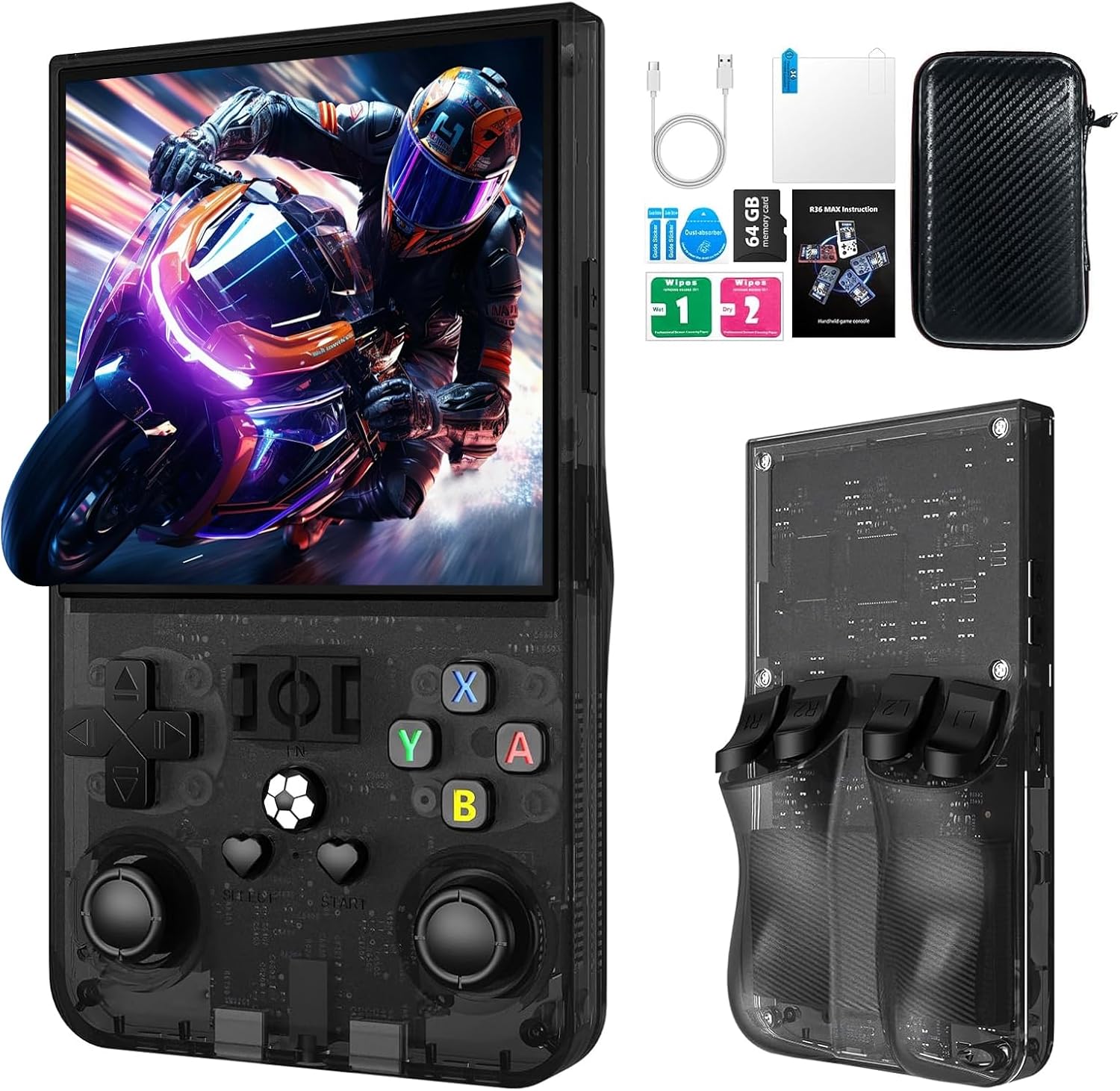
Descripció de la imatge: The R36MAX handheld game console displayed alongside its accessories, including a Type-C cable, screen protector, 64GB TF card, and a protective carrying case.
2.2 Característiques de la consola
- Processador: 1.5GHz 64-bit RK3326 CPU with ARM64bit quad-core Cortex-A35 CPU.
- Sistema operatiu: Linux-based system.
- Visualització: 4.0-inch IPS HD screen with 720x720 pixel resolution, covered with tempered glass.
- Emmagatzematge: Built-in 64GB TF card, expandable via additional TF card slot.
- Bateria: 4000mAh rechargeable battery, providing up to 10 hours of playtime.
- Àudio: Built-in speakers and 3.5mm headphone jack.
- Connectivitat: Port de càrrega tipus C.
2.3 Disposició i controls del dispositiu
Familiarize yourself with the console's buttons and ports:

Descripció de la imatge: A detailed diagram of the R36MAX handheld game console, highlighting the location and function of each button and port.
Davant View: Features a 4.0-inch screen at the top. Below the screen, from left to right, are:
- Left Rocker (analog joystick)
- Coixinet direccional (D-pad)
- Botó de selecció
- FN (Function) button
- Botó d'inici
- Right Rocker (analog joystick)
- A, B, X, Y action buttons
- Volume keys (+ and -) on the right side.
- Power and Reset buttons on the left side.
- TF-game and TF1-OS card slots on the top edge.
A dalt View: Shows R1, R2, L1, L2 shoulder buttons.
3. Configuració
3.1 Càrrega inicial
- Connect the provided Type-C charging cable to the charging port at the bottom of the console.
- Connect the other end of the cable to a compatible USB power adapter (5V/1A or 5V/2A recommended).
- Allow the console to charge fully before first use. The charging indicator light will typically change color or turn off when charging is complete.
Important: Do not play games while the console is charging, as this may potentially damage the TF card or the device's internal components.
3.2 Inserting/Removing TF Cards
The console comes with a pre-installed 64GB TF card for games. You can also insert an additional TF card for expanded storage.
- Locate the TF card slots on the top edge of the console (TF-game and TF1-OS).
- To insert a card, gently push the TF card into the slot until it clicks into place. Ensure the card is oriented correctly.
- To remove a card, gently push it inward again until it springs out.
Precaució: Always power off the console before inserting or removing TF cards to prevent data corruption.
4. Instruccions de funcionament
4.1 Encès/Apagat
- Encès: Manteniu premut el botó Poder button (located on the left side) for a few seconds until the screen illuminates.
- Apagar: Manteniu premut el botó Poder button until a power-off menu appears, then select "Shutdown" or "Power Off". Alternatively, a quick press of the power button may put the device into sleep mode.
- Restablir: In case of a system freeze, use the Restableix button (small pinhole next to Power button) with a thin object to restart the console.
4.2 Navegació bàsica
- Utilitza el Coixinet direccional (D-pad) or Left/Right Rockers to navigate through menus and game selections.
- Premeu el botó Un botó per confirmar les eleccions.
- Premeu el botó Botó B. to go back or cancel.
- El Seleccioneu i Comença buttons are typically used for in-game functions or menu options.
4.3 Jugar a jocs
The console supports various emulators. To play a game:
- From the main menu, navigate to the desired emulator or game list.
- Select a game using the D-pad/rockers and press the Un botó per llançar-lo.
- During gameplay, use the console's buttons as per the original game's controls.
4.4 Adjusting Screen Rotation (RetroArch Menu)
For certain games or preferences, you may need to adjust the screen orientation:
- Enter any game.
- Premeu Seleccioneu + X simultaneously to open the RetroArch Quick Menu.
- Premeu el botó Botó B. to return to the main RetroArch menu.
- Navega a Configuració i premeu A.
- Seleccioneu Vídeo i premeu A.
- Seleccioneu Sortida i premeu A.
- Seleccioneu Rotació de vídeo i premeu A.
- Tria Normal or other desired rotation options and press A per confirmar.
- Exit the RetroArch menu to apply changes.
4.5 Control de volum
Utilitza el Volume keys (+ and -) located on the right side of the console to adjust the audio output level.
4.6 Headphone Connection
Connect standard 3.5mm headphones to the OTC Headset port at the bottom of the console for private listening.
5. Manteniment
5.1 Neteja de la consola
- Use a soft, dry, lint-free cloth to wipe the screen and body of the console.
- Per a marques difícils, lleugerament dampen the cloth with water or a mild screen cleaner. Avoid harsh chemicals.
- Do not spray liquids directly onto the console.
5.2 Cura de la bateria
- Per allargar la durada de la bateria, eviteu descarregar-la completament amb freqüència.
- Store the console in a cool, dry place when not in use for extended periods.
- If storing for a long time, charge the battery to approximately 50% capacity.
5.3 Actualitzacions de programari
Consulteu periòdicament la informació oficial del fabricant website or community forums for potential software or firmware updates. Follow instructions carefully when performing updates to avoid system damage.
6. Solució De Problemes
If you encounter issues with your R36MAX console, refer to the following common problems and solutions:
| Problema | Causa possible | Solució |
|---|---|---|
| La consola no s'encén. | Bateria baixa; Fallada del sistema. | Charge the console for at least 30 minutes. If still unresponsive, use the Reset button. |
| Games do not load or crash. | Corrupted game file; TF card issue; Emulator error. | Ensure TF card is properly inserted. Try restarting the console. Verify game file integrity if possible. |
| Buttons are unresponsive or incorrect. | Software glitch; Button mapping issue. | Restart the console. Check in-game or emulator settings for button remapping options. |
| La pantalla està en blanc o parpelleja. | System error; Display connection issue. | Restart the console. If the problem persists, contact customer support. |
Si el problema persisteix després d'intentar aquestes solucions, consulteu la secció Garantia i assistència per obtenir més ajuda.
7. Especificacions
| Característica | Detall |
|---|---|
| Model | R36 MAX |
| Processador | 1.5GHz 64-bit RK3326 CPU, ARM64bit quad-core Cortex-A35 |
| Sistema operatiu | Linux |
| Pantalla | 4.0-inch IPS HD, 720x720 pixels, Tempered Glass |
| Capacitat d'emmagatzematge de memòria | 64 GB (expandable via TF card) |
| Bateria | 4000 mAh (bateria 1 D inclosa) |
| Durada de la bateria | Fins a 10 hores |
| Port de càrrega | Tipus-C |
| Sortida d'àudio | Built-in speakers, 3.5mm headphone jack |
| Dimensions del producte | 5.7 x 3.2 x 1.8 polzades |
| Pes de l'article | 12.6 unces |
| Material | Plàstic |
| Fabricant | WDYQJE |
| Edat recomanada | 12 mesos i més |

Descripció de la imatge: An image illustrating the R36MAX console's battery features, including "More than 6-8 hours of playback", "4000mAh High Capacity", "USB C charge cable", and "Maximum 5V 1.5A or 2A Charging". A close-up of the USB-C charging port is also visible.
8. Garantia i Suport
For warranty information and customer support, please refer to the documentation included with your purchase or visit the official WDYQJE weblloc web. Conserveu el comprovant de compra per a qualsevol reclamació de garantia.
Política de devolució: The product typically includes a 30-day return/replacement policy. Please check your purchase details for specific terms.
For additional assistance, you may contact WDYQJE customer service through their official channels.

