1. Introducció
Welcome to the user manual for your new Lava A1 Music keypad mobile phone. This guide provides essential information on setting up, operating, maintaining, and troubleshooting your device. Please read this manual carefully to ensure proper use and to maximize the performance of your phone.
The Lava A1 Music is designed for reliable communication with features such as clear sound, long battery life, and user-friendly operation.
2. Informació de seguretat
- Seguretat de la bateria: Use only original or approved batteries and chargers. Do not short-circuit, puncture, or expose the battery to extreme temperatures. Dispose of batteries properly.
- Seguretat de conducció: Do not use your phone while driving. If necessary, use a hands-free accessory.
- Dispositius mèdics: Mantingueu una distància de seguretat entre el telèfon i els dispositius mèdics com ara els marcapassos. Consulteu el vostre metge i el fabricant del dispositiu mèdic per obtenir pautes específiques.
- Avions: Turn off your phone when on an aircraft.
- Ambients explosius: Turn off your phone in areas with potentially explosive atmospheres, such as gas stations or chemical plants.
- Resistència a l'aigua: Aquest dispositiu no és impermeable. Eviteu l'exposició a líquids.
- Nens: Keep the phone and its accessories out of reach of small children.
3. Contingut del paquet
En obrir el paquet, comproveu que tots els elements hi siguin presents i que estiguin en bon estat:
- Lava A1 Music Mobile Phone
- Bateria
- Adaptador (carregador)
- Manual d'usuari (Aquest document)
4. Dispositiu acabatview
Familiarize yourself with the physical components of your Lava A1 Music phone.

Imatge 4.1: Davant i darrere view of the Lava A1 Music mobile phone, showcasinel seu disseny compacte i el seu teclat numèric.
The phone features a durable build with a comfortable keypad for easy dialing and navigation. The rear panel includes the speaker grille and the A1 Music branding.
Disposició del teclat

Imatge 4.2: Detallada view of the Lava A1 Music keypad, highlighting the numerical and function keys.
- Tecla de navegació: S'utilitza per a la navegació i selecció de menús.
- Tecla de trucada: Initiates or answers calls.
- Tecla d'engegada/finalització: Ends calls, returns to standby, or powers the phone on/off.
- Tecles programades: Context-sensitive keys for menu options.
- Numerical Keys: For dialing numbers and entering text.
5. Configuració
5.1 Inserting SIM Card(s) and Battery
- Treure la contraportada: Gently pry open the back cover of the phone from the designated notch.
- Inseriu la targeta(es) SIM: Locate the SIM card slot(s). Insert your SIM card(s) into the slot(s) with the gold contacts facing down, ensuring they are correctly seated. This phone supports Dual SIM functionality.
- Insereix la bateria: Col·loca la bateria al compartiment de la bateria, alineant els contactes daurats de la bateria amb els del telèfon.
- Substituïu la coberta posterior: Carefully align and press the back cover until it clicks securely into place.
5.2 Càrrega de la bateria
Abans del primer ús, es recomana carregar completament la bateria.
- Connecteu l'adaptador del carregador a una presa de corrent.
- Connect the other end of the charger to the phone's charging port.
- L'indicador de bateria a la pantalla mostrarà l'estat de càrrega.
- Un cop estigui completament carregat, desconnecteu el carregador.
The Lava A1 Music features a 1000mAh battery, providing up to 5 days of standby time under optimal conditions.
5.3 Engegada/apagada
- Per encendre: Manteniu premut el botó Tecla de fi/engegada fins que la pantalla s'il·lumini.
- Per apagar: Manteniu premut el botó Tecla de fi/engegada until the power-off options appear, then select "Power Off".
6. Instruccions de funcionament
6.1 Fer trucades
- From the standby screen, enter the phone number using the keypad.
- Premeu el botó Clau de trucada per iniciar la trucada.
- Per finalitzar una trucada, premeu el botó Tecla de fi/engegada.
6.2 Sending SMS Messages
- Vés a Menú > Missatges > Escriu missatge.
- Introduïu el vostre missatge amb el teclat numèric.
- Introduïu el número de telèfon del destinatari o seleccioneu-lo dels contactes.
- Seleccioneu Enviar.
6.3 Connectivitat Bluetooth
The Lava A1 Music supports Bluetooth for wireless connectivity with compatible devices.
- Vés a Menú > Configuració > Connectivitat > Bluetooth.
- Turn Bluetooth On.
- Seleccioneu Dispositius aparellats or Cerca nou dispositiu per connectar.
6.4 Reproductor de música
Enjoy your favorite music with the phone's built-in music player and clear sound output.

Imatge 6.1: Illustration of the powerful sound feature, indicating high-quality audio output for music and calls.
- Vés a Menú > Multimèdia > Reproductor de música.
- Select a song from your storage to play.
- Use the navigation keys to control playback (play, pause, skip).
6.5 Funció de la torxa
The phone includes an instant torch feature for convenience.
- To turn on the torch, press and hold the designated torch key (refer to your phone's keypad for exact key, often the '0' or a dedicated side button).
- Repeat the action to turn it off.
6.6 Auto Call Recording
The Lava A1 Music supports automatic call recording.
- Vés a Menú > Configuració > Configuració de trucades.
- Locate and enable the Registre automàtic de trucades opció.
- Recorded calls will be saved in the phone's memory or on an inserted memory card.
6.7 Suport lingüístic
The device supports 22 Indian languages, allowing you to operate the phone in your preferred language.
- Vés a Menú > Configuració > Configuració del telèfon > Llengua.
- Seleccioneu l'idioma desitjat de la llista.
6.8 Super Battery Mode
Activate Super Battery Mode to extend your phone's battery life when power is low.
- This mode typically optimizes background processes and display settings to conserve power.
- Access this feature through Menú > Configuració > Gestió d'energia or a similar path.
6.9 Display and Contact Photo Icons
The phone features a 2-inch display for clear viewing and supports contact photo icons for easy call verification.

Imatge 6.2: The 2-inch display of the Lava A1 Music, showing clear visuals.
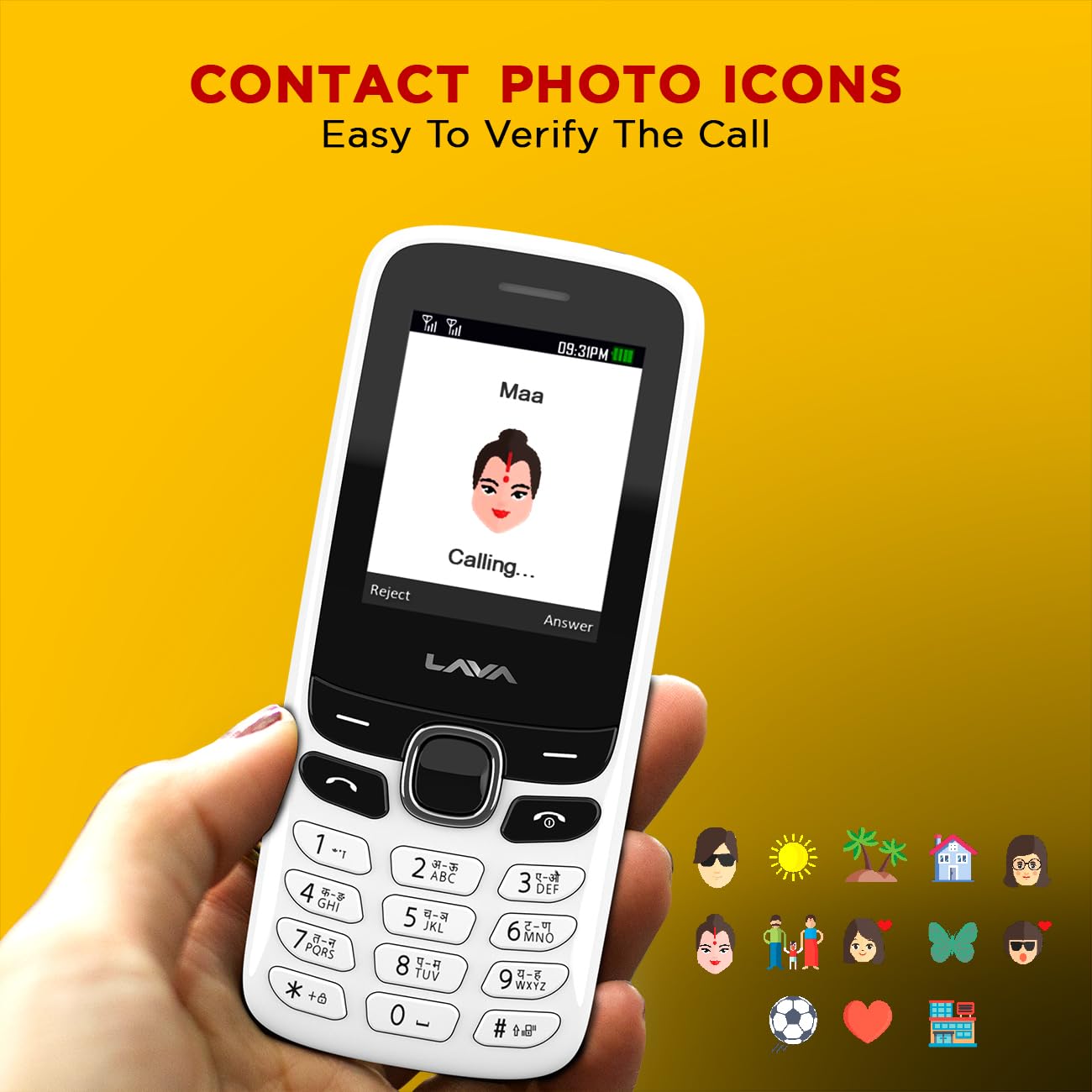
Imatge 6.3: Example of contact photo icons on the Lava A1 Music, aiding in quick identification of callers.
7. Manteniment
7.1 Cura de la bateria
- Eviteu sobrecarregar o descarregar completament la bateria amb freqüència.
- No exposeu la bateria a temperatures extremes de calor o fred.
- If the phone will not be used for an extended period, charge the battery to about 50% before storing.
7.2 Neteja del dispositiu
- Use a soft, dry cloth to clean the phone's surface.
- Eviteu utilitzar productes químics durs, dissolvents de neteja o detergents forts.
- Keep the charging port and audio jack free from dust and debris.
7.3 Emmagatzematge
Guardeu el telèfon en un lloc fresc i sec, allunyat de la llum solar directa i de temperatures extremes.
8. Solució De Problemes
This section addresses common issues you might encounter with your Lava A1 Music phone.
| Problema | Possible solució |
|---|---|
| El telèfon no s'encén | Assegureu-vos que la bateria estigui carregada. Comproveu si la bateria està inserida correctament. |
| Sense senyal de xarxa | Check if the SIM card is properly inserted. Move to an area with better network coverage. Contact your service provider. |
| No puc fer ni rebre trucades | Check network signal. Ensure your SIM card is active. Verify call barring settings. |
| La bateria s'esgota ràpidament | Reduce screen brightness. Close unused applications. Activate Super Battery Mode. |
| El teclat no respon | Restart the phone. Ensure no physical obstruction on the keys. |
Si el problema persisteix després de provar aquestes solucions, poseu-vos en contacte amb l'atenció al client.
9. Especificacions
Detailed technical specifications for the Lava A1 Music mobile phone:
| Marca | Lava |
| Número de model | A1 Music |
| Sistema operatiu | Android 10.0 |
| Mida de la pantalla | 2 polzades (5.08 cm) |
| Resolució | 240 x 320 píxels |
| Capacitat de la bateria | 1000 milionsampabans de l'hora (mAh) |
| Temps de conversa telefònica | Fins a 96 hores |
| Tecnologies de connectivitat | USB, Bluetooth |
| Característiques especials | Dual SIM, Auto Call Recording, Instant Torch, 22 Indian Language Support, Super Battery Mode |
| Jack d'àudio | 3.5 mm |
| Factor de forma | Bar |
| Dimensions del producte | 11.25 x 4.8 x 1.47 cm |
| Pes de l'article | 70 g |
| País d'origen | Índia |
| Què hi ha a la caixa | Adaptador |
10. Garantia i Suport
10.1 Informació de la garantia
Your Lava A1 Music mobile phone comes with a 1 any de garantia de substitució from the date of purchase. This warranty covers manufacturing defects and ensures a replacement device in case of eligible issues. Please retain your purchase receipt as proof of purchase for warranty claims.
La garantia no cobreix els danys causats per mal ús, accidents, reparacions no autoritzades o desgast normal.
10.2 Atenció al client
For any technical assistance, warranty claims, or further inquiries, please contact Lava customer support. Refer to the official Lava website or your product packaging for the most current contact details, including phone numbers and service center locations.
També podeu visitar l'oficial Lava Store on Amazon per obtenir més informació sobre el producte i recursos d'assistència.


