Introducció
This manual provides detailed instructions for the DIERYA DK81E 75% Mechanical Gaming Keyboard. Please read this manual thoroughly before using the product to ensure proper setup and operation. Retain this manual for future reference.
The DIERYA DK81E is a compact 75% layout mechanical keyboard designed for gaming and productivity. It features hot-swappable switches, a gasket-mount design with multi-layer sound dampening, customizable RGB backlighting, a dedicated volume knob, and a powerful web-based driver for advanced customization.
Contingut del paquet
- DIERYA DK81E Mechanical Keyboard x 1
- Cable USB-C a USB-A x 1
- Extractor de tecles x 1
- Tirador d'interruptor x 1
- Manual d'usuari x 1

Configuració
- Descomprimir el teclat: Carefully remove the DIERYA DK81E keyboard and all accessories from the packaging.
- Connecteu el cable USB: Insert the USB-C end of the provided cable into the port on the back of the keyboard. Connect the USB-A end to an available USB port on your computer or gaming console.
- Reconeixement del sistema: Your operating system (Windows, macOS, Linux) should automatically detect and install the necessary drivers. No additional software installation is required for basic functionality.
- Ajustar els peus del teclat: El teclat té duestage adjustable feet. Flip them out to achieve your preferred typing angle. The anti-slip rubber pads on the bottom ensure stability.


Instruccions de funcionament
Funcions bàsiques del teclat
The DIERYA DK81E operates as a standard 75% layout keyboard. All keys function as labeled. For keys that are typically present on a full-size keyboard but not on a 75% layout (e.g., F-keys, Page Up/Down, Home, End, Delete), they are accessible via the Function (Fn) key combinations. Refer to the keycap legends for specific Fn key functions.
Multimedia Volume Knob
The dedicated metal knob located on the top right of the keyboard provides convenient control over audio and media playback.
- Girar en sentit horari: Augmenta el volum.
- Girar en sentit antihorari: Disminuir el volum.
- Prémer: Reproducció/pausa multimèdia.

Control de retroil·luminació RGB
The keyboard features vibrant RGB backlighting with 16.8 million colors and over 15 preset lighting effects. Specific key combinations (often involving the Fn key) are used to cycle through effects, adjust brightness, and change colors. Consult the included quick start guide or the web driver for detailed instructions on RGB customization.

Web-Based Driver for Customization
The DIERYA DK81E utilizes a browser-based driver for advanced customization, eliminating the need for software installation and ensuring zero memory footprint. This driver allows for:
- Reassignació de tecles
- Enregistrament de macro
- Quick shortcuts
- In-depth RGB personalization
Per accedir al web driver, open a web browser and navigate to the address provided in the quick start guide or on the manufacturer's website. The driver is compatible with Windows, macOS, and Linux operating systems.

Característiques clau
- Interruptors intercanviables en calent: The DK81E features universal hot-swappable sockets compatible with 3-pin and 5-pin mechanical switches. This allows users to easily change switches without soldering, enabling personalized typing feel and sound.
- Gasket-Mount Design with 6-Layer Dampening Foam: The advanced gasket-mount structure, combined with six layers of sound-absorbing foam, provides a flexible typing experience and a deeper, more satisfying acoustic profile.
- Pre-Lubed Linear Switches: The keyboard comes equipped with factory pre-lubricated linear switches, ensuring a smooth and consistent keystroke experience right out of the box. These switches are rated for 50 million keystrokes.
- Tecles de doble pressió: The keycaps are manufactured using a double-shot injection molding process, which ensures legends will not fade or wear off over time, maintaining a pristine look and feel.
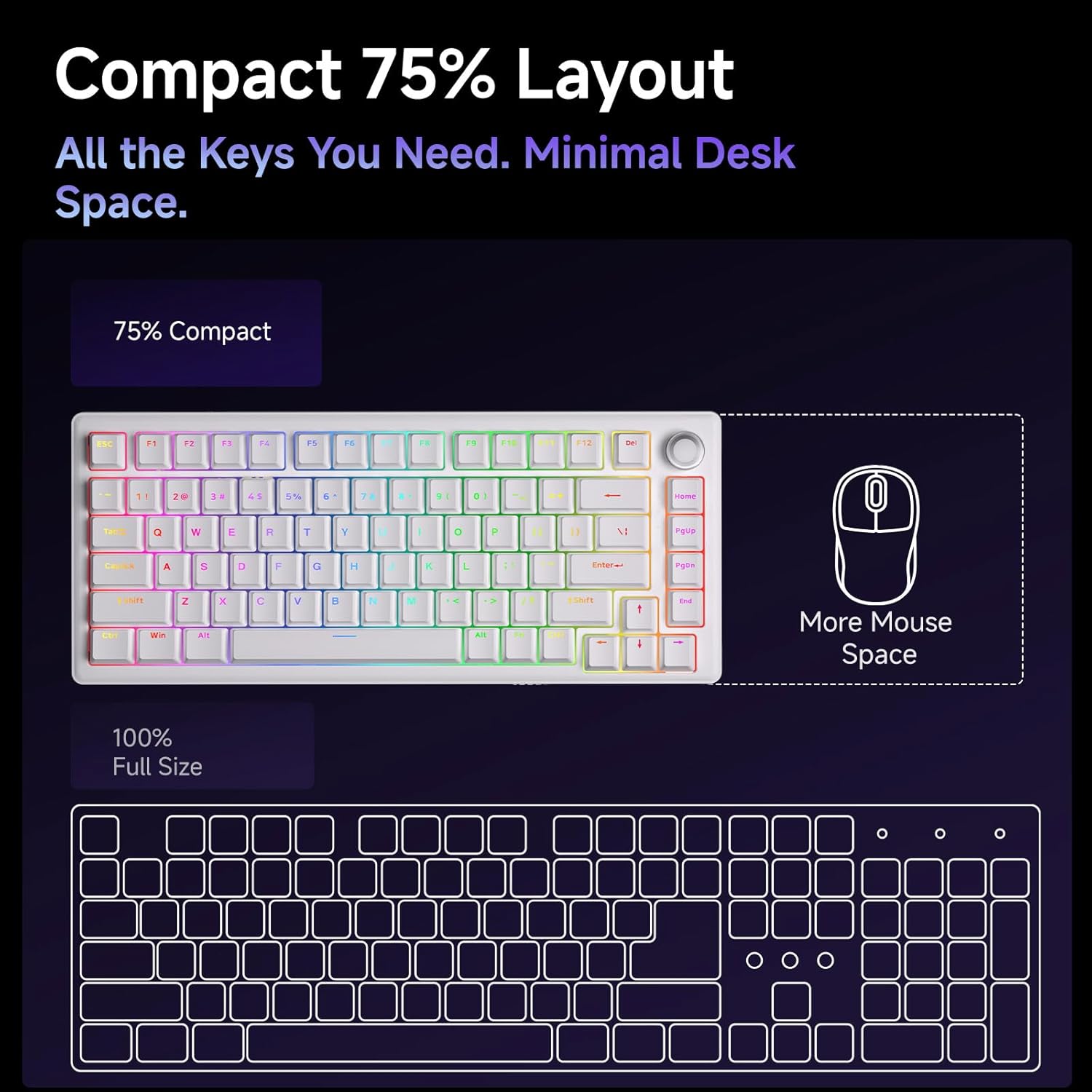
- Disseny compacte al 75%: The 75% layout provides all essential keys while minimizing desk space, offering more room for mouse movement.



Manteniment
Neteja del teclat
Una neteja regular ajuda a mantenir el rendiment i l'aspecte del teclat.
- Eliminació de pols: Feu servir una llauna d'aire comprimit per treure la pols i les restes que hi ha entre les tecles.
- Neteja de les tecles: Gently remove keycaps using the provided keycap puller. Clean them with a soft cloth dampnetejat amb una solució de neteja suau (per exemple, alcohol isopropílic diluït amb aigua). Assegureu-vos que les tecles estiguin completament seques abans de tornar-les a col·locar.
- Neteja de superfícies: Wipe the keyboard's surface with a soft, lint-free cloth. Avoid harsh chemicals or abrasive materials.
Substitució d'interruptors i tecles
The hot-swappable design allows for easy replacement of switches and keycaps.
- Eliminació de les tecles: Use the keycap puller to carefully grip and lift keycaps straight up.
- Eliminació dels interruptors: Use the switch puller to gently clamp the top and bottom clips of the switch, then pull the switch straight up from the PCB.
- Instal·lació d'interruptors: Alineeu els pins del nou interruptor amb els forats de la placa de circuit imprès. Premeu fermament fins que l'interruptor encaixi al seu lloc. Assegureu-vos que els pins no estiguin doblegats.
- Instal·lació de les tecles: Align the keycap stem with the switch stem and press down gently until it is securely seated.
Resolució de problemes
- El teclat no respon:
- Assegureu-vos que el cable USB-C estigui connectat correctament tant al teclat com a l'ordinador.
- Prova de connectar el teclat a un port USB diferent de l'ordinador.
- Prova el teclat en un altre ordinador per descartar problemes específics del sistema.
- Llums RGB no funcionen/incorrectes:
- Check the RGB control key combinations (refer to the quick start guide) to ensure brightness is not set to zero or an incorrect mode is selected.
- Accedeix al web driver to verify RGB settings and apply changes.
- Claus que no es registren:
- If a specific key is not working, carefully remove its keycap and switch. Inspect the switch pins for any bends or damage. Straighten bent pins or replace the switch if damaged.
- Assegureu-vos que l'interruptor estigui completament encaixat a la placa de circuit imprès.
- El botó de volum no funciona:
- Verify that the keyboard is properly connected and recognized by the system.
- Test media playback in different applications.
Especificacions
| Característica | Detall |
|---|---|
| Nom del model | DK81E |
| Marca | DIERYA |
| Disseny | 75% |
| Tipus de canvi | Mechanical (Pre-lubed Creamy Linear Switch) |
| Intercanviable en calent | Sí (compatible amb 3 pins/5 pins) |
| Estil de muntatge | Muntatge de junta |
| Dampening | 6-Layer Sound-Absorbing Foam |
| Il·luminació de fons | RGB (16.8 Million Colors, 15+ Effects) |
| Taps de claus | Double-Shot Injection Molded |
| Connectivitat | Cable USB-C amb cable (desmuntable) |
| Taxa de votació | 1000 Hz |
| Característiques especials | Volume Knob, Programmable Web Conductor |
| Dispositius compatibles | Consola de jocs, PC |
| Sistemes operatius | Windows, macOS, Linux |
| Pes de l'article | 1.96 lliures |
| Dimensions del paquet | 15.31 x 5.79 x 1.85 polzades |
Garantia i Suport
Specific warranty information for the DIERYA DK81E keyboard is not provided in this manual. For detailed warranty terms, technical support, or further assistance, please visit the official DIERYA weblloc web o contacteu directament amb el seu servei d'atenció al client.
Official DIERYA Weblloc: DIERYA Store on Amazon


