Introducció
This manual provides comprehensive instructions for the Baseus 30000mAh 65W Power Bank and the Nomos Win Air 12-in-1 Docking Station. Please read this manual carefully before using the products to ensure proper operation, optimal performance, and longevity. Keep this manual for future reference.

Image: The Baseus 30000mAh 65W Power Bank and the Nomos Win Air 12-in-1 Docking Station shown together. The power bank is a rectangular device with a digital display, and the docking station is a compact, vertical unit with multiple ports.
Baseus 30000mAh 65W Power Bank Overview
The Baseus 30000mAh 65W Power Bank is a high-capacity portable charger designed for fast charging of various devices, including laptops, tablets, and smartphones. It features multiple output ports and a digital display for monitoring battery status.
Característiques principals:
- Capacitat de 30000 mAh: Proporciona energia estesa per a múltiples càrregues.
- Lliurament de potència (PD) de 65 W: Supports fast charging for compatible laptops and devices.
- Pantalla digital: Mostra el percentatge de bateria en temps realtage i estat de càrrega.
- Ports múltiples: Equipat amb ports USB-C i USB-A per a una càrrega versàtil.

Image: A visual representation of the 30000mAh power bank's charging capacity for various devices, including iPhone 16, Samsung Galaxy S24 Ultra, Steam Deck, and iPad Pro.

Image: The 65W USB-C power bank connected to a MacBook Pro 13", illustrating its fast charging capability to reach 50% in 56 minutes.

Image: A diagram showing the universal compatibility of the power bank with various laptops (HP, MacBook, Dell), phones (iPhone 12-16 series, Samsung Galaxy S20-S24 series), and other devices (Steam Deck, Switch, AirPods).
Baseus Nomos Win Air 12-in-1 Docking Station Overview
The Baseus Nomos Win Air 12-in-1 Docking Station is a versatile hub designed to expand the connectivity of your laptop, providing multiple ports for peripherals, external displays, and network access. It supports dual 4K monitor output and high-speed data transfer.
Característiques principals:
- Expansió 12 en 1: Integrates various ports for comprehensive connectivity.
- Dual 4K HDMI: Supports two external monitors with up to 4K resolution at 60Hz.
- 10Gbps USB Ports: High-speed USB-C and USB-A ports for rapid data transfer.
- Gigabit Ethernet: Provides stable and fast wired network connection.
- PD 100W Input: Allows for power delivery to the connected laptop (power adapter not included).

Image: A clean desk setup featuring the compact Baseus docking station connected to a laptop and dual external monitors, emphasizing its ability to reduce cable clutter.
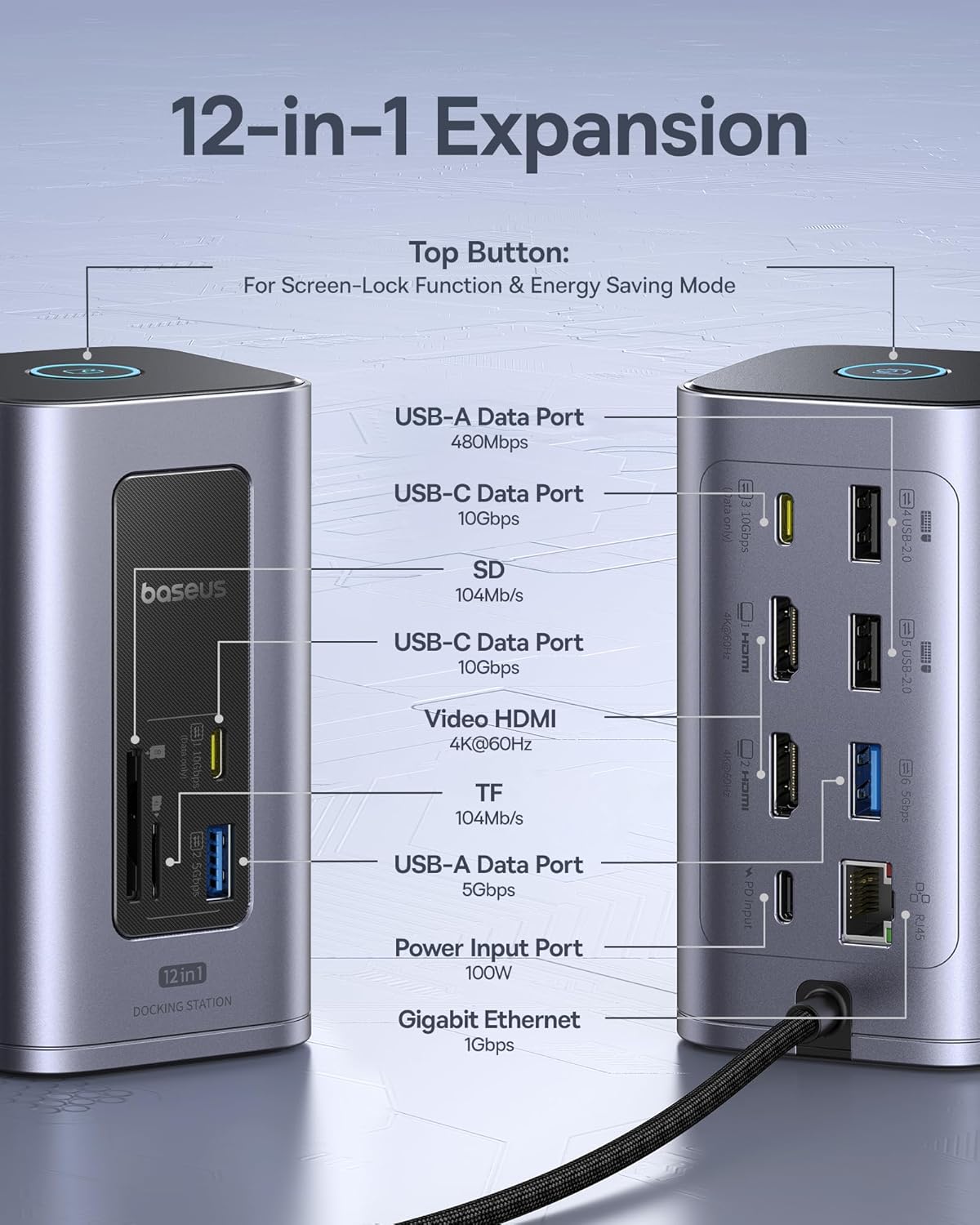
Image: A detailed diagram highlighting the various ports on the 12-in-1 docking station, including USB-A, USB-C, SD/TF card slots, HDMI, Ethernet, and Power Input, along with their specifications.
Setup: Baseus 30000mAh 65W Power Bank
Càrrega inicial:
- Connect the included USB-C to C cable to the power bank's input port.
- Connect the other end of the cable to a compatible USB-C wall charger (not included) with at least 65W output for optimal charging speed.
- The digital display will show the charging progress. Charge the power bank fully before first use.
Comprovació del nivell de bateria:
Premeu el botó d'engegada una vegada per activar la pantalla digital i view el percentatge actual de la bateriatage.
Setup: Baseus Nomos Win Air 12-in-1 Docking Station
Connecting to Your Laptop:
- Connect the integrated USB-C cable from the docking station to a compatible USB-C port on your laptop. Ensure your laptop's USB-C port supports video output (DisplayPort Alternate Mode) and Power Delivery for full functionality.
- For power delivery to your laptop, connect a USB-C power adapter (up to 100W, not included) to the "PD Input" port on the docking station.
Connecting External Displays:
- Connect your HDMI monitors to the HDMI ports on the docking station using HDMI cables.
- Adjust display settings on your laptop (e.g., extend, duplicate) as needed.
- Note: For macOS, dual monitors will display the same content (mirror mode) due to system limitations.
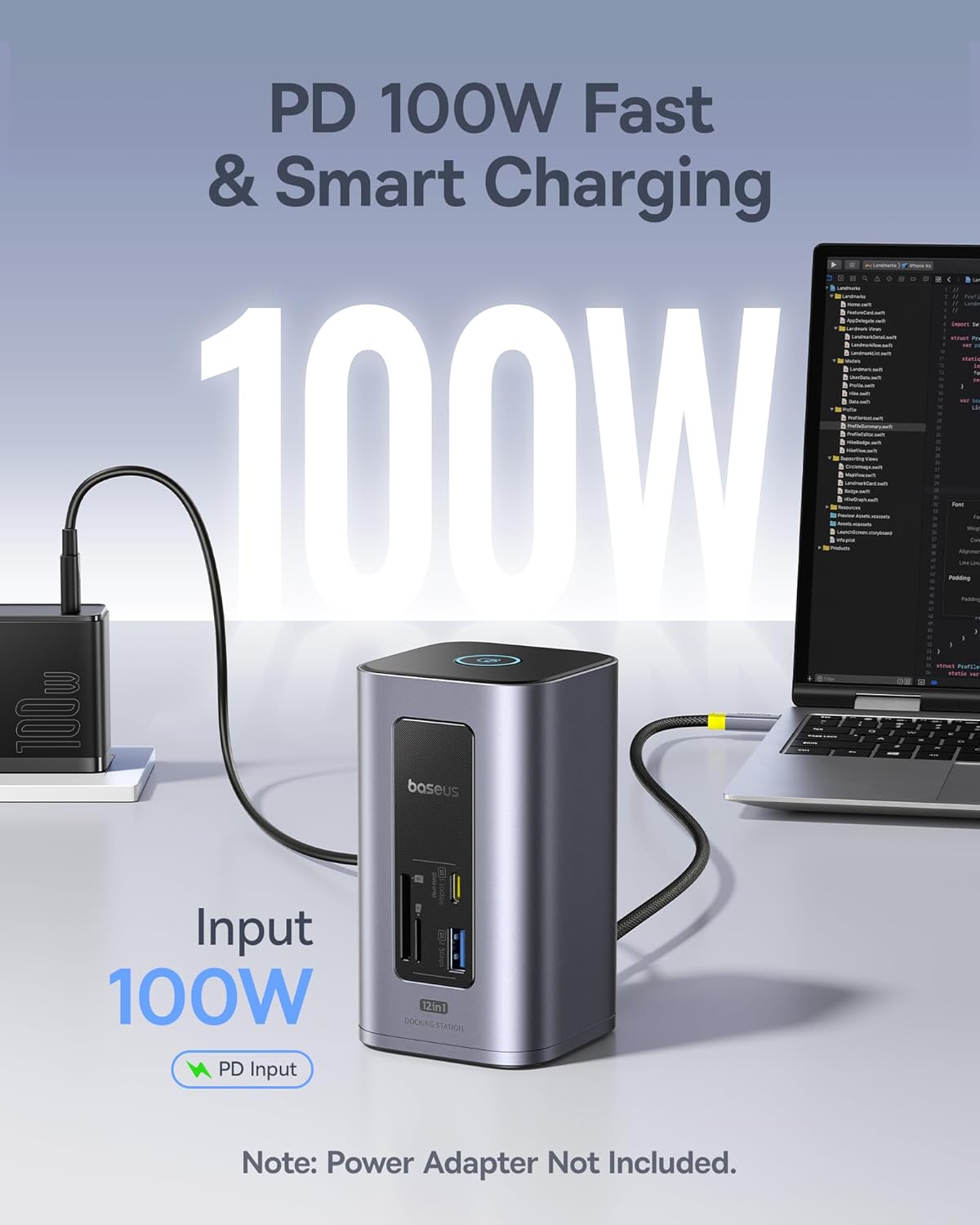
Image: The docking station connected to a laptop, with a 100W power adapter plugged into its PD Input port, demonstrating power delivery to the laptop. Note that the power adapter is sold separately.
Operating: Baseus 30000mAh 65W Power Bank
Dispositius de càrrega:
- Connect your device's charging cable to the appropriate output port (USB-C or USB-A) on the power bank.
- El banc d'energia començarà a carregar el dispositiu automàticament. La pantalla digital mostrarà el nivell de bateria restant.
- Per aturar la càrrega, simplement desconnecteu el dispositiu.
Càrrega simultània:
El carregador extern permet carregar diversos dispositius simultàniament. La potència de sortida total es distribuirà entre els dispositius connectats.
Operating: Baseus Nomos Win Air 12-in-1 Docking Station
Ús de ports USB:
Connect USB peripherals such as keyboards, mice, external hard drives, or flash drives to the available USB-A (5Gbps, 10Gbps) and USB-C (10Gbps) data ports.

Image: A visual demonstrating the high-speed data transfer capabilities of the docking station, showing a 20GB file transferring in 20 seconds via 10Gbps ports and 50 seconds via 5Gbps ports.
Using Card Readers:
Insert SD or TF (MicroSD) cards into the corresponding slots for data access. The card readers support speeds up to 104MB/s.
Connexió Ethernet:
Connect an Ethernet cable to the Gigabit Ethernet port for a stable and high-speed wired internet connection.
Screen-Lock Function & Energy Saving Mode:
Press the top button on the docking station to activate the screen-lock function or engage energy-saving mode, depending on your system's configuration.

Image: A user working at a desk with a laptop connected to the docking station, which in turn is connected to two external 4K monitors, demonstrating the dual display capability. A note indicates that macOS will show the same content on both external displays.
Manteniment
- Keep both products away from water, moisture, and extreme temperatures.
- Eviteu deixar caure els dispositius ni sotmetre'ls a impactes forts.
- Clean the surfaces with a soft, dry cloth. Do not use harsh chemicals or abrasive cleaners.
- Store the products in a cool, dry place when not in use.
- For the power bank, recharge it at least once every three months to maintain battery health if not used regularly.
Resolució de problemes
Power Bank Issues:
- El dispositiu no es carrega: Ensure the power bank is charged. Check cable connections and try a different cable or port. Verify your device is compatible with the power bank's output specifications.
- Càrrega lenta: Ensure you are using a fast-charging compatible cable and your device supports fast charging. For the power bank itself, use a 65W or higher PD charger for optimal input speed.
Docking Station Issues:
- No es mostra cap pantalla al monitor extern: Ensure your laptop's USB-C port supports DisplayPort Alternate Mode. Check HDMI cable connections. Try restarting your laptop. Verify monitor input source is set correctly.
- No power delivery to laptop: Ensure a compatible USB-C PD power adapter (up to 100W) is connected to the docking station's PD Input port. Verify your laptop supports USB-C PD.
- Dispositius USB no reconeguts: Ensure devices are properly connected. Try different USB ports. Restart your laptop.
- Ethernet not working: Check the Ethernet cable connection. Ensure your laptop's network settings are configured correctly.
- macOS dual monitor issue: As noted, macOS typically mirrors displays through a single MST hub like this docking station. This is a system limitation, not a product defect.
Especificacions
Baseus 30000mAh 65W Power Bank:
| Capacitat | 30000 mAh |
| Potència de sortida màxima | 65 W (USB-C PD) |
| Potència d'entrada | Fins a 65 W (USB-C PD) |
| Ports | USB-C (Entrada/Sortida), USB-A (Sortida) |
| Mostra | Digital Battery Percentage |
Baseus Nomos Win Air 12-in-1 Docking Station:
| Model | Nomos Win Air (12-in-1) |
| Ports HDMI | 2 x 4K@60Hz |
| Ports de dades USB-C | 1 x 10 Gbps |
| Ports de dades USB-A | 1 x 10Gbps, 1 x 5Gbps, 3 x 480Mbps |
| Port Ethernet | 1 x Gigabit (1Gbps) |
| Lector de targetes | SD & TF (104MB/s) |
| Entrada de potència | PD 100W (USB-C) |
Garantia i Suport
Baseus products are covered by a limited warranty. For detailed warranty information, technical support, or customer service inquiries, please refer to the official Baseus weblloc web o poseu-vos en contacte amb el vostre distribuïdor local. Conserveu el comprovant de compra per a reclamacions de garantia.
Baseus oficial Weblloc: www.baseus.com


