1. Introducció
This manual provides essential information for setting up, operating, maintaining, and troubleshooting your TCL 55C6K 55-inch 4K QD-Mini LED Google TV. Please read this manual thoroughly before using your television to ensure proper and safe operation.

Figura 1.1: Frontal view of the TCL 55C6K 55-inch TV.
2. Què hi ha a la caixa
Verifiqueu que tots els components siguin presents a l'embalatge:
- 1N LED TV (TCL 55C6K)
- Cable d'àudio 1N
- 1N Stand (Table Top Stand)
- Manual d'usuari 1N
- Targeta de garantia 1N
- 1N Power Cord
- Comandament a distància 1N
- 2 piles AAA
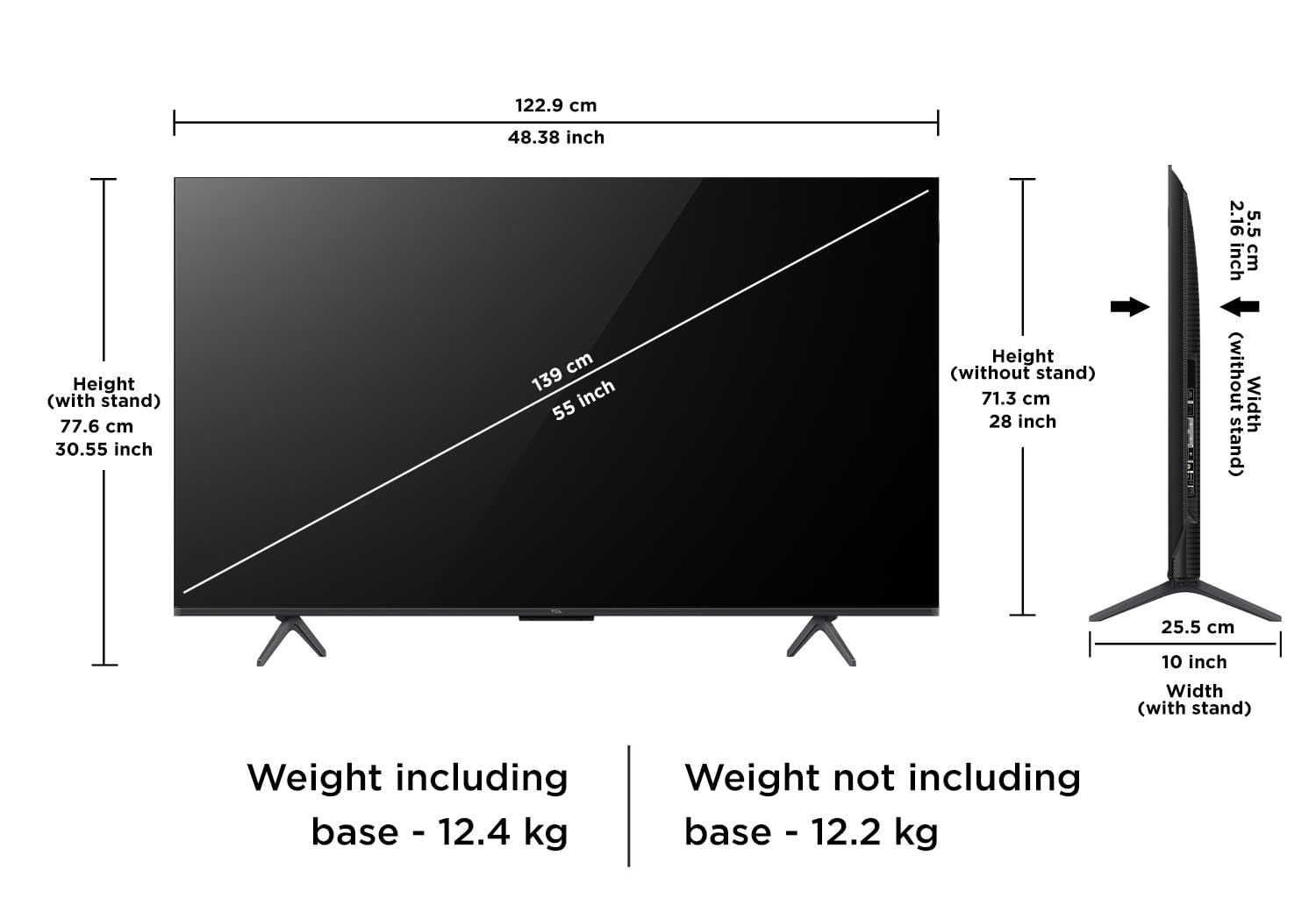
Figure 2.1: Included items in the TCL 55C6K TV box. Note that a fixed wall mount is not included and must be purchased separately.
3. Configuració
3.1. Instal·lació del suport o del muntatge a la paret
Your TCL 55C6K TV comes with a table top stand. Follow the instructions provided in the separate stand assembly guide to attach it securely. If you prefer wall mounting, a compatible wall mount kit must be purchased separately. Ensure the wall mount is installed by a qualified professional to prevent damage or injury.
3.2. Connexió de perifèrics
Connect your external devices such as set-top boxes, gaming consoles, or sound systems to the appropriate ports on the TV. Refer to the port diagram below for connection points.

Figure 3.1: Connectivity ports on the TCL 55C6K TV, including USB 3.0, LAN, HDMI, and Audio Out.
- Ports HDMI: Connect high-definition devices. This TV features 3 HDMI ports, including one with eARC support.
- Port USB: Per connectar dispositius d'emmagatzematge USB.
- Port LAN: Per a connexió a Internet per cable.
- Entrada d'antena/satèl·lit: Per connectar una antena o una antena parabòlica.
- Sortida d'àudio digital (òptica): Per connectar receptors d'àudio externs.
3.3. Connexió d'alimentació
After connecting all necessary cables, plug the power cord into the TV and then into a wall outlet. The TV will enter standby mode.
3.4. Configuració inicial
Press the power button on the remote control to turn on the TV. Follow the on-screen instructions to complete the initial setup, which includes language selection, network connection (Wi-Fi or Ethernet), and Google account sign-in for Google TV features.
4. Funcionament del televisor
4.1. Funcions de control remot
The included smart remote provides access to all TV functions. Insert the two AAA batteries into the remote control, ensuring correct polarity.
Figure 4.1: The TCL 55C6K remote control, featuring dedicated hotkeys for popular streaming services and Google Assistant access.
- Botó d'encesa: Encén o apaga el televisor.
- Bloc de navegació: Per a la navegació pel menú.
- Botó D'acord: Confirma les seleccions.
- Botó enrere: Torna a la pantalla anterior.
- Botó d'inici: Accedeix a la pantalla d'inici de Google TV.
- Botons de volum: Ajusta el volum.
- Botó de l'Assistent de Google: Activa les ordres de veu.
- Botons d'aplicació dedicats: Quick access to streaming services like Netflix, Prime Video, etc.
4.2. Interfície de Google TV
Your TV runs on Google TV, offering a personalized content experience. The home screen provides access to streaming apps, live TV, and personalized recommendations.

Figure 4.2: The Google TV interface on the TCL 55C6K, showing various streaming applications.
- Accés a l'aplicació: Navigate to the 'Apps' section to download and manage your favorite streaming applications.
- Assistent de Google: Use voice commands via the remote to search for content, control smart home devices, or get information.
- Replica de pantalla: Emet contingut des de telèfons intel·ligents o tauletes compatibles al teu televisor.
4.3. Configuració de la pantalla
The TCL 55C6K features a QD-Mini LED panel with 4K resolution and a 144Hz refresh rate. You can adjust picture settings to optimize your viewexperiència.

Figure 4.3: Key display features of the TCL 55C6K TV, including QD-Mini LED and 144Hz refresh rate.
- Modes d'imatge: Select from various preset picture modes (e.g., Standard, Vivid, Movie, Game) or customize settings like brightness, contrast, and color.
- HDR 10: El televisor és compatible amb HDR10 per millorar el contrast i el color en contingut compatible.
- Freqüència d'actualització nativa de 144 Hz: Provides smoother motion, especially beneficial for gaming.
- Micro atenuació: Enhances contrast by analyzing and adjusting brightness in different zones of the screen.
4.4. Configuració d'àudio
The TV features 40 Watts output with Dolby Audio and ONKYO 2.1ch Hi-Fi System for an immersive sound experience.
- Modes de so: Choose from various sound modes (e.g., Standard, Music, Movie, Voice) or adjust equalizer settings.
- Dolby Atmos: Experience immersive, multi-dimensional sound with compatible content.
- Àudio extern: Connect external sound systems via HDMI (eARC) or Digital Audio Out for enhanced audio.
5. Manteniment
5.1. Neteja del televisor
- Desendolla sempre el televisor abans de netejar-lo.
- Feu servir un drap suau i sec per netejar la pantalla i la carcassa. Per a marques difícils, fregueu suaument.ampNetegeu el drap amb aigua o un netejador de pantalles suau i no abrasiu.
- No ruixeu mai el netejador directament sobre la pantalla.
5.2. Atenció general
- Eviteu col·locar el televisor sota la llum solar directa o a prop de fonts de calor.
- Assegureu-vos que hi hagi una ventilació adequada al voltant del televisor.
- No bloquejar les obertures de ventilació.
6. Solució De Problemes
Si teniu problemes amb el televisor, consulteu els problemes i solucions més comuns següents:
| Problema | Possible solució |
|---|---|
| Sense poder | Comproveu si el cable d'alimentació està ben connectat al televisor i a la presa de corrent. Assegureu-vos que la presa de corrent funciona. |
| No hi ha imatge, però hi ha so | Comproveu la font d'entrada. Assegureu-vos que els dispositius externs estiguin connectats i encesos correctament. |
| No hi ha so, però hi ha imatge | Check the volume level and mute status. Verify audio cable connections for external devices. Check TV audio output settings. |
| El comandament a distància no funciona | Canvieu les piles. Assegureu-vos que no hi hagi cap obstacle entre el comandament a distància i el sensor d'infrarojos del televisor. |
| Problemes de connexió Wi-Fi | Restart your router and the TV. Check Wi-Fi password. Ensure the TV is within range of the router. |
| Problemes de qualitat d'imatge (per exemple, borrosa, distorsionada) | Adjust picture settings. Check the quality of the input signal or source content. |
For further assistance, refer to the full troubleshooting section in the digital user manual available on the TCL support weblloc o contacteu amb el servei d'atenció al client.
7. Especificacions
Detailed technical specifications for the TCL 55C6K 55-inch 4K QD-Mini LED Google TV:
| Característica | Especificació |
|---|---|
| Marca | TCL |
| Model | 55C6K |
| Mida de la pantalla | 55 polzades (139 cm) |
| Tecnologia de visualització | QD-Mini LED |
| Resolució | 4K Ultra HD (3840 x 2160) |
| Freqüència d'actualització | 144 Hz |
| Sistema operatiu | Google TV |
| RAM | 3 GB |
| Emmagatzematge intern (ROM) | 32 GB |
| Processador | 64-bit Quad Core Processor (AiPQ Processor) |
| Connectivitat | Wi-Fi 5, Ethernet, Bluetooth, 3 HDMI Ports (1 with eARC), 1 USB Port |
| Sortida de so | 40 Watts (ONKYO 2.1ch Hi-Fi System) |
| Tecnologia d'àudio | Dolby Audio, Dolby Atmos |
| Característiques especials | QD-Mini LED, 512+ Local Dimming Zones, HDR 10, AiPQ Processor, 100% Color Volume Plus, 178 Degree Wide Viewing Angle, Micro Dimming, Metallic Bezel-Less Design, Google Assistant, Prime Video, Netflix, Hotstar, Zee5, Web Browser, Screen Mirroring, Works with Alexa, Multiple Eye Care |
| Dimensions del producte (LxWxH) | 122.9 x 29.7 x 77.6 cm (amb suport) |
| Pes de l'article | 12.2 kg (sense suport), 12.4 kg (amb suport) |
| Font d'alimentació | CA 240 volts |
| Qualificació energètica | 2 Star (Annual Energy Consumption: 229 kWh/Year) |

Figure 7.1: Dimensions and weight specifications for the TCL 55C6K TV.

Figure 7.2: Energy label for the TCL 55C6K TV, indicating its 2-star rating and annual energy consumption.
8. Garantia i Suport
8.1. Informació de la garantia
The manufacturer provides a 2-year warranty from the date of purchase for the television unit and a 6-month warranty for the remote control. Warranty claims can be processed using your Amazon e-invoice.
8.2. Atenció al client
For any technical assistance, service requests, or further inquiries, please refer to the official TCL India website or contact their customer service. The user manual can also be accessed from the brand website under the 'About this item' or 'Product details' section.


