Introducció
This manual provides detailed instructions for the installation, operation, and maintenance of your ID-COOLING FX360 TD CPU Liquid Cooler. Please read this manual thoroughly before installation to ensure proper setup and optimal performance. Retain this manual for future reference.
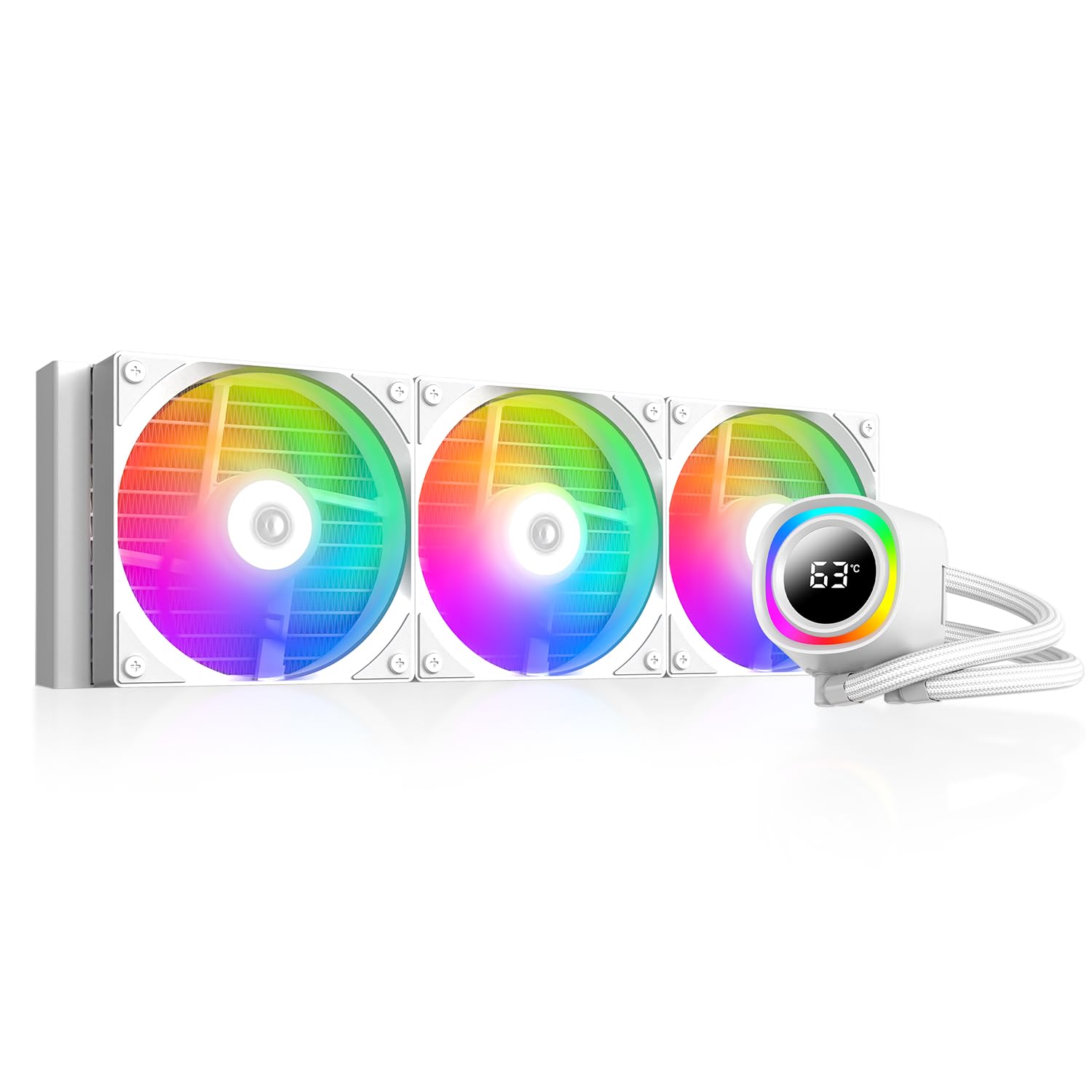
Figure 1: ID-COOLING FX360 TD CPU Liquid Cooler installed in a PC case, showcasing its integrated temperature display and ARGB lighting.
Informació de seguretat
- Assegureu-vos que el sistema estigui apagat i desendollat de la presa de corrent abans de la instal·lació.
- Manipuleu els components amb cura per evitar danys.
- Avoid contact with the liquid coolant. In case of contact, rinse thoroughly with water.
- Do not modify the cooler or its components. Unauthorized modifications may void the warranty and pose safety risks.
- Mantenir fora de l'abast dels nens.
Contingut del paquet
Verifiqueu que tots els components siguin presents abans de començar la instal·lació:
- 1x Radiator with Integrated Pump and Tubing
- 3x 120mm ARGB Fans
- 1x Intel Mounting Bracket Kit (LGA1851/1700/1200/115x)
- 1x AMD Mounting Bracket Kit (AM5/AM4)
- 1x Backplate (Universal)
- 1x Tub de pasta tèrmica
- Fan Screws and Mounting Hardware
- ARGB and Fan Splitter Cables
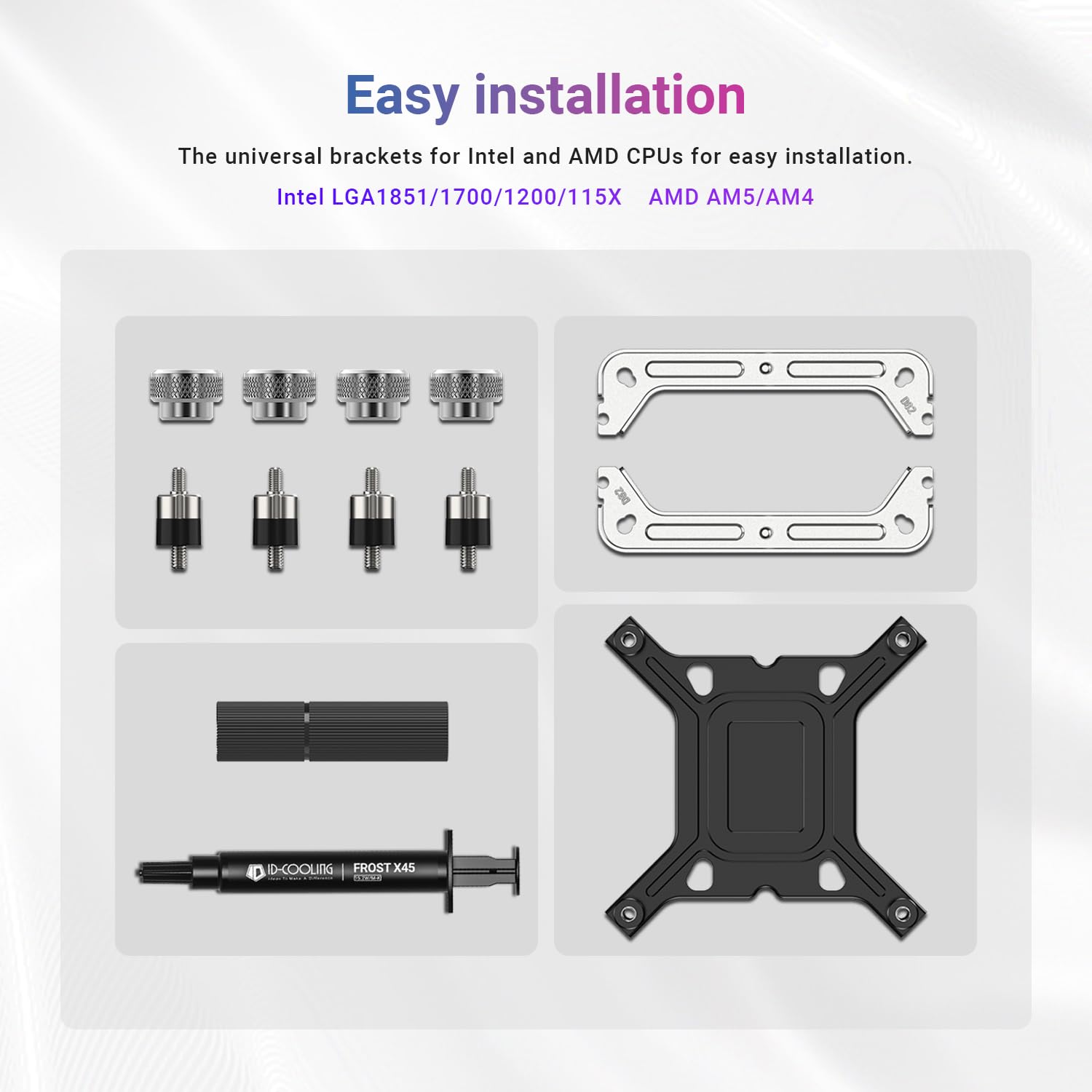
Figura 2: Mésview of mounting hardware and accessories for Intel and AMD platforms.
Instal·lació
Follow these general steps for installing the ID-COOLING FX360 TD. Refer to your motherboard and PC case manuals for specific guidance on component placement.
- Prepareu el sòcol de la CPU: Install the appropriate backplate for your Intel or AMD motherboard. Secure the standoffs onto the backplate.
- Aplicar pasta tèrmica: Clean the CPU surface. Apply a small amount of the provided thermal paste to the center of the CPU.
- Muntar la bomba: Place the pump head onto the CPU, aligning it with the standoffs. Secure it with the correct mounting brackets and thumb screws.
- Instal·lació del radiador i els ventiladors: Mount the three 120mm fans to the radiator using the provided screws. Install the radiator assembly into your PC case, typically at the top or front, ensuring adequate airflow.
- Connectar els cables:
- Connect the pump's 4-pin power cable to the CPU_FAN or AIO_PUMP header on your motherboard.
- Connect the fan power cables to the fan headers on your motherboard, using the splitter cable if necessary.
- Connect the ARGB cables from the pump and fans to a compatible 5V 3-pin ARGB header on your motherboard.

Figure 3: Universal brackets and thermal paste for Intel and AMD CPU installation.

Figure 4: High-performance thermal paste for efficient heat transfer.
Instruccions de funcionament
Once installed and powered on, the ID-COOLING FX360 TD will begin cooling your CPU. The integrated features provide real-time monitoring and customizable aesthetics.
Real-Time CPU Temperature Display
The pump head features a built-in LCD that displays the CPU temperature in real-time. This allows for immediate monitoring of your CPU's thermal status without additional software. Ensure all necessary cables are connected for the display to function.

Figure 5: The pump head's LCD screen showing real-time CPU temperature.
Addressable RGB (ARGB) Lighting
The pump head and fans are equipped with ARGB lighting. This lighting can be synchronized with your motherboard's ARGB software (e.g., ASUS Aura Sync, GIGABYTE RGB Fusion, MSI Mystic Light Sync, ASRock Polychrome Sync) for unified system lighting effects. Connect the ARGB cables to the appropriate motherboard header.

Figure 6: The pump head displaying ARGB lighting and CPU temperature.
Funcionament del ventilador
The three 120mm fans are designed for high airflow and quiet operation. Their speed is typically controlled by the motherboard based on CPU temperature, which can be configured in the BIOS or through motherboard software.

Figure 7: Details of the 120mm fans, highlighting airflow and noise levels.
Vídeo 1: Un overview of the ID-COOLING FX360 TD CPU Liquid Cooler, demonstrating its features and appearance within a PC build.
Manteniment
Un manteniment regular ajuda a garantir la longevitat i el rendiment òptim del vostre refrigerador de líquid.
- Neteja de pols: Netegeu periòdicament la pols de les aletes del radiador i de les pales del ventilador amb aire comprimit o un raspall suau. Assegureu-vos que els ventiladors no girin durant la neteja.
- Comprovació de la canonada i les connexions: Inspeccioneu els tubs i les connexions per detectar qualsevol signe de fuites o danys. Assegureu-vos que totes les connexions estiguin ben fixades.
- Monitor de temperatures: Regularly check the CPU temperature display to ensure the cooler is functioning effectively. Significant increases in idle temperatures may indicate an issue.
Resolució de problemes
If you encounter issues with your ID-COOLING FX360 TD, refer to the following common troubleshooting steps:
- Sense alimentació/Els ventiladors no giren: Check all power connections to the pump and fans. Ensure they are securely plugged into the correct motherboard headers. Verify power supply connections.
- Temperatures altes de la CPU:
- Ensure the pump is running (you may feel a slight vibration or hear a faint hum).
- Verifiqueu que el capçal de la bomba estigui ben muntat a la CPU i que la pasta tèrmica s'hagi aplicat correctament.
- Check for obstructions to airflow through the radiator.
- Confirm fan orientation for proper airflow (typically pushing air through the radiator).
- La pantalla de temperatura no funciona: Ensure the display's power and data cables are correctly connected to the motherboard. Check for any software requirements from ID-COOLING for display functionality.
- Il·luminació ARGB no funciona/incorrecta: Verify ARGB cable connections to the motherboard's 5V 3-pin header. Ensure your motherboard's ARGB software is installed and configured correctly.
- Sorolls inusuals: A slight hum from the pump is normal. Excessive gurgling or grinding noises may indicate air in the loop or a pump issue. Ensure the radiator is mounted higher than the pump if possible to allow air to collect in the radiator.
Especificacions
| Marca | ID-REFREDAMENT |
| Número de model | FX360 TD |
| Mètode de refrigeració | Líquid |
| Dispositius compatibles | Desktop CPUs (Intel LGA1851/1700/1200/115x, AMD AM5/AM4) |
| Material del radiador | Alumini |
| Material de placa freda | coure |
| Nivell de soroll (màx.) | 27.2 Decibels (Fans) |
| Tipus de connector d'alimentació | 4-Pin (Pump), 4-Pin (Fans) |
| Velocitat de la bomba | Up to 2,900 RPM (±10%) |
| Dimensions del ventilador | 120 x 120 x 25 mm |
| Fan Airflow (Max) | 58 CFM |
| Fan Static Pressure (Max) | 1.94 mm H2O |
| Suport TDP | Fins a 350 W |

Figure 8: High-efficiency radiator design for superior heat dissipation.

Figure 9: The pump's internal structure, featuring a micro-channel cold plate and high-flow design.
Garantia i Suport
ID-COOLING products are manufactured to high standards and come with a limited warranty. For specific warranty terms and conditions, please refer to the warranty card included with your product or visit the official ID-COOLING website. For technical support, product inquiries, or warranty claims, please contact ID-COOLING customer service through their official channels.
Nota: Conserveu el tiquet de compra com a comprovant de compra a efectes de garantia.