1. Introducció
Thank you for choosing the Havit Gamenote MS955WB RGB Wireless Gaming Mouse. This advanced gaming mouse offers versatile connectivity options (2.4GHz wireless, Bluetooth 5.0, and wired), a high-precision sensor, customizable RGB lighting, and a convenient charging dock with a display. This manual provides detailed instructions to help you set up, operate, and maintain your new gaming mouse for optimal performance.
2. Contingut del paquet
Si us plau, comproveu el contingut del paquet per assegurar-vos que hi hagi tots els elements:
- Havit Gamenote MS955WB RGB Wireless Gaming Mouse
- Charging Dock with Display
- Cable de càrrega USB-C a USB-A
- USB 2.4GHz Wireless Receiver (often stored inside the mouse)
- Manual d'usuari

Image: The Havit Gamenote MS955WB RGB Wireless Gaming Mouse shown with its charging dock. The mouse is black with the Havit logo and model number visible. The charging dock features RGB lighting at its base.
3. Configuració
3.1 Càrrega del ratolí
Before initial use, it is recommended to fully charge the mouse. The mouse can be charged via the charging dock or directly using the USB-C cable.
- Ús de la base de càrrega: Connect the USB-C cable to the charging dock and then to a USB power source (e.g., computer USB port, USB wall adapter). Place the mouse onto the charging dock, ensuring the charging pins align. The display on the dock will indicate charging status.
- Direct USB-C Connection: Connect the USB-C cable directly to the mouse and then to a USB power source. The mouse can be used in wired mode while charging.
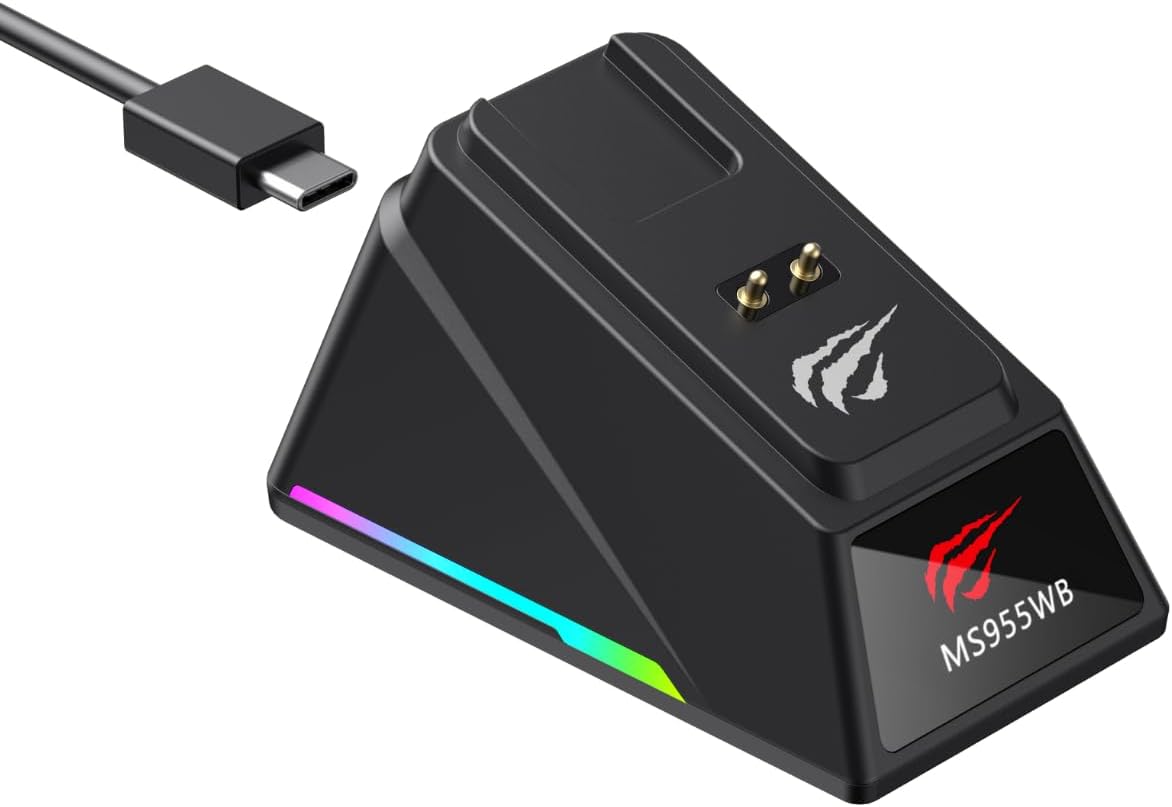
Image: The black charging dock for the Havit Gamenote MS955WB mouse, shown with a USB-C cable connected. The dock has charging pins and RGB lighting at its base.
3.2 Connexió del ratolí
The Havit Gamenote MS955WB offers three connection modes: 2.4GHz Wireless, Bluetooth 5.0, and Wired.
3.2.1 Mode sense fil de 2.4 GHz
- Locate the USB 2.4GHz wireless receiver, usually stored in a compartment on the underside of the mouse.
- Plug the receiver into an available USB-A port on your computer.
- Turn on the mouse using the power switch on its underside. Select the 2.4GHz mode (indicated by an icon or switch position).
- El ratolí s'hauria de connectar automàticament a l'ordinador.
3.2.2 Mode Bluetooth 5.0
- Turn on the mouse and select the Bluetooth mode using the switch on the underside.
- A l'ordinador o dispositiu, navega fins a la configuració de Bluetooth i activa el Bluetooth.
- Cerca new devices. The mouse should appear as "Havit MS955WB" or similar.
- Select the mouse to pair. Follow any on-screen prompts.
3.2.3 Mode amb cable
- Connect the USB-C end of the charging cable to the mouse and the USB-A end to your computer.
- The mouse will automatically switch to wired mode and function without needing a battery charge.
4. Funcionament
4.1 Ajust de DPI
The mouse features adjustable DPI (Dots Per Inch) settings, allowing you to change cursor sensitivity on the fly. The available DPI levels are 1000, 2400, 4800, 6400, 8000, and 22000. Use the dedicated DPI button (usually located behind the scroll wheel) to cycle through these settings. The current DPI level may be indicated on the charging dock's display or via an LED indicator on the mouse.
4.2 Funcions dels botons
The MS955WB mouse is equipped with 6 programmable buttons:
- Botó esquerre de clic: Funció de clic principal estàndard.
- Botó dret: Funció de clic secundari estàndard.
- Roda de desplaçament: Scrolls up/down, and acts as a middle click button.
- Botó DPI: Canvia ciclísticament pels nivells de DPI preestablerts.
- Botó Endavant: Navega cap endavant web navegadors o file exploradors.
- Botó enrere: Navega cap enrere web navegadors o file exploradors.

Imatge: Un costat view of the Havit Gamenote MS955WB mouse, highlighting the two programmable thumb buttons on the left side.
4.3 Control d'il·luminació RGB
The mouse features customizable RGB lighting. Specific controls for changing lighting modes or colors may be available through a dedicated button or via software (if applicable). Refer to the product's official weblloc web per a qualsevol descàrrega de programari disponible.
4.4 Charging Dock Display
The charging dock includes a small display that provides useful information, such as the current battery level of the mouse, the active connection mode (2.4GHz, Bluetooth, or Wired), and potentially the current DPI setting. This allows for quick monitoring of your mouse's status.

Imatge: Vista de dalt a baix view of the Havit Gamenote MS955WB mouse, showing its ergonomic shape, scroll wheel, and DPI button. The green LED indicator is visible.
5. Manteniment
Proper care ensures the longevity and performance of your Havit Gamenote MS955WB mouse:
- Neteja: Use a soft, dry cloth to wipe the mouse and charging dock. For stubborn dirt, slightly dampNetegeu el drap amb aigua o un netejador suau d'electrònica. Eviteu productes químics agressius o materials abrasius.
- Emmagatzematge: Quan no l'utilitzeu durant períodes prolongats, guardeu el ratolí en un lloc fresc i sec, allunyat de la llum solar directa i de temperatures extremes.
- Cura de la bateria: To prolong battery life, avoid fully discharging the mouse frequently. Charge it when the battery indicator shows low power.
- Eviteu líquids: Keep the mouse and charging dock away from liquids to prevent damage to internal components.
6. Solució De Problemes
If you encounter issues with your Havit Gamenote MS955WB mouse, refer to the following table for common problems and solutions:
| Problema | Possible solució |
|---|---|
| El ratolí no respon (2.4 GHz) |
|
| El ratolí no respon (Bluetooth) |
|
| El ratolí no es carrega |
|
| El moviment del cursor és erràtic o lent |
|
7. Especificacions
Key technical specifications for the Havit Gamenote MS955WB RGB Wireless Gaming Mouse:
| Característica | Especificació |
|---|---|
| Nom del model | MS955WB |
| Configuració de DPI | 1000-2400-4800-6400-8000-22000 DPI |
| Nombre de botons | 6 |
| Connectivitat | 2.4GHz Wireless, Bluetooth 5.0, Wired (USB-C) |
| Capacitat de la bateria | 400 mAh |
| Pes | 89 grams |
| Carregant | Charging Dock (with display) or USB-C Cable |
| Color | Negre |
8. Garantia i Suport
The Havit Gamenote MS955WB RGB Wireless Gaming Mouse comes with a Garantia del distribuïdor de 2 anysSi us plau, conserveu el comprovant de compra per a reclamacions de garantia.
For technical support, warranty inquiries, or further assistance, please contact your local distributor or refer to the official Havit weblloc web per obtenir informació de contacte del servei d'atenció al client.


