Introducció
Benvingut al manual d'usuari del vostre teclat mecànic sense fil Logitech Alto Keys K98M. Aquesta guia proporciona instruccions completes per a la configuració, el funcionament, el manteniment i la resolució de problemes per garantir un rendiment òptim i una experiència d'escriptura satisfactòria. Llegiu aquest manual detingudament abans d'utilitzar el vostre teclat nou.

Descripció de la imatge: La imatge principal del producte del teclat mecànic sense fil Logitech Alto Keys K98M, presentat en color grafit, mostraasing el seu disseny i maquetació complets.
Característiques clau
- Escriptura immersiva amb UniCushion: Experimenta la sensació d'un teclat mecànic on la junta de suport absorbeix les vibracions per a unes pulsacions de tecles més suaus, oferint comoditat i precisió.
- Escriptura fluida i perfecta: Compta amb interruptors de marbre intercanviables en calent amb tecles còncaves, que ofereixen una escriptura estable i sensible per a la comoditat durant tot el dia.
- Retroil·luminació blanca: Les tecles resistents amb retroil·luminació blanca garanteixen funcionalitat i estil en qualsevol condició d'il·luminació.
- Personalitzable per a la productivitat: Programa les tecles d'acció a través de l'aplicació Logi Options+ per adaptar el teclat a les teves necessitats i augmentar la productivitat amb l'accés a les funcions amb un sol clic.
- Disseny funcional i elegant: Combina una carcassa superior transparent, una disposició de 98 tecles i colors vibrants per a una experiència d'escriptura tàctil pràctica, elegant i satisfactòria.
- Durada de la bateria ampliada: Gaudeix de fins a 12 mesos d'ús sense fil amb el receptor USB Bluetooth Low Energy o LogiBolt, amb una còmoda recàrrega USB-C.
- Connectivitat multidispositiu sense fissures: Es connecta mitjançant Bluetooth i LogiBolt, compatible amb Windows, macOS, Chrome OS, Linux i iOS per a un ús versàtil en diversos dispositius.
Contingut del paquet
Si us plau, verifiqueu que tots els elements estiguin presents a l'embalatge del producte:

Descripció de la imatge: La imatge mostra el contingut típic que es troba al paquet del Logitech Alto Keys K98M: el teclat mecànic en si, un receptor USB LogiBolt i un cable de càrrega USB-C.
- Teclat mecànic sense fil Logitech Alto Keys K98M
- Receptor USB Logi Bolt
- Cable de càrrega USB-C
Configuració i connectivitat
Carregant el teclat
Abans del primer ús, o quan l'indicador de bateria mostri que la bateria està baixa, connecteu el teclat a una font d'alimentació amb el cable USB-C proporcionat. El teclat es pot utilitzar normalment mentre es carrega.

Descripció de la imatge: Un detallat view del teclat Logitech Alto Keys K98M, destacant el port de càrrega USB-C situat al lateral, que indica on connectar el cable de càrrega.
Connexió mitjançant Bluetooth
- Assegureu-vos que el teclat estigui correctament carregat.
- Enceneu el teclat amb l'interruptor d'alimentació.
- Activeu el mode d'emparellament Bluetooth al teclat. Normalment, això es fa prement i mantenint premut un botó d'emparellament Bluetooth dedicat o una combinació de tecles de funció (consulteu la disposició específica del vostre teclat per a la icona Bluetooth).
- Al dispositiu (PC, Mac, portàtil, tauleta, telèfon intel·ligent), navegueu fins a la configuració de Bluetooth i seleccioneu "Logitech Alto Keys K98M" de la llista de dispositius disponibles.
- Seguiu les indicacions de la pantalla per completar el procés de vinculació.
Connexió mitjançant el receptor USB Logi Bolt
- Inseriu el receptor USB Logi Bolt a un port USB disponible de l'ordinador.
- Assegureu-vos que el teclat estigui encès.
- El teclat s'hauria de connectar automàticament al receptor. Si no s'estableix la connexió, feu servir el programari Logi Options+ per emparellar manualment els dispositius.
Instal·lació de programari (Logi Options+ App)
Per a una personalització completa i per desbloquejar totes les funcions del teclat, descarregueu i instal·leu l'aplicació Logi Options+ des de la versió oficial de Logitech. weblloc. Aquest programari us permet:
- Personalitza les tecles d'acció per a funcions específiques.
- Gestionar connexions multidispositiu.
- Comprova l'estat de la bateria i rep notificacions.

Descripció de la imatge: Aquesta imatge mostra una estació de treball d'escriptori completa amb el teclat Logitech Alto Keys K98M. El monitor de l'ordinador mostra la interfície de l'aplicació Logi Options+, que demostra com els usuaris poden personalitzar les funcions i la configuració del teclat.
Funcionament del teclat
Experiència de mecanografia
L'Alto Keys K98M està dissenyat amb la tecnologia de muntatge de junta UniCushion, que absorbeix eficaçment les vibracions per proporcionar un son més suau i acústic.asing i pulsació de tecles tàctil. Els interruptors de marbre intercanviables en calent, combinats amb les tecles còncaves, garanteixen una experiència d'escriptura estable i sensible adequada per a un ús prolongat.

Descripció de la imatge: Un professional secundarifile view del teclat Logitech Alto Keys K98M, que mostra clarament el disseny de la junta UniCushion integrat a l'estructura del teclat, responsable de l'absorció de vibracions.
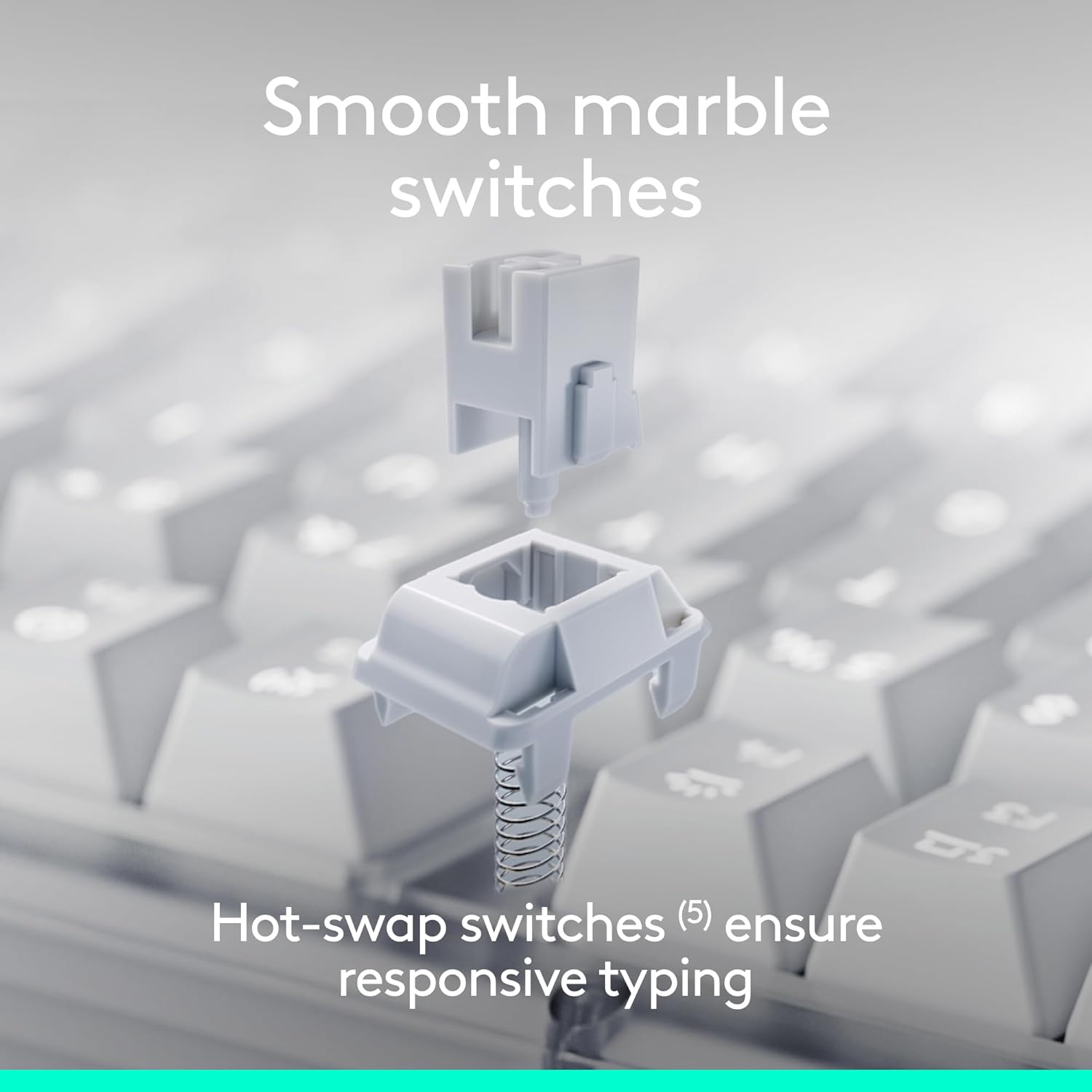
Descripció de la imatge: Un diagrama desplegat que il·lustra els components individuals d'un interruptor Marble intercanviable en calent, demostrant el seu disseny modular per a una fàcil substitució o personalització.
Control de retroiluminació
El teclat té retroiluminació blanca per millorar la visibilitat en diverses condicions d'il·luminació. Ajusteu la intensitat de la retroiluminació amb les tecles de funció dedicades (normalment F5 i F6, o tecles similars marcades amb una icona de sol). En prémer aquestes tecles, es passarà pels diferents nivells de brillantor o s'activarà/desactivarà la retroiluminació.

Descripció de la imatge: Una fotografia de primer pla del teclat Logitech Alto Keys K98M en un entorn amb poca llum, que mostra...asing la retroiluminació blanca clara i brillant de les tecles.
Personalització de les tecles d'acció
Aprofita l'aplicació Logi Options+ per personalitzar les tecles d'acció (les tecles de la fila de funció) del teclat. Pots assignar tasques específiques, iniciar aplicacions o crear macros personalitzades per optimitzar el flux de treball i augmentar la productivitat.
Commutació multidispositiu
L'Alto Keys K98M permet canviar sense problemes entre fins a tres dispositius connectats. Feu servir les tecles Easy-Switch (normalment F1, F2, F3, marcades amb icones de dispositiu) per canviar instantàniament entre els ordinadors, tauletes o telèfons intel·ligents emparellats.
Manteniment
Per garantir la longevitat i el rendiment òptim del teclat, seguiu aquestes pautes de manteniment:
- Neteja: Netegeu regularment les tecles i el xassís del teclat amb un drap suau, sec i sense borrissol. Per a la brutícia resistent, netegeu lleugerament.amp Es pot fer servir un drap amb sabó suau, assegurant-se que no entri humitat al teclat.
- Eviteu productes químics durs: No utilitzeu netejadors abrasius, dissolvents ni productes químics agressius, ja que poden danyar l'acabat del teclat i les llegendes de les tecles.
- Cura del medi ambient: Mantingueu el teclat allunyat de la humitat excessiva, la llum solar directa i les temperatures extremes per evitar danys als components interns i la degradació de la bateria.
- Cura de les tecles i els interruptors: Si esteu substituint interruptors intercanviables en calent, manipuleu-los amb cura per evitar que es dobleguin els pins. Assegureu-vos que les tecles estiguin ben col·locades després de la neteja o la personalització.
Resolució de problemes
Si teniu problemes amb el teclat Logitech Alto Keys K98M, consulteu les solucions habituals següents:
El teclat no respon
- Comproveu la bateria: Assegureu-vos que el teclat tingui prou bateria. Connecteu-lo a una font d'alimentació amb el cable USB-C.
- Encès: Verifiqueu que l'interruptor d'engegada del teclat estigui en la posició "On".
- Restablir la connexió:
- Per a Bluetooth: Ves a la configuració de Bluetooth del dispositiu, oblida't del teclat i torna'l a emparellar.
- Per al Logi Bolt: assegureu-vos que el receptor USB estigui ben connectat a un port USB que funcioni. Proveu un altre port USB. Si els problemes persisteixen, utilitzeu l'aplicació Logi Options+ per tornar a emparellar el teclat amb el receptor.
- Reinicieu els dispositius: Reinicieu l'ordinador o el dispositiu connectat al teclat.
La retroiluminació no funciona o és tènue
- Ajusta la brillantor: Feu servir les tecles de funció de retroiluminació dedicades (per exemple, F5/F6) per augmentar la brillantor.
- Nivell de bateria: Una bateria baixa pot fer que la retroiluminació s'atenuï o s'apagui per estalviar energia. Carregueu el teclat.
Claus específiques que no es registren
- Comproveu l'assentament de les tecles: Premeu suaument la tecla afectada per assegurar-vos que estigui completament encaixada a l'interruptor.
- Neteja de restes: Elimineu qualsevol residu o pols que pugui haver-hi al voltant o sota la tapa de les tecles.
- Inspecció de commutadors (per a intercanviables en calent): Si us sentiu còmodes, retireu amb cura la tapa de les tecles i després l'interruptor. Inspeccioneu si els pins de l'interruptor estan doblegats o danyats i torneu-los a inserir amb cura.
- Actualització de programari/firmware: Assegureu-vos que l'aplicació Logi Options+ i el firmware del teclat estiguin actualitzats.
Especificacions
| Característica | Detall |
|---|---|
| Marca | Logitech |
| Número de model | 920-013575 |
| Tecnologia de connectivitat | Bluetooth, RF (Logi-Bolt), USB |
| Tipus de teclat | Mecànica |
| Interruptors | Interruptors de marbre intercanviables en calent |
| Il·luminació de fons | Blanc, color únic |
| Compatibilitat de sistemes operatius | Chrome OS, Linux, Mac OS, Windows 10, iOS |
| Pes de l'article | 2.43 lliures |
| Dimensions del producte | 15.79 x 5.79 x 1.56 polzades |
| Font d'alimentació | Funciona amb bateria (recarregable USB-C) |
| Durada de la bateria | Fins a 12 mesos (amb Bluetooth Low Energy) |
Nota: Les especificacions estan subjectes a canvis sense avís previ.
Garantia i Suport
Per obtenir informació detallada sobre la garantia, assistència tècnica i accés a recursos addicionals per al teclat Logitech Alto Keys K98M, visiteu el lloc web d'assistència oficial de Logitech. weblloc:
També podeu trobar més informació del producte i registrar el vostre dispositiu a la botiga Logitech d'Amazon:
Producte oficial acabatview
Descripció del vídeo: Aquest vídeo oficial del producte de Logitech ofereix una visió generalview del teclat mecànic personalitzable sense fil Alto Keys K98M, mostraasinel seu disseny, les característiques principals i l'experiència general d'escriptura.


