1. Introducció
This manual provides detailed instructions for the installation, operation, and maintenance of your XTRONS 8-inch QLED Android 14 Car Stereo. Please read this manual thoroughly before using the product to ensure proper functionality and safety. Keep this manual for future reference.
2. Producte acabatview
2.1 Models i anys aplicables
- Per a Audi:
- Audi A4 B6 (8E/8H) (2000-2006)
- Audi A4 B7 (8E/8H) (2004-2008)
- Audi S4 B6 (8E/8H) (2003-2005)
- Audi S4 B7 (8E/8H) (2005-2008)
- Audi RS4 (2002-2008)
- Audi RS4 B7 (8E) (2006-2008)
- For SEAT:
- SEAT Exeo (2008-2012)
2.2 Característiques clau
- 8-inch QLED IPS Screen: 1280*720 high-definition QLED display with a capacitive touchscreen, 178° viewing angle, powered by Adreno 610 GPU for ultra-smooth 4K entertainment.
- High Performance CPU: Qualcomm Snapdragon 665 Octa-Core processor, 8GB RAM, and Android 14 for responsive operation. 256GB ROM storage for app downloads.
- Connectivitat amb telèfon intel·ligent: Built-in Wireless Apple CarPlay and Wireless & Wired Android Auto for seamless integration with your phone, accessing GPS, calls, music, Google Assistant, and Siri. Bluetooth 5.0 for calls and voice control.
- Ultimate Sound Experience: Built-in DSP with Digital Amplifier Processing (TDA7808) and DTS Digital Sound (Si47925) for fully digital lossless audio output, enhancing sound fidelity and interference immunity.
- Descodificació CANbus optimitzada: Ensures perfect functionality after upgrading, including steering wheel control, ACC control, reversing control, door status, and more. Displays radio frequency, AUX, Bluetooth, and GPS status on your dashboard.
- Smart and Intuitive UI: Features Day/Night Mode, quick access bar for favorite apps, easy volume control, and compass/longitude/latitude display.
- Capacitats multimèdia: Supports Split Screen and Picture-in-Picture for multitasking, 4K video playback, and Multimedia USB Input.
- Connectivitat de xarxa: Dual Band Wi-Fi (2.4GHz and 5GHz) for faster speed and flexibility.
- Refrigeració eficient: 100% Aluminum Heat Sink and Built-in Cooling Fan (auto-activates above 90°C or manually anytime).
3. Contingut del paquet
Si us plau, verifiqueu que tots els elements que s'enumeren a continuació estiguin inclosos al vostre paquet:
- 1 × Main Unit
- 2 × Arnès de cablejat ISO
- 1 × Cable RCA
- 1 × Cable d'antena de ràdio
- 1 × 4G +Antenna (Note: 4G Function not supported in USA)
- 1 × 4G -Antenna
- 1 × Antena GPS
- 2 cable USB
- 1 × Caixa CANbus
- 1 × Cable de càmera
- 2 × Clip
- 2 × Uninstallation Tool
- 1 × AmpCaixa Lifer per al sistema BOSE
- 1 × Wiring Diagram for AmpCaixa lifier
- 1 × Manual en anglès
- 1 × German Manual
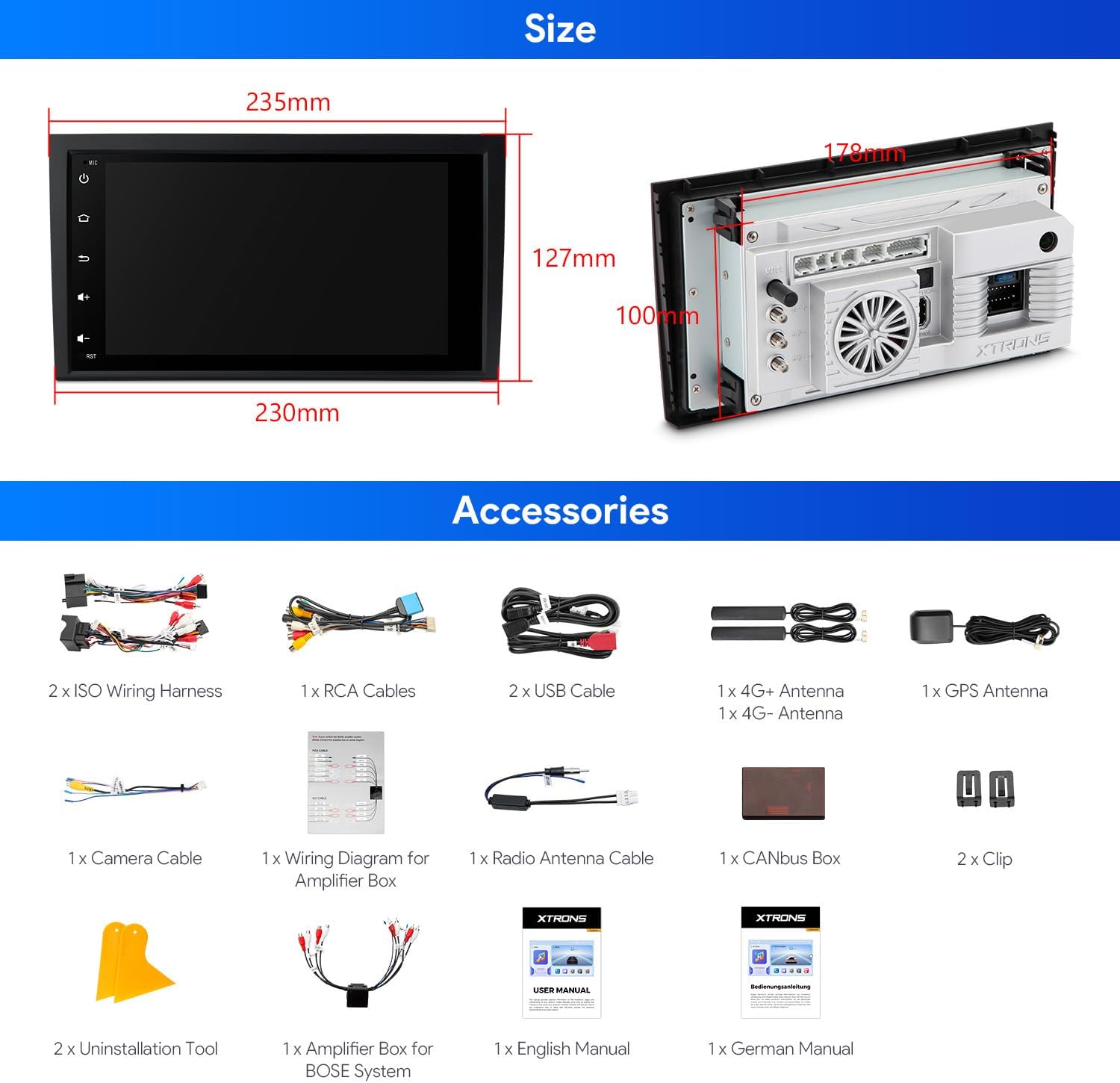
Figura 3.1: Accessoris inclosos
4. Instal·lació i configuració
4.1 Notes de compatibilitat
This product is a double DIN size unit. If your vehicle's original CD player is single DIN size, this unit will NO fit your car. This head unit is compatible with your car's original BOSE system.

Figure 4.1: Compatibility Check
4.2 Cables & Wiring
Ensure your vehicle's radio antenna port matches the provided picture. An additional cable (XTRONS ICE/ACS/ISOFZ) may be required for certain antenna types. If rear speakers have static noise after installation, an XTRONS AK/INIB/NRCBL may be needed (ensure your original ISO wiring harness plug is 40pin before buying).
Figure 4.2: Cable Identification
4.3 Passos generals d'instal·lació
Professional installation is highly recommended for this car stereo. Refer to the included 'Wiring Diagram for Amplifier Box' and the 'English Manual' for detailed, step-by-step instructions specific to your vehicle model. The uninstallation tools provided can assist in removing your old unit.

Figura 4.3: Abans i després de la instal·lació Example
5. Instruccions de funcionament
This section covers the primary functions and features of your XTRONS car stereo. For a visual guide to many of these features, please refer to the product video below.
Video 5.1: XTRONS 8 Inch Qualcomm 665 Android Car Stereo for Audi A4 S4 RS4 - This video demonstrates key operating features of the XTRONS car stereo, including UI navigation, CarPlay, Android Auto, DSP settings, 4K video playback, split screen, Wi-Fi, 4G, Bluetooth calling, AHD camera input, FM/AM radio, and GPS.
5.1 User Interface (UI) & Display
The unit features a smart and intuitive UI with a customizable layout. Easily switch between Day and Night modes for optimal visibility while driving. The 8-inch QLED IPS screen provides a 1280x720 high-definition display with a 178° wide viewangle de ing.
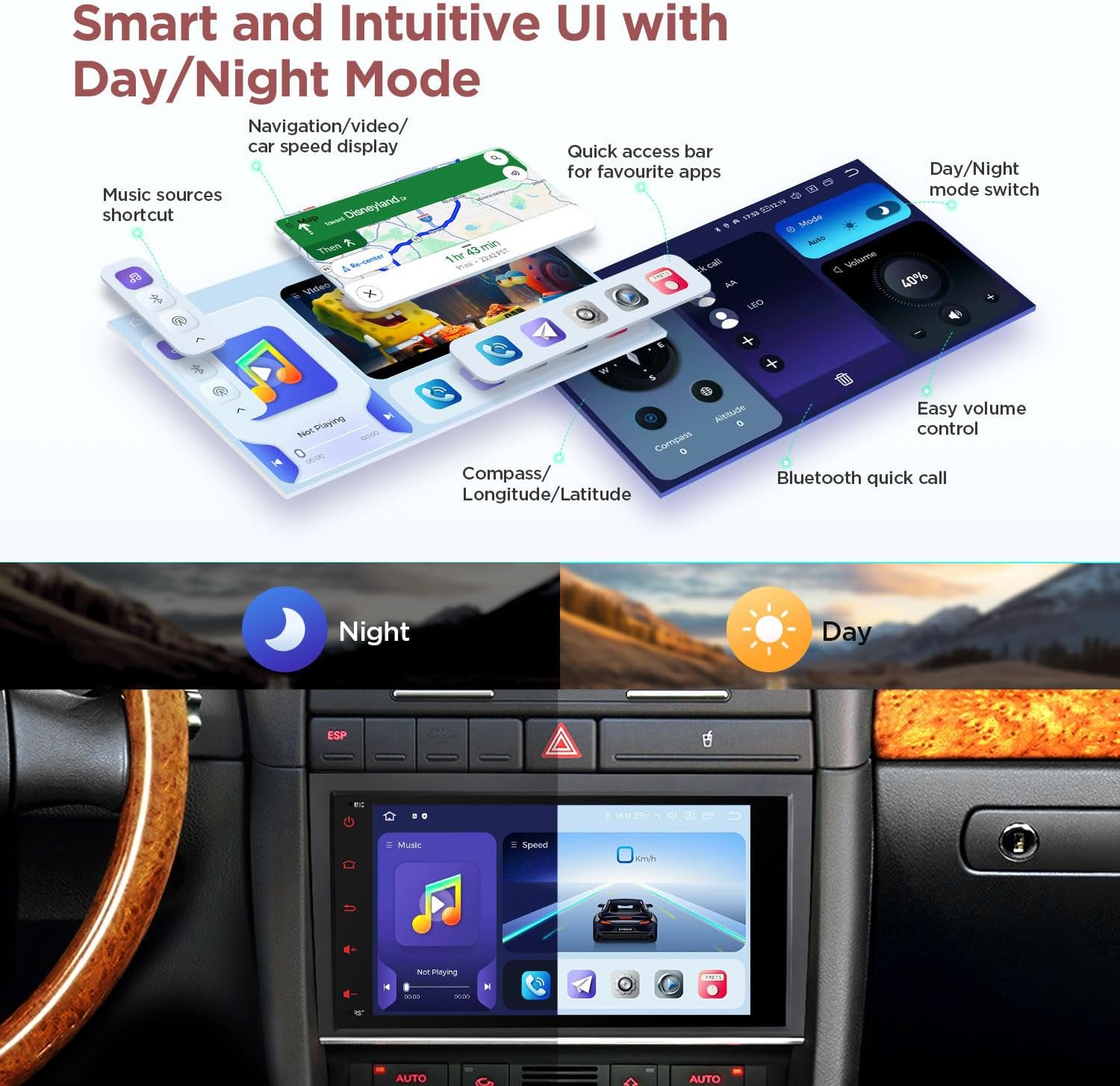
Figure 5.1: Smart UI with Day/Night Mode
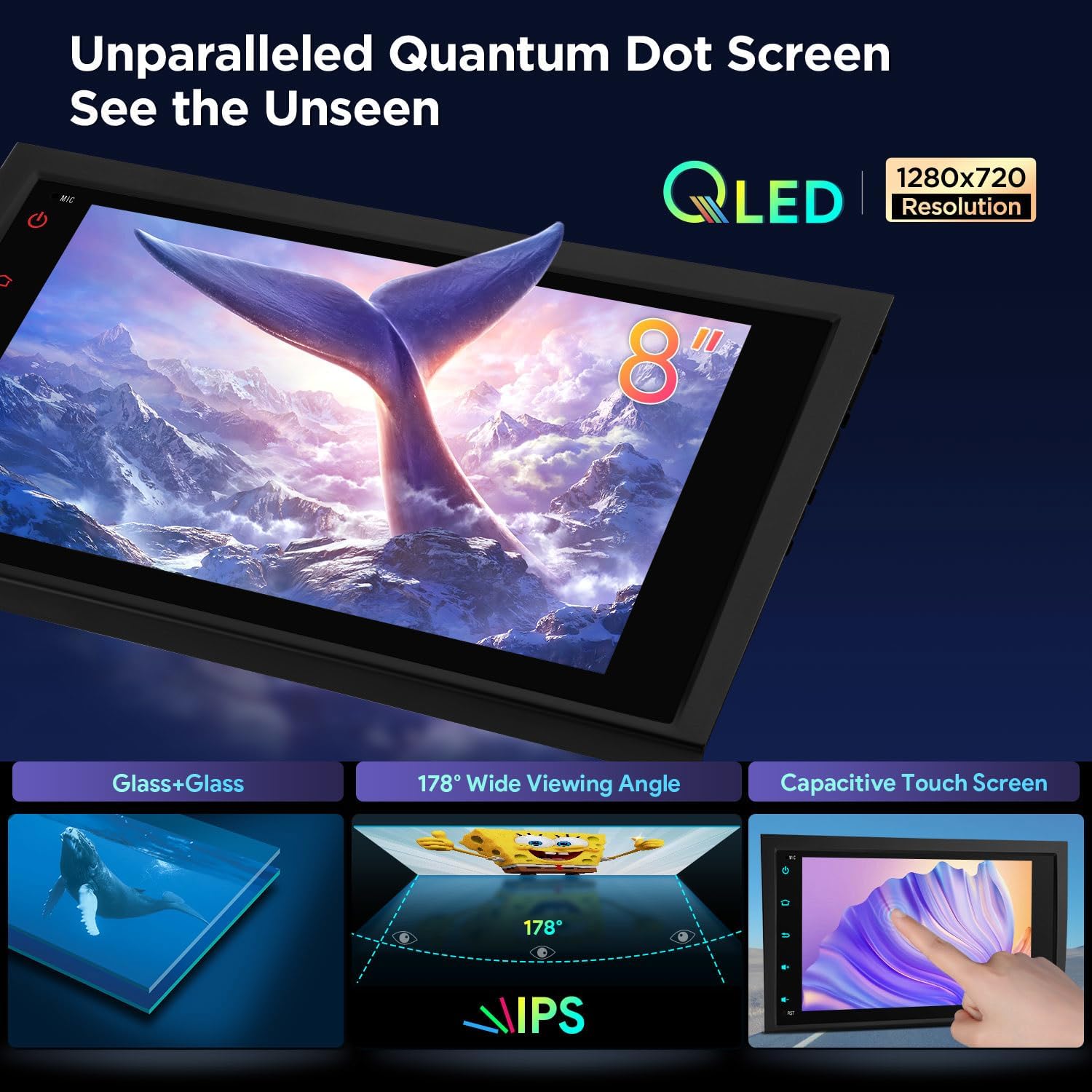
Figure 5.2: QLED IPS Touch Screen
5.2 Connectivitat de telèfons intel·ligents
Connect your smartphone effortlessly using built-in Wireless Apple CarPlay, Wireless & Wired Android Auto, or Bluetooth 5.0. Screen mirroring is also supported for displaying your phone's content on the stereo screen.

Figure 5.3: Seamless Smartphone Integration
5.3 Funcions d'àudio
Experience superior audio quality with the built-in DSP, featuring Digital Amplifier Processing (TDA7808) and DTS Digital Sound (Si47925). This combination provides fully digital lossless audio output, enhancing clarity and reducing interference.
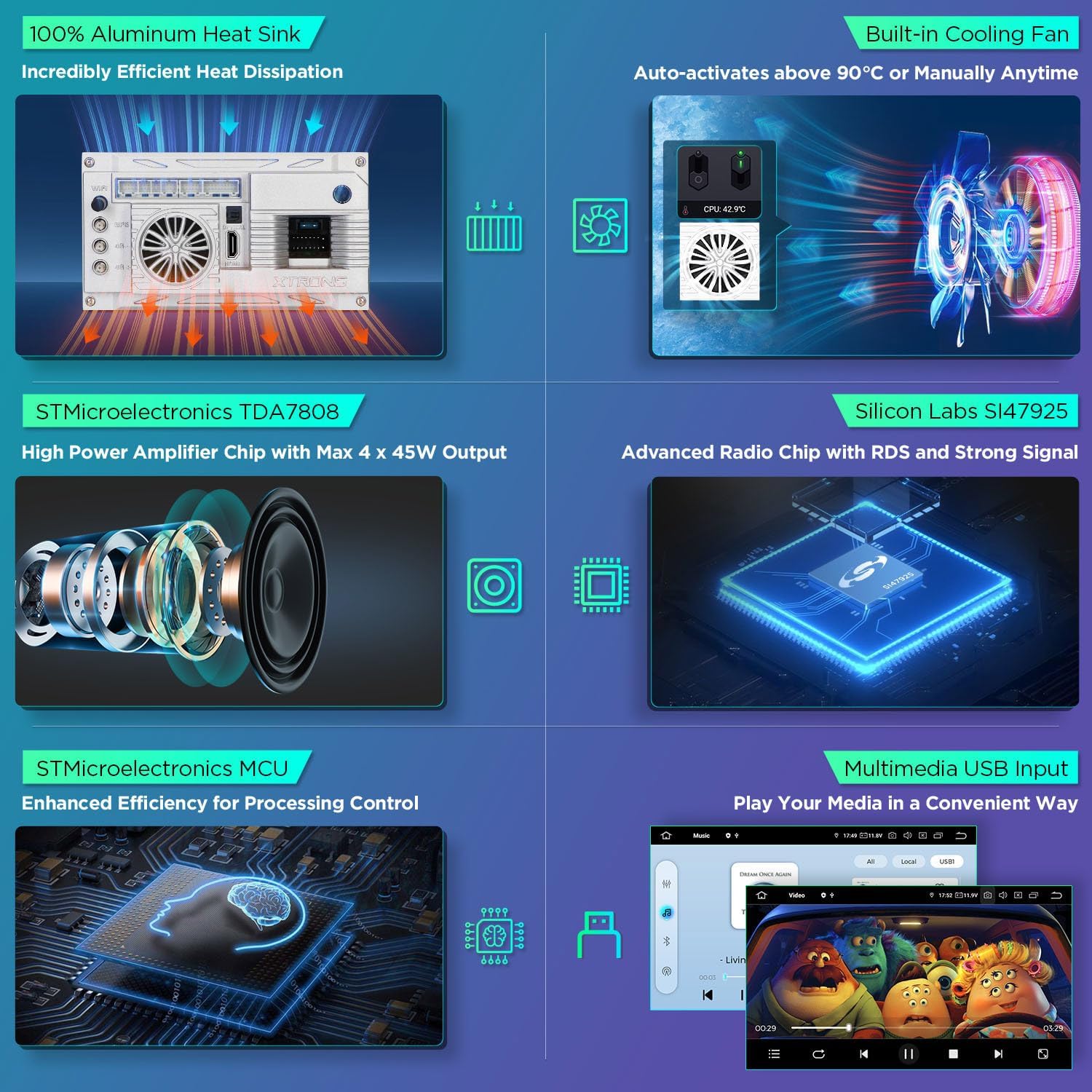
Figure 5.4: Advanced Audio Components
5.4 CANbus Decoding
The optimized CANbus decoding ensures that original vehicle functions such as BOSE system, ACC control, reversing control, light control, handbrake control, and door status are fully supported and displayed on the car stereo.

Figure 5.5: CANbus Integration
5.5 Multimedia & Navigation
Enjoy ultra-smooth 4K video playback and multitask with Split Screen and Picture-in-Picture modes. The unit also features built-in GPS for navigation and supports FM/AM radio with RDS.
6. Manteniment
Per garantir la longevitat i el rendiment òptim del vostre estèreo de cotxe XTRONS, seguiu aquestes pautes de manteniment:
- Neteja: Feu servir un drap suau i sec per netejar la pantalla i l'exterior. Eviteu productes de neteja o dissolvents abrasius.
- Actualitzacions de programari: Consulteu periòdicament la informació oficial de XTRONS website or contact support for available software updates to enhance performance and add new features.
- Control de temperatura: Avoid exposing the unit to extreme temperatures. The built-in cooling fan helps manage internal heat.
- Connexions de cable: Assegureu-vos que tots els cables estiguin connectats correctament per evitar problemes intermitents.
7. Solució De Problemes
If you encounter any issues with your car stereo, refer to the following common troubleshooting steps:
- Sense energia: Comproveu totes les connexions d'alimentació i els fusibles. Assegureu-vos que el vehicle estigui engegat.
- Sense so: Verify speaker connections, volume settings, and audio source selection. Check DSP settings for any muted channels.
- Problemes amb el senyal GPS: Assegureu-vos que l'antena GPS estigui instal·lada correctament i que tingui una vista clara view del cel. Comproveu la configuració del GPS a la unitat.
- Problemes de connexió Bluetooth: Assegura't que el Bluetooth estigui activat tant a l'equip de música com al telèfon. Prova de desvincular i tornar a vincular els dispositius.
- Pantalla tàctil que no respon: Perform a soft reset of the unit (refer to the main manual for specific instructions).
- CANbus Functions Not Working: Verify the CANbus box is correctly connected and configured in the unit's settings.
If the problem persists after attempting these steps, please contact XTRONS customer support for further assistance.
8. Especificacions
| Mida de la pantalla | 8.8 polzades |
| Mida de la pantalla | 8.8 polzades |
| Marca | XTRONS |
| Fabricant | XTRONS |
| Tecnologia de connectivitat | Bluetooth, USB, Wi-Fi |
| Característica especial | Bluetooth, Touchscreen |
| Dispositius compatibles | Telèfon intel·ligent, iPhone |
| Tipus de servei del vehicle | Cotxe |
| ASIN | B0FMDYMYTG |
| Data de primera disponibilitat | 14 d'agost de 2025 |
9. Garantia
The XTRONS 8-inch QLED Android 14 Car Stereo comes with a 1 anys de garantia del fabricant. Please retain your proof of purchase for any warranty claims. For detailed terms and conditions, refer to the warranty information provided with your product or contact XTRONS customer service.
10. Suport
For technical support, product inquiries, or assistance with installation, please visit the official XTRONS website or contact their customer service department. You can find contact information on the XTRONS weblloc web o a la documentació inclosa amb el producte.


