1. Introducció
Thank you for choosing the TABWEE T60 Pro Tablet. This manual provides essential information for setting up, operating, maintaining, and troubleshooting your device. Please read it carefully to ensure optimal performance and longevity of your tablet.
2. Què hi ha a la caixa
Upon unboxing your TABWEE T60 Pro Tablet, please verify that all the following items are included:
- 1 x TABWEE T60 Pro Tablet
- 1 x Teclat Bluetooth
- 1 x ratolí Bluetooth
- 1 x Stylus Pen
- 1 x funda protectora
- 1 carregador de 18 W
- 1 x cable de càrrega tipus C
- 1 x Manual d'usuari

Image: All items included in the TABWEE T60 Pro Tablet package.
3. Configuració
3.1 Encès inicial
- Press and hold the power button located on the side of the tablet until the TABWEE logo appears on the screen.
- Segueix les instruccions que apareixen a la pantalla per seleccionar l'idioma i la regió i acceptar els termes i condicions.
3.2 Connexió a Wi-Fi
- During the initial setup, you will be prompted to connect to a Wi-Fi network. Select your preferred network from the list.
- Enter the Wi-Fi password if required and tap 'Connect'.
- If you skip this step, you can connect later via 'Settings' > 'Network & Internet' > 'Wi-Fi'.
3.3 Configuració del compte de Google
Sign in with your Google account to access the Google Play Store, Gmail, and other Google services. If you don't have an account, you can create one during this step.
3.4 Attaching the Protective Case and Keyboard
The included protective case is designed to fit your TABWEE T60 Pro Tablet securely. Align the tablet with the case and gently press it into place. The keyboard can be magnetically attached to the case or connected via Bluetooth for a laptop-like experience.
4. Instruccions de funcionament
4.1 Pantalla i experiència visual
The TABWEE T60 Pro features a 13.4-inch FHD+ display with a 120Hz refresh rate, providing a smooth and immersive visual experience. It also supports Widevine L1 for high-definition streaming content.
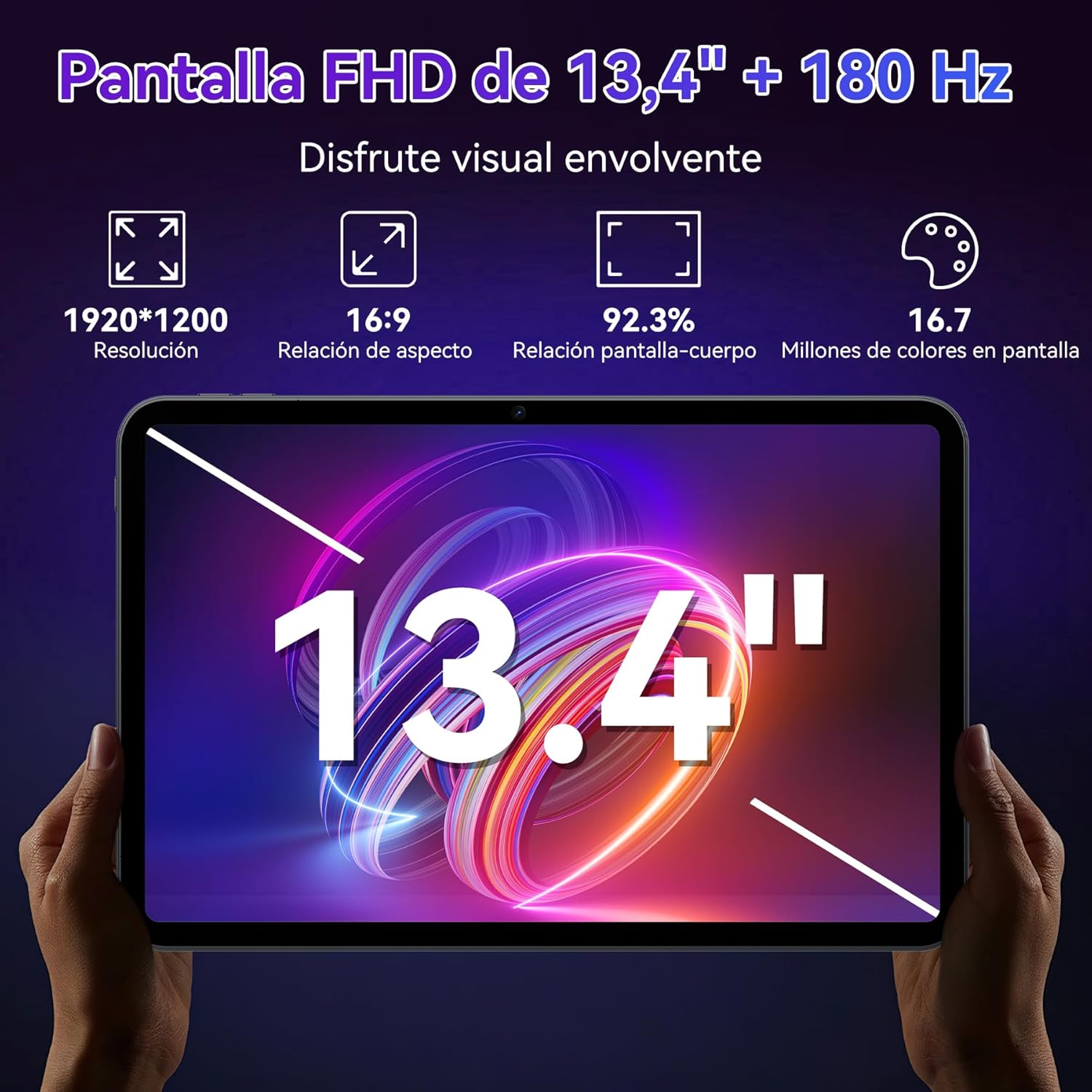
Imatge: Detallada view of the 13.4-inch FHD+ display specifications.

Image: Visual representation of the tablet's display features, including 120Hz refresh rate and TÜV Rheinland certification.
4.2 Android 15 and Performance
The tablet runs on Android 15, optimized with Gemini AI for enhanced speed and privacy. It features an Octa-Core Unisoc T7280 processor, 24GB RAM (8GB physical + 16GB virtual), and 256GB UFS storage, expandable up to 2TB with a TF card.

Image: Key improvements and features of Android 15.

Image: Android 15 Hyper-Engine details for performance and intelligence.

Image: Memory and storage expansion capabilities.

Image: Octa-Core Falcon Engine processor architecture.
4.3 AI Assistant (Gemini AI)
Leverage the integrated Gemini AI 2.0 for intelligent assistance, including smart chats, text-to-image generation, smart Q&A, and personalized recommendations. This AI enhances user interaction and productivity.

Imatge: Més deview of Gemini AI 2.0 capabilities.

Imatge: Examples of Gemini AI voice control in various scenarios.
4.4 Connectivitat
The tablet supports Bluetooth 5.0 for connecting peripherals and 5G Wi-Fi for high-speed internet access, ensuring stable and fast data transfer.

Image: Connectivity features including Bluetooth 5.0 and 5G Wi-Fi.
4.5 Característiques de la càmera
Equipped with a 16MP AI rear camera and an 8MP AI front camera, the tablet supports Face ID for secure unlocking and intelligent Google Lens features.

Image: Details of the tablet's camera system and features.
4.6 Gestió de la bateria
The 10000mAh battery provides extended usage time, and with 18W fast charging, your tablet can be quickly recharged. The OTG function allows the tablet to act as a power bank for other devices.

Image: Battery capacity and fast charging information.

Imatge: Estimacions de la durada de la bateria per a diverses activitats.
4.7 Ús del teclat i del ratolí
The included Bluetooth keyboard and mouse transform your tablet into a versatile workstation. To connect:
- Assegureu-vos que el teclat i el ratolí estiguin carregats i encesos.
- On your tablet, go to 'Settings' > 'Connected devices' > 'Bluetooth'.
- Activa el Bluetooth i cerca els dispositius disponibles.
- Select the keyboard and mouse from the list to pair them. Follow any on-screen prompts.

Image: Tablet used with keyboard and mouse for productivity.
5. Manteniment
5.1 Neteja de la tauleta
Use a soft, lint-free cloth to clean the screen and body of the tablet. Avoid using harsh chemicals or abrasive materials, as they can damage the screen and finish. For stubborn smudges, slightly dampNetegeu el drap amb aigua o una solució netejadora de pantalles.
5.2 Cura de la bateria
To prolong battery life, avoid exposing the tablet to extreme temperatures. Charge the battery regularly, but avoid leaving it fully charged or fully discharged for extended periods. Use only the provided charger and cable.
5.3 Actualitzacions de programari
Regularly check for and install software updates to ensure your tablet has the latest features, security patches, and performance improvements. Go to 'Settings' > 'System' > 'System update' to check for updates.
6. Solució De Problemes
La tauleta 6.1 no s'encén
- Assegureu-vos que la bateria estigui carregada. Connecteu la tauleta al carregador i espereu uns minuts abans d'intentar engegar-la de nou.
- Mantingueu premut el botó d'engegada durant almenys 10-15 segons per realitzar un reinici forçat.
6.2 La pantalla no respon
- Reinicieu la tauleta.
- If the screen remains unresponsive, try a factory reset (note: this will erase all data).
6.3 Problemes de connectivitat Wi-Fi
- Toggle Wi-Fi off and on in 'Settings'.
- Reinicieu el vostre encaminador Wi-Fi.
- Oblida't de la xarxa i torna a connectar-te.
6.4 Les aplicacions es bloquegen o es bloquegen
- Clear the cache and data for the problematic app in 'Settings' > 'Apps'.
- Desinstal·leu i torneu a instal·lar l'aplicació.
- Assegura't que el programari de la tauleta estigui actualitzat.
7. Especificacions
| Característica | Especificació |
|---|---|
| Marca | TABWEE |
| Nom del model | T60 Pro |
| Dimensions del producte | 30.94 x 20.14 x 0.79 cm |
| Pes | 412 g |
| Mida de la pantalla | 13.4 polzades |
| Resolució de pantalla | 1920 x 1200 píxels |
| Processador | Unisoc T7280 Octa-Core (2.2 GHz) |
| RAM | 24 GB (8 GB físic + 16 GB virtual) |
| Emmagatzematge | 256 GB (Expandable up to 2TB with TF card) |
| Sistema operatiu | Android 15 & Gemini AI 2.0 |
| Resolució de la càmera posterior | 16 MP |
| Resolució de la càmera frontal | 8 MP |
| Capacitat de la bateria | 10000 mAh |
| Connectivitat | Bluetooth 5.0, Wi-Fi (802.11ac) |
| Color | Negre |
8. Garantia i Suport
Your TABWEE T60 Pro Tablet comes with an extended 4-year warranty (2 years standard + 2 years extra). This warranty covers manufacturing defects and ensures peace of mind for your purchase.

Image: Information regarding TABWEE's warranty and support commitment.
8.1 Atenció al client
For any technical assistance, warranty claims, or product inquiries, please contact our customer support team:
- Correu electrònic: serviceplus.linda@gmail.com
- Telèfon (Regne Unit): +44 7700 156388
- Telèfon (EUA): +1 (717) 896-6060
- Phone (CA): +1 (587) 841-0500
- Telèfon (DE): +49 157 3598 0115

Image: Contact details for post-sales support.


