1. Introducció
Thank you for choosing the JOMAA VM604 Wireless Ergonomic Vertical Mouse. This advanced mouse is designed to provide superior comfort and efficiency, reducing wrist strain during prolonged use. Featuring multi-device connectivity, adjustable DPI, and a unique multi-function dial, the VM604 is an ideal tool for various computing environments.
Si us plau, llegiu aquest manual detingudament abans d'utilitzar el producte per garantir-ne el funcionament correcte i maximitzar-ne la vida útil.
2. Producte acabatview
2.1 Contingut del paquet
- JOMAA VM604 Ergonomic Vertical Mouse
- Receptor USB (2.4G)
- Cable de càrrega USB-C
- Manual d'usuari
2.2 Mouse Components
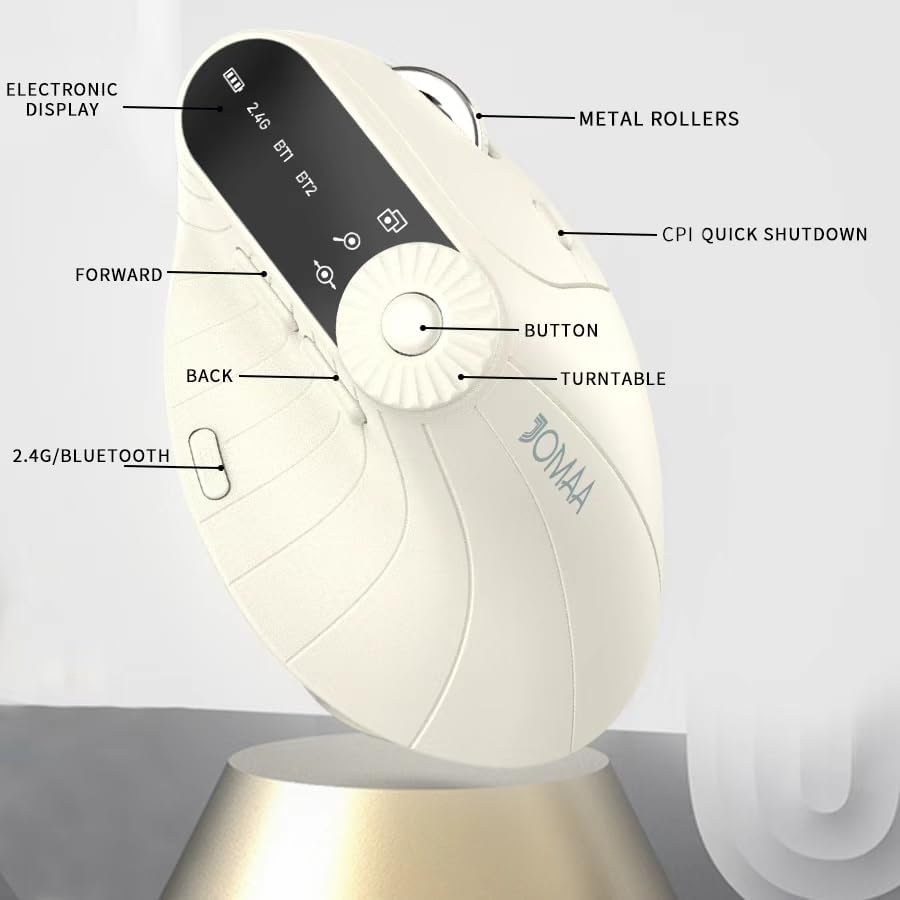
Imatge 1: Labeled components of the JOMAA VM604 mouse, highlighting the electronic display, metal rollers, CPI quick shutdown, forward/back buttons, turntable, and 2.4G/Bluetooth switch.
- Botó esquerre de clic: Standard left mouse function.
- Botó dret: Standard right mouse function.
- Roda de desplaçament: Per a desplaçament vertical.
- Botó Endavant: Navega cap endavant web navegadors o file exploradors.
- Botó enrere: Navega cap enrere web navegadors o file exploradors.
- Multi-function Turntable/Dial: Offers three functions: 1. Window switching, 2. Zoom in/out (for pages and images), 3. Page moves left/right (for Excel).
- DPI/CPI Adjustment Button: Canvia ciclísticament pels paràmetres de DPI (1000/1200/1600/2400).
- Electronic Display: Shows battery level, connection mode (2.4G, BT1, BT2), and DPI setting.
- Connection Mode Switch (Bottom): Toggles between 2.4G, Bluetooth 1 (BT1), and Bluetooth 2 (BT2) modes.
- Power ON/OFF Switch (Bottom): Activa o desactiva el ratolí.
- Port de càrrega USB-C: Situat a la part frontal del ratolí.
- Ranura d'emmagatzematge del receptor USB: Situat a la part inferior del ratolí.
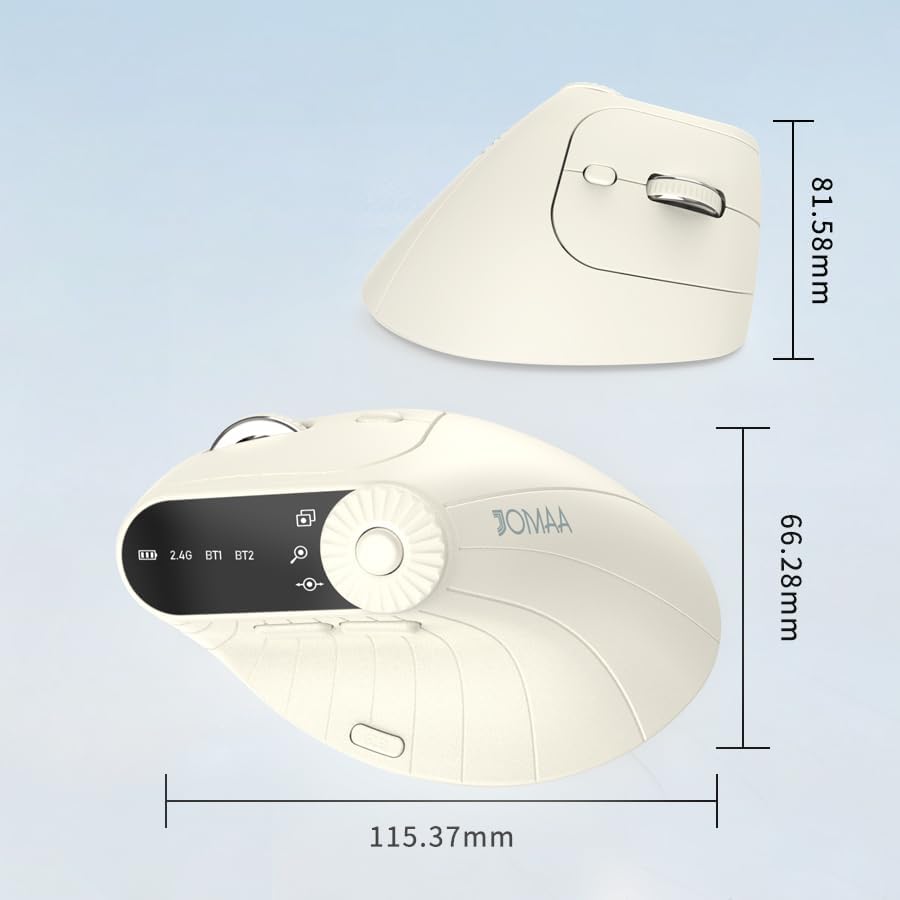
Imatge 2: Dimensions of the JOMAA VM604 mouse, showing its ergonomic vertical design.

Imatge 3: Illustration of the JOMAA VM604's 57-degree ergonomic design, promoting a natural handshake posture to reduce wrist pressure.
3. Configuració
3.1 Càrrega del ratolí
The JOMAA VM604 mouse features a built-in rechargeable battery. To charge:
- Connect the provided USB-C charging cable to the charging port at the front of the mouse.
- Connecteu l'altre extrem del cable USB a una font d'alimentació USB (per exemple, un port USB de l'ordinador o un adaptador de paret USB).
- The electronic display will indicate charging status.

Imatge 4: The JOMAA VM604 mouse connected via USB-C for charging, with a visible charging indicator on the electronic display.
3.2 Connexió sense fil 2.4G
For a stable and fast wireless connection:
- Locate the USB receiver stored in the slot at the bottom of the mouse.
- Connecteu el receptor USB a un port USB disponible de l'ordinador.
- Turn on the mouse using the ON/OFF switch at the bottom.
- Slide the connection mode switch to the '2.4G' position. The mouse should automatically connect to your computer.
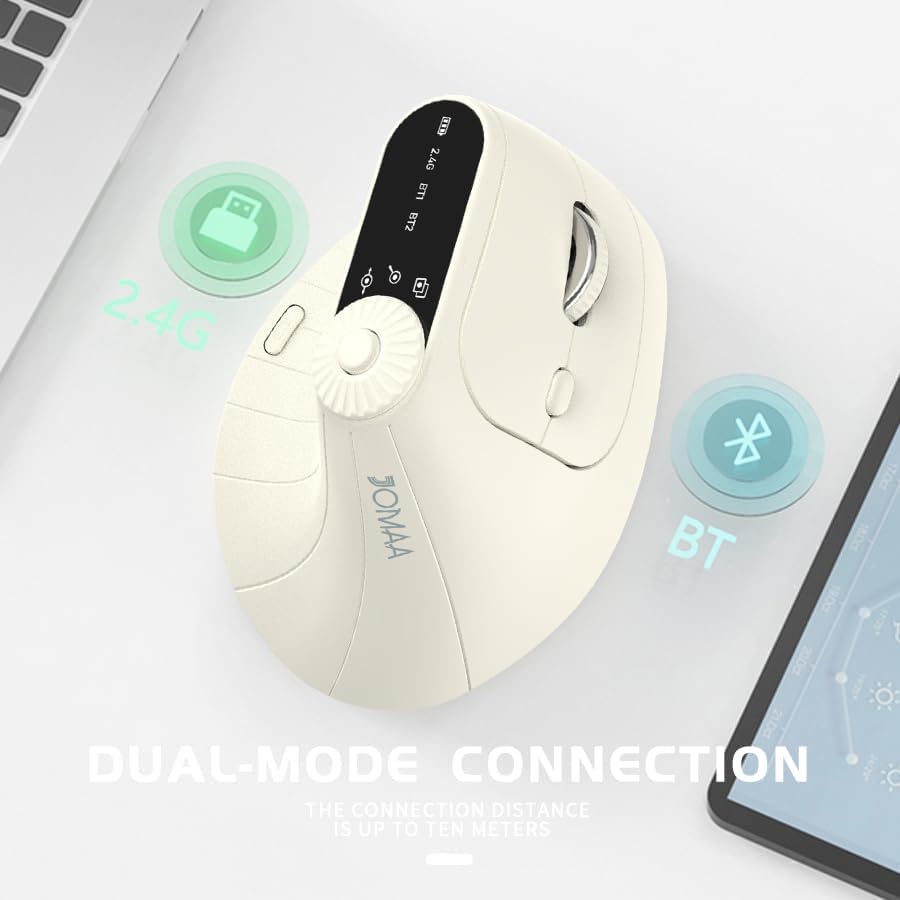
Imatge 5: The JOMAA VM604 mouse illustrating its dual-mode connection capabilities, including the 2.4G USB receiver and Bluetooth options.
3.3 Bluetooth Connection (BT1/BT2)
The mouse can connect to two different Bluetooth devices:
- Turn on the mouse using the ON/OFF switch at the bottom.
- Slide the connection mode switch to either 'BT1' or 'BT2' position.
- For the first Bluetooth connection or to reset a connection, press and hold the connection mode switch for 3-5 seconds until the Bluetooth indicator on the electronic display starts blinking.
- On your device (PC, Laptop, MacBook), go to Bluetooth settings and search for 'JOMAA VM604' (or similar name).
- Select the mouse to pair. The indicator light will stop blinking once connected.
- To switch between connected devices, simply double-click the connection mode switch to cycle through 2.4G, BT1, and BT2.
4. Instruccions de funcionament
4.1 Ajust de DPI
Adjust the mouse sensitivity (DPI/CPI) to suit your preference:
- Press the DPI Adjustment Button (Component 7) located near the multi-function dial.
- Each press will cycle through the available DPI settings: 1000, 1200, 1600, and 2400.
- The electronic display will show the current DPI setting.
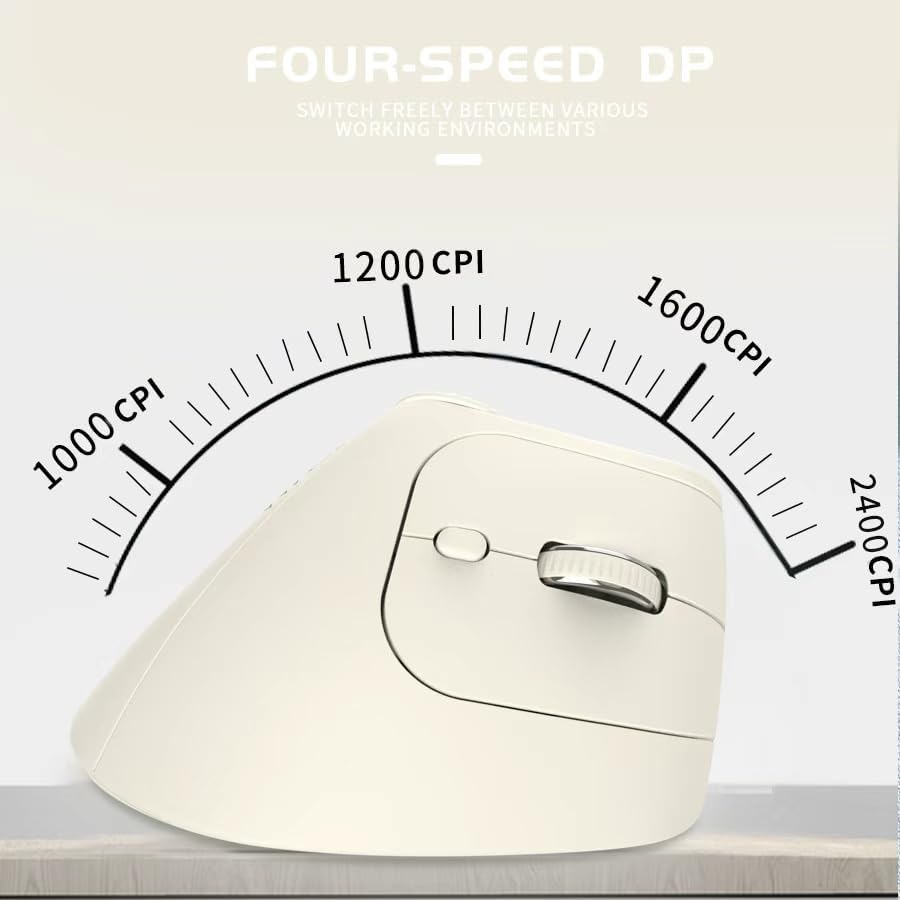
Imatge 6: The JOMAA VM604 mouse highlighting its four-speed CPI settings (1000, 1200, 1600, 2400) for precise optical tracking.
4.2 Multi-Function Turntable
The unique turntable (Component 6) provides enhanced control:
- Window Switching: Rotate the dial to quickly switch between open application windows.
- Apropar/reduir: Rotate the dial to zoom in or out on pages and images.
- Page Left/Right: Useful for navigating large spreadsheets in applications like Excel.

Imatge 7: The multi-function knob on the JOMAA VM604 mouse, demonstrating its uses for window switching, zooming in/out on pages and images, and moving pages left/right in applications like Excel.
4.3 Forward/Back Buttons
Use the Forward (Component 4) and Back (Component 5) buttons for quick navigation in web navegadors i file exploradors.
5. Manteniment
5.1 Neteja
Per mantenir un rendiment i una higiene òptims:
- Apagueu el ratolí abans de netejar-lo.
- Utilitzeu un suau, damp cloth to wipe the surface of the mouse.
- Eviteu utilitzar productes químics o materials abrasius.
- Periodically clean the optical sensor at the bottom with a cotton swab.
5.2 Cura de la bateria
Per allargar la durada de la bateria:
- Eviteu descarregar completament la bateria amb freqüència.
- Charge the mouse regularly, even if not completely depleted.
- If the mouse will not be used for an extended period, turn it off.

Imatge 8: The JOMAA VM604 mouse demonstrating its intelligent hibernate mode, which activates after 60 seconds of inactivity to save power.
6. Solució De Problemes
- El ratolí no respon: Ensure the mouse is turned on and fully charged. Check the connection mode (2.4G or Bluetooth) and ensure it's correctly paired/connected to your device. For 2.4G, try plugging the USB receiver into a different port. For Bluetooth, try re-pairing the device.
- Cursor movement is erratic: Clean the optical sensor at the bottom of the mouse. Ensure the surface you are using is clean and suitable for mouse operation. Adjust the DPI setting to a lower value if the cursor is too fast.
- Problemes de connexió Bluetooth: Ensure your device's Bluetooth is enabled. Try forgetting the device in your Bluetooth settings and re-pairing. Ensure the mouse is in the correct BT1 or BT2 mode and in pairing mode (blinking indicator).
- Multi-function dial not working: Ensure the mouse is properly connected. Some functions may require specific application support.
7. Especificacions
| Característica | Detall |
|---|---|
| Dimensions del producte | 6 x 4 x 0.04 polzades |
| Pes de l'article | 7.4 unces |
| Número de model de l'article | VM604 |
| Bateries | 1 9V batteries required (included) - Note: Product features built-in rechargeable battery, 9V battery information may be a listing error. |
| Tecnologia de connectivitat | Bluetooth, USB (sense fil 2.4G) |
| Característica especial | Ergonomic Design, Multi-function Turntable, Adjustable DPI, Rechargeable |
| Tecnologia de detecció de moviment | Òptic |
| Configuració de DPI | 1000/1200/1600/2400 |
| Color | Beiga |
8. Garantia i Suport
JOMAA products are designed and manufactured to the highest quality standards. This product is covered by a limited warranty from the date of purchase. For detailed warranty information, technical support, or customer service inquiries, please refer to the contact information provided on the product packaging or visit the official JOMAA weblloc.
Conserveu el vostre comprovant de compra per a reclamacions de garantia.
9. Vídeo oficial del producte
Vídeo 1: Un acabatview of the JOMAA VM604 Ergonomic Mouse, showcasing its unique vertical design and comfortable grip. This video highlights the physical appearance and ergonomic benefits of the mouse.


