1. Introducció
Welcome to the user manual for the Autel MaxiIM K-M.100 Diagnostic Tool. This manual provides essential information for the proper setup, operation, maintenance, and troubleshooting of your device. Please read this manual thoroughly before using the tool to ensure safe and effective operation.
The Autel MaxiIM K-M.100 is a professional automotive diagnostic and key programming tool designed for a wide range of vehicle models. It features advanced hardware for fast performance and supports continuous software updates.
2. Producte acabatview
2.1. Components
The Autel MaxiIM K-M.100 package includes the following items:
- Autel Diagnostic Tool K-M.100 (Main Unit)
- VCI 200 Adapter
- Caixa d'embalatge
2.2. Característiques del dispositiu
The MaxiIM K-M.100 is equipped with advanced features to enhance diagnostic and key programming capabilities:
- Sistema operatiu: Android 9.0 with Rockchip PX30 processor for quick boot-up and smooth multitasking.
- Visualització: 5.5-inch (1280x720) touchscreen for clear data visualization.
- Memòria: 2GB RAM + 64GB internal storage.
- Bateria: 4950mAh battery for extended operation.
- Cobertura del vehicle: Supports over 700 vehicle models globally.
- Actualitzacions: Includes lifetime software updates.
2.3. Imatges del producte

Figura 1: Davant i darrere view of the Autel MaxiIM K-M.100 Diagnostic Tool, showing the main unit and the VCI200 adapter.
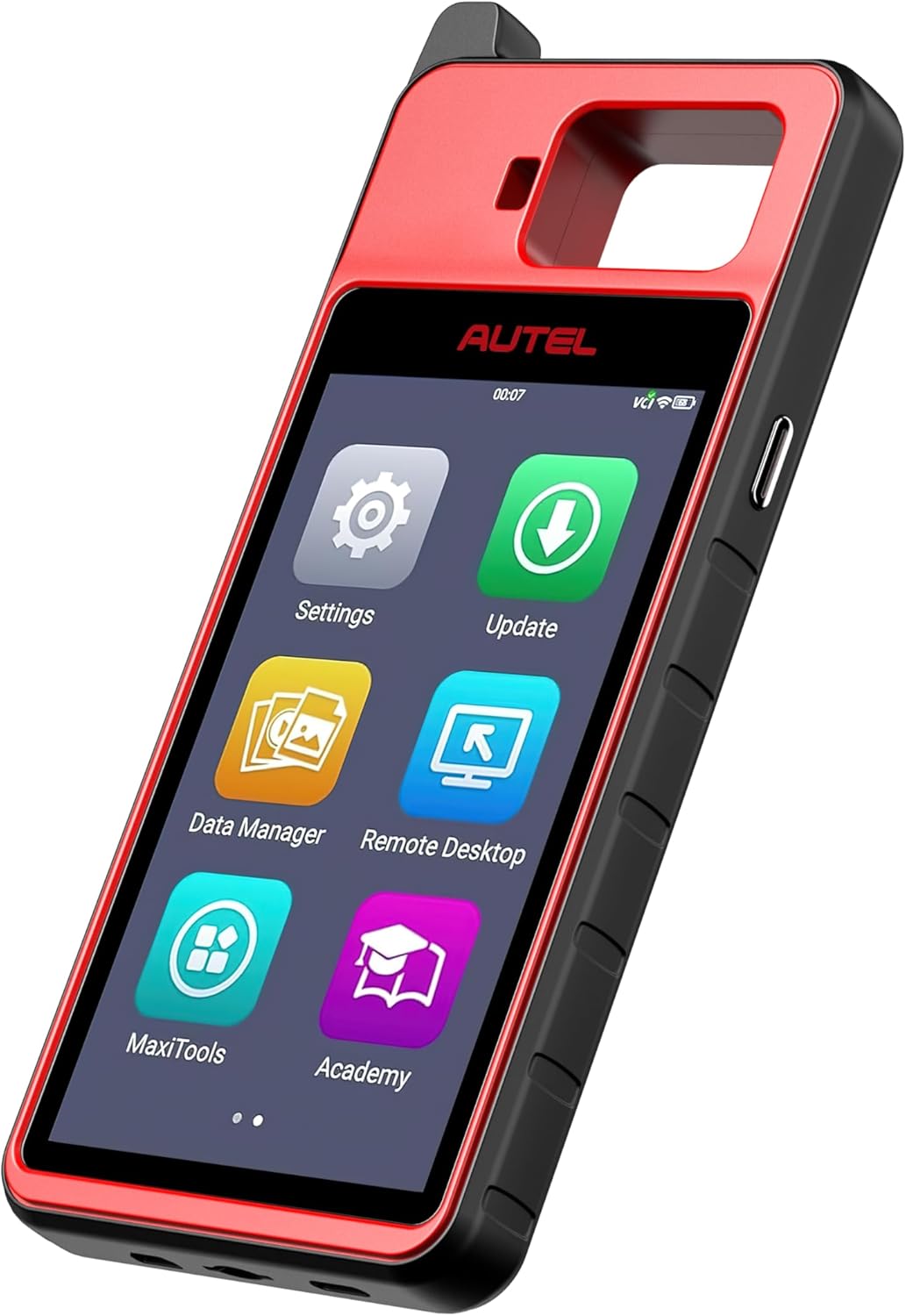
Figura 2: Angle view of the Autel MaxiIM K-M.100 Diagnostic Tool, highlighting its ergonomic design.

Figura 3: Frontal view of the Autel MaxiIM K-M.100 Diagnostic Tool, showing the main menu interface on the screen.
3. Configuració
Follow these steps to set up your Autel MaxiIM K-M.100 for first-time use:
3.1. Càrrega inicial
- Connect the provided power adapter to the MaxiIM K-M.100 charging port.
- Connecteu l'adaptador a una presa de corrent estàndard.
- Allow the device to charge completely before first use. The charging indicator will show the battery status.
3.2. Encès / apagat
- Per encendre: Premeu i manteniu premut el botó d'engegada (normalment situat al lateral) fins que la pantalla s'il·lumini.
- Per apagar: Mantingueu premut el botó d'engegada i, a continuació, seleccioneu "Apagar" de les opcions que apareixen a la pantalla.
3.3. Initial Software Configuration
- Upon first boot, follow the on-screen prompts to select your language, time zone, and Wi-Fi network.
- Register your device with Autel by creating an account or logging in with an existing one. This is necessary for software updates and support.
- Perform a system update to ensure all software is current. Navigate to the "Update" icon on the main screen and follow instructions.
4. Instruccions de funcionament
4.1. Connexió a un vehicle
- Localitza el port OBD2 del vehicle, normalment sota el tauler de control al costat del conductor.
- Plug the VCI200 adapter into the vehicle's OBD2 port. Ensure a secure connection.
- The VCI200 adapter will establish a wireless connection with the MaxiIM K-M.100 main unit. Verify the connection status indicator on the main unit.
- Gireu el contacte del vehicle a la posició "ON" (motor apagat).
4.2. Performing Diagnostics
- From the main menu, select the "Diagnostics" application.
- Trieu el fabricant, el model i l'any del vehicle tal com se us demani.
- The system will automatically scan for available vehicle systems.
- Select the desired diagnostic function, such as "Auto Scan" for a full system scan, "Control Unit" for specific module access, or "Service Functions" for maintenance tasks.
- Follow the on-screen instructions to read fault codes, view live data, perform active tests, or access special functions.
4.3. Key Programming (IMMO)
The MaxiIM K-M.100 supports various immobilizer and key programming functions:
- From the main menu, select the "IMMO" application.
- Choose the vehicle manufacturer, model, and year.
- Select the specific IMMO function you wish to perform, such as "Key Learning," "Remote Control Learning," "IMMO Data Read," or "IMMO ECU Reset."
- Follow the detailed on-screen instructions carefully. These procedures often require specific steps like turning the ignition on/off, inserting/removing keys, or entering security codes.
- Ensure the vehicle battery is adequately charged during key programming procedures to prevent interruptions.
4.4. Actualitzacions de programari
Regular software updates ensure your tool has the latest vehicle coverage and functions:
- Connect the MaxiIM K-M.100 to a stable Wi-Fi network.
- Tap the "Update" icon on the main screen.
- Select the available updates and tap "Download All" or select specific updates.
- Once downloaded, tap "Install" to apply the updates. The device may restart during this process.
5. Manteniment
5.1. Neteja del dispositiu
- Utilitzeu un suau, damp cloth to clean the exterior of the main unit and VCI adapter.
- Avoid using abrasive cleaners or solvents that could damage the screen or casing.
- Keep the charging port and OBD2 connector free of dust and debris.
5.2. Cura de la bateria
- Carregueu el dispositiu regularment, fins i tot si no l'utilitzeu amb freqüència, per mantenir la bateria en bon estat.
- Eviteu exposar el dispositiu a temperatures extremes, ja que poden degradar el rendiment de la bateria.
5.3. Manteniment del programari
- Perform software updates as they become available to ensure optimal performance and access to new features.
- Regularly back up important diagnostic data to an external storage device or cloud service if available.
6. Solució De Problemes
This section addresses common issues you might encounter with your MaxiIM K-M.100.
| Problema | Causa possible | Solució |
|---|---|---|
| El dispositiu no s'encén. | Bateria baixa; botó d'engegada no premut prou estona; dispositiu avariat. | Charge the device fully; Press and hold the Power button for 3-5 seconds; Contact support if issue persists. |
| VCI200 adapter not connecting. | Loose connection; VCI not powered; Bluetooth interference. | Ensure VCI is firmly plugged into OBD2 port; Check vehicle ignition is ON; Move away from strong wireless signals. |
| Unable to communicate with vehicle. | Incorrect vehicle selection; Faulty OBD2 port; Software issue. | Verify vehicle information; Check vehicle's OBD2 port with another tool; Perform software update; Contact support. |
| L'actualització del programari falla. | Unstable Wi-Fi connection; Insufficient storage space. | Ensure strong Wi-Fi signal; Clear unnecessary data to free up space; Retry update. |
If you encounter issues not listed here or if the suggested solutions do not resolve the problem, please contact Autel customer support.
7. Especificacions
Technical specifications for the Autel MaxiIM K-M.100 Diagnostic Tool:
- Marca: Autel
- Model: Autel Diagnostic Tool + VCI200 Adapter (K-M.100)
- Sistema operatiu: Android 9.0
- Pes de l'article: 3.79 lliures
- Dimensions del paquet: 12.7 x 10.8 x 4 polzades
- Número de peça del fabricant: Autel Maxi-I-M Tool with VCI200
- ASIN: B0FMK83KGN
- Tipus d'ajust per a automòbils: Ajust específic del vehicle
- Data de primera disponibilitat: 15 d'agost de 2025
8. Garantia i Suport
Autel provides comprehensive support for the MaxiIM K-M.100 Diagnostic Tool.
- Còpia de seguretat de qualitat: The product includes a 12-month quality backup from the date of purchase.
- Actualitzacions de programari: Enjoy lifelong software upgrades to keep your tool current with the latest vehicle data and functionalities.
- Suport tècnic: For any technical assistance, compatibility checks, or troubleshooting, please contact Autel customer support.
Correu electrònic de contacte: autelcare@outlook.com (Disponible 24/7)


