1. Introducció
Welcome to the Ossuret Car Radio user manual. This document provides comprehensive instructions for the installation, operation, and maintenance of your new Android 13 car multimedia system. Please read this manual thoroughly before using the product to ensure proper functionality and safety. This unit is specifically designed for Nissan Juke models manufactured between 2010 and 2014.
2. Informació de seguretat
- Instal·lació professional recomanada: A causa de la complexitat dels sistemes elèctrics dels cotxes, es recomana la instal·lació professional per evitar danys a la unitat o al vehicle.
- Seguretat de conducció: No feu funcionar el sistema de manera que us distregui de la conducció. Prioritzeu sempre la seguretat viària.
- Font d'alimentació: Ensure the unit is connected to a 12V DC power supply with a negative ground. Incorrect wiring can cause damage.
- Temperatura: Eviteu exposar la unitat a temperatures extremes o a la llum solar directa durant períodes prolongats.
- Humitat: Mantingueu la unitat seca. L'exposició a la humitat pot provocar un mal funcionament o una descàrrega elèctrica.
- Neteja: Utilitzeu un drap suau i sec per netejar. No utilitzeu netejadors abrasius ni dissolvents.
3. Contingut del paquet
Si us plau, comproveu que tots els elements següents estiguin inclosos al vostre paquet:
- Ossuret Car Radio Unit
- Cable USB
- Cable RCA
- Antena GPS
- Descodificador Canbus
- Power Harness (Vehicle Specific)
- Installation Brackets and Screws
4. Especificacions
| Característica | Especificació |
|---|---|
| Sistema operatiu | Android 13 |
| RAM | 2 GB |
| ROM | 32 GB |
| CPU | Quad-Core A53 1.5Ghz |
| Mida de la pantalla | 9 polzades |
| Resolució de pantalla | 1280 x 720 |
| Tipus de pantalla tàctil | Capacitive Multi-touch |
| Característiques especials | Wireless CarPlay, Android Auto, GPS Navigation |
| Connectivitat | USB, Bluetooth, WiFi (802.11b/g/n) |
| Tipus de mapa | Europe (pre-loaded offline maps) |
| Mode de sortida d'àudio | estèreo |
| Fabricant | Hitour Tech |
| Dimensions del paquet | 36.5 x 23.5 x 10.7 cm |
| Pes del paquet | 1.48 kg |
5. Configuració
5.1 Instal·lació
The Ossuret Car Radio is designed for direct fitment in Nissan Juke models from 2010-2014. It replaces the factory radio unit. Due to the specific wiring and CANbus integration required, professional installation is strongly recommended.
- Desconnecta la bateria: Abans d'arrencar, desconnecteu el terminal negatiu de la bateria del vehicle per evitar curtcircuits.
- Treure la ràdio de fàbrica: Carefully remove the existing factory radio and trim panels. Refer to your vehicle's service manual for specific instructions.
- Connecteu l'arnès de cablejat: Connect the provided wiring harness, RCA cables, and GPS antenna to the corresponding ports on the Ossuret unit and your vehicle's wiring. Ensure the CANbus decoder is correctly connected.
- Unitat d'instal·lació: Mount the Ossuret car radio into the dashboard opening using the provided brackets and screws.
- Torneu a connectar la bateria: Torneu a connectar el terminal negatiu de la bateria del vehicle.
- Funcionalitat de prova: Power on the unit and test all functions (radio, audio, touchscreen, steering wheel controls, etc.) before reassembling the dashboard trim.
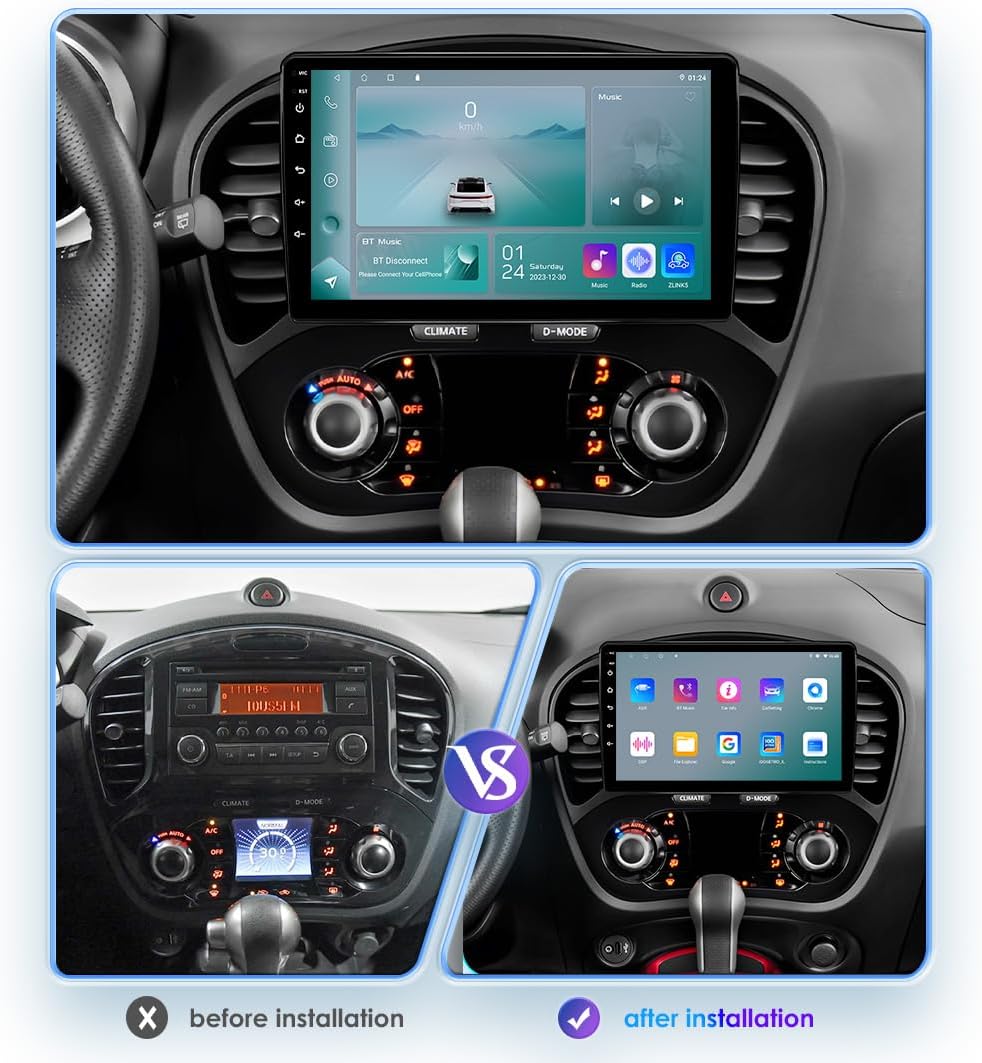
This image illustrates the dashboard of a Nissan Juke before and after the installation of the Ossuret car radio, highlighting the integrated fit and modern display.
5.2 Engegada inicial
Upon first power-on, the system will boot up to the Android interface. You may be prompted to set up basic preferences such as language and time zone. Ensure the GPS antenna is positioned correctly for optimal signal reception.
6. Instruccions de funcionament
CarPlay sense fil 6.1 / Android Auto
The unit supports wireless Apple CarPlay and Android Auto via the pre-installed Z-Link application. This allows seamless integration of your smartphone for navigation, music, calls, and other apps.
- Enable Bluetooth/WiFi: On your smartphone, ensure Bluetooth and WiFi are enabled.
- Open Z-Link: On the car radio, open the 'Z-Link' application.
- Parella el dispositiu: Follow the on-screen instructions to pair your smartphone via Bluetooth. Once paired, the system will automatically establish a WiFi connection for CarPlay or Android Auto.
- Funcions d'accés: Your phone's compatible apps and features will now be accessible on the car radio's display.

This image demonstrates the wireless CarPlay and Android Auto system, showing how smartphone applications like Phone, Music, Maps, and Messages are displayed on the car radio screen.
6.2 Funció Bluetooth
The built-in Bluetooth module allows for hands-free calling and wireless audio streaming.
- Maridatge: Go to the Bluetooth settings on the car radio and enable Bluetooth. Cerca available devices on your smartphone and select the car radio (usually named 'CarBT' or similar). Confirm the pairing code if prompted.
- Trucades mans lliures: Once paired, you can make and receive calls directly from the car radio's interface. The built-in microphone ensures clear communication.
- Phonebook Download: The system supports downloading your phone's contact list for easy access.
- Música Bluetooth: Stream audio from your smartphone to the car's speakers wirelessly.

This image displays the Bluetooth calling interface on the car radio, showing a dial pad and contact search function for hands-free communication.
6.3 Connexió USB
Connect external USB devices to play audio and video files. The unit supports USB storage devices up to 2TB.
- Connecta el dispositiu USB: Insert your USB drive into one of the provided USB ports.
- Accés Files: The system will automatically detect the device. Navigate to the 'File Manager' or 'Music/Video Player' app to browse and play content.

This image shows the file browsing interface when a USB device is connected, allowing users to access various media files i carpetes.
6.4 Control del volant
The unit is compatible with your vehicle's factory steering wheel controls, allowing you to manage audio functions without taking your hands off the wheel.
- Reconeixement automàtic: After proper installation with the CANbus decoder, the steering wheel controls should be automatically recognized.
- Customization (if needed): If controls are not functioning correctly, navigate to the 'Steering Wheel Control' settings in the system menu to manually map the buttons.
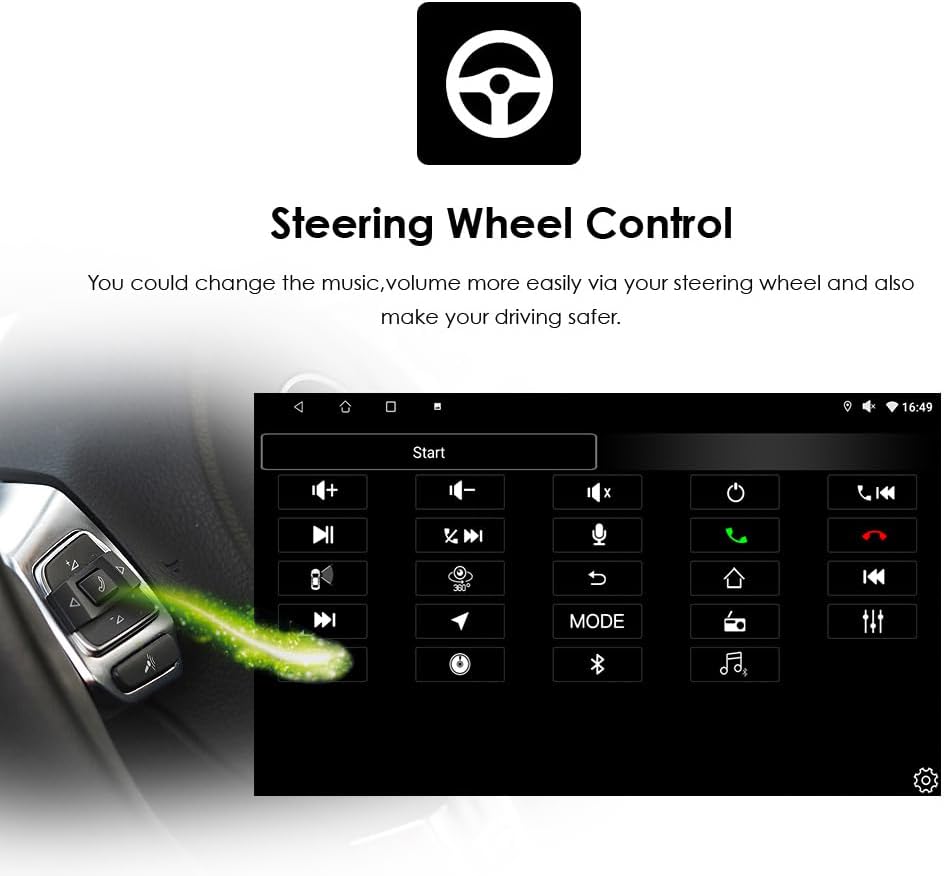
This image illustrates the steering wheel control setup screen, showing how various functions can be assigned to the vehicle's steering wheel buttons for convenient operation.
6.5 Radio Function (RDS)
The car radio features an FM tuner with RDS support, allowing you to listen to your favorite radio stations.
- Interval de sintonització FM: 87.5-108 MHz
- FM Increment: 0.05MHz (EU) / 0.1MHz (US)
- Regional Support: Europe, USA1, USA2, Japan, Russia
- Scanning and Presets: Use the radio application to scan for stations and save your preferred frequencies as presets.

This image shows the radio interface, displaying current frequency, station presets, and controls for tuning and band selection.
6.6 Navegació GPS
The unit comes with pre-loaded European offline maps and supports online navigation.
- Navegació fora de línia: Access the pre-installed navigation app to use the offline European maps without an internet connection.
- Navegació en línia: Connect to WiFi to use online navigation apps (e.g., Google Maps, Waze) for real-time traffic updates and broader map coverage.
- Guia de veu: The system supports voice guidance for turn-by-turn directions.
- Funció de doble zona: Navigate while playing music or other media in the background.
6.7 Darrera View Entrada de càmera
Enhance safety with a rear-view camera (sold separately). The system automatically displays the camera feed when reversing.
- Connexió: Connecteu un connector posterior compatibleview càmera a l'entrada dedicada de la unitat.
- Visualització automàtica: When the vehicle is shifted into reverse gear, the screen will automatically switch to display the rear-view camera feed, helping to identify obstacles and blind spots.
6.8 Reproducció multimèdia
The unit supports various audio and video formats for local playback or streaming.
- Formats de música compatibles: MP3, WMA, AAC, RM, FLAC, etc.
- Formats de vídeo compatibles: MPEG-1/2/4, H264, H263, VC1, RV, RMVB, DivX, Sorenson Spark, VP8, AVS Stream, etc.
- Sortida de vídeo: Synchronize all functions with external displays such as headrest monitors or overhead screens.

This image shows the car radio display actively playing a video, demonstrating its multimedia capabilities.
7. Manteniment
- Neteja de pantalla: Feu servir un drap suau i sense borrissol per netejar suaument la pantalla tàctil. Per a taques difícils, fregueu lleugeramentampNetegeu el drap amb aigua o un netejador de pantalles. No ruixeu el netejador directament sobre la pantalla.
- Actualitzacions de programari: Periodically check for software updates through the system settings or the manufacturer's weblloc per garantir un rendiment òptim i l'accés a noves funcions.
- Eviteu líquids: Eviteu que entri líquids a la unitat, ja que això pot causar danys greus.
- Condicions ambientals: Operate the unit within recommended temperature ranges. Extreme heat or cold can affect performance and lifespan.
8. Solució De Problemes
If you encounter issues with your Ossuret Car Radio, refer to the following common problems and solutions:
| Problema | Possible solució |
|---|---|
| La unitat no s'encén | Check power connections and vehicle's fuse box. Ensure the battery is properly connected. |
| Sense so | Verify speaker connections. Check volume levels and mute settings. Ensure audio output mode is correct. |
| La pantalla tàctil no respon | Perform a soft reset (refer to system settings for reset option). Ensure the screen is clean and free of debris. |
| Bluetooth/CarPlay/Android Auto not connecting | Ensure Bluetooth and WiFi are enabled on both the unit and your smartphone. Restart both devices. Clear previous pairings and try again. Check Z-Link app status. |
| Senyal GPS feble o inexacte | Assegureu-vos que l'antena GPS estigui instal·lada correctament i que tingui una vista clara view del cel. Eviteu els obstacles. |
| Els comandaments del volant no funcionen | Verify CANbus decoder connection. Check steering wheel control settings in the unit's menu for proper mapping. |
Si el problema persisteix després d'intentar aquestes solucions, poseu-vos en contacte amb l'atenció al client per obtenir més ajuda.
9. Garantia i Suport
Your Ossuret Car Radio is covered by a standard manufacturer's warranty. Please refer to the warranty card included in your package or contact your retailer for specific warranty terms and conditions.
For technical support, troubleshooting assistance, or warranty claims, please contact the seller or manufacturer directly. Keep your purchase receipt and product serial number handy when contacting support.


