1. Introducció
The NEEWER Basics 9" LED Video Light Panel (Model NL-120B) is designed to provide versatile and high-quality lighting for various content creation needs. Featuring edge-lit technology, it delivers soft, eye-caring illumination with adjustable color temperature and brightness. This manual provides essential information for the safe and effective use of your LED video light panel.
2. Contingut del paquet
Verifiqueu que tots els elements siguin presents al vostre paquet:
- 1 x LED Video Light Panel with Built-in Battery
- 1 x Cold Shoe Adapter
- 1 x cable USB tipus C
3. Configuració
3.1 Càrrega de la bateria
The NL-120B features a built-in 3.7V 4000mAh lithium battery. For optimal battery longevity, fully charge the device before first use.
- Connect the provided USB Type-C cable to the light panel's charging port.
- Connect the other end of the USB Type-C cable to a compatible USB power source (e.g., wall adapter, computer USB port).
- The battery indicator on the display will show charging progress. A full charge typically takes approximately 2 hours.

3.2 Attaching the Cold Shoe Adapter
The 1/4" cold shoe adapter allows for versatile mounting options.
- Screw the cold shoe adapter into the 1/4" screw hole located at the bottom of the light panel.
- Securely attach the cold shoe adapter to a DSLR camera, camcorder, tripod, or other compatible device.
- The adapter allows for 180° front and back tilt to achieve desired shooting angles.

4. Instruccions de funcionament
4.1 Encès/Apagat
Locate the power button on the side of the light panel. Press and hold the button for a few seconds to turn the device on or off.
4.2 Ajust de la brillantor
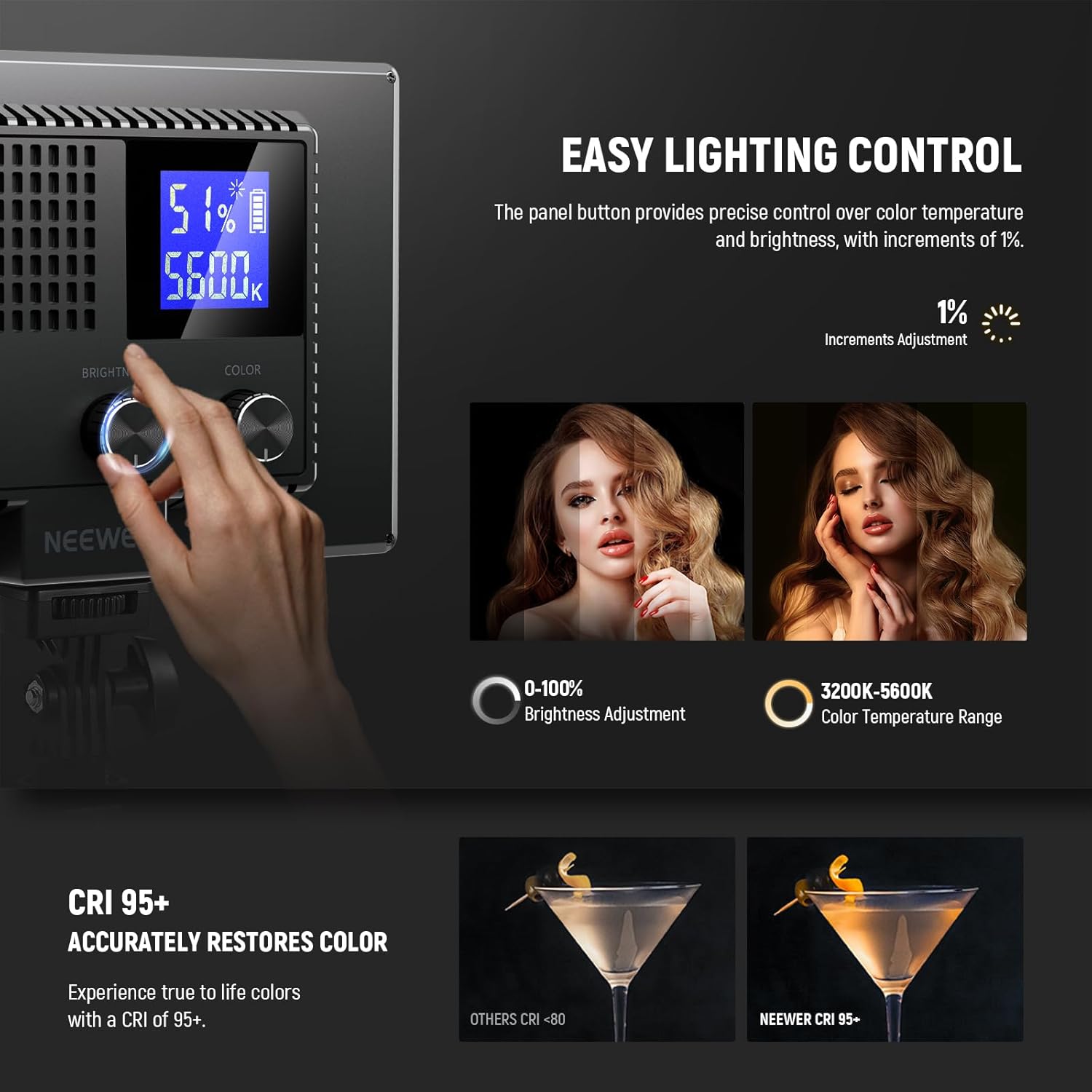
The NL-120B offers stepless dimming from 0% to 100% in 1% increments.
- With the light powered on, locate the brightness control knob on the back panel.
- Rotate the knob clockwise to increase brightness.
- Rotate the knob counter-clockwise to decrease brightness.
- The current brightness percentage es mostrarà a la pantalla LCD.

4.3 Ajust de la temperatura de color
The light panel allows for precise adjustment of color temperature from 3200K (warm) to 5600K (cool).
- With the light powered on, locate the color temperature control knob on the back panel.
- Rotate the knob clockwise to increase the color temperature (cooler light).
- Rotate the knob counter-clockwise to decrease the color temperature (warmer light).
- The current color temperature in Kelvin (K) will be displayed on the LCD screen.

5. Manteniment
- Keep the light panel clean by wiping it with a soft, dry cloth. Avoid using harsh chemicals or abrasive materials.
- Guardeu el dispositiu en un lloc fresc i sec, allunyat de la llum solar directa i de temperatures extremes.
- Ensure the USB Type-C port is free from dust and debris to maintain proper charging functionality.
- The light panel is made of ABS plastic for lightweight portability and increased durability.
6. Solució De Problemes
6.1 La llum no s'encén
- Check if the battery is sufficiently charged. Connect the light to a power source using the USB Type-C cable and allow it to charge.
- Ensure the power button is pressed and held correctly to activate the device.
6.2 Durada curta de la bateria
- Battery runtime is approximately 1.5 hours on a full charge. If you require longer operation, consider using the light while connected to a power source via the USB Type-C cable.
- Operating at 100% brightness will consume battery power faster. Adjust brightness levels as needed to extend runtime.
7. Especificacions
| Característica | Detall |
|---|---|
| Model | NL-120B Standard |
| Tipus d'element | Panell de llum de vídeo LED |
| Entrada | 5V 2A |
| Potència màxima | 10W |
| Quantitat de LED | 120 (60 Warm + 60 White) |
| CRI/TLCI | 95+ |
| Temperatura de color | 3200K-5600K |
| Il·luminació màxima | 800lux/0.5m |
| Capacitat de la bateria | 3.7 V 4000 mAh |
| Temps d'execució | 1.5H |
| Temps de càrrega | Unes 2 h |
| Dimensions | 7.6" x 1" x 5" / 192x21.4x128mm |
| Pes de l'article | 1.06 lliures |
| Fabricant | NOVA |
| UPC | 191073116528 |

8. Garantia i assistència
Per obtenir informació sobre la garantia i l'atenció al client, consulteu la pàgina oficial de NEEWER. weblloc web o contacteu directament amb el servei d'atenció al client. Conserveu el rebut de compra per a reclamacions de garantia.
Visit the NEEWER Store: NEEWER Official Store


