1. Producte acabatview
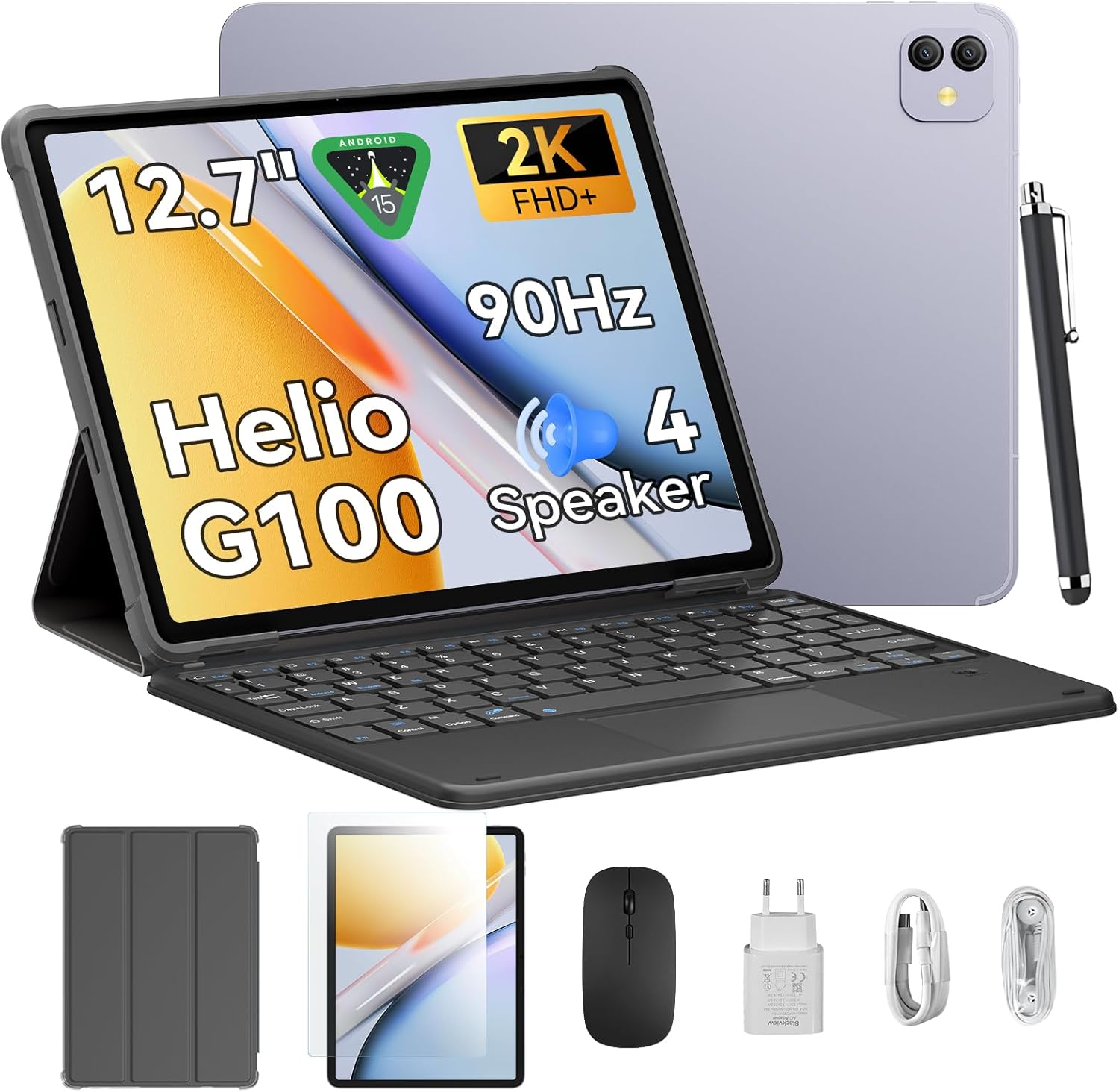
El Negreview Link8 is a 12.7-inch Android 15 tablet designed for versatile use, from entertainment to productivity. It features a 2K+ 90Hz display, a Helio G100 Octa-Core processor, up to 18GB RAM (6GB physical + 12GB virtual), 256GB internal storage, and an 8400mAh battery. The tablet comes with a 16MP camera and supports 2.4G/5G WiFi and GPS. Included accessories enhance its functionality, making it suitable for various tasks.
2. Configuració
2.1 Desembalatge i inspecció inicial
Traieu amb cura tots els elements de l'embalatge. Verifiqueu que hi hagi tots els components:
- Negreview Link8 Tablet
- Teclat
- Stylus
- Ratolí
- Adaptador d'alimentació
- Cable USB-C
- Auriculars
- Funda protectora
- Protector de pantalla
Inspeccioneu la tauleta i els accessoris per detectar qualsevol dany visible.
2.2 Càrrega de la tauleta
Before first use, fully charge the tablet. Connect the USB-C cable to the tablet's charging port and the power adapter. Plug the adapter into a wall outlet. The charging indicator will typically appear on the screen.
2.3 Engegada/apagada
- Per encendre: Press and hold the Power button (usually located on the side) until the Blackview logo appears on the screen.
- Per apagar: Press and hold the Power button until the power options menu appears. Select "Power off."
- Per reiniciar: From the power options menu, select "Restart."
2.4 Configuració inicial
En engegar-la per primera vegada, la tauleta us guiarà pel procés de configuració inicial:
- Seleccioneu el vostre idioma preferit.
- Connecteu-vos a una xarxa Wi-Fi.
- Review i acceptar els termes i condicions.
- Inicia la sessió amb el teu compte de Google o crea'n un de nou. Això és essencial per descarregar aplicacions de Google Play Store.
- Configura el bloqueig de pantalla (PIN, patró, contrasenya o empremta digital).
- Restaurar dades d'un dispositiu anterior (opcional).
2.5 Connexió d'accessoris
El Negreview Link8 supports various accessories for enhanced productivity:
- Teclat: The included keyboard typically connects via Bluetooth. Enable Bluetooth on your tablet (Settings > Connected devices > Bluetooth), put the keyboard in pairing mode, and select it from the list of available devices.
- stylus: The stylus may connect via Bluetooth or be passive. Refer to the stylus-specific instructions for pairing if required.
- Ratolí: The included mouse usually connects via Bluetooth. Follow the same Bluetooth pairing steps as for the keyboard.
3. Instruccions de funcionament
3.1 Navegació bàsica
- Gestos tàctils: Toca per seleccionar, llisca per desplaçar-te, pessiga per ampliar.
- Pantalla d'inici: Access apps, widgets, and customize layout.
- Panell de notificacions: Feu lliscar el dit cap avall des de la part superior de la pantalla fins a view notificacions i configuracions ràpides.
- Calaix d'aplicacions: Llisca cap amunt des de la part inferior de la pantalla per accedir a totes les aplicacions instal·lades.
3.2 Configuració de la pantalla
Navega a Configuració > Pantalla to adjust:
- Brillantor: Manually adjust or enable adaptive brightness.
- Freqüència d'actualització: The tablet supports a 90Hz refresh rate for smoother visuals. You can often switch between standard (60Hz) and high (90Hz) refresh rates to balance performance and battery life.
- Resolució de pantalla: The 2K+ display offers high clarity. Resolution settings are usually automatic but can sometimes be adjusted.
- Tema fosc: Enable for a darker interface, which can reduce eye strain and save battery.
3.3 Rendiment i emmagatzematge
The tablet is powered by the Helio G100 Octa-Core processor and features 6GB of physical RAM, expandable with up to 12GB of virtual RAM for a total of 18GB. It includes 256GB of internal storage. To optimize performance:
- Tanca les aplicacions que no s'utilitzen i que s'executen en segon pla.
- Regularly clear cache for apps.
- Gestioneu l'emmagatzematge eliminant innecessaris files or moving them to cloud storage.
3.4 Connectivitat
- Wi-Fi: Supports 2.4G and 5G networks for stable and fast internet access. Connect via Configuració > Xarxa i Internet > Wi-Fi.
- Bluetooth: For connecting wireless accessories like headphones, keyboards, and mice. Enable via Configuració > Dispositius connectats > Bluetooth.
- GPS: The tablet includes GPS for location services and navigation. Ensure location services are enabled in Configuració> Ubicació.
3.5 Ús de la càmera
The tablet is equipped with a 16MP camera. Open the Camera app to take photos or record videos. Explore various modes and settings available within the app.
3.6 Àudio
The tablet features quad stereo speakers for an immersive audio experience. Adjust volume using the physical volume buttons or through Configuració > So i vibració.
3.7 Gestió de la bateria
The 8400mAh battery provides extended usage. To maximize battery life:
- Redueix la brillantor de la pantalla.
- Desactiva el Wi-Fi, el Bluetooth i el GPS quan no els utilitzis.
- Tanca les aplicacions en segon pla.
- Enable battery saver mode (Configuració > Bateria).
4. Manteniment
4.1 Neteja de la tauleta
Feu servir un drap suau i sense borrissol per netejar la pantalla i el cos de la tauleta. Per a taques difícils, fregueu lleugerament.ampRenta el drap amb aigua o una solució netejadora de pantalles. Evita productes químics agressius o materials abrasius.
4.2 Actualitzacions de programari
Comproveu i instal·leu regularment si hi ha actualitzacions de programari per garantir un rendiment òptim, seguretat i accés a noves funcions. Aneu a Configuració > Sistema > Actualització del sistema.
4.3 Gestió d'emmagatzematge
Periòdicament review l'ús d'emmagatzematge de la tauleta (Configuració > Emmagatzematge). Delete unnecessary apps, photos, videos, and files to free up space and maintain performance.
4.4 Cura de la bateria
To prolong battery lifespan, avoid extreme temperatures and do not leave the tablet fully charged or fully discharged for extended periods.
5. Solució De Problemes
This section addresses common issues you might encounter with your Blackview Link8 tablet.
La tauleta 5.1 no s'encén
- Ensure the tablet is charged. Connect it to the charger and wait a few minutes before attempting to power on.
- Mantingueu premut el botó d'engegada durant almenys 10-15 segons per forçar un reinici.
5.2 La pantalla no respon
- Reinicieu la tauleta mantenint premut el botó d'engegada.
- If the screen is completely frozen, perform a force restart (see 5.1).
5.3 Problemes de connexió Wi-Fi
- Assegureu-vos que el Wi-Fi estigui activat a la tauleta.
- Reinicieu el vostre encaminador Wi-Fi.
- Oblida't de la xarxa (Configuració > Xarxa i Internet > Wi-Fi, tap on network, then "Forget") and reconnect.
5.4 Rendiment lent
- Tanca les aplicacions no utilitzades.
- Esborrar les memòries cau de les aplicacions (Configuració > Aplicacions > [Nom de l'aplicació] > Emmagatzematge i memòria cau > Esborra la memòria cau).
- Check available storage and free up space if necessary.
- Reinicieu la tauleta.
5.5 Restabliment de fàbrica (últim recurs)
Si els problemes persisteixen, un restabliment de fàbrica els pot resoldre. Avís: Això esborrarà totes les dades de la tauleta. Fes una còpia de seguretat de les dades importants abans de continuar.
Vés a Configuració > Sistema > Opcions de restabliment > Esborra totes les dades (restabliment de fàbrica)Seguiu les instruccions que apareixen a la pantalla.
6. Especificacions
| Característica | Especificació |
|---|---|
| Nom del model | Enllaç 8 |
| Sistema operatiu | Android 15 |
| Mida de la pantalla | 12.7 polzades |
| Resolució de pantalla màxima | 2160*1600 Pixels (2K+) |
| Freqüència d'actualització | 90 Hz |
| Processador | Helio G100 Octa-Core |
| RAM | 6 GB (ampliable fins a 18 GB amb RAM virtual) |
| Emmagatzematge intern | 256 GB |
| Capacitat de la bateria | 8400 mAh |
| Durada mitjana de la bateria | 24 hores (segons l'ús) |
| Càmera | 16MP |
| Connectivitat | 2.4G/5G WiFi, Bluetooth, GPS |
| Dimensions del producte (LxWxH) | 8 x 11.1 x 0.33 polzades |
| Pes de l'article | 4.77 lliures |
7. Garantia i Suport
7.1 Informació de la garantia
Please refer to the warranty card included with your product or visit the official Blackview website for detailed warranty terms and conditions. Standard warranty typically covers manufacturing defects for a specified period from the date of purchase.
7.2 Atenció al client
For technical assistance, troubleshooting beyond this manual, or warranty claims, please contact Blackview customer support. You can usually find contact information on the official Blackview weblloc web o a través del venedor on vau comprar el producte.
Visita el Negreview Botiga a Amazon per obtenir més informació sobre el producte i recursos d'assistència.


