Introducció
Thank you for choosing the JBL BAR-500-MK2 Dolby Atmos Soundbar with a 10" Wireless Subwoofer. This manual provides essential information for setting up, operating, and maintaining your new audio system. Please read it thoroughly to ensure proper use and to maximize your listening experience.
The JBL BAR-500-MK2 delivers immersive 3D surround sound with Dolby Atmos and MultiBeam 3.0 technology, transforming movies, music, and games into captivating experiences. The powerful 10-inch wireless subwoofer provides thrilling, precise bass. Enjoy seamless streaming with AirPlay, Alexa Multi-room Music, and Chromecast built-in, offering access to over 300 streaming options.
Què hi ha a la caixa
Desembaleu amb cura tots els components i assegureu-vos que heu rebut els articles següents:
- JBL BAR-500-MK2 Soundbar
- Subwoofer sense fil de 10"
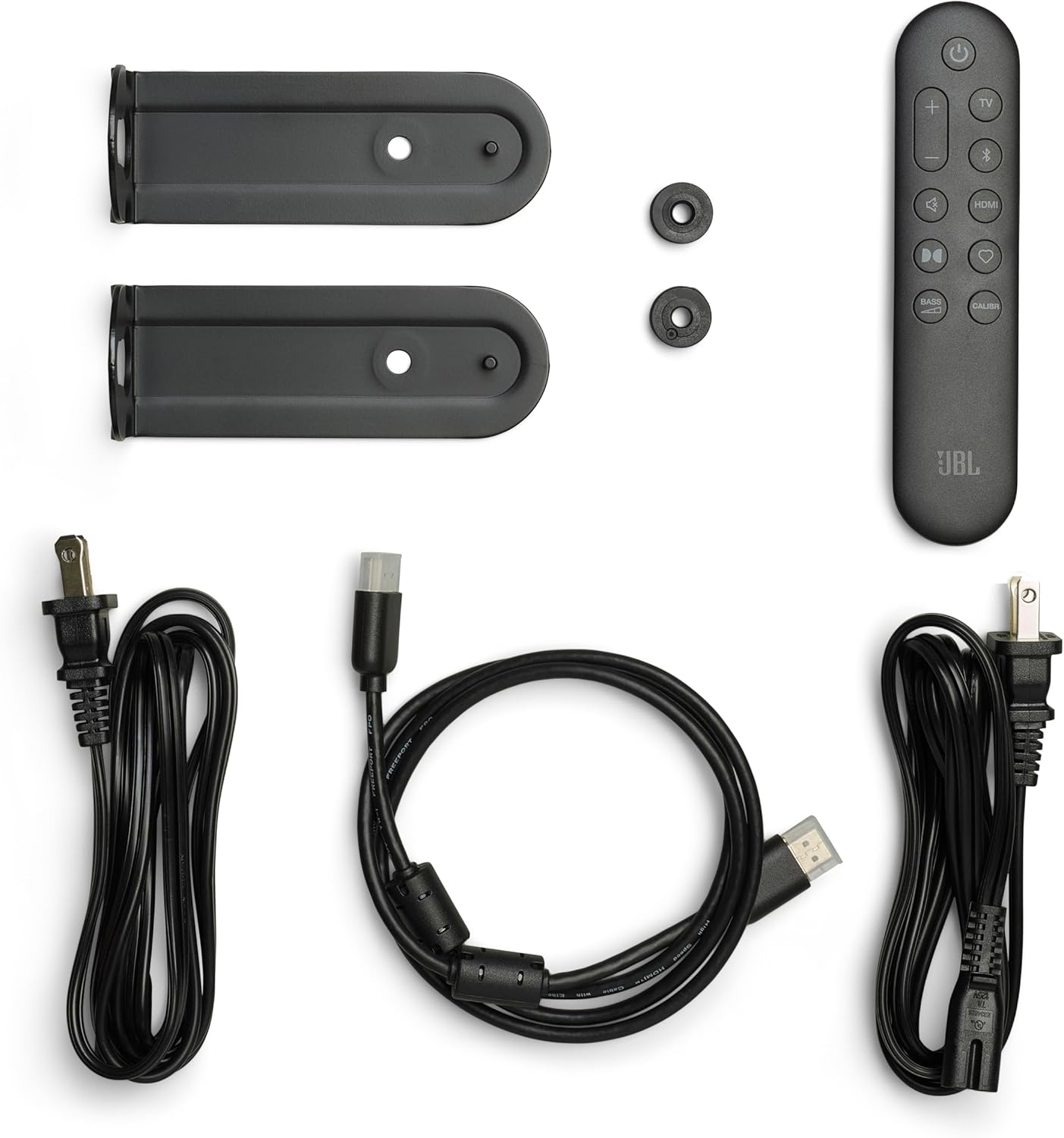
- Remote Control with 2 x batteries
- Cable HDMI
- 2 x L-shape Wall-Mount Brackets
- Plantilla de muntatge a la paret
- Cables d'alimentació (la quantitat pot variar segons la regió)
Configuració
1. Col·locació
Place the soundbar directly below your TV, centered for optimal audio alignment. The wireless subwoofer can be placed anywhere in the room, ideally near the soundbar, ensuring it has a clear path for wireless signal transmission.

2. Connexions
Connect the soundbar to your TV using the supplied HDMI cable. Plug one end into the HDMI OUT (TV ARC/TV eARC) port on the soundbar and the other end into the HDMI ARC/eARC port on your TV. If your TV does not have an HDMI ARC/eARC port, use an optical cable (not included) to connect the soundbar's OPTICAL port to your TV's optical output.

3. Encès
Connect the power cords to the soundbar and the wireless subwoofer, then plug them into a power outlet. The soundbar and subwoofer should automatically power on and pair. If the subwoofer does not pair automatically, refer to the Troubleshooting section.
4. Calibratge del so
The JBL BAR-500-MK2 features Easy Sound Calibration to optimize 3D surround effects for your specific room. Follow the instructions in the JBL One App to perform the calibration process for the best audio performance.

Instruccions de funcionament
Encès/Apagat
Premeu el botó d'engegada de la barra de so o del comandament a distància per encendre o apagar el sistema.
Control de volum
Use the volume up (+) and volume down (-) buttons on the soundbar or remote control to adjust the volume.

Selecció d'entrada
Press the Source button on the remote control or the input selection button on the soundbar to cycle through available input sources (HDMI, Optical, Bluetooth, Wi-Fi).
Emparellament Bluetooth
To pair a Bluetooth device, press and hold the Bluetooth button on the remote control or soundbar until the indicator flashes. Then, select "JBL BAR-500-MK2" from your device's Bluetooth settings.
Transmissió Wi-Fi
Utilize AirPlay, Alexa Multi-room Music, or Chromecast built-in for seamless audio streaming from your compatible devices. Follow the instructions within the respective apps (e.g., JBL One App, Apple Home, Alexa app) to connect your soundbar to your home Wi-Fi network and access over 300 streaming options.
PureVoice 2.0
The PureVoice 2.0 technology enhances dialogue clarity, ensuring you hear every word crisply and consistently, even during intense action scenes.
MultiBeam 3.0
MultiBeam 3.0 technology projects sound beams throughout your room, creating a truly immersive and lifelike surround sound experience without the need for additional rear speakers.

Vídeo oficial del producte
Manteniment
Neteja
Netegeu les superfícies de la barra de so i del subwoofer amb un drap suau i sec. No utilitzeu netejadors líquids ni materials abrasius, ja que poden danyar l'acabat.
Actualitzacions de programari
The soundbar may receive automatic software updates via its Wi-Fi connection. Ensure the soundbar is connected to the internet to receive the latest features and performance improvements.
Resolució de problemes
- Sense so: Check all cable connections (HDMI, Optical). Ensure the correct input source is selected on the soundbar and your TV. Verify that the volume is not muted or set too low on both the soundbar and TV.
- El subwoofer no es connecta: If the wireless subwoofer does not automatically pair, ensure both the soundbar and subwoofer are powered on. Press and hold the pairing button on the back of the subwoofer and the pairing button on the soundbar (refer to the full manual for exact button locations) until the indicator lights confirm pairing.
- So distorsionat: Try reducing the volume. Check the audio source for quality issues. Ensure no objects are obstructing the soundbar or subwoofer.
- Problemes de connectivitat Bluetooth/Wi-Fi: Restart the soundbar and your connected device. Ensure the soundbar is within range of your Wi-Fi router or Bluetooth device. Check your network settings.
Especificacions
| Característica | Detall |
|---|---|
| Nom del model | JBLBAR500M2BLKAM |
| Tipus d'altaveu | Barra de so |
| Soundbar Transducer | 5x (42x80)mm racetrack drivers, 4x 0.75” tweeters |
| Subwoofer Transducer | 10" |
| Entrada de vídeo HDMI | 1 |
| Sortida de vídeo HDMI | 1 (TV ARC/TV eARC) |
| Versió HDMI HDCP | 2.3 |
| HDR Pass Through | HDR10+, Dolby Vision |
| Resposta de freqüència | 40 Hz - 20 kHz |
| Entrades d'àudio | Optical, Bluetooth, USB |
| Versió Bluetooth | v5.3 |
| Tecnologia de comunicació sense fils | Bluetooth, WiFi |
| Configuració del canal de so envoltant | 5.1 |
| Dimensions del producte (barra de so) | 4.1 "P x 37" W x 2" H |
| Pes de l'article | 6.5 lliures |
| Color | Negre |
| Font d'alimentació | AC |
Garantia i Suport
This JBL BAR-500-MK2 system includes a full 1-year manufacturer's warranty. Additionally, it comes with a 1-year Amber Protection Plan, providing extended coverage for mechanical & electrical failures and power surge protection from day one. This protection plan is intended for residential use only and is exclusively offered by Walt's TV.

For technical support, warranty claims, or further assistance, please contact JBL customer service or refer to the official JBL weblloc web per obtenir informació detallada sobre el suport.