1. Introducció
This manual provides essential information for setting up, operating, and maintaining your Machenike Mini Desktop. Please read this manual thoroughly before using the device to ensure proper functionality and longevity.
The Machenike Mini Desktop, model GTR HP8745H00, is a compact and powerful computing solution featuring an AMD Ryzen 7 8745HS processor, AMD Radeon Graphics, 32GB DDR5 RAM, and a 1TB SSD, running on Windows 11 Home.
2. Contingut del paquet
Verifiqueu que tots els elements siguin presents al paquet:
- Machenike Mini Desktop (GTR HP8745H00)
- Adaptador d'alimentació
- Manual d'usuari (aquest document)
- (Additional accessories may vary by region or bundle)
3. Producte acabatview
The Machenike Mini Desktop is designed for efficiency and performance in a small form factor. Below is an illustration of the device and its various ports.

Imatge: Frontal view del Machenike Mini Desktop, mostraasing its compact design and front-facing ports.
3.1. Disseny del port
Familiarize yourself with the available ports for connecting peripherals and displays.
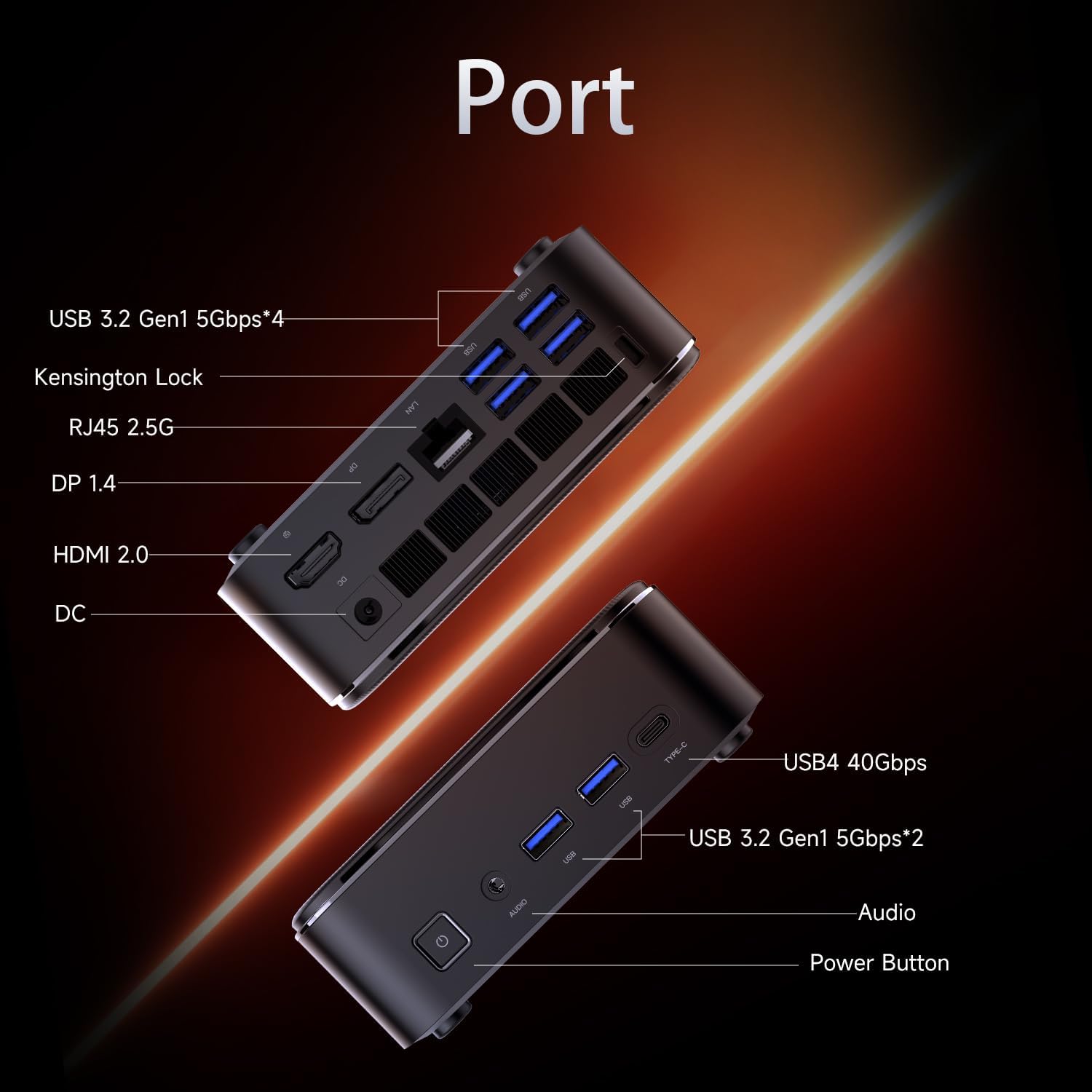
Image: Diagram illustrating the various ports on the Machenike Mini Desktop, including USB, Type-C, HDMI, DisplayPort, RJ45, and audio connections.
- Ports frontals: Power Button, 3.5mm Audio Jack, 2 x USB 3.2 Gen1 (5Gbps), 1 x Type-C (USB4 40Gbps)
- Ports posteriors: 2 x USB 3.2 Gen1 (5Gbps), 1 x USB 3.2 Gen2 (10Gbps), 1 x Type-C, 1 x HDMI 2.1, 1 x RJ45, 1 x Display Port, DC Power Input, Kensington Lock Slot, Restart Button
4. Configuració inicial
Follow these steps to set up your Machenike Mini Desktop:
- Connecta la pantalla: Connect your monitor or display to the Mini Desktop using an HDMI or DisplayPort cable. The device supports 4K resolution.
- Connecteu els perifèrics: Connecteu el teclat, el ratolí i qualsevol altre dispositiu USB als ports USB disponibles.
- Connectar l'alimentació: Connect the power adapter to the DC power input port on the Mini Desktop, then plug the adapter into a power outlet.
- Encès: Press the power button located on the front of the device. The system will boot up.
- Configuració de Windows: Seguiu les instruccions que apareixen a la pantalla per completar la configuració inicial del Windows 11 Home, incloent-hi l'idioma, la regió, la connexió de xarxa i la creació del compte d'usuari.
5. Instruccions de funcionament
5.1. Encendre/apagar
- Encès: Premeu el botó d'encesa a la part frontal del dispositiu.
- Apagar: Feu clic al botó Inici del Windows i, a continuació, seleccioneu Energia > Apagar.
- Reinicia: Feu clic al botó Inici del Windows i, a continuació, seleccioneu Energia > Reiniciar.
5.2. Connexió a la xarxa
- Wi-Fi: The device supports Wi-Fi 6. During Windows setup or via Windows Settings, select your Wi-Fi network and enter the password.
- Cablejat (Ethernet): Connect an Ethernet cable from your router or modem to the RJ45 port on the back of the Mini Desktop.
5.3. Connexió de dispositius externs
- Dispositius USB: Connect USB flash drives, external hard drives, printers, or other USB peripherals to any available USB 3.2 Gen1 or Gen2 ports.
- Type-C Devices: Use the Type-C ports for compatible devices, including high-speed data transfer (up to 40Gbps on the front Type-C port) or display output.
- Àudio: Connect headphones or speakers to the 3.5mm audio jack on the front.
- Bluetooth: The device supports Bluetooth for wireless peripherals like keyboards, mice, and speakers. Pair devices through Windows Settings > Bluetooth & devices.
6. Manteniment
Regular maintenance helps ensure optimal performance and extends the lifespan of your Mini Desktop.
- Neteja: Use a soft, dry cloth to clean the exterior. For dust accumulation in vents, use compressed air. Ensure the device is powered off and unplugged before cleaning.
- Actualitzacions de programari: Comproveu i instal·leu regularment si hi ha actualitzacions de Windows i controladors per garantir l'estabilitat i la seguretat del sistema.
- Ventilació: Ensure the Mini Desktop is placed in a well-ventilated area. Avoid blocking the air vents to prevent overheating.
- Còpia de seguretat de dades: Feu còpies de seguretat periòdiques de les dades importants en un disc dur extern o en un emmagatzematge al núvol.
7. Solució De Problemes
Aquesta secció tracta problemes comuns que podeu trobar.
- Sense energia:
- Ensure the power adapter is securely connected to both the Mini Desktop and a working power outlet.
- Proveu la presa de corrent amb un altre dispositiu.
- Sense pantalla:
- Verify that the HDMI or DisplayPort cable is securely connected to both the Mini Desktop and the monitor.
- Assegureu-vos que el monitor estigui encès i configurat a la font d'entrada correcta.
- Prova un cable o monitor diferent si estàs disponible.
- Sense connexió a Internet:
- For Wi-Fi, check if the Wi-Fi adapter is enabled in Windows Settings and if you are connected to the correct network with the right password.
- Per a una connexió per cable, assegureu-vos que el cable Ethernet estigui connectat correctament i que el vostre encaminador/mòdem funcioni.
- Problemes de connectivitat Bluetooth:
- Assegureu-vos que el Bluetooth estigui habilitat a la Configuració de Windows.
- Remove and re-pair the problematic Bluetooth device.
- Update Bluetooth drivers through Device Manager.
- Ensure the device is within range and fully charged.
- Alentiment del sistema:
- Check Task Manager for resource-intensive applications.
- Assegureu-vos que hi hagi prou espai lliure a l'SSD.
- Executeu una neteja i desfragmentació del disc (per al disc dur, tot i que els SSD no necessiten desfragmentació).
- Perform a malware scan.
8. Especificacions
Detailed technical specifications for the Machenike Mini Desktop (GTR HP8745H00):
| Característica | Especificació |
|---|---|
| Model | GTR HP8745H00 |
| Processador | AMD Ryzen 7 8745HS (8 Cores, 16 Threads, 16MB L3 Cache, up to 5.1 GHz) |
| Gràfics | Gràfics AMD Radeon (integrats) |
| RAM | 32 GB de DDR5 (4800 MHz) |
| Emmagatzematge | SSD PCIe M.2 d'1 TB |
| Sistema operatiu | Windows 11 Home |
| Connectivitat sense fil | Wi-Fi 6 (802.11ax), Bluetooth |
| Ports davanters | 1 x Power Button, 1 x 3.5mm Audio, 2 x USB 3.2 Gen1 (5Gbps), 1 x Type-C (USB4 40Gbps) |
| Ports posteriors | 2 x USB 3.2 Gen1 (5Gbps), 1 x USB 3.2 Gen2 (10Gbps), 1 x Type-C, 1 x HDMI 2.1, 1 x RJ45, 1 x Display Port, DC Power Input, Kensington Lock, Restart Button |
| Resolució de pantalla màxima | 3840 x 2160 (4K) |
| Dimensions (LxWxH) | 5.05 x 1.96 x 5.05 polzades |
| Pes | 3.4 lliures |
| Color | Negre |
9. Garantia i Suport
Machenike products are covered by a limited warranty. For specific warranty terms and conditions, please refer to the warranty card included with your product or visit the official Machenike weblloc.
For technical support, troubleshooting assistance, or to inquire about service, please contact Machenike customer support or visit the official brand store: