1. Introducció
Thank you for choosing the FNIRSI BTM-24 Car Battery Tester. This device is designed to accurately measure the health, voltage, and internal resistance of 12V and 24V automotive batteries. It performs comprehensive diagnostics including cranking, load, and charging tests to ensure optimal battery performance and vehicle operation. This manual provides detailed instructions for safe and effective use of your BTM-24 tester.
2. Informació de seguretat
Please read all safety warnings and instructions before using this product to prevent injury or damage to the device or vehicle.
- Utilitzeu sempre protecció ocular quan treballeu a prop de bateries.
- Ensure proper ventilation when testing batteries, as they can emit explosive gases.
- Avoid sparks or open flames near the battery.
- The FNIRSI BTM-24 features reverse polarity and overvoltage protection. However, always ensure correct connection of the clamps: vermell clamp to positive (+) terminal i negre clamp to negative (-) terminal.
- Do not touch conductive metal parts of the clamps during operation to prevent electric shock.
- Mantingueu el dispositiu sec i net. No l'exposeu a la pluja ni a la humitat.
- Do not attempt to disassemble or modify the tester. Refer all servicing to qualified personnel.
3. Producte acabatview
The FNIRSI BTM-24 is a compact and user-friendly battery tester equipped with a 2.4-inch color screen and intuitive controls.
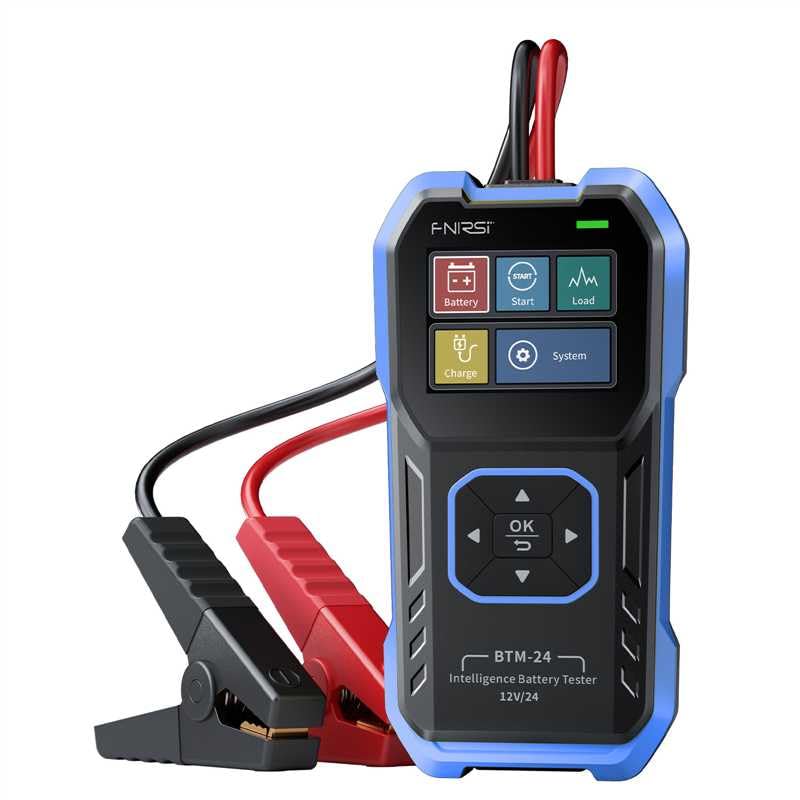
Imatge 1: FNIRSI BTM-24 Car Battery Tester. The device features a blue and black casing, a color display, and integrated red (positive) and black (negative) battery clamps. The screen shows icons for Battery, Start, Load, Charge, and System functions, along with navigation buttons (OK, Up, Down, Left, Right).
3.1. Components i controls
- Pantalla a color d'2.4 polzades: Displays test results, menus, and settings.
- Botons de navegació:
- Botó D'acord: Confirma seleccions o accedeix a menús.
- Up/Down/Left/Right Buttons: Navegueu pels menús i opcions.
- Integrated Test Cables: Durable cables with insulated red (positive) and black (negative) clamps.
- Port de tipus C: Per a actualitzacions de firmware.
- Suport plegable: For stable support during use.
- Rear Wall-Mounting Option: Per a un emmagatzematge còmode.
4. Configuració
- Prepareu la bateria: Assegureu-vos que els terminals de la bateria estiguin nets i sense corrosió. Si cal, netegeu-los amb un raspall de filferro.
- Connecteu el provador:
- Connecteu el red positive (+) clamp al terminal positiu de la bateria.
- Connecteu el black negative (-) clamp al terminal negatiu de la bateria.
El provador s'encén automàticament un cop connectat correctament.
- Pantalla inicial: The device will display the main menu, offering various test options.
5. Instruccions de funcionament
Navigate through the menus using the Up/Down/Left/Right buttons and confirm selections with the OK button.
5.1. Prova de la bateria
This test measures battery health (%), voltage, i la resistència interna.
- From the main menu, select "Battery" and press OK.
- Select the battery type (e.g., Regular Flooded, AGM Spiral/Flat, GEL, EFB, LAB/EV LAB).
- Select the battery standard (e.g., CCA, IEC, EN, DIN, JIS#, GB) and input the rated CCA value.
- The tester will perform the analysis and display results such as voltage, internal resistance, and battery health (%). The health status will be indicated as "Good," "Fair," or "Low."
5.2. Cranking Test (Start Test)
This test checks the engine's starting performance by analyzing the battery's ability to deliver current during ignition.
- From the main menu, select "Start" and press OK.
- Seguiu les instruccions que apareixen a la pantalla per engegar el motor del vehicle.
- The tester will record the minimum cranking voltage and the time taken to start the engine.
- Results will indicate the cranking status, helping to diagnose potential starter or battery issues.
5.3. Prova de càrrega
This test evaluates the vehicle's charging system, including the alternator and regulator.
- From the main menu, select "Charge" and press OK.
- Follow the on-screen instructions, which typically involve starting the engine and revving it to a specified RPM.
- The tester will monitor the charging voltage, displaying minimum, maximum, and dynamic voltage readings, often with a waveform view per a una anàlisi detallada.
- The results will indicate if the charging system is functioning correctly or if there are issues like overcharging or undercharging.
5.4. Load Test
This test assesses the battery's ability to maintain voltage under a simulated load.
- From the main menu, select "Load" and press OK.
- The tester will guide you through applying a load (e.g., turning on headlights or other accessories).
- It will monitor the minimum and dynamic voltage under load, often with a waveform view.
- The results help determine if the battery can adequately support the vehicle's electrical demands.
5.5. Configuració del sistema
Access system settings to customize the device.
- From the main menu, select "System" and press OK.
- Options may include language selection, display brightness, day/night UI themes, and viewing device information.
6. Manteniment
- Neteja: Netegeu el dispositiu amb un drap suau i sec. No utilitzeu productes de neteja abrasius ni dissolvents.
- Emmagatzematge: Guardeu el provador en un lloc fresc i sec, allunyat de la llum solar directa i de temperatures extremes.
- Cura del cable: Inspect the test cables and clamps regularly for damage. Do not use if insulation is cracked or wires are exposed.
- Actualitzacions de firmware: Reviseu periòdicament el fabricant website for firmware updates. Use the Type-C port to update the device as instructed.
7. Solució De Problemes
| Problema | Causa possible | Solució |
|---|---|---|
| El dispositiu no s'encén. | Incorrect battery connection; battery completely dead. | Assegureu-vos que clamps are securely connected to the correct battery terminals (+ to +, - to -). If the battery is completely discharged, the tester may not power on. Try charging the battery first. |
| Resultats de proves inexactes. | Dirty battery terminals; incorrect battery type/standard selected. | Clean battery terminals. Verify that the correct battery type and standard (e.g., CCA) are selected in the tester's menu. |
| "Reverse Polarity" error. | Clamps connected to the wrong terminals. | Immediately disconnect the clamps and reconnect them correctly: red to positive (+), black to negative (-). The device has protection, but correct connection is essential. |
| Screen freezes or malfunctions. | Error temporal de programari. | Disconnect the tester from the battery for a few seconds, then reconnect. If the issue persists, check for firmware updates. |
8. Especificacions
| Característica | Detall |
|---|---|
| Model | BTM-24 |
| Voltage Rang | 12V / 24V |
| Gamma CCA | 0-2000 CCA |
| Tipus de bateries compatibles | Regular Flooded, AGM Spiral/Flat, GEL, EFB, LAB/EV LAB |
| Estàndards suportats | CCA, IEC, EN, DIN, JIS#, GB |
| Mostra | Pantalla a color de 2.4 polzades |
| Connectivitat | Type-C port for firmware updates |
| Protecció | Polaritat inversa, sobretensiótage |
| Dimensions del producte | 6.22 x 3.27 x 1.06 polzades |
| Pes de l'article | 11.68 unces |
| Fabricant | FNIRSI |
9. Garantia i Suport
Per obtenir informació sobre la garantia, assistència tècnica o consultes de servei, consulteu la pàgina oficial de FNIRSI. weblloc web o poseu-vos en contacte amb el seu departament d'atenció al client. Conserveu el rebut de compra per a reclamacions de garantia.
Visit the official FNIRSI Store: FNIRSI Technology Store


