1. Introducció
This manual provides detailed instructions for the installation, operation, and maintenance of the Y&H 100A MPPT Solar Charge Controller. This device is designed to efficiently manage power from solar panels to charge various battery types, including AGM, Gel, Flooded, and Lithium batteries, across 12V, 24V, 36V, and 48V systems. It features a clear LCD display for monitoring and comprehensive protection functions to ensure safe and reliable operation.

Figura 1: Frontal view of the Y&H 100A MPPT Solar Charge Controller.
2. Informació de seguretat
Llegiu atentament totes les instruccions de seguretat abans de la instal·lació i el funcionament. Si no seguiu aquestes instruccions, podeu patir descàrregues elèctriques, incendis o lesions greus.
- Assegureu-vos que tot el cablejat sigui realitzat per personal qualificat.
- Always disconnect the battery and solar panel power before installing or adjusting the controller.
- Do not reverse the positive and negative terminals during connection.
- Instal·leu el controlador en una zona ben ventilada, allunyada de la llum solar directa, de les altes temperatures i de la humitat.
- Do not attempt to repair or modify the controller yourself. Contact customer support for assistance.
3. Producte acabatview
The Y&H 100A MPPT Solar Charge Controller is designed for optimal solar power management. Key features include:
- High Precision MPPT Tracking: Achieves over 99.5% tracking efficiency and up to 98% conversion efficiency.
- Volum automàtictage Detecció: Supports 12V, 24V, 36V, and 48V systems.
- Ampli rang d'entrada fotovoltaica: Maximum PV panel input up to 150V (Voc) and 5200W (48V system).
- Suport de tipus de bateria: Compatible with Gel, Sealed (AGM), Flooded, and Lithium (LiFePO4/Li(NiCoMn)O2) batteries.
- Protecció integral: Inclou excés de voltage, over-discharge, reverse connection, overload, and over-temperature protection.
- Pantalla LCD: Clear display of status and data, with easy mode and setting switching.

Figura 2: Mésview of controller features and capabilities.
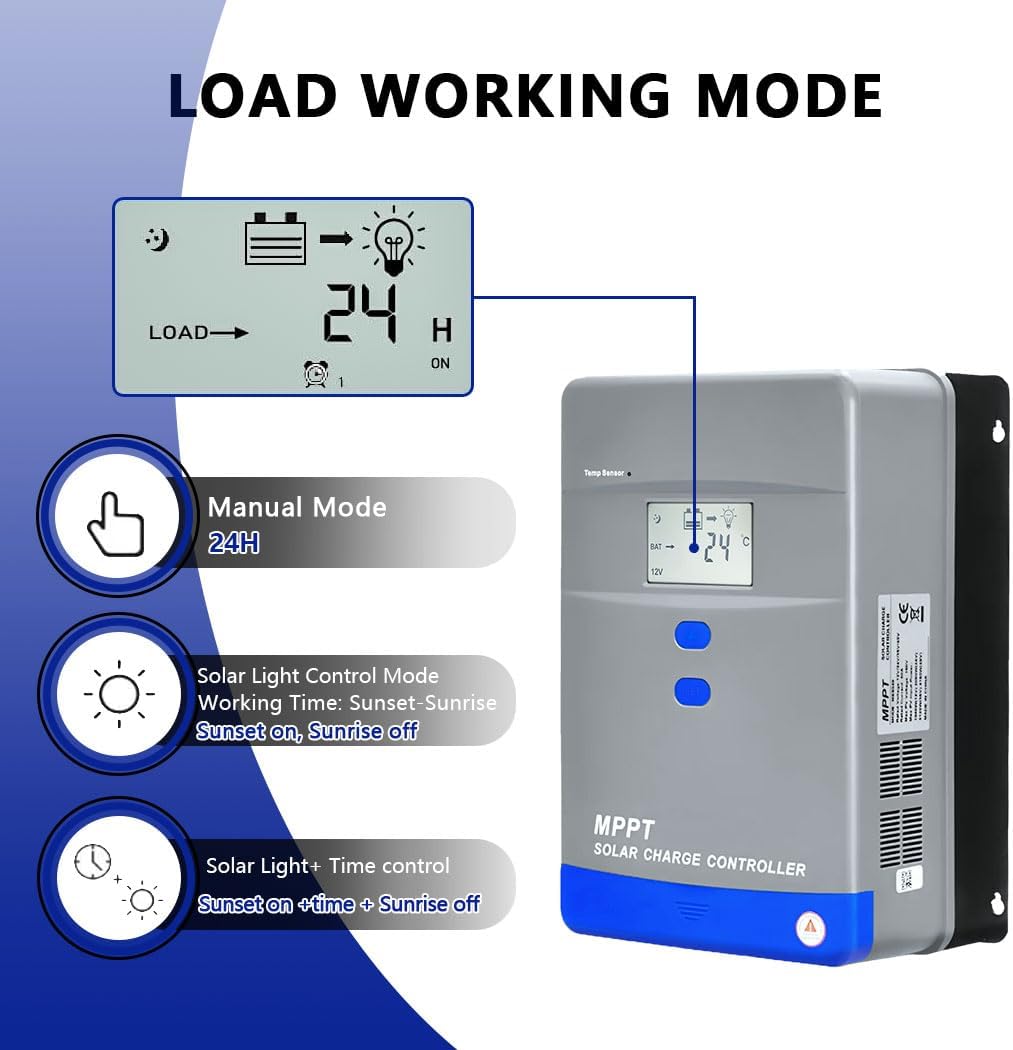
Figure 3: Product dimensions (10.24in x 7.48in x 4.33in, 5.39 pounds).
4. Configuració i cablejat
Follow these steps for proper installation and wiring of your Y&H MPPT Solar Charge Controller.
4.1 Wiring Procedure
- Open the Bottom Cover: First, open the bottom cover of the product to access the wiring terminals.
- Connecteu la bateria: Connect the battery to the controller first. Ensure correct polarity (positive to positive, negative to negative) to avoid damage.
- Connect the Solar Panel (PV): Connecteu el panell solar al controlador.
- Connect the Load: Connect your DC load to the controller.
Video 1: Step-by-step guide on wiring the solar charge controller, including opening the cover, connecting the battery, solar panel, and load.

Figure 4: Wiring diagrams illustrating connections for 12V and 24V systems, showing solar panels, controller, battery, and load.
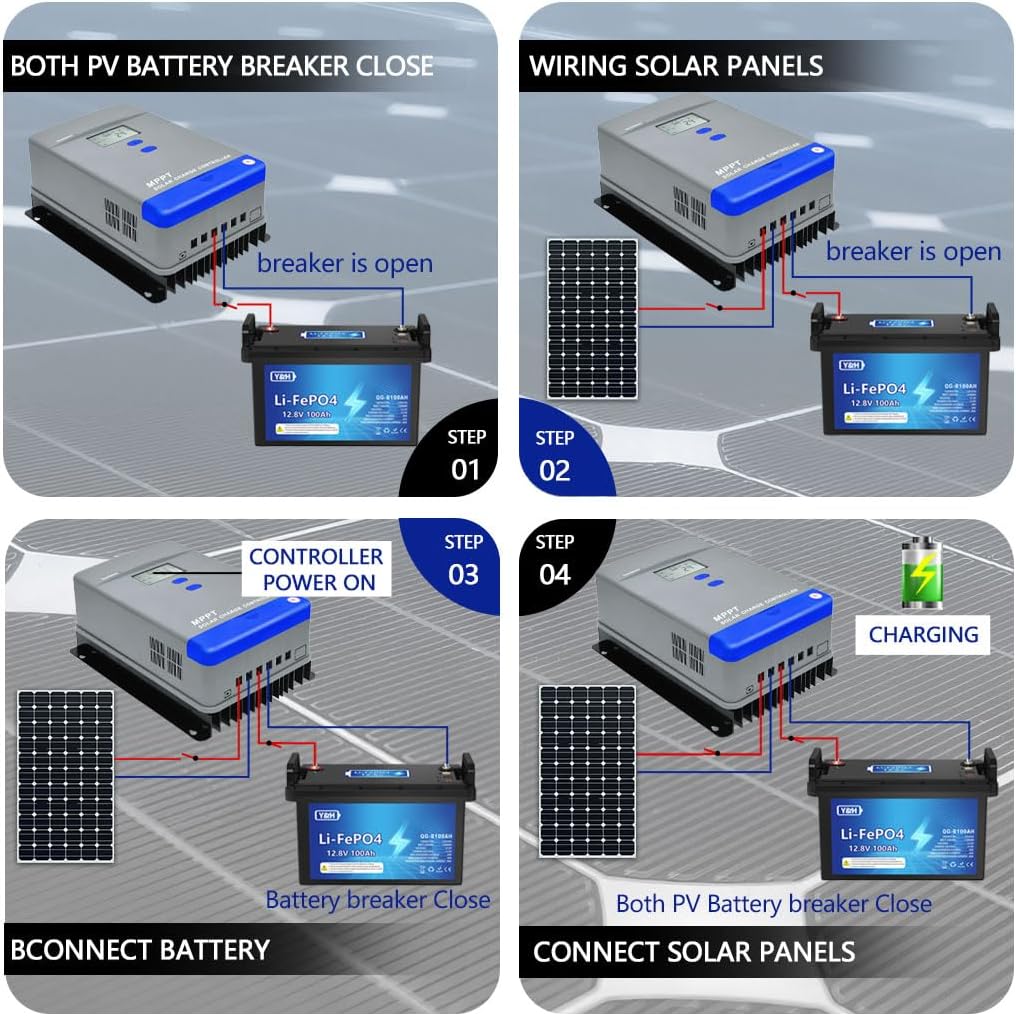
Figure 5: Visual guide for connecting the battery and solar panels to the controller, emphasizing the sequence of connections.
4.2 Initial Settings: Battery System Voltage i Tipus
Before operation, it is crucial to set the correct battery system voltage and battery type. Lithium batteries require manual voltagConfiguració.
- Enter Setup Page: Press and hold the "▲" (Up) button for over 5 seconds to enter the setup page.
- Set Battery System Voltage:
- Briefly press the "▲" button 8 times to navigate to the battery voltage interface (e.g., "12V").
- Press and hold "▲" for over 5 seconds until the numbers begin flashing.
- Use "▲" or "SET" to adjust the voltage to match your system (e.g., 12V, 24V, 36V, 48V).
- Press and hold "▲" for over 5 seconds to save the setting.
- Set Battery Type:
- Briefly press the "▲" button 7 times to navigate to the battery type interface (e.g., "USr 1").
- Press and hold "▲" for over 5 seconds until the digits begin flashing.
- Briefly press the "▲" button 4 times to cycle through battery types (e.g., SLd for Sealed/AGM, GEL, FLd for Flooded, USr for User-defined/Lithium). Select the appropriate type for your battery.
- Press and hold "▲" for over 5 seconds to save the setting.
- Sortir de la configuració: Press and hold "SET" for over 5 seconds to return to the main interface.
Note: All lithium batteries must be manually set to the correct voltage and user-defined type for proper charging.
Video 2: Instructions for setting the battery system voltage and battery type on the controller's LCD display.
5. Instruccions de funcionament
5.1 Navegació per pantalla LCD
The LCD display shows the controller's status and data. Use the "▲" (Up) and "SET" buttons to navigate and adjust parameters.
- Brief Press "▲": Cycles through various battery parameters on the main page.
- Brief Press "SET": Activates or deactivates the controller's load switch.
- Press and Hold "SET" (in settings interface): Exits back to the main interface.

Figure 6: Visual guide for navigating the LCD display using the "Up" and "SET" buttons to check charging parameters.
5.2 Configuració del mode d'operació de càrrega
The controller supports various load working modes:
- Enter Setup Page: Press and hold the "▲" (Up) button for over 5 seconds to enter the setup page.
- Navigate to Load Mode Interface: Briefly press the "▲" button 10 times to reach the load mode interface (e.g., "Ld4").
- Adjust Load Mode:
- Press and hold "▲" for over 5 seconds until the digits begin flashing.
- Use "▲" or "SET" briefly to switch between modes:
- Ld1: Manual Mode (24H) - Load is always on.
- Ld2: Solar Light Control Mode - Load turns on at sunset, off at sunrise.
- Ld3: Solar Light + Time Control - Load turns on at sunset for a set duration, off at sunrise.
- Ld4: Test Mode - Load is always on for testing.
- Press and hold "▲" for over 5 seconds to save the setting.
- Sortir de la configuració: Press and hold "SET" for over 5 seconds to return to the main interface.

Figure 7: Illustration of the different load working modes available on the controller.
6. Especificacions
| Característica | Especificació |
|---|---|
| Marca | Y&H |
| Model | Controlador de càrrega solar MPPT 100A |
| Volum del sistematage | 12V/24V/36V/48V Automàtic |
| Volum d'entrada PV màximtage (Voc) | 150 V |
| Potència d’entrada màxima PV | 1300W (12V) / 2600W (24V) / 3900W (36V) / 5200W (48V) |
| Corrent de càrrega nominal | 100A |
| Eficiència de seguiment | 99.5% |
| Eficiència de conversió | 98% |
| Tipus de bateria compatibles | AGM, Gel, Flooded, Lithium (LiFePO4/Li(NiCoMn)O2) |
| Funcions de protecció | Sobrevoltage, Over-discharge, Reverse Connection, Overload, Over-temperature |
| Temperatura de funcionament | -20 ℃ a + 55 ℃ |
| Grau IP | IP30 |
| Dimensions del producte | 26 x 19 x 11 cm (10.24 x 7.48 x 4.33 polzades) |
| Pes del producte | 2.36 kg (5.20 lliures) |
| UPC | 704334627062 |
7. Manteniment
Un manteniment regular garanteix la longevitat i el rendiment òptim del vostre controlador de càrrega solar.
- Neteja: Mantingueu el controlador net i lliure de pols i brutícia. Feu servir un drap sec per netejar-lo.
- Ventilació: Ensure the installation area remains well-ventilated to prevent overheating.
- Connexions: Periodically check all wiring connections for tightness and corrosion. Loose connections can cause power loss or overheating.
- Condicions ambientals: Verify that the controller is not exposed to extreme temperatures, direct moisture, or corrosive environments beyond its specified operating range.
8. Solució De Problemes
If you encounter issues with your Y&H MPPT Solar Charge Controller, refer to the following common problems and solutions:
- Sense pantalla/Sense alimentació:
- Comproveu les connexions de la bateria i assegureu-vos que estiguin ben fixades i polaritzades.
- Comproveu el volum de la bateriatage està dins del rang de funcionament del controlador.
- La bateria no es carrega:
- Reviseu les connexions dels panells solars i assegureu-vos que rebin prou llum solar.
- Verifica el volum del panell solartage està dins del rang d'entrada del controlador.
- Ensure the correct battery type and system voltage are set in the controller's settings.
- La càrrega no funciona:
- Check load connections and ensure the load is not exceeding the controller's rated current.
- Verify the load operation mode is correctly set (e.g., not in a timed mode when continuous operation is desired).
- Briefly press the "SET" button to activate the load switch.
- Over-temperature Warning:
- Ensure the controller is installed in a well-ventilated area.
- Reduce the load or solar input if possible, or improve ventilation.
For persistent issues or complex problems, please contact Y&H customer support.
9. Garantia i Suport
Y&H products are manufactured with high-quality standards. For warranty information, technical support, or service inquiries, please refer to the contact details provided with your purchase or visit the official Y&H weblloc web. Si us plau, tingueu a mà el model del producte i la data de compra quan us poseu en contacte amb el servei d'assistència.


