1. Introducció i finalview
The LILYGO T-Deck ESP32-S3 is a versatile development board integrating an ESP32-S3 microcontroller with LoRa, Bluetooth Low Energy (BLE), and Wi-Fi connectivity. It features a 2.8-inch ST7789 IPS LCD, a full QWERTY keyboard, and a trackball for user interaction. This specific variant comes pre-loaded with Meshtastic firmware, enabling long-range, off-grid communication capabilities. It is designed for developers and enthusiasts interested in IoT, wireless communication, and custom embedded projects.
Les característiques clau inclouen:
- MCU: ESP32-S3FN16R8 Dual-core LX7 microprocessor
- Connectivitat sense fils: 2.4 GHz Wi-Fi & Bluetooth 5 (LE), LoRaWAN
- Visualització: 2.8 inch ST7789 SPI Interface IPS LCD (320 x 240 resolution)
- Onboard Functions: Trackball, Microphone, Speaker, QWERTY Keyboard
- Emmagatzematge: 16MB PSRAM, 8MB Flash

Figura 1.1: Frontal view of the LILYGO T-Deck, showing the display and keyboard.
2. Instruccions de configuració
This section outlines the initial steps to get your LILYGO T-Deck operational. For detailed technical information and advanced configurations, please refer to the official LILYGO Wiki and GitHub repository.
2.1 Contingut del paquet
Verifiqueu que tots els components siguin presents al vostre paquet:
- 1 x LILYGO T-Deck ESP32-S3 Module
- 1 x 6-pin Header
- 1 x cable d'alimentació
- 1 x 433MHz FPC Antenna (frequency may vary based on model)

Figure 2.1: Contents of the LILYGO T-Deck package, including the main board, pin header, power cable, and antenna.
2.2 Connexió de l'antena
- Locate the U.FL connector on the LILYGO T-Deck board for the LoRa antenna.
- Carefully snap the FPC antenna connector onto the U.FL connector. Ensure a secure connection.

Figura 2.2: Esquena view of the LILYGO T-Deck board, highlighting the LoRa antenna connector and other components.
2.3 Alimentació del dispositiu
The LILYGO T-Deck can be powered via its USB-C port or an external battery connected to the battery connector.
- Alimentació USB-C: Connect a standard USB-C cable to the device and a 5V power source (e.g., computer USB port, USB wall adapter).
- Potència de la bateria: Connect a compatible LiPo battery to the designated battery connector on the board. Ensure correct polarity.
2.4 Initial Firmware (Meshtastic)
This LILYGO T-Deck variant comes pre-loaded with Meshtastic firmware. For updates or custom firmware installation, refer to the official Meshtastic documentation and the LILYGO GitHub repository.
Important: When flashing new firmware, it is often necessary to set the device to bootloader mode. This typically involves holding down the trackball button while powering on the device, or using a specific switch combination. Consult the LILYGO GitHub for precise instructions for your model.
Recursos útils:
3. Instruccions de funcionament
The LILYGO T-Deck provides multiple interfaces for interaction, including a display, keyboard, and trackball.
3.1 Navegació bàsica
- Visualització: The 2.8-inch IPS LCD shows information and menu options.
- Trackball: Use the trackball for menu navigation (up, down, left, right) and selection (press down).
- Teclat: The integrated QWERTY keyboard allows for text input, such as sending messages in Meshtastic.

Figura 3.1: Angle view of the LILYGO T-Deck, illustrating the interactive display and keyboard.
3.2 Meshtastic Firmware Operation
With Meshtastic firmware, the T-Deck functions as a long-range communication device. Specific operations will depend on the Meshtastic UI version installed.
- Enviament de missatges: Use the keyboard to type messages and the trackball to navigate and send.
- Configuració del canal: Access radio configuration settings through the device's menu to adjust channels, power, and other network parameters.
- Integració GPS: If a GPS module is connected (not included), the device can display location information and share it over the mesh network.
For detailed instructions on using Meshtastic features, refer to the official Meshtastic documentation and community resources.
4. Manteniment
Proper care and maintenance will ensure the longevity and optimal performance of your LILYGO T-Deck.
- Neteja: Use a soft, dry cloth to clean the device. Avoid abrasive materials or harsh chemicals. For the screen, use a microfiber cloth.
- Emmagatzematge: Guardeu el dispositiu en un lloc fresc i sec, allunyat de la llum solar directa i de temperatures extremes.
- Cura de la bateria: If using an external LiPo battery, follow the manufacturer's guidelines for charging and storage. Avoid over-discharging or over-charging.
- Protecció física: Consider using a protective case to prevent damage from drops or impacts.

Figure 4.1: The LILYGO T-Deck shown within a protective case, illustrating recommended storage.
5. Solució De Problemes
This section addresses common issues you might encounter with your LILYGO T-Deck.
5.1 El dispositiu no s'encén
- Comproveu la font d'alimentació: Ensure the USB-C cable is securely connected to a functional power source, or that the external battery is charged and correctly connected.
- Interruptor d'alimentació: Verify that the power switch on the side of the board is in the 'ON' position.
5.2 Screen Remains Blank After Power On
- Problema del firmware: A blank screen can indicate a firmware issue or that the device is in bootloader mode. Try re-flashing the firmware following instructions on the LILYGO GitHub.
- Connexió: Ensure the display's flexible flat cable (FFC) is properly seated in its connector.
5.3 LoRa Communication Issues
- Connexió d'antena: Confirm the LoRa antenna is securely connected to the U.FL port.
- Tipus d'antena: Ensure you are using the correct frequency antenna for your region (e.g., 433MHz, 868MHz, 915MHz).
- Configuració del firmware: Verify that the LoRa settings in your Meshtastic firmware (e.g., frequency, power) match your requirements and local regulations.
5.4 General Connectivity Problems (Wi-Fi/BLE)
- Suport de firmware: Ensure your installed firmware supports and enables Wi-Fi and BLE functionalities.
- Interferència: Minimize potential interference from other 2.4 GHz devices.
For more complex issues, consult the LILYGO GitHub repository's issues section or the Meshtastic community forums for assistance.
6. Especificacions
Detailed technical specifications for the LILYGO T-Deck ESP32-S3 module:
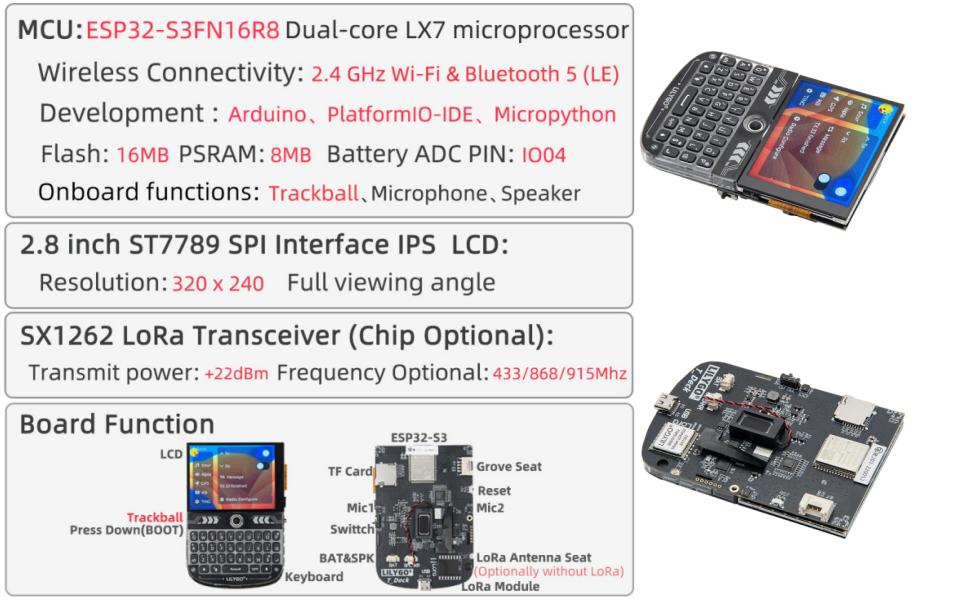
Figure 6.1: Visual representation of LILYGO T-Deck specifications and features.
| Característica | Descripció |
|---|---|
| MCU | ESP32-S3FN16R8 Dual-core LX7 microprocessor |
| Connectivitat sense fil | 2.4 GHz Wi-Fi & Bluetooth 5 (LE) |
| LoRa Transceiver | SX1262 (Chip Optional), Transmit power: +22dBm, Frequency Optional: 433/868/915MHz |
| Mostra | 2.8 inch ST7789 SPI Interface IPS LCD, Resolution: 320 x 240, Full viewangle de ing |
| Memòria Flash | 16MB PSRAM, 8MB Flash |
| Onboard Functions | Trackball, Microphone, Speaker, QWERTY Keyboard |
| Entorn de desenvolupament | Arduino, PlatformIO-IDE, Micropython |
| Dimensions (aprox.) | Longitud: 100 mm, Amplada: 67 mm, Alçada: 14 mm |
| Pes de l'article | 3.2 unces |
| ASIN | B0FP14ZCR3 |
| UPC | 717382831527 |
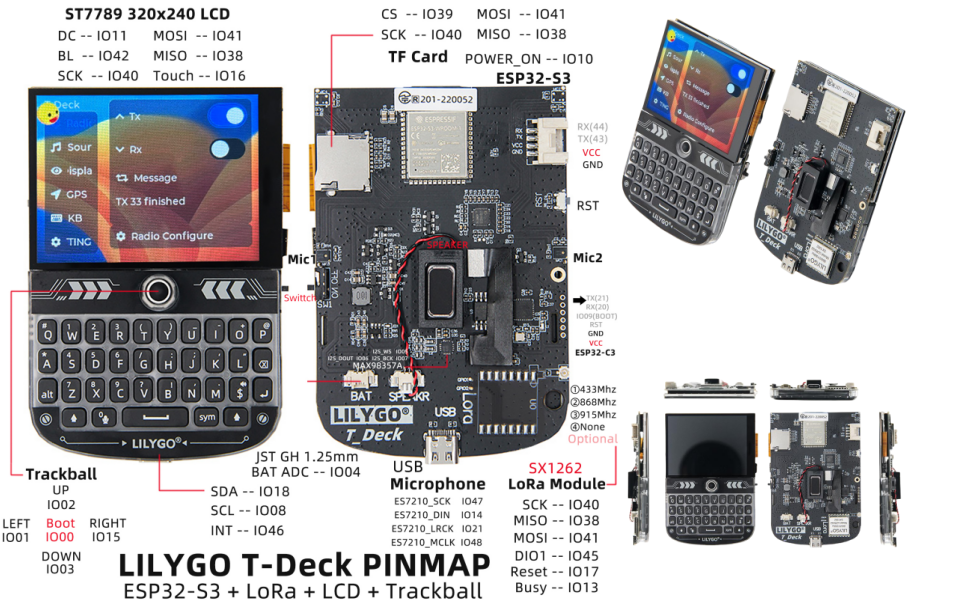
Figure 6.2: Pinmap diagram for the LILYGO T-Deck, detailing GPIO assignments and connectors.

Figure 6.3: Physical dimensions of the LILYGO T-Deck module.
7. Garantia i Suport
LILYGO is committed to providing quality products and customer satisfaction.
7.1 Product Service
If you have any questions or suggestions regarding the LILYGO T-Deck, please feel free to contact LILYGO customer service. They aim to answer your questions as soon as possible.
7.2 Technical Resources
For comprehensive technical documentation, community support, and the latest firmware updates, please refer to the following official resources:
Specific warranty details are not provided in this manual. Please refer to your purchase documentation or contact LILYGO directly for warranty information.


