Introducció
Thank you for choosing the LogiLink BT0070 BT 6.0 Gaming Headset. This manual provides essential information for the proper setup, operation, and maintenance of your headset. Please read these instructions carefully before using the product to ensure optimal performance and longevity.
The LogiLink BT0070 is a versatile wireless gaming headset designed for clear communication and immersive audio experiences. It features a 360° microphone, comfortable ear pads, an adjustable headband, and a long-lasting battery.
Informació de seguretat
- No exposeu els auriculars a temperatures extremes, humitat ni substàncies corrosives.
- Eviteu deixar caure els auriculars ni sotmetre'ls a impactes forts.
- No intenteu desmuntar ni modificar els auriculars. Això anul·larà la garantia i pot causar danys.
- Mantingueu els auriculars allunyats de l'aigua i altres líquids.
- Utilitzeu només el volum de càrrega especificattage i corrent.
- Escoltar durant molt de temps a nivells de volum alts pot causar danys auditius. Ajusteu el volum a un nivell segur.
Contingut del paquet
Si us plau, comproveu el paquet per veure si hi ha els elements següents:
- LogiLink BT0070 Gaming Headset
- Cable de càrrega USB
- Cable d'àudio AUX de 3.5 mm
- Manual d'usuari (aquest document)
Producte acabatview
Familiarize yourself with the components of your LogiLink BT0070 Gaming Headset.

Imatge: Acabatview of the LogiLink BT0070 headset highlighting its adjustable headband, adjustable microphone, soft memory earmuffs, and flexible design for various head shapes.
- Diadema ajustable: Allows for a customized and comfortable fit.
- Micròfon ajustable: A 360° noise-isolating microphone for clear voice communication.
- Soft Memory Ear Pads: Designed for extended comfort during long gaming sessions.
- Botons de control: (Specific button functions will be detailed in the Operating section).
- Port AUX de 3.5 mm: Per a la connexió per cable a dispositius.
- Port de càrrega: Per recarregar la bateria interna.
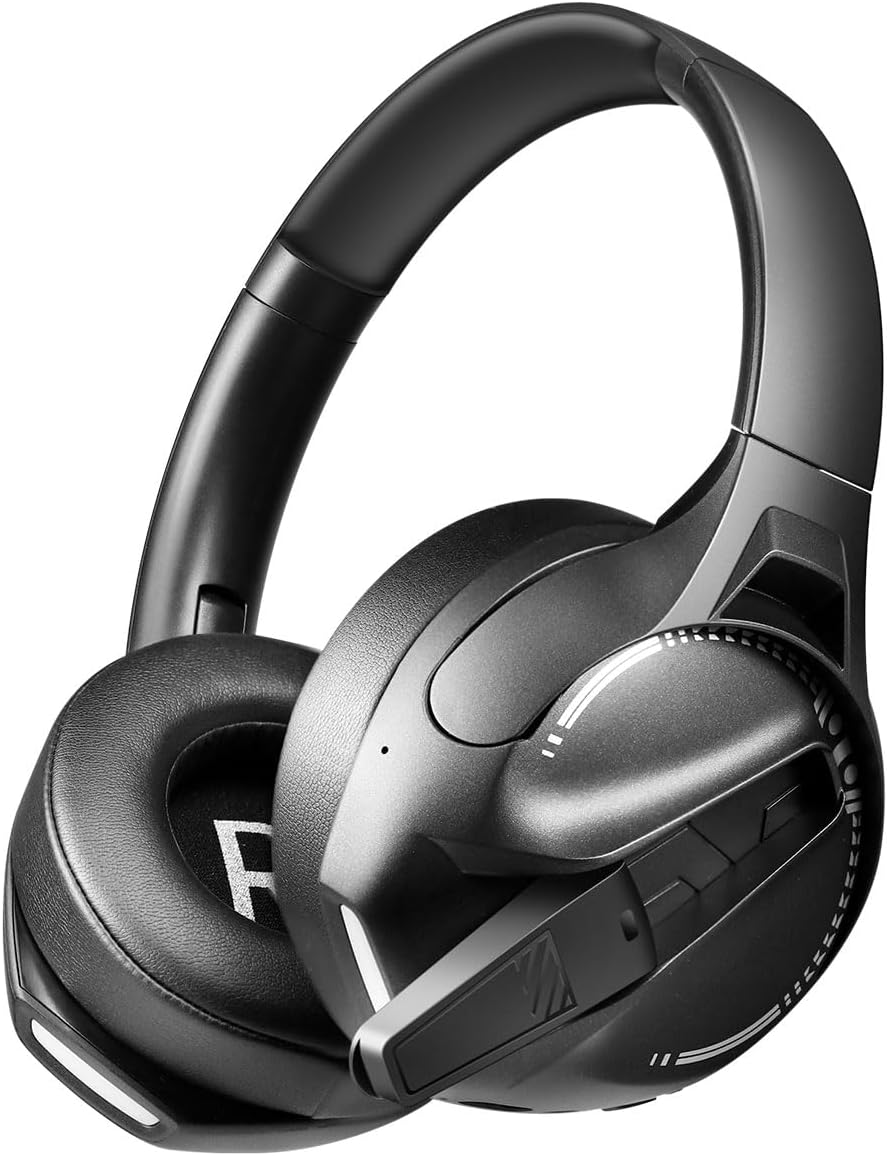
Imatge: lateral view of the LogiLink BT0070 headset, showing the extended microphone arm and ear cup design.

Imatge: Davant view of the LogiLink BT0070 headset, showcasing el seu disseny general.
Configuració
1. Càrrega dels auriculars
Before first use, fully charge the headset. Connect the USB charging cable to the headset's charging port and the other end to a compatible USB power source (e.g., computer USB port, USB wall adapter).

Imatge: Illustration of power adapter requirements. Use a 3.0-3.0W power adapter. Note that a power adapter is not included with the headset.
- A full charge typically takes approximately [X] hours (specific time not provided, refer to product packaging or LED indicator).
- The LED indicator on the headset will change color or turn off once charging is complete.
- Ensure the power source provides 3.0-3.0W for optimal charging.
2. Encès / apagat
- Per encendre: Premeu i manteniu premut el botó d'engegada durant aproximadament 3 segons fins que l'indicador LED s'encengui.
- Per apagar: Premeu i manteniu premut el botó d'engegada durant aproximadament 5 segons fins que l'indicador LED s'apagui.
3. Emparellament Bluetooth
Per connectar els auriculars sense fil a un dispositiu:
- Assegureu-vos que els auriculars estan apagats.
- Press and hold the Power button for approximately 5-7 seconds until the LED indicator flashes rapidly (usually blue and red), indicating pairing mode.
- On your device (smartphone, laptop, etc.), enable Bluetooth and search for new devices.
- Select "LogiLink BT0070" from the list of available devices.
- Once paired, the LED indicator on the headset will typically flash slowly or turn solid blue.
4. Connexió amb cable (AUX de 3.5 mm)
For a wired connection, use the included 3.5mm AUX audio cable:
- Connecteu un extrem del cable d'àudio de 3.5 mm al port AUX dels auriculars.
- Connecteu l'altre extrem al connector d'àudio de 3.5 mm del dispositiu.
- The headset will operate in passive mode, drawing no power from its battery.
5. Ajust d'ajust
For optimal comfort and sound quality, adjust the headset to fit your head:
- Extend or retract the adjustable headband until the ear cups comfortably cover your ears.
- Ensure the soft memory ear pads create a good seal around your ears.
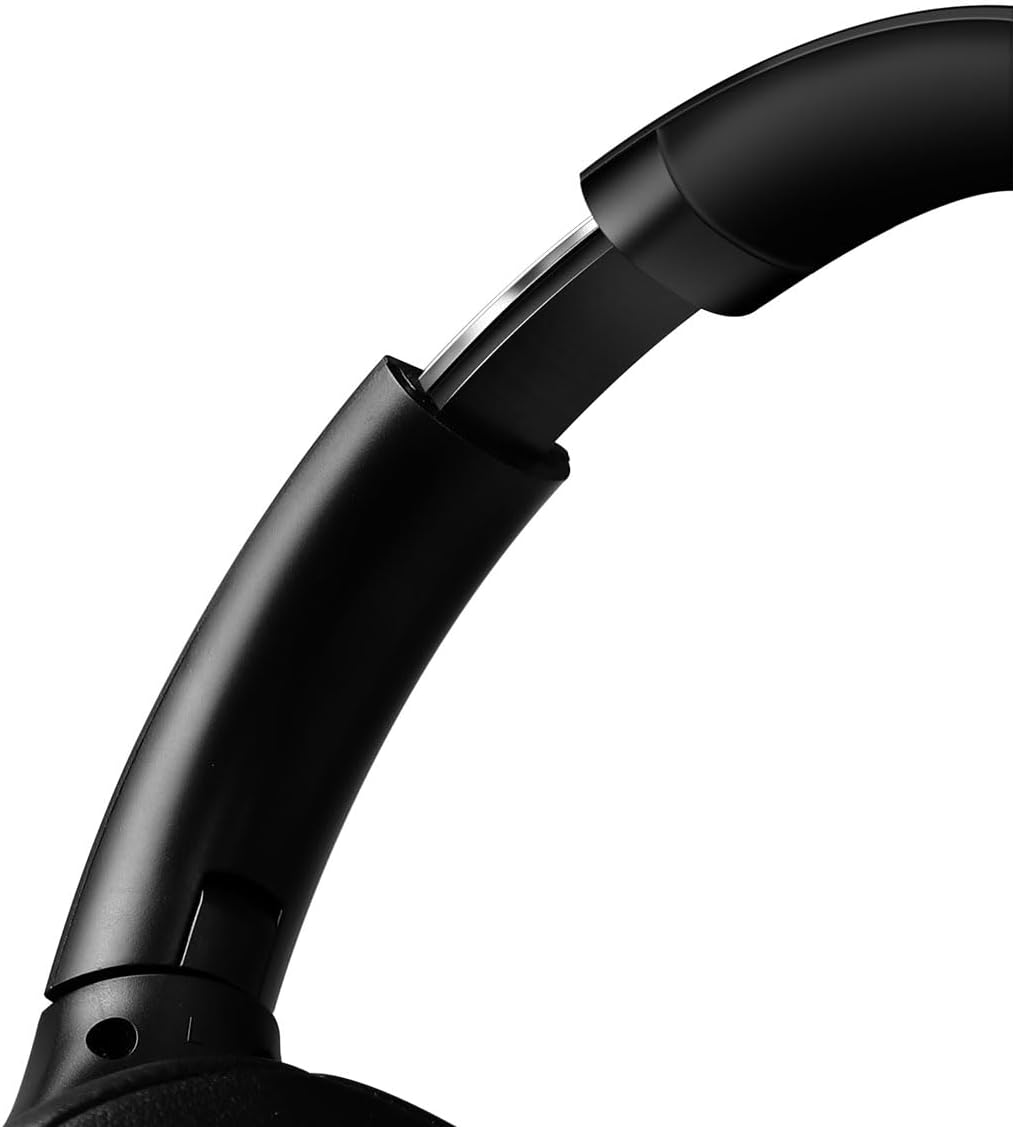
Imatge: Primer pla view of the adjustable headband mechanism, demonstrating how to customize the fit.
Funcionament dels auriculars
1. Controls bàsics
The headset features intuitive controls, typically located on the ear cups:
- Botó d'encesa: Press and hold to power on/off. Short press for [X function, e.g., play/pause, answer call - specifics not provided, common functions listed].
- Augment de volum / pista següent: Prem curt per pujar el volum. Prem llarg per passar a la següent pista.
- Baixada de volum / pista anterior: Prem curt per baixar el volum. Prem llarg per anar a la pista anterior.
- Botó multifunció (MFB): (Often combined with Power button) Single press to Play/Pause music or Answer/End calls. Double press to Redial last number.
2. Ús del micròfon
The integrated 360° noise-isolating microphone is designed for clear communication.
- Ajust del micròfon: Col·loca el micròfon a prop de la boca per a una captació òptima de la veu.
- Silencia/Activa el silenci: (Specific button for mute not provided, common methods listed) Look for a dedicated mute button on the headset or use your device's software controls.
3. Cancel·lació activa de soroll (ANC)
The headset features Active Noise Cancellation to reduce ambient noise.
- Activació de l'ANC: (Specific button for ANC not provided, common methods listed) Look for a dedicated ANC button or a combination press on existing buttons.
- When ANC is active, you may notice a slight change in audio characteristics.

Imatge: Users experiencing immersive audio with the LogiLink BT0070 headset, emphasizing its 3D surround sound capabilities for gaming.
Manteniment
1. Neteja
- Netegeu els auriculars amb un drap suau, sec i sense borrissol.
- No utilitzeu netejadors abrasius, alcohol ni dissolvents químics.
- Clean the ear pads gently to remove any buildup.
2. Emmagatzematge
- Guardeu els auriculars en un lloc fresc i sec, allunyat de la llum solar directa i de temperatures extremes.
- Si l'emmagatzemeu durant un període prolongat, assegureu-vos que la bateria estigui parcialment carregada (al voltant del 50%) per preservar-ne l'estat.

Imatge: The LogiLink BT0070 headset shown in a folded configuration, suitable for compact storage or transport.
3. Cura de la bateria
- Eviteu descarregar completament la bateria amb freqüència.
- Charge the headset regularly, even if not in use, to maintain battery health.
Resolució de problemes
Si teniu problemes amb els auriculars, consulteu els problemes i solucions més comuns següents:
| Problema | Possible solució |
|---|---|
| Els auriculars no s'encén. | Ensure the headset is fully charged. Press and hold the Power button for the required duration. |
| No es pot emparellar per Bluetooth. | Ensure the headset is in pairing mode (rapidly flashing LED). Turn off and on your device's Bluetooth. Move closer to the device. Clear previous Bluetooth connections on your device. |
| Sense so o amb un volum baix. | Check headset and device volume levels. Ensure the headset is properly connected (Bluetooth or AUX). For Bluetooth, check audio output settings on your device. |
| El micròfon no funciona. | Ensure the microphone is not muted. Check microphone input settings on your device. Ensure the microphone is positioned correctly. |
| La qualitat del so és deficient. | Ensure the headset is within Bluetooth range. Check for interference from other wireless devices. For wired connection, ensure the 3.5mm cable is fully inserted. |
Especificacions
Key technical specifications for the LogiLink BT0070 Gaming Headset:
| Característica | Detall |
|---|---|
| Model | BT0070 |
| Tecnologia de connectivitat | Bluetooth 6.0, 3.5mm AUX |
| Comunicació sense fils | Bluetooth |
| Tipus d’auriculars | Sobre l'orella |
| Diàmetre del conductor | 40 mm |
| Impedància | 32 ohms |
| Micròfon | 360° Noise-isolating, Omnidirectional |
| Control de soroll | Cancel·lació activa del soroll |
| Durada de la bateria | Fins a 50 hores |
| Color | Negre |
| Pes de l'article | 500 grams |
| Dimensions del producte | 16.8 x 17.8 x 7.5 cm |
| Compatible amb | Smartphone & Laptop |
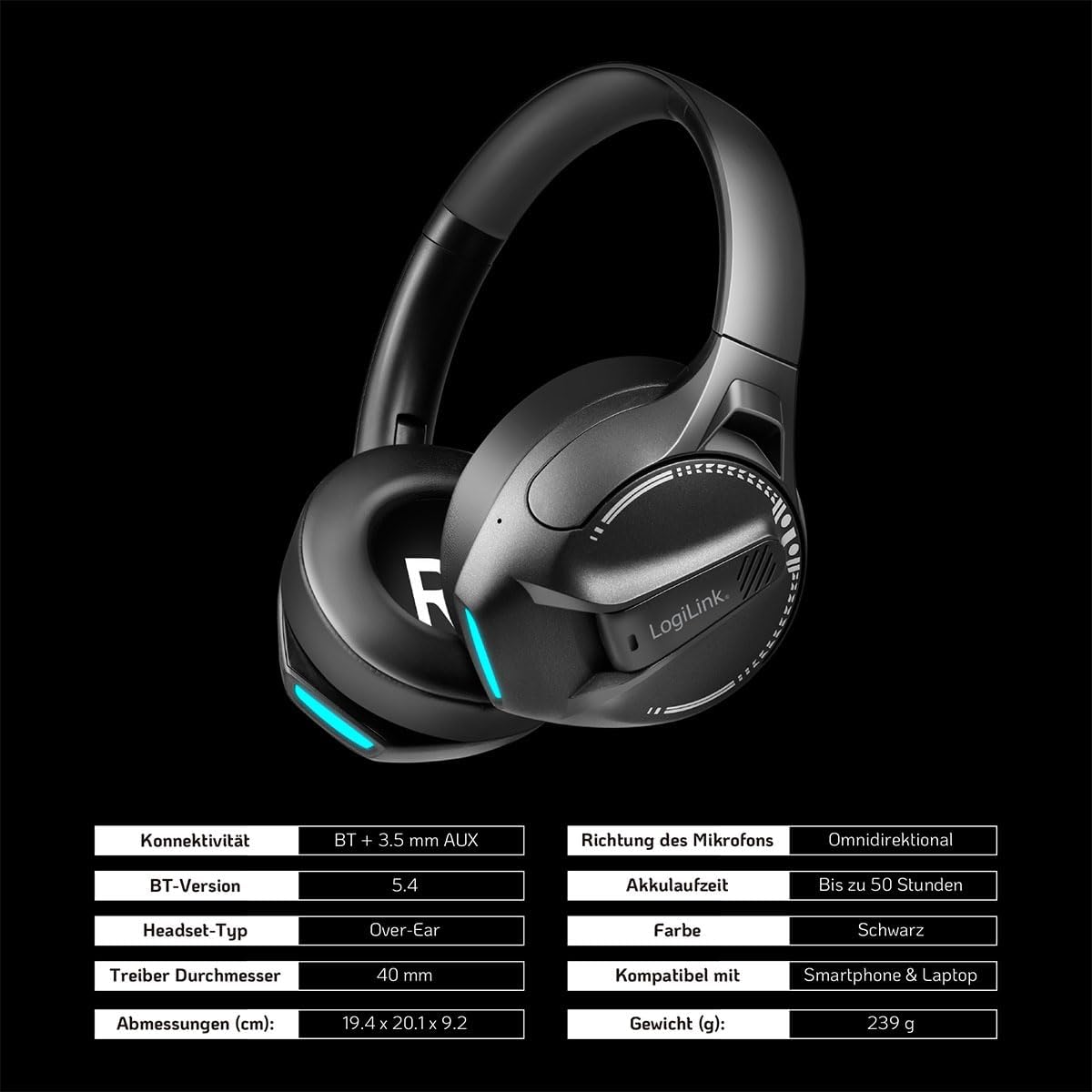
Imatge: Visual representation of key specifications for the LogiLink BT0070 headset, including connectivity, battery life, and dimensions. Note: The image lists Bluetooth version 5.4, while the product title specifies 6.0.
Garantia i Suport
LogiLink products are designed and manufactured to the highest quality standards. For warranty information and technical support, please refer to the warranty card included with your product or visit the official LogiLink weblloc.
Conserveu el vostre comprovant de compra per a reclamacions de garantia.


