1. Introducció
Gràcies per la compraasing the Monster S350 Bluetooth Speaker. This portable wireless speaker features a touch screen, Bluetooth 6.0 connectivity, and support for TF cards, offering a versatile audio experience. This manual provides detailed instructions for setup, operation, maintenance, and troubleshooting to ensure optimal performance and longevity of your device.
2. Informació de seguretat
- No exposeu l'altaveu a temperatures extremes, llum solar directa ni humitat elevada.
- Eviteu deixar caure o sotmetre l'altaveu a forts impactes.
- Mantingueu l'altaveu lluny de l'aigua i altres líquids.
- No intenteu desmuntar, reparar o modificar l'altaveu vosaltres mateixos. Poseu-vos en contacte amb personal de servei qualificat si cal.
- Feu servir només el cable de càrrega proporcionat o un equivalent certificat.
- Elimineu les piles d'acord amb la normativa local. No les incinereu.
3. Contingut del paquet
Si us plau, comproveu el paquet per veure si hi ha els elements següents:
- Monster S350 Bluetooth Speaker
- Cable de càrrega USB
- Manual d'usuari
4. Producte acabatview
Familiarize yourself with the components of your Monster S350 speaker.

Figura 4.1: Davant view of the Monster S350 Bluetooth Speaker, showcasing its retro design and touch screen.

Figura 4.2: Close-up of the speaker's top controls, illustrating the long press function for power and swipe gestures for volume adjustment.
Controls i ports:
- Control de potència/volum: Long press to turn on/off. Swipe up to increase volume, swipe down to decrease volume.
- Pantalla tàctil: For navigation, settings, and displaying information.
- Ranura per a targetes TF: Insert a TF (microSD) card for local music playback.
- Port de càrrega USB-C: Per carregar l'altaveu.
5. Configuració
5.1 Càrrega de l'altaveu
- Connect the USB charging cable to the speaker's USB-C port.
- Connecteu l'altre extrem del cable a un adaptador de corrent USB (no inclòs) o al port USB d'un ordinador.
- The charging indicator on the screen will show the charging status. A full charge typically takes approximately 2-3 hours.
5.2 Engegada/apagada
- Per encendre: Long press the Power/Volume knob until the screen lights up.
- Per apagar: Long press the Power/Volume knob until the screen turns off.
5.3 Vinculació Bluetooth
Pair your Monster S350 with a Bluetooth-enabled device.
- Ensure the speaker is powered on and within range of your Bluetooth device (e.g., smartphone, tablet).
- Al dispositiu Bluetooth, activeu el Bluetooth i cerqueu els dispositius disponibles.
- Select "Monster S350" from the list of found devices.
- Un cop emparellat, l'altaveu indicarà una connexió correcta i podreu començar a reproduir àudio.

Figura 5.1: The speaker displaying its Bluetooth connection status alongside a smartphone's Bluetooth settings.
Reproducció de targetes TF 5.4
Play music directly from a TF (microSD) card.
- Assegureu-vos que l'altaveu estigui apagat.
- Insert a TF card (up to 32GB, formatted to FAT32) into the TF card slot until it clicks into place.
- Power on the speaker. The speaker will automatically detect the TF card and switch to local music playback mode, or you can select it from the touch screen menu.

Figura 5.2: Demonstrating the insertion of a TF card into the speaker's dedicated slot for local music playback.
6. Instruccions de funcionament
Reproducció d'àudio bàsica 6.1
- Reproduir/pausa: Tap the play/pause icon on the touch screen.
- Pista següent: Swipe right on the touch screen or tap the next track icon.
- Pista anterior: Swipe left on the touch screen or tap the previous track icon.
- Control de volum: Swipe up on the Power/Volume knob to increase volume, swipe down to decrease volume. Alternatively, adjust volume via the connected Bluetooth device.
6.2 Ús de la pantalla tàctil
The full-color touchscreen display allows for intuitive navigation and access to various features.
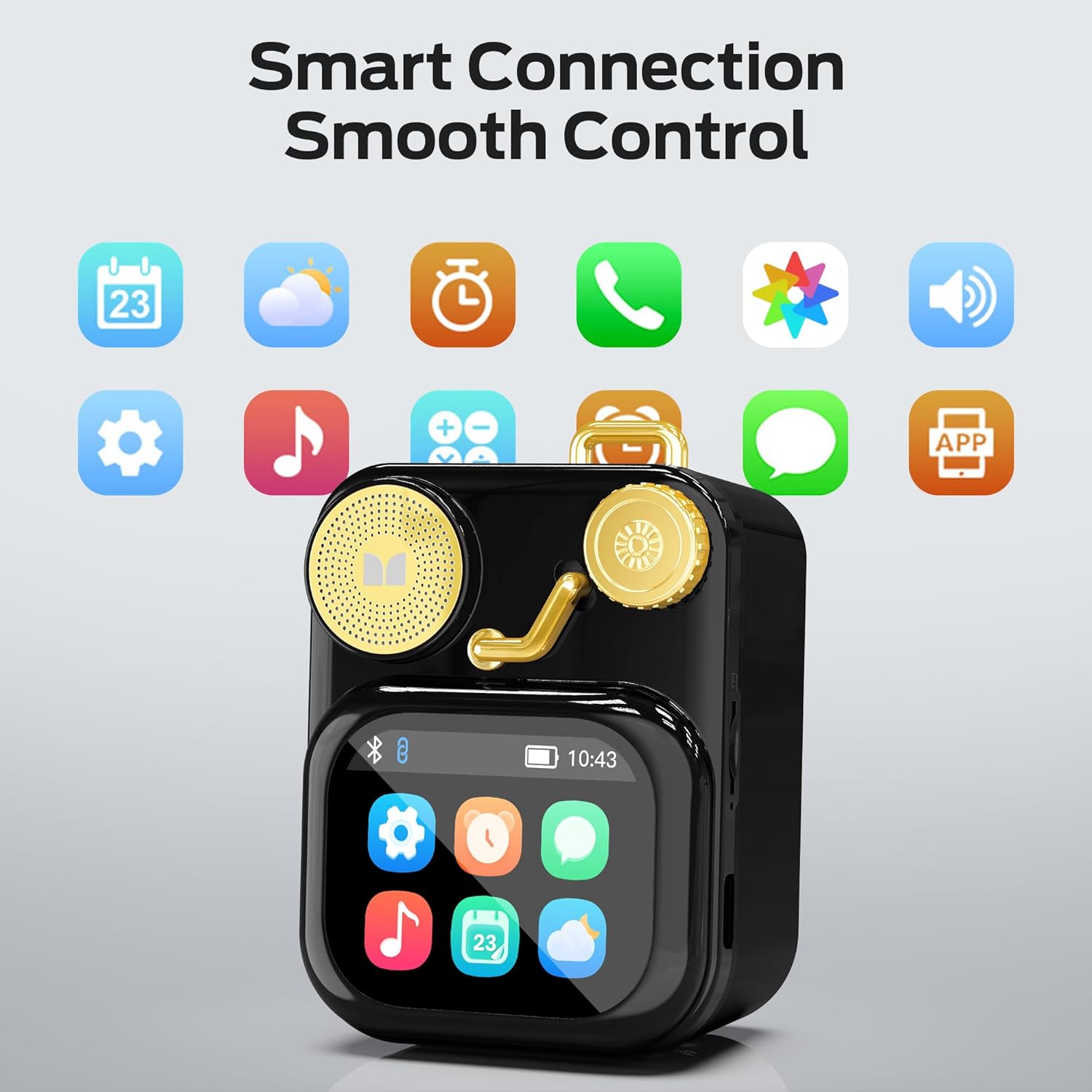
Figura 6.1: The speaker's touch screen displaying various application icons for smart features.
- Navegació: Swipe left/right or up/down to browse through menus and options.
- Selecció: Toqueu una icona o opció per seleccionar-la.
- Configuració: Access system settings, Bluetooth options, display preferences, and more through the settings icon.
6.3 Funcions intel·ligents
When connected to a compatible smartphone via Bluetooth and the companion app (if available), the speaker can display various smart features:

Figura 6.2: Examples of smart features displayed on the speaker's screen, including notifications, weather, lyrics, and Bluetooth call information.
- Mobile Notifications: Receive alerts for messages and other app notifications.
- Informació de la cançó: Display song titles and artist information during playback.
- Alarmes: Set and manage alarms directly from the speaker.
- Actualitzacions meteorològiques: View informació meteorològica en temps real.
- Soroll blanc: Access soothing white noise sounds for relaxation.
7. Manteniment
7.1 Neteja
- Wipe the speaker's surface with a soft, dry, lint-free cloth.
- Do not use abrasive cleaners, alcohol, or chemical solvents, as these may damage the finish.
- Mantingueu els ports lliures de pols i deixalles.
7.2 Emmagatzematge
- Guardeu l'altaveu en un lloc fresc i sec, allunyat de la llum solar directa i de temperatures extremes.
- If storing for an extended period, charge the battery to approximately 50% every three months to preserve battery life.
8. Solució De Problemes
If you encounter issues with your Monster S350 speaker, refer to the following solutions:
| Problema | Causa possible | Solució |
|---|---|---|
| L'altaveu no s'encén. | La bateria està esgotada. | Carregueu l'altaveu amb el cable USB proporcionat. |
| No hi ha so de l’altaveu. | El volum és massa baix o està silenciat. El dispositiu no està emparellat. | Increase speaker volume. Ensure Bluetooth device is paired and playing audio. |
| No s'ha pogut emparellar per Bluetooth. | Speaker is not in pairing mode. Device is out of range. Interference. | Ensure speaker is on and Bluetooth is enabled. Move devices closer. Turn off other Bluetooth devices. |
| No es reprodueix música a la targeta TF. | Card not inserted correctly. Unsupported file format. Corrupted card. | Torneu a inserir la targeta TF. Assegureu-vos que la música fileestan en un format compatible (per exemple, MP3). Proveu una altra targeta TF. |
| Smart features not working. | Not connected to companion app. App issues. | Ensure the speaker is connected to the companion app on your smartphone. Check app permissions and updates. |
9. Especificacions
Technical details of the Monster S350 Bluetooth Speaker:
- Nom del model: S350
- Marca: Monstre
- Material: Metall
- Color: Negre
- Dimensions del producte: 12.5P x 10.5A x 5.4H centímetres (aprox. 4.9 x 4.1 x 2.1 polzades)
- Pes de l'article: 160 grams (aprox. 0.35 lliures)
- Tecnologia de connectivitat: Bluetooth 6.0
- Potència de sortida màxima dels altaveus: 10 watts
- Mode de sortida d'àudio: estèreo
- Tipus de muntatge: Taula
- Bateria: 1 bateria de ions de liti (inclosa)
- Suport de targeta TF: Yes (up to 32GB, FAT32 format recommended)

Figura 9.1: Diagram illustrating the internal woofer for deep bass and tweeter for crisp highs, contributing to the speaker's audio quality.
10. Garantia i Suport
For warranty information or technical support, please refer to the documentation included with your purchase or contact Monster customer service. Keep your proof of purchase for warranty claims.
Contacte d'atenció al client: Please visit the official Monster website or refer to your product packaging for the most current support contact information.


