1. Introducció
The COLMI R10 Smart Ring is a sophisticated health and fitness tracker designed to seamlessly integrate into your daily life. It offers continuous monitoring of key health metrics, including heart rate, blood oxygen levels, and sleep patterns, alongside activity tracking features. This manual provides detailed instructions to help you set up, operate, and maintain your COLMI R10 Smart Ring for optimal performance.

Imatge 1.1: The COLMI R10 Smart Ring in silver, showcasing its internal sensors, alongside its compact charging case.
2. Contingut del paquet
Upon opening your COLMI R10 Smart Ring package, please verify that all the following items are included:
- Anell intel·ligent COLMI R10
- Estoig de càrrega
- Cable de càrrega
- Manual d'usuari (aquest document)
3. Sizing and Fit
Accurate sizing is crucial for comfortable wear and precise data collection. It is highly recommended to use a COLMI sizing kit to determine your ideal ring size before purchasing the COLMI R10 Smart Ring.
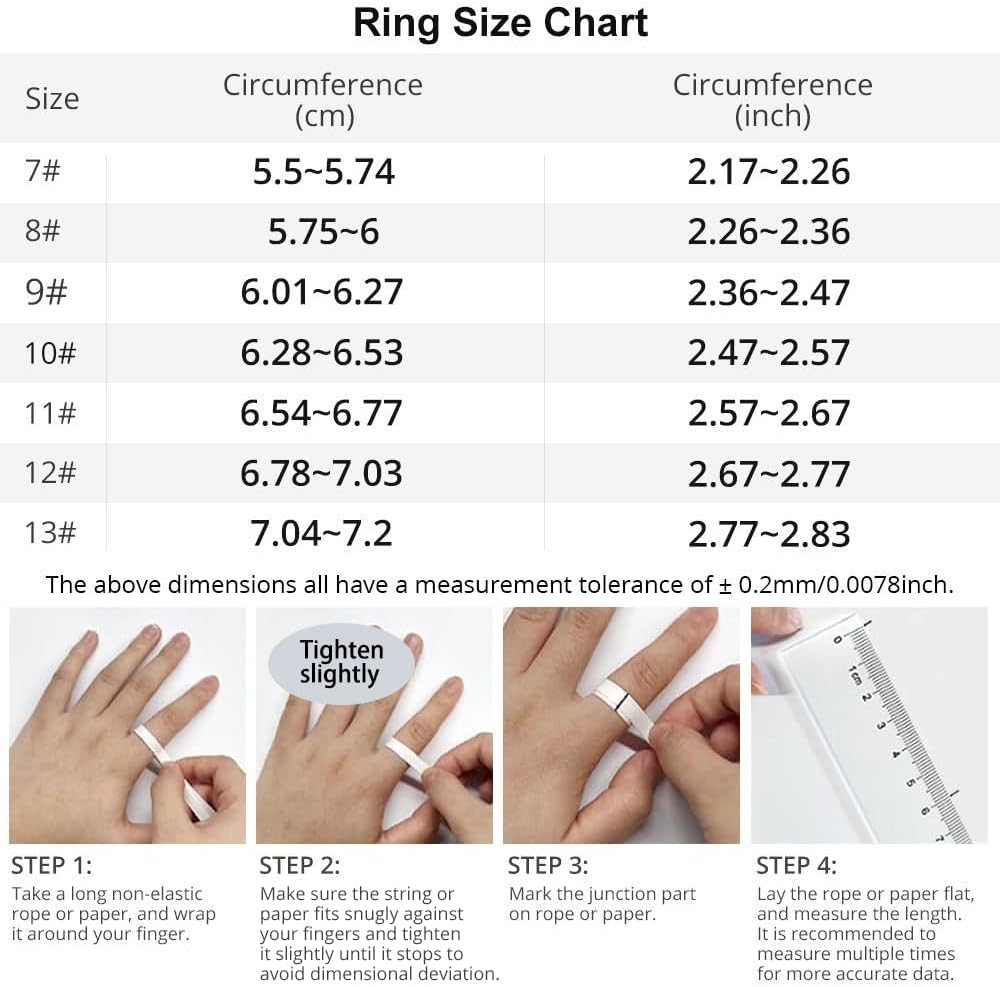
Imatge 3.1: A detailed ring size chart showing circumference in centimeters and inches, along with a four-step guide on how to measure your finger using a non-elastic rope or paper.
How to Measure Your Finger:
- Pas 1: Take a long non-elastic rope or paper strip and wrap it around your finger.
- Pas 2: Ensure the string or paper fits snugly against your finger and tighten it slightly until it stops to avoid dimensional deviation.
- Pas 3: Marca la part de la unió a la corda o al paper.
- Pas 4: Lay the rope or paper flat and measure its length. It is recommended to measure multiple times for more accurate data.
4. Configuració
4.1 Càrrega inicial
Before first use, fully charge your COLMI R10 Smart Ring. Place the ring into its charging case, then connect the charging cable to the case and a USB power source. The indicator light on the charging case will show the charging status.
4.2 Descàrrega i instal·lació d'aplicacions
The COLMI R10 Smart Ring requires the companion "Q Ring" app for full functionality and data synchronization. Download the app from your device's app store (available for Android and iPhone).
4.3 Pairing Your Smart Ring
- Ensure your COLMI R10 Smart Ring is charged.
- Activa el Bluetooth al teu telèfon intel·ligent.
- Open the "Q Ring" app.
- Follow the on-screen instructions within the app to search for and pair with your COLMI R10 Smart Ring.
- Once paired, the app will display your ring's connection status and begin synchronizing data.

Imatge 4.1: Visual guide showing the COLMI sizing kit, various ring sizes, and a smartphone displaying the "Q Ring" app interface for health data.
5. Instruccions de funcionament
The COLMI R10 Smart Ring continuously monitors various health metrics. All collected data is synchronized with the "Q Ring" app on your smartphone.
5.1 Monitorització de la freqüència cardíaca
The ring provides 24/7 real-time heart rate monitoring. View your current heart rate and historical data within the "Q Ring" app. The app allows you to track trends and understand your heart health over time.

Imatge 5.1: A woman wearing the COLMI R10 Smart Ring, with a smartphone displaying the app's heart rate monitoring interface, showing real-time and historical heart rate data.
5.2 Blood Oxygen Monitoring (SpO2)
Quickly measure your blood oxygen saturation (SpO2) with a single tap in the app. This feature helps assess your body's oxygen supply efficiency. The app also provides scheduled blood oxygen detection settings.

Imatge 5.2: A woman wearing the COLMI R10 Smart Ring, with a smartphone displaying the app's blood oxygen detection interface, showing SpO2 levels and historical data.
5.3 Monitorització del son
The ring analyzes your sleep stages, including deep sleep, light sleep, and awake time. This in-depth analysis helps you understand your sleep quality and duration, contributing to better rest.

Imatge 5.3: A woman wearing the COLMI R10 Smart Ring while sleeping, with a smartphone displaying the app's sleep monitoring interface, showing sleep duration, efficiency, and stages.
5.4 Activity Tracking (Pedometer & Fitness)
The COLMI R10 records your daily steps, calorie consumption, and exercise duration. It generates exercise reports, acting as your personal fitness coach to help you achieve your activity goals.
Imatge 5.4: A woman wearing the COLMI R10 Smart Ring during exercise, with graphics showing tracked steps, mileage, and calories burned.
5.5 Control remot de la càmera
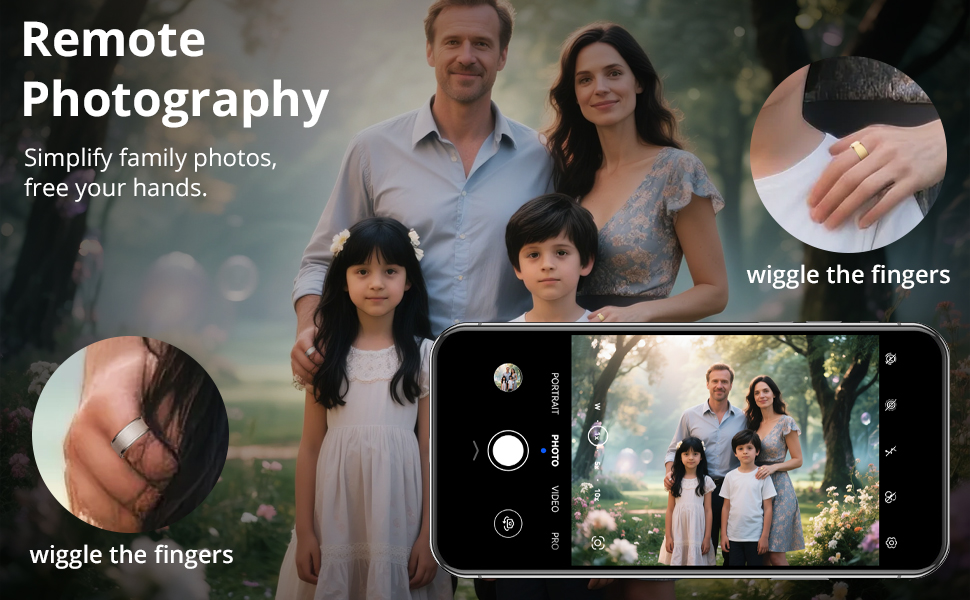
Utilize the smart ring for remote camera control, simplifying photography and allowing for hands-free picture taking. This feature is activated through the "Q Ring" app.

Imatge 5.5: The COLMI R10 Smart Ring next to a smartphone displaying a camera interface, illustrating the remote camera control function.
6. Càrrega i durada de la bateria
The COLMI R10 Smart Ring is designed for extended use with its portable charging case.
- Ring Battery Life: A single charge provides approximately 3-5 days of continuous use.
- Capacitat de la caixa de càrrega: The charging case holds enough power for an additional 7-10 full charges of the ring.
- Total Standby Time: With the charging case, the total standby time can reach up to 30 days.
To charge, simply place the ring into the charging case. Connect the charging cable to the case and a USB power adapter (not included) for optimal charging of the case itself.

Imatge 6.1: The COLMI R10 Smart Ring nestled in its open charging case, highlighting its portability and extended battery life capabilities.
7. Manteniment
To ensure the longevity and accurate performance of your COLMI R10 Smart Ring, follow these maintenance guidelines:
- Neteja: Gently wipe the ring with a soft, dry, lint-free cloth. Avoid using abrasive materials or harsh chemicals.
- Exposició a l'aigua: The ring is designed for daily wear, but avoid prolonged submersion in water or exposure to high-pressure water jets.
- Emmagatzematge: When not in use, store the ring in its charging case in a cool, dry place away from direct sunlight and extreme temperatures.
- Evita els impactes: Protect the ring from drops and impacts, which can damage internal components or the exterior finish.
8. Solució De Problemes
If you encounter issues with your COLMI R10 Smart Ring, please refer to the following common solutions:
- Ring Not Connecting/Pairing:
- Ensure the ring is charged.
- Verifiqueu que el Bluetooth estigui habilitat al vostre telèfon intel·ligent.
- Restart the "Q Ring" app.
- Try restarting your smartphone.
- If issues persist, unpair the device from your phone's Bluetooth settings and attempt to pair again through the app.
- Inconsistent Data Collection (e.g., Sleep, Activity):
- Ensure the ring is worn correctly and snugly on your finger. A loose fit can affect sensor accuracy.
- Verify the app is updated to the latest version.
- Ensure the ring's sensors are clean and free from debris.
- Confirm the ring's battery level is sufficient for continuous monitoring.
- Synchronize data regularly with the app.
- Problemes de càrrega:
- Comproveu si el cable de càrrega està connectat correctament tant a la carcassa com a la font d'alimentació.
- Ensure the ring is correctly seated in the charging case.
- Proveu un altre port USB o adaptador de corrent.
If these steps do not resolve your issue, please contact COLMI customer support for further assistance.
9. Especificacions
| Característica | Detall |
|---|---|
| Nom del model | COLMI R10 |
| Marca | COLMI |
| Número de model de l'article | COLMI R10 |
| Pes de l'article | 3.53 unces |
| Dimensions del paquet | 4.53 x 3.15 x 0.98 polzades |
| Bateries | 1 bateria no estàndard (inclosa) |
| Capacitat de la bateria | 15 milionsamp Hores |
| Composició de les cèl·lules de la bateria | Polímer de liti |
| Sistema operatiu | Android, iPhone |
| Tecnologia de connectivitat | Bluetooth |
| Característiques especials | Blood oxygen monitoring, Heart rate, Sleep monitoring |
| GPS | Sense GPS |
| Forma | Ronda |
| Capacitat d'emmagatzematge de memòria | 1 MB |
| Fabricant | Shenzhen COLMi Technology Co., Ltd. |
10. Garantia i Suport
The COLMI R10 Smart Ring comes with a standard manufacturer's warranty. For specific warranty terms and conditions, please refer to the documentation included with your purchase or visit the official COLMI weblloc.
For technical support, troubleshooting assistance, or warranty claims, please contact COLMI customer service. Contact information can typically be found on the COLMI official website or within the "Q Ring" app.


