1. Introducció
This manual provides detailed instructions for the YUNZII QL108 Typewriter Style Mechanical Gaming Keyboard. Designed for both work and gaming, this full-size keyboard features a retro aesthetic with modern functionalities, including hot-swappable switches, RGB backlighting, and multi-system compatibility.

Image 1.1: The YUNZII QL108 Typewriter Style Mechanical Gaming Keyboard, showcasing its retro design with round keycaps and metal frame.
Vídeo 1.1: Un overview of the YUNZII QL108 Typewriter Mechanical Gaming Keyboard, highlighting its full-size layout and design elements.
2. Configuració
2.1 Contingut del paquet
Verifiqueu que tots els elements siguin presents al paquet:
- QL108 Keyboard
- Cable USB per a TIPUS C
- Switch and Keycap Puller
- Manual d'usuari
- Interruptors addicionals

Image 2.1: The contents of the YUNZII QL108 package, including the keyboard, USB-C cable, keycap/switch puller, manual, and extra switches.
2.2 Connexió per cable
The QL108 keyboard connects via a wired USB-C connection for stable and high-speed response.
- Connect the provided USB-C cable to the port on the back of the keyboard.
- Connecteu l'altre extrem del cable USB-C a un port USB disponible de l'ordinador.
- The keyboard will automatically be recognized by your system.

Image 2.2: Illustration of the Type-C wired connection, emphasizing reduced latency and high-speed response.
2.3 Compatibilitat del sistema
The QL108 keyboard offers broad compatibility with various operating systems:
- Windows
- macOS
- Android
- iOS
To switch between Windows and Mac layouts, use the following key combinations:
- Fn+A: Enter Windows Layout
- Fn + S: Enter Mac Layout

Image 2.3: Visual guide for switching between Windows and Mac layouts using Fn key combinations.
2.4 Suports ajustables
The keyboard features adjustable two-stage kickstands on the underside to customize your typing angle for improved comfort.

Image 2.4: The ergonomic design of the QL108 keyboard, highlighting the two-stage adjustable kickstands for varied typing heights.
3. Instruccions de funcionament
3.1 Tecles multimèdia i de funció
The QL108 keyboard includes dedicated multimedia and function keys accessible via the Fn clau:
- Fn + F1-F12: Access 12 multimedia functions.
- Fn + Win: Lock the Windows key.
- Fn + Esc: Reset lighting effects.
- Fn + Arrow Keys: Adjust light brightness/speed.

Imatge 3.1: acabatview of multimedia, lighting, and lock functions configurable directly from the keyboard using the Fn key.
3.2 Il·luminació de fons RGB
The keyboard features vibrant RGB backlighting with multiple dynamic modes and customizable settings:
- Fn + Fletxa amunt/avall: Adjust 4 brightness levels.
- Fn + Fletxa esquerra/dreta: Adjust light speed.
- Fn + Tab: Toggle white light ON/OFF.
- Fn + |: Cycle through 24 backlight effects.
- Fn + Intro: Cycle through 9 preset backlight colors.

Image 3.2: Instructions on how to change RGB backlight settings, including brightness, speed, effects, and colors.
Video 3.1: Demonstration of the RGB backlighting features of the YUNZII QL108 Typewriter Gaming Keyboard.
3.3 programable Web Programari
The keyboard supports advanced online customization software for both Windows and Mac systems. This software allows you to:
- Remap keys for improved efficiency.
- Edit macros to combine multiple shortcuts into one keystroke.
- Design and personalize your own RGB backlighting.

Image 3.3: An illustration of the programmable web software interface for Windows and Mac, showing options for key remapping, macro editing, and RGB design.
3.4 Typing Sound
Video 3.2: A demonstration of the typing sound produced by the YUNZII QL108 Typewriter Keyboard with Onyx Switches.
4. Manteniment
4.1 Neteja
The QL108 keyboard features a super smooth and delicate surface, making it easy to clean. Use a soft, damp cloth to wipe down the keycaps and frame. Avoid harsh chemicals or abrasive materials.
4.2 Commutadors intercanviables en calent
The QL108 is a fully hot-swappable mechanical keyboard, supporting both 3-pin and 5-pin switches. This allows for effortless customization and replacement of switches without soldering.
- Use the provided switch puller to carefully remove the desired switch.
- Align the pins of the new switch with the sockets on the PCB.
- Premeu suaument el nou interruptor al seu lloc fins que faci clic de manera segura.
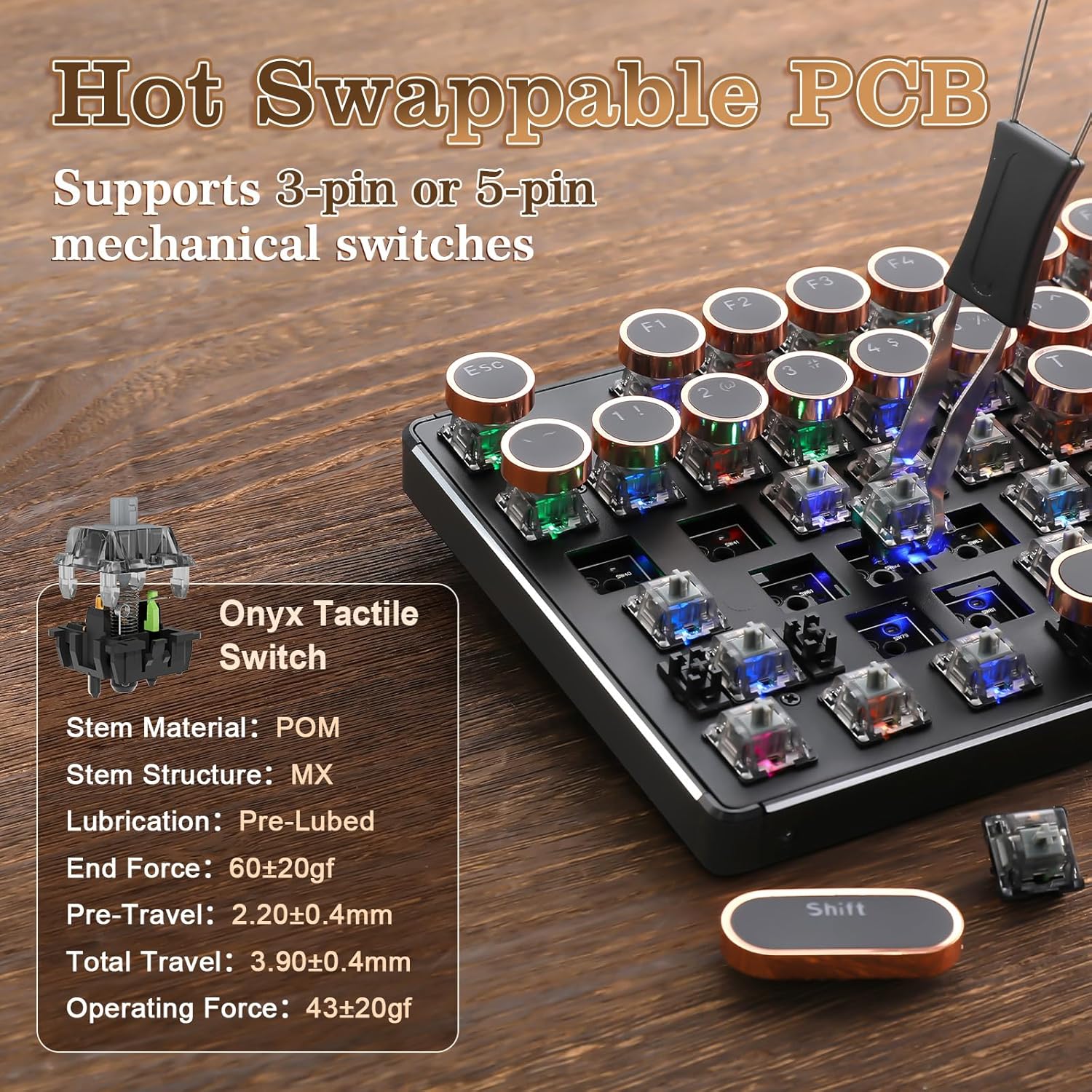
Imatge 4.1: Detallada view of the hot-swappable PCB and Onyx Tactile Switches, illustrating the ease of switch replacement.
5. Solució De Problemes
5.1 El teclat no respon
- Assegureu-vos que el cable USB-C estigui connectat correctament tant al teclat com a l'ordinador.
- Prova de connectar el teclat a un port USB diferent de l'ordinador.
- Prova el teclat en un altre ordinador per descartar problemes específics del sistema.
5.2 Problemes de retroiluminació
- Ús Fn + Arrow Keys (Up/Down) per ajustar els nivells de brillantor.
- Ús Fn + | to cycle through different backlight effects.
- Ús Fn + Intro to change backlight colors.
- If the backlight is off, try Fn + Tab to toggle white light ON/OFF.
6. Especificacions
| Característica | Detall |
|---|---|
| Dimensions del producte | 18.5 x 6.73 x 1.97 polzades |
| Pes de l'article | 0.035 unces |
| Fabricant | YUNZII |
| Tecnologia de connectivitat | USB-C |
| Descripció del teclat | Mecànica |
| Característiques especials | Backlit, Ergonomic, Hot-Swappable, Round Key |
| Il·luminació del teclat | RGB |
| Material | Metal Panel, Electroplated Keycaps |
| Número de model | QL108 |
7. Garantia i Suport
For any product inquiries, technical assistance, or warranty claims, please contact YUNZII Customer Support. We are committed to providing helpful and timely assistance.
7.1 How to Contact Support
You can reach us directly through the Amazon platform:
- Before placing an order: Visit the YUNZII product page, select the seller's name "Yunzii Keyboard", and click "Ask a question" to send a message.
- After placing an order: Go to your orders, select "Problem with order", and send us a message.

Image 7.1: Visual guide on how to contact YUNZII Customer Support via Amazon.


