1. Introducció
This manual provides essential information for the safe and efficient operation of your Hisense 43Q6Q 4K QLED Smart TV. Please read this manual thoroughly before using your TV and retain it for future reference. This television features a 43-inch 4K UHD QLED display, Dolby Vision & Atmos, AI Upscaling, Game Mode Plus, and built-in Alexa for an enhanced viewexperiència.
2. Informació de seguretat
Observeu sempre les següents precaucions de seguretat per evitar incendis, descàrregues elèctriques o lesions:
- No exposeu el televisor a la pluja o la humitat.
- No obriu el televisor casing; demaneu totes les tasques de manteniment a personal qualificat.
- Assegureu-vos una ventilació adequada al voltant del televisor.
- Mantingueu el televisor allunyat de la llum solar directa, de fonts de calor i de flames obertes.
- Feu servir només el cable d'alimentació que s'inclou amb el televisor.
- Desendolleu el televisor durant tempestes o quan no l'utilitzeu durant períodes prolongats.
- Mantingueu les peces petites i les piles fora de l'abast dels nens.
3. Què hi ha a la caixa
Verifiqueu que tots els components siguin presents:
- 1 LED TV (Hisense 43Q6Q)
- 1 Suport de taula
- 1 Manual d'usuari (aquest document)
- 1 Targeta de garantia
- 1 Control remot
- 2 piles AAA
4. Configuració
4.1. TV Overview
Familiarize yourself with the front, side, and rear views of your Hisense 43Q6Q TV.

Imatge: Frontal view of the Hisense 43Q6Q 4K QLED Smart TV, showcasing el seu disseny de bisell prim.
Imatge: Lateral view of the Hisense 43Q6Q 4K QLED Smart TV, highlighting its thin profile.

Imatge: Part posterior view of the Hisense 43Q6Q 4K QLED Smart TV, showing the input/output ports and mounting points.
4.2. Installing the Table Top Stand
- Col·loqueu amb cura el televisor cara avall sobre una superfície suau i plana per evitar que es facin malbé la pantalla.
- Align the stand with the screw holes on the bottom of the TV.
- Fixeu el suport amb els cargols proporcionats. Assegureu-vos que el suport estigui ben fixat.
4.3. Muntatge a la paret (opcional)
If you choose to wall mount your TV, ensure you use a compatible VESA wall mount kit (not included) and follow the instructions provided with the wall mount. Professional installation is recommended.
4.4. Potència de connexió
- Connect the power cord to the AC IN port on the TV.
- Connecteu l'altre extrem del cable d'alimentació a una presa de corrent.
4.5. Configuració inicial
- Premeu el botó d'engegada del comandament a distància o del televisor per engegar-lo.
- Segueix les instruccions que apareixen a la pantalla per seleccionar l'idioma i el país i connectar-te a la xarxa Wi-Fi.
- Complete the guided setup for the VIDAA U9 operating system.
5. Instruccions de funcionament
5.1. Control remot
Introduïu les dues piles AAA al comandament a distància, observant la polaritat correcta. El comandament a distància us permet navegar pels menús, ajustar el volum, canviar de canal i accedir a funcions intel·ligents.

Image: The Hisense TV remote control, highlighting its voice control button and smart features.
5.2. Smart TV Features (VIDAA U9 OS)
Your Hisense TV runs on the VIDAA U9 operating system, providing access to a variety of streaming applications and smart functionalities.
- Accés a les aplicacions: Use the remote's home button to access the main smart TV interface, where you can find pre-installed apps like Netflix, Amazon Prime Video, JioCinema, and YouTube.
- Control de veu: Utilize the built-in Alexa by pressing the dedicated voice button on your remote. Speak commands to search for content, control playback, or manage smart home devices.
- Compartició de pantalla: Share content from your mobile devices using Wi-Fi, Bluetooth, Apple AirPlay, or Apple Home.
Image: The Hisense Smart TV interface displaying various streaming application icons.
5.3. Millores d'imatge i so
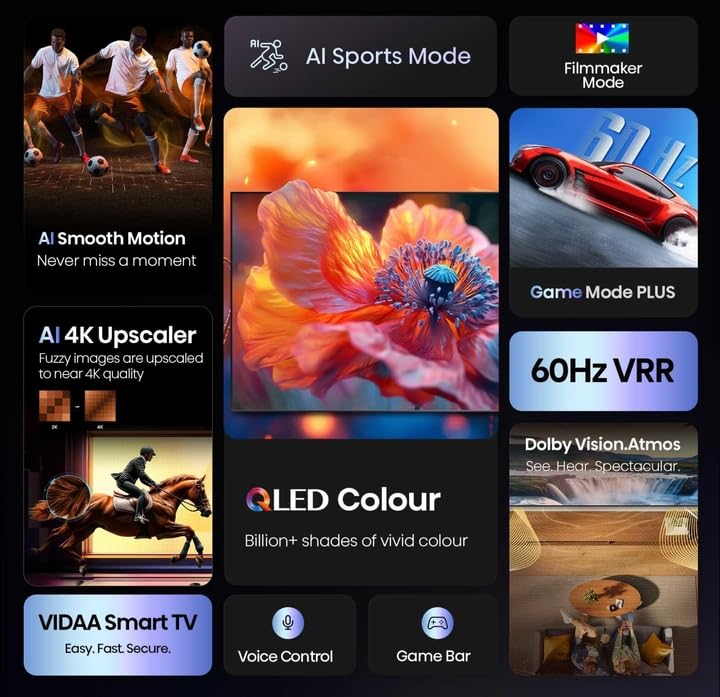
The TV incorporates advanced technologies for optimal viewing i escoltant.
- 4K QLED Display: Experience vibrant colors and sharp details with Quantum Dot technology.
- Dolby Vision & HDR10+ Decoding: Enhanced contrast and color accuracy for compatible content.
- Augment de l'IA: Converts lower-resolution content to near 4K quality.
- Sensor de llum d'IA: Automatically adjusts screen brightness based on ambient light for comfortable viewing i eficiència energètica.
- Mode cineasta: Preserves the original aspect ratio, color, frame rate, and dynamic range as intended by the filmmaker.
- Dolby Atmos & DTS Virtual X: Provides immersive, multi-dimensional audio through the TV's dual 10W speakers.

Imatge: Més deview of Hisense TV features including AI Sports Mode, Filmmaker Mode, AI 4K Upscaler, QLED Colour, 60Hz VRR, Dolby Vision Atmos, VIDAA Smart TV, Voice Control, and Game Bar.

Image: Visual representation of QLED Colour technology, emphasizing billions of shades of vivid color.

Image: Illustration of the immersive sound experience provided by Dolby Vision Atmos.

Image: Demonstrates AI 4K Upscaler for clearer images and AI Smooth Motion for fluid action scenes.
Image: Explains Filmmaker Mode for authentic viewing and EzPlay for soundbar integration.
5.4. Característiques de joc
The Hisense 43Q6Q is equipped with features to enhance your gaming experience.
- Mode de joc Plus: Redueix el retard d'entrada per a una experiència de joc més sensible.
- ALLM (mode automàtic de baixa latència): Automatically switches to low-latency mode when a game console is detected.
- VRR (Variable Refresh Rate) 48–60 Hz: Synchronizes the TV's refresh rate with the game console's output to eliminate screen tearing and stuttering.
- Barra de jocs: An integrated control center for managing game settings and monitoring gameplay data.

Image: Illustrates the Game Mode Plus for ultra-smooth gaming and the Game Bar for seamless management.
5.5. Connectivitat
Your TV offers multiple connectivity options:
- HDMI: Connect gaming consoles, Blu-ray players, and other HDMI-enabled devices.
- USB: Reprodueix contingut multimèdia files de dispositius d'emmagatzematge USB.
- Ethernet: Per a una connexió a Internet per cable estable.
- Wi-Fi: Per a l'accés a Internet sense fil.
- Bluetooth: Connecteu auriculars sense fil o altres dispositius Bluetooth.
6. Manteniment
6.1. Neteja de la pantalla
- Gently wipe the screen with a soft, dry, lint-free cloth.
- Per a marques difícils, esbandiu lleugeramentampen the cloth with water or a specialized screen cleaner (ensure it's safe for QLED displays) and wipe gently.
- Never spray liquid directly onto the screen.
6.2. Atenció general
- Keep the TV free from dust by regularly wiping the casinamb un drap suau i sec.
- Assegureu-vos que les obertures de ventilació no estiguin bloquejades.
- Eviteu col·locar objectes pesats a sobre del televisor.
7. Solució De Problemes
Refer to the following table for common issues and solutions:
| Problema | Causa possible | Solució |
|---|---|---|
| Sense poder | Power cord disconnected; Power outlet not working | Comproveu la connexió del cable d'alimentació; proveu la presa de corrent amb un altre dispositiu. |
| No hi ha imatge, però hi ha so | Incorrect input source; Loose HDMI/AV cable | Press the 'Input' button on the remote to select correct source; Check cable connections. |
| No hi ha so, però hi ha imatge | Volume muted or too low; External audio device issue | Unmute or increase volume; Check connections to external audio systems. |
| El comandament a distància no funciona | Batteries depleted or incorrectly inserted; Obstruction between remote and TV | Canvieu les piles; assegureu-vos que la línia de visió amb el sensor d'infrarojos del televisor estigui clara. |
| Problemes de connexió Wi-Fi | Contrasenya incorrecta; Problemes amb el router; TV massa lluny del router | Torneu a introduir la contrasenya del Wi-Fi; reinicieu l'encaminador; acosteu el televisor a l'encaminador o utilitzeu Ethernet. |
8. Especificacions
| Característica | Detall |
|---|---|
| Marca | Hisense |
| Model | 43Q6Q |
| Mida de la pantalla | 108 cm (43 polzades) |
| Tecnologia de visualització | QLED 4K |
| Resolució | 3840 x 2160 píxels (4K UHD) |
| Freqüència d'actualització | 60 Hz |
| Sistema operatiu | VIDA A U |
| Sortida d'àudio | 2.0 Channel, Dolby Atmos, DTS Virtual X |
| Connectivitat | Wi-Fi, Ethernet, HDMI, USB, Bluetooth |
| Característiques especials | Netflix, Amazon Prime Video, JioCinema, YouTube, AI Upscaling, Pixel Pro, Bezel-less, Micro Dimming, ALLM, Game Mode Plus, Alexa Built-in |
| Dimensions del producte | 7.4P x 96.3A x 56H centímetres |
| Pes de l'article | 20 kg |
| Voltage | 230 Volts |
| Wattage | 80 watts |
9. Garantia i Suport
Your Hisense 43Q6Q TV comes with a 1 any de garantia integral on the product, provided by Hisense from the date of purchase.
For technical support, service requests, or warranty claims, please refer to the contact information provided on your warranty card or visit the official Hisense India weblloc.


