1. Introducció
Thank you for choosing the HUAYU KL RM-L1710 Universal LCD LED TV Remote Control. This remote is designed to provide seamless control over various LCD and LED televisions, featuring dedicated buttons for popular streaming services. This manual will guide you through the setup, operation, and maintenance of your new remote control.
2. Instruccions de seguretat importants
- No barregeu piles velles i noves.
- No barregeu piles alcalines, estàndard (carboni-zinc) o recarregables (níquel-cadmi).
- Always remove exhausted batteries promptly to prevent leakage and damage.
- Eliminar les bateries usades d'acord amb la normativa local.
- Keep the remote control away from direct sunlight, heat sources, and moisture.
- No intenteu desmuntar ni modificar el comandament a distància.
3. Contingut del paquet
- 1 x HUAYU KL RM-L1710 Universal LCD LED TV Remote Control
- 1 x Manual d'usuari (aquest document)
4. Remote Control Button Layout
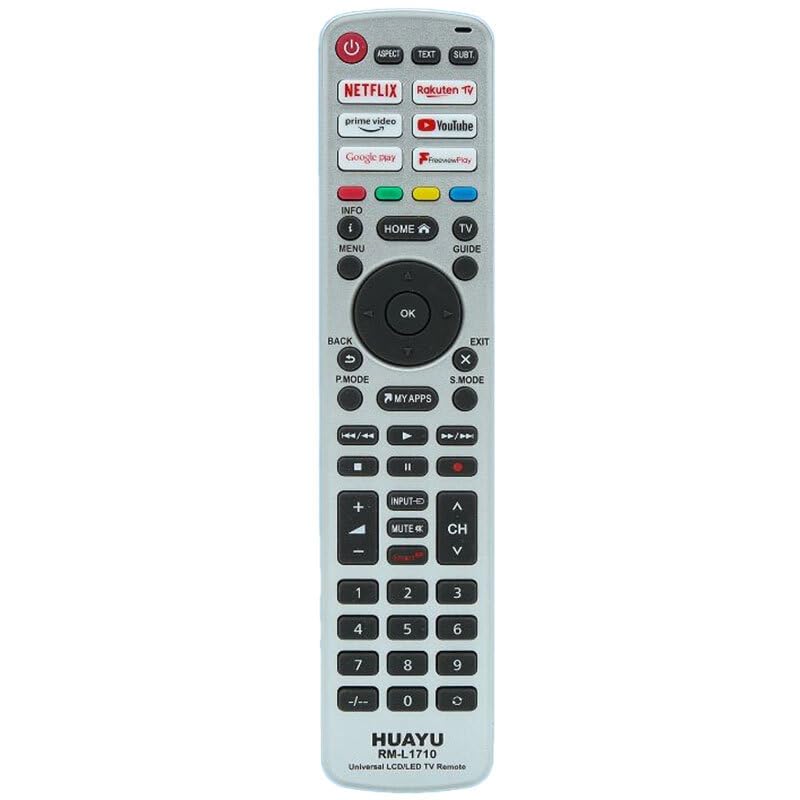
This image displays the full layout of the HUAYU RM-L1710 remote control. It is a silver-colored remote with black buttons. At the top are the power button, aspect ratio, text, and subtitle buttons. Below these are dedicated app buttons for Netflix, Rakuten TV, Prime Video, YouTube, Google Play, and FreeviewPlay. The central navigation cluster includes Home, Info, Menu, TV Guide, and a directional pad with an OK button. Below this are Back, Exit, P.Mode, S.Mode, and My Apps buttons. Media playback controls (rewind, play, fast forward, stop, pause, record) are located next. Further down are volume and channel controls, input, and mute buttons. The bottom section features a numeric keypad from 0-9, along with a dash button. The brand 'HUAYU' and model 'RM-L1710 Universal LCD/LED TV Remote' are printed at the very bottom.
Funcions del botó:
- POWER (botó vermell): Encén o apaga el televisor.
- ASPECTE: Changes the screen aspect ratio.
- TEXT: Activates or deactivates teletext.
- SUBT: Activa o desactiva els subtítols.
- NETFLIX, Rakuten TV, prime video, YouTube, Google play, FreeviewJugar: Direct access buttons for respective streaming applications.
- INFO (i): Displays on-screen information.
- HOME (House icon): Returns to the TV's main home screen or smart hub.
- GUIA TELEVISIVA: Obre la guia electrònica del programa.
- MENÚ: Accedeix al menú principal del televisor.
- Pad direccional (amunt, avall, esquerra, dreta): Navega pels menús i opcions.
- D'ACORD: Confirma les seleccions.
- BACK (U-turn arrow): Torna a la pantalla o menú anterior.
- EXIT (X): Surt del menú o de l'aplicació actual.
- P. MODE: Canvia els modes d'imatge.
- MODE S: Canvia els modes de so.
- MY APPS: Accesses the TV's applications list.
- Media Playback Controls (Rewind, Play, Fast Forward, Stop, Pause, Record): Controla la reproducció de suports.
- INPUT (Arrow into box): Selecciona fonts d'entrada (HDMI, AV, etc.).
- MUTE (Speaker with cross): Silencia o activa el so del televisor.
- VOL (+/-): Ajusta el nivell de volum.
- CH (Up/Down arrows): Canvia els canals de televisió.
- Numeric Keypad (0-9, -/--): Enters channel numbers or other numerical data.
5. Configuració inicial
5.1 Instal·lació de bateries
- Obriu la tapa del compartiment de la bateria a la part posterior del comandament a distància.
- Introduïu dues piles AAA (no incloses), assegurant-vos que els terminals positiu (+) i negatiu (-) coincideixin amb les marques de l'interior del compartiment.
- Tanqueu bé la tapa del compartiment de la bateria.
5.2 Programació del comandament a distància
As a universal remote, the RM-L1710 may require programming to operate your specific TV model. There are typically two methods for programming universal remotes:
Method 1: Auto Search
- Assegureu-vos que el vostre televisor estigui encès.
- Press and hold the 'SET' button (if available, or a combination like 'POWER' + 'SET' for 3 seconds) until the indicator light stays on.
- Point the remote at your TV and repeatedly press the 'POWER' button (or 'CH+' button) until your TV turns off or changes channel.
- Once the TV responds, immediately press the 'SET' or 'OK' button to save the code. The indicator light should turn off.
- Test all functions of the remote. If some functions do not work, repeat the auto-search process to find a more compatible code.
Method 2: Code Entry
- Locate the brand code for your TV from the code list provided with the remote (if applicable). Note: A code list is not provided with this manual. Please refer to the packaging or manufacturer's website for specific codes.
- Enceneu el televisor.
- Press and hold the 'SET' button (or a similar programming button) until the indicator light stays on.
- Enter the 3 or 4-digit code for your TV brand using the numeric keypad.
- If the code is valid, the indicator light will turn off.
- Test the remote's functions. If it does not work, try another code for your TV brand.
6. Operating Your Remote Control
6.1 Funcions bàsiques del televisor
- Premeu PODER to turn your TV on or off.
- Ús VOL +/- per ajustar el volum del so.
- Ús CH Up/Down to change channels sequentially.
- Premeu MUT to temporarily silence the TV.
- Premeu ENTRADA to cycle through available input sources (e.g., HDMI 1, AV, Component).
6.2 Smart TV and App Functions
The remote features dedicated buttons for quick access to popular streaming services:
- Premeu NETFLIX to launch the Netflix application.
- Premeu vídeo principal to launch the Amazon Prime Video application.
- Premeu YouTube to launch the YouTube application.
- Premeu Rakuten TV to launch the Rakuten TV application.
- Premeu Google play to launch the Google Play Store or Google Play Movies & TV.
- Premeu GratuïtviewJugar to access the Freeview Play platform (if supported by your TV).
- Premeu LES MEVES APLICACIONS a view all installed applications on your TV.
6.3 Navigation and Menu Controls
- Utilitza el Coixinet direccional (Up, Down, Left, Right arrows) to move the cursor or highlight items in menus.
- Premeu OK to confirm a selection or open a highlighted item.
- Premeu MENÚ to open the TV's main settings menu.
- Premeu CASA to return to the TV's main home screen or smart hub.
- Premeu TORNAR to go back to the previous screen or menu.
- Premeu Sortida to close the current menu or application.
- Premeu INFO to display information about the current program or input.
- Premeu GUIA DE TV to access the electronic program guide.
6.4 Controls de reproducció multimèdia
These buttons control media playback in compatible applications or when viewing content from connected devices:
- Jugar: Inicia la reproducció.
- Pausa: Posa en pausa la reproducció.
- Atura: Atura la reproducció.
- Rewind (Double left arrow): Rebobina contingut multimèdia.
- Fast Forward (Double right arrow): Avança ràpidament el contingut multimèdia.
- Skip Back (Double left arrow with line): Salta a la pista/capítol anterior.
- Skip Forward (Double right arrow with line): Salta a la pista/capítol següent.
- Record (Red dot): Initiates recording (if supported by your TV and connected storage).
6.5 Teclat numèric
- Use numbers 0-9 to directly enter channel numbers.
- El -/-- button is used for entering two-digit channel numbers or other specific functions.
7. Cura i Manteniment
- Clean the remote control with a soft, dry cloth. Do not use liquid or aerosol cleaners.
- Eviteu deixar caure el comandament a distància ni sotmetre'l a impactes forts.
- Si no feu servir el comandament a distància durant un període prolongat, traieu-ne les piles per evitar fuites.
- Store the remote in a cool, dry place.
8. Guia de resolució de problemes
| Problema | Causa possible | Solució |
|---|---|---|
| El comandament a distància no funciona. | Les piles estan gastades o incorrectament inserides. | Substituïu les piles per unes de noves, assegurant la polaritat correcta. |
| El comandament a distància no funciona. | Remote is not programmed to the TV. | Refer to Section 5.2 "Programming the Remote Control" and try programming again. |
| Remote has short range or intermittent response. | Weak batteries. Obstruction between remote and TV. | Replace batteries. Ensure a clear line of sight to the TV's IR receiver. |
| Alguns botons no funcionen. | Incorrect TV code programmed. | Try reprogramming the remote with a different code for your TV brand (if available). |
| App buttons (Netflix, YouTube, etc.) do not work. | TV does not support the app or is not connected to the internet. | Ensure your Smart TV is connected to the internet and the apps are installed and up-to-date. Some older TVs may not support these direct access buttons. |
9. Especificacions del producte
- Model: RM-L1710
- Marca: HUAYU
- Compatibilitat: Universal for most LCD/LED TVs
- Font d'alimentació: 2 piles AAA (no incloses)
- Transmissió: Infrarojos (IR)
10. Informació sobre la garantia i atenció al client
This product is covered by a standard manufacturer's warranty. Please refer to the warranty card included with your purchase or contact your retailer for specific warranty terms and conditions. For technical support or further assistance, please contact the point of purchase or visit the HUAYU official weblloc per obtenir informació de contacte.


