Introducció
This manual provides essential information for setting up, operating, maintaining, and troubleshooting your Apple Watch Series 11 GPS 42mm. Please read this manual thoroughly to ensure proper use and to maximize the features of your device.

Image: The Apple Watch Series 11 GPS 42mm, featuring a jet black aluminum case and a black sport band. The display shows a digital watch face.
Què hi ha a la caixa
Verifiqueu que tots els elements estiguin presents a l'embalatge del producte:
- Apple Watch Series 11 GPS 42mm Jet Black Aluminium Case
- Banda esportiva negra
- Cable de càrrega magnètic d'1 m

Image: A visual representation of the Apple Watch Series 11 box contents, including the smartwatch, a black sport band, and a USB-C magnetic fast charging cable.
Configuració
1. Carregant el teu Apple Watch
Before initial use, fully charge your Apple Watch. Connect the magnetic charging cable to the back of your Apple Watch and plug the USB-C end into a power adapter (sold separately) or a USB-C port. The watch will display a charging indicator. A full charge can take approximately 1.5 to 2 hours. For up to 8 hours of normal use, a 15-minute charge is sufficient.
2. Fixació de la banda
Slide the band into the slots on the top and bottom of the Apple Watch case until you feel and hear a click. Ensure the band is securely fastened before wearing.
3. Emparellament amb iPhone
- Assegura't que el teu iPhone estigui actualitzat a la darrera versió d'iOS i que tingui el Bluetooth i el Wi-Fi activats.
- Enceneu el vostre Apple Watch mantenint premut el botó lateral fins que aparegui el logotip d'Apple.
- Col·loca el teu Apple Watch a prop del teu iPhone. Apareixerà una pantalla d'emparellament a l'iPhone. Toca "Continua".
- Col·loca l'iPhone de manera que l'Apple Watch aparegui a la viewcercador a l'aplicació Apple Watch.
- Follow the on-screen instructions on both your iPhone and Apple Watch to complete the pairing process, including setting up a passcode and choosing your preferred settings.
Funcionament del teu Apple Watch
Navegació i controls bàsics
- Corona digital: Gira per desplaçar-te, fer zoom o ajustar els valors. Prem una vegada per anar a l'esfera del rellotge o a la llista d'aplicacions. Prem dues vegades per canviar entre les dues últimes aplicacions. Mantén premut per a Siri.
- Botó lateral: Press once to open the Dock (recent apps). Press and hold for Emergency SOS or to power off.
- Gestos: Tap to select, swipe to navigate, force touch for additional options (context-dependent). Double tap and wrist flick gestures are also supported.
Característiques clau
The Apple Watch Series 11 offers a range of functionalities to support your daily life and well-being:
- Vigilància de la salut:
- Hypertension Notifications: The watch can identify potential signs of chronic high blood pressure.
- Sleep Score & Sleep Apnea Notifications: Track and understand your sleep quality, including sleep stages, and receive notifications for possible sleep apnea.
- Aplicació d'ECG: Feu un electrocardiograma en qualsevol moment per comprovar si hi ha signes de fibril·lació auricular.
- Monitorització de la freqüència cardíaca: Receive notifications for high, low, or irregular heart rhythms.
- Blood Oxygen App: Mesura els teus nivells d'oxigen a la sang.
- Aplicació de signes vitals: View overnight health metrics.
- Aplicació de medicaments: Track your medication schedule.
- Seguiment del cicle: Monitor your menstrual cycle with retrospective ovulation estimates.
- Seguiment de la forma física:
- Anells d'activitat: Fes un seguiment del teu moviment diari, exercici i objectius d'estar de peu.
- Aplicació d'entrenament: Advanced metrics for various workouts, including Pacer, Heart Rate Zones, and training load.
- Company d'entrenament: Powered by Apple Intelligence, this feature enhances your workout experience when near your iPhone.
- Connectivitat:
- GPS: GPS integrat per a un seguiment precís de la ubicació durant activitats a l'aire lliure.
- Comunicació: Send texts, make calls, listen to music, use Siri, and receive notifications when connected to your iPhone or Wi-Fi.
- Apple Pay: Fes pagaments segurs directament des del teu canell.
- Característiques de seguretat:
- SOS d'emergència: Quickly contact emergency services.
- Crash Detection & Fall Detection: Automatically detect severe car crashes or hard falls and connect you with emergency services, notifying your emergency contacts.
- Registre d'entrada: Notifica automàticament a un ésser estimat quan arribis a la teva destinació.
- Durabilitat: Water resistant up to 50m (swimproof) and IP6X dust resistant.

Image: A collage highlighting key features: a notification for possible hypertension, an icon indicating up to 24 hours of battery life, a sleep score display of 84, and a close-up of the superdurable display.
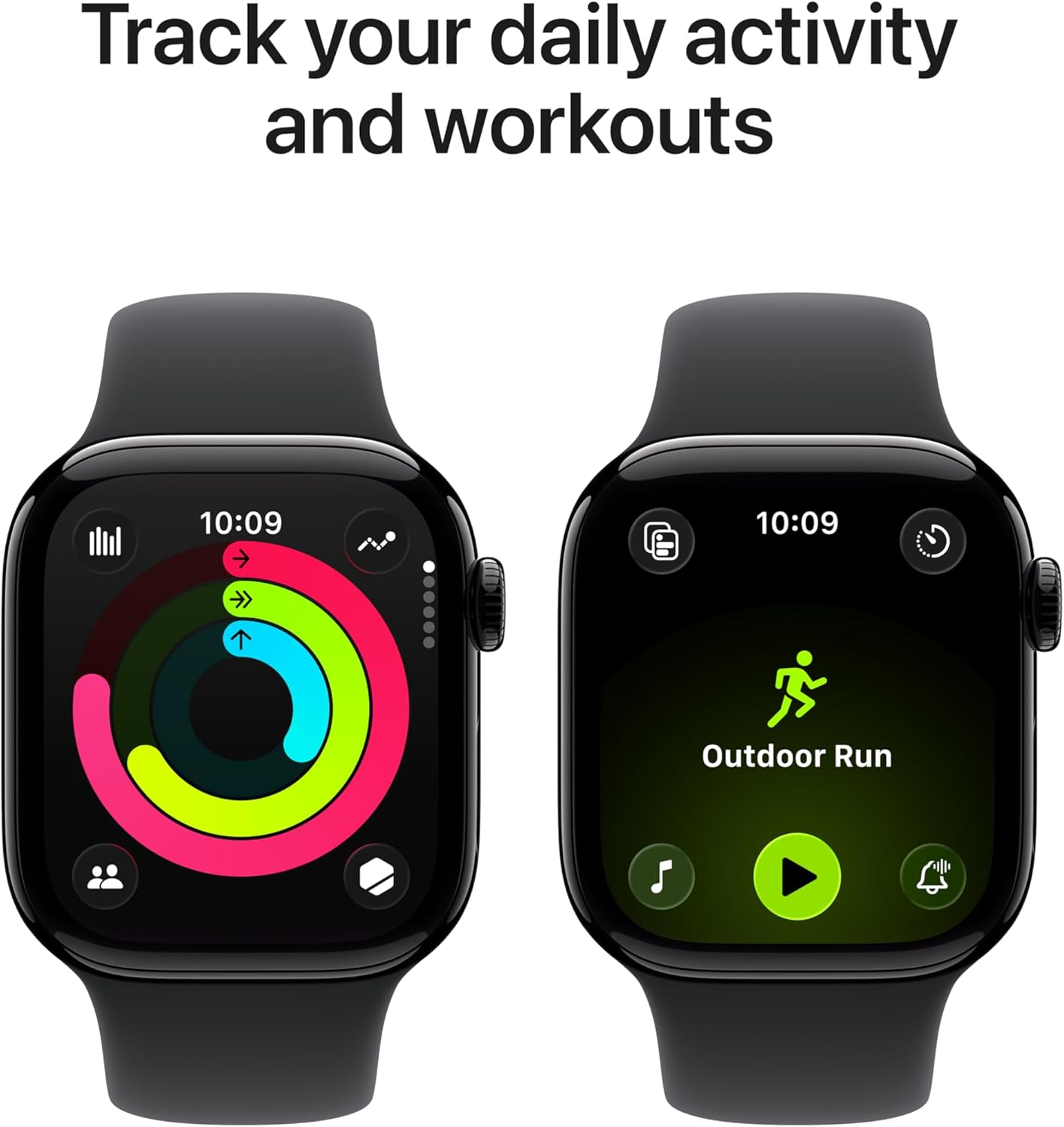
Image: Two Apple Watch displays side-by-side. One shows the activity rings tracking daily movement, and the other shows the 'Outdoor Run' workout interface.
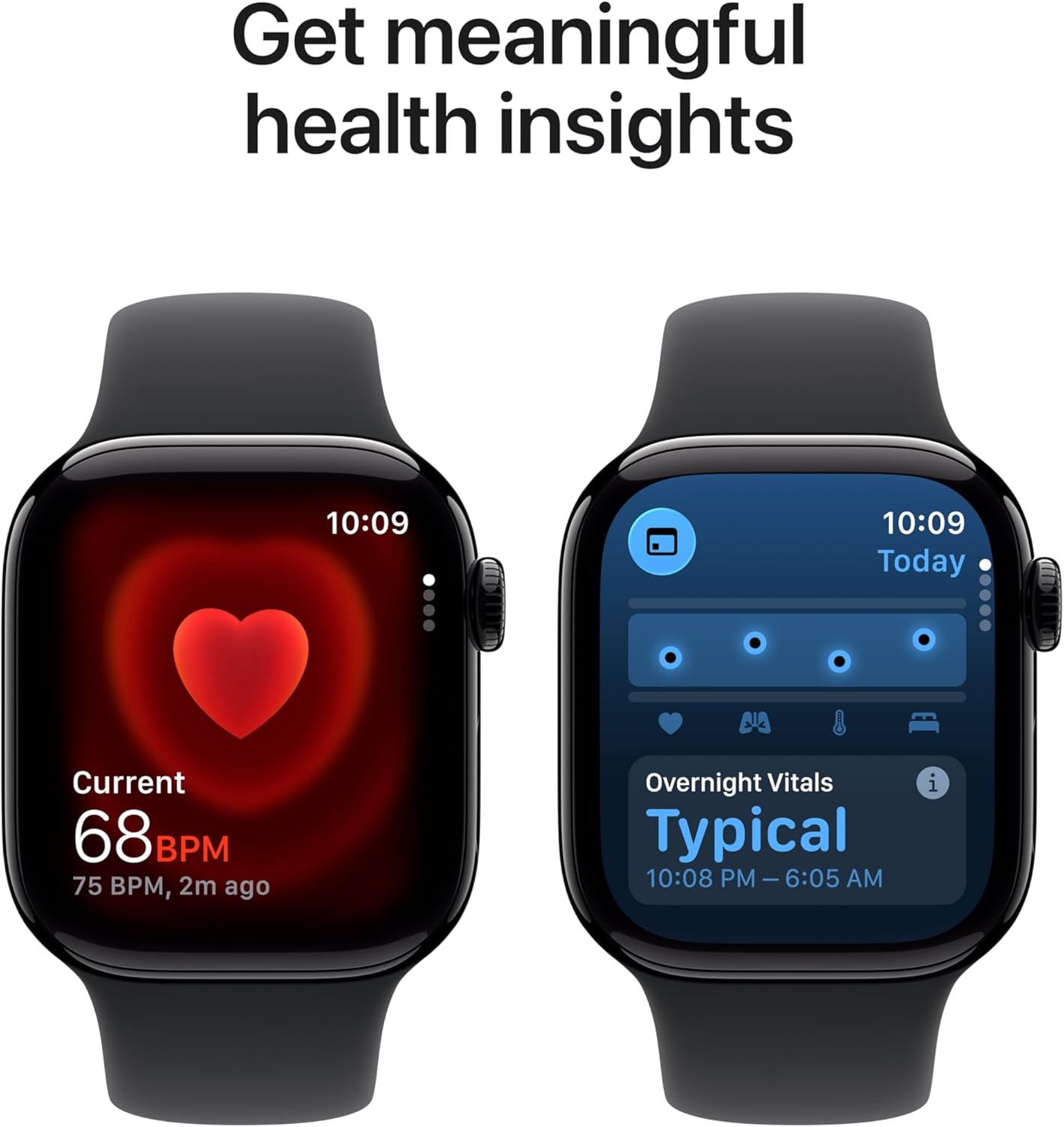
Image: Two Apple Watch displays. One shows a heart rate reading of 68 BPM, and the other shows 'Overnight Vitals' with a typical reading from 10:08 PM to 6:05 AM.

Image: A person wearing an Apple Watch Series 11 on their wrist, interacting with the display while outdoors, illustrating the 'Stay connected on the go' feature.
Manteniment
Neteja del teu Apple Watch
To maintain accuracy and prevent skin irritation, regularly clean your Apple Watch. Use a soft, lint-free cloth. If necessary, lightly dampen the cloth with fresh water. Do not use soaps, cleaning products, abrasive materials, or compressed air. Ensure the watch is dry before charging or wearing.
Cura de la bateria
To optimize battery longevity, avoid exposing your Apple Watch to extreme temperatures. For long-term storage, charge the device to about 50% and store it in a cool, dry place.
Actualitzacions de programari
Keep your Apple Watch software updated to the latest version of watchOS. Updates often include performance improvements, new features, and security enhancements. You can check for updates via the Apple Watch app on your iPhone.
Resolució de problemes
Problemes comuns i solucions
- El rellotge no s'encén: Ensure the watch is charged. If it still doesn't turn on, try a force restart by holding both the side button and Digital Crown for at least 10 seconds until you see the Apple logo.
- No es carrega: Verify the magnetic charging cable is properly connected to the watch and the power source. Try a different power adapter or USB-C port. Ensure the back of the watch and the charger are clean.
- Problemes d'aparellament: Ensure your iPhone's Bluetooth is on and the watch is within range. Restart both your iPhone and Apple Watch. If issues persist, unpair the watch from your iPhone (if previously paired) and attempt to pair again.
- L'aplicació no respon: Press the side button once to open the Dock, then swipe to the app and swipe left to close it. Reopen the app. If unresponsive, force restart the watch.
Per a una resolució de problemes més detallada o per a problemes persistents, consulteu el suport oficial d'Apple. weblloc web o poseu-vos en contacte amb el servei d'atenció al client d'Apple.
Especificacions
| Característica | Detall |
|---|---|
| Número de model | MEQT4LW/A |
| Dimensions del producte | 9.4 x 3 x 1.2 polzades |
| Pes de l'article | 1.12 unces |
| Fabricant | Apple |
| Sistema operatiu | watchOS |
| Capacitat d'emmagatzematge de memòria | 64 GB |
| Característiques especials | Activity Tracker, Always On Display, Cycle Tracking, GPS, Heart Rate Monitor, Sleep Score, Hypertension Notifications |
| Tecnologia de connectivitat | GPS, 5G, LTE, Wi-Fi 4 (802.11n), Bluetooth 5.3, Second-generation Ultra Wideband chip |
| Composició de les cèl·lules de la bateria | Ió de liti |
| GPS | Built-in GPS (L1 GPS, GNSS, Galileo, QZSS and BeiDou) |
| Forma | Rectangular |
| Mida de la pantalla | 42 mil·límetres |
| Material | Aluminium or Titanium case |
| Àudio | Altaveu, micròfon |
| Control | Digital Crown with haptic feedback, Side button, Double tap and wrist flick gesture, Siri with on-device processing |
| Mostra | Always-On Retina display with wide-angle OLEDs and LTPO3, Ion-X front gt glass with 2x scratch resistance (aluminum cases), Sapphire front crystal (titanium cases), Up to 2,000 nits maximum brightness, 1 nit minimum brightness, 326 pixels per inch |
| Xip | S10 SiP amb processador de doble nucli de 64 bits i Apple Neural Engine de 4 nuclis |
| Sensors | Electrical heart sensor, Third-generation optical heart sensor, Blood oxygen sensor, Temperature sensor, Compass, Always-on altimeter, High dynamic range gyroscope, High-g accelerometer, Ambient light sensor, Depth gauge up to 6 meters, Water temperature sensor |
| Característiques de seguretat | SOS d'emergència, Trucades d'emergència internacionals, Detecció de xocs, Detecció de caigudes, Monitorització de soroll, Retrocés |
| Durabilitat | Resistència a l'aigua de 50 m (a prova de nedar), resistència a la pols IP6X |
| Potència i durada de la bateria | Up to 24 hours of normal use, Up to 38 hours in Low Power Mode, Fast-charge capable (Up to 80% charge in about 30 minutes, 15 minutes for up to 8 hours of normal use) |
Informació de la garantia
Your Apple Watch Series 11 is covered by Apple's standard limited warranty. This warranty covers manufacturing defects for a specified period from the date of purchase. For detailed terms and conditions, including coverage duration and how to make a claim, please refer to the official warranty documentation provided with your product or visit the Apple weblloc.
Additional coverage options, such as AppleCare+, may be available for purchase separately to extend your warranty and provide accidental damage protection.
Suport
For further assistance, technical support, or to explore additional features and accessories for your Apple Watch Series 11, please visit the official Apple Support weblloc:
https://support.apple.com/watch
You can also find community forums, FAQs, and contact information for direct support on the Apple Support portal.


