1. Introducció
This manual provides essential instructions for the setup, operation, and maintenance of your innioasis G3 160GB MP3 Player. Please read this guide thoroughly to ensure optimal performance and longevity of your device.
2. Què hi ha a la caixa
- Mp3 player x 1
- 128GB SD card x1
- Cable USB-C x 1
- Wired headphones x 1
- Manual d'usuari x 1

Figure 2.1: Included components with the innioasis G3 MP3 Player.
3. Configuració
3.1. Càrrega del dispositiu
Connect the provided USB-C cable to the device's USB-C port and the other end to a compatible USB power adapter or computer. The device features a 1500mAh battery, providing up to 25 hours of continuous music playback with wired earphones or 5 hours of video on a single charge. A full charge typically takes about 2 hours.

Figure 3.1: USB-C charging port and 3.5mm audio output.
3.2. Inserció de la targeta SD
The device comes with a pre-installed 128GB SD card. The expansion slot supports up to 1TB for additional storage. To insert or replace an SD card, locate the card slot on the side of the device and gently push the card until it clicks into place.

Figure 3.2: Storage capacity overview and SD card slot.
3.3. Connexió a Wi-Fi
The innioasis G3 supports Dual-Band Wi-Fi (2.4GHz & 5GHz). To connect:
- Vés a Configuració.
- Seleccioneu Xarxa i Internet.
- Activa/desactiva el Wi-Fi On.
- Seleccioneu la xarxa Wi-Fi desitjada i introduïu la contrasenya si se us demana.
3.4. Connecting to Bluetooth Devices
The device features Bluetooth 4.2 with two-way sending for connecting to wireless headphones, speakers, or car audio systems. To connect:
- Vés a Configuració.
- Seleccioneu Dispositius connectats.
- Commuta el Bluetooth On.
- Seleccioneu Vincula un dispositiu nou and choose your device from the list.

Figure 3.3: Bluetooth connectivity for audio output.
4. Instruccions de funcionament
4.1. Navegació bàsica
The device features a 4-inch HD touchscreen for easy navigation. Swipe left or right to access different app screens. Use the on-screen navigation buttons (Home, Back, Recent Apps) at the bottom of the display.

Figure 4.1: Device interface with app icons.
4.2. Reproducció de música
The MP3 player supports a wide range of audio formats (MP3, WAV, FLAC, AAC, APE, OGG, M4A, WMA, MP2, etc.) and comes pre-installed with popular music apps like Spotify, Amazon Music, Apple Music, Pandora, Tidal, and Deezer.
- Música local: Use the pre-installed 'Music' app to scan and import your entire library, create custom playlists, and search for songs.
- Aplicacions de streaming: Open any pre-installed streaming app, log in with your account, and enjoy online music via Wi-Fi.
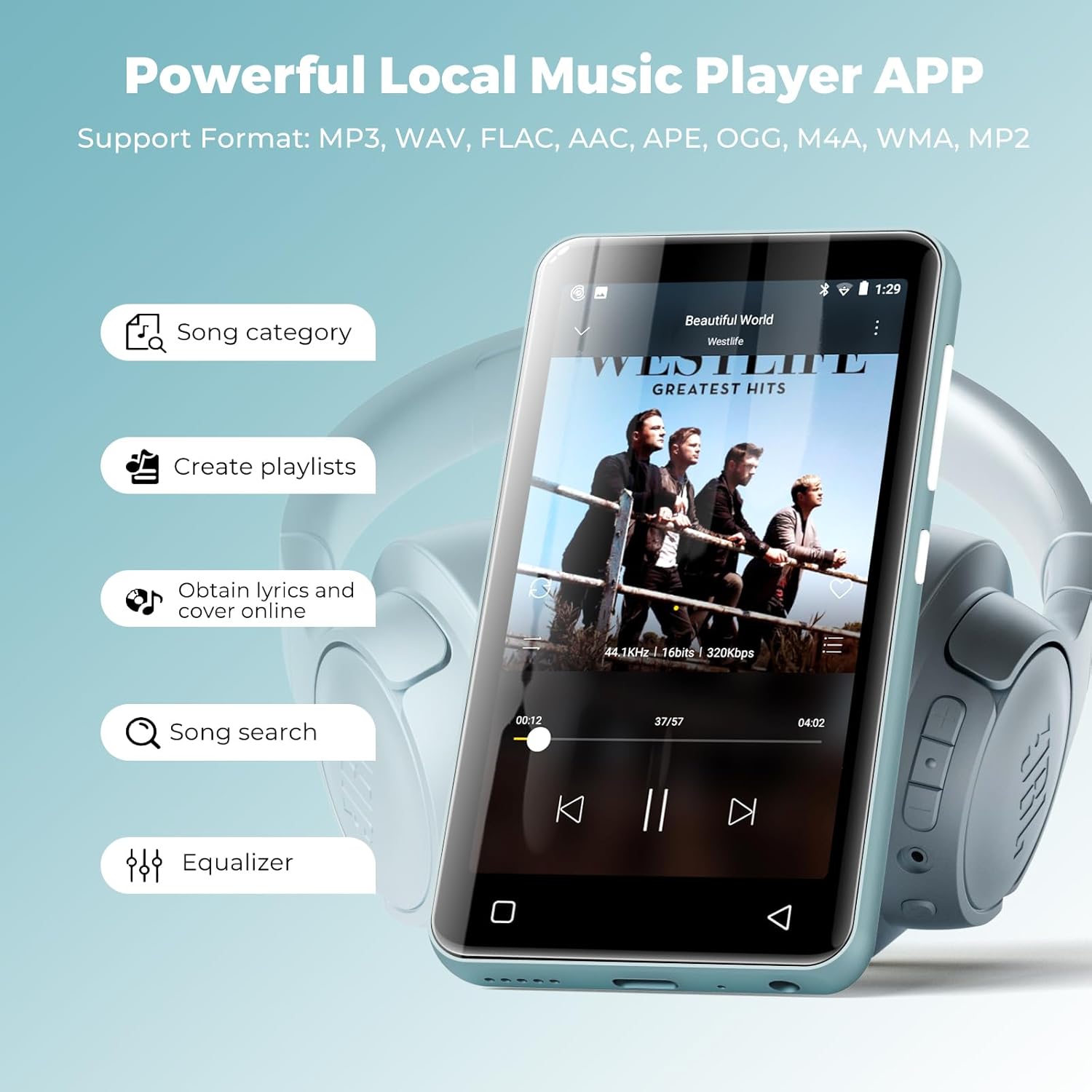
Figure 4.2: Local music player interface and features.
4.3. Audiobook Playback
The device comes pre-loaded with audiobook apps such as Audible, Libby, and Audiobooks. Launch the desired app, log in, and access your audiobook library.

Figure 4.3: Audiobook listening experience.
4.4. Reproducció de vídeo
The 4-inch HD touchscreen supports 720p or 1080p video playback. Compatible formats include AVI, MKV, MP4, MPEG, MOV, VOB, WMV, WEBM, DIVX, F4V, FLV, Xvid, 3GP, etc. Transfer video files to the device's internal storage or SD card and access them via the 'Videos' app.

Figure 4.4: Video playback on the device.
4.5. Gestió d'aplicacions i controls parentals
You can install new apps and update existing ones. The parental control feature requires your approval before any app can be downloaded. Apps that require Google Play services (e.g., YouTube, YouTube Music) are not supported. You can also easily uninstall apps to free up space.
- To Manage Apps: Vés a Configuració > Aplicacions i notificacions.
- Controls parentals: Accés Configuració > Control parental to set a password and manage app installation permissions.

Figure 4.5: Parental control settings interface.
4.6. Other Applets
The device includes a collection of handy apps such as FM radio, e-book reader, voice recorder, file manager, clock, calendar, and calculator.

Figura 4.6: Mésview of additional utility apps.
5. Especificacions
| Característica | Detall |
|---|---|
| Dimensions del producte | 0.39 x 2.36 x 4.33 polzades |
| Pes de l'article | 0.018 unces |
| Número de model de l'article | G3 |
| Bateries | Necessites 1 piles de ions de liti (incloses) |
| Marca | innioasi |
| Nom del model | G3 |
| Característiques especials | Equalizer, FM Radio, Hi-Res Audio, Video Playback, Voice Recorder |
| Tecnologia de connectivitat | Bluetooth, USB, Wi-Fi |
| Capacitat d'emmagatzematge de memòria | 160 GB (32GB internal + 128GB SD card) |
| Mida de la pantalla | 4 polzades |
| Tipus de suport | Micro SD, Micro SDHC, Micro SDXC, SD Card, SDHC |
| Tecnologia de visualització | LCD |
6. Manteniment
6.1. Atenció general
- Mantingueu el dispositiu sec i allunyat de temperatures extremes.
- Clean the screen with a soft, lint-free cloth. Avoid abrasive materials.
- Eviteu deixar caure el dispositiu o sotmetre-lo a forts impactes.
6.2. Cura de la bateria
- Charge the device regularly, but avoid leaving it fully charged or fully discharged for extended periods.
- Feu servir només el cable USB-C proporcionat per carregar.
7. Solució De Problemes
7.1. El dispositiu no s'encén
- Ensure the device is sufficiently charged. Connect it to a power source for at least 15 minutes before attempting to turn it on again.
- Premeu i manteniu premut el botó d'engegada durant 10-15 segons per realitzar un reinici forçat.
7.2. Unable to Connect to Wi-Fi/Bluetooth
- Verify that Wi-Fi/Bluetooth is enabled in the device settings.
- Ensure the network password is correct for Wi-Fi.
- For Bluetooth, ensure the target device is in pairing mode and within range.
- Restart both the MP3 player and the Wi-Fi router/Bluetooth device.
7.3. Apps Not Functioning Correctly
- Ensure the device has a stable internet connection if the app requires it.
- Esborra la memòria cau de l'aplicació: vés a Configuració > Aplicacions i notificacions, select the app, then Emmagatzematge i memòria cau, i toqueu Esborra la memòria cau.
- Note that apps requiring Google Play services are not supported on this device.
8. Garantia i Suport
All innioasis Bluetooth music players are backed by a 1-year warranty. For any inquiries or support needs, please contact our customer service team, available for 12 hours to ensure your complete satisfaction.


