Introducció
This manual provides essential information for the safe and efficient use of your Blaupunkt 40FGC5500S 40-inch Full HD Google TV. Please read it thoroughly before operating the device and retain it for future reference. This television combines Full HD LED display technology with the Google TV operating system, offering a wide range of entertainment options and smart features.
Configuració
1. Desembalatge i contingut
Traieu amb cura el televisor i tots els accessoris de l'embalatge. Assegureu-vos que hi hagi tots els components:
- Blaupunkt 40FGC5500S TV Unit
- Control remot
- Cable d'alimentació
- Suports de TV (2 peces) i cargols
- Manual d'usuari (aquest document)
Inspect the TV for any damage. If any damage is found, do not proceed with installation and contact customer support.

Davant view of the Blaupunkt 40FGC5500S 40-inch Full HD Google TV, showcasing la seva pantalla i els seus marcs prims.

Frontal inclinat view of the Blaupunkt 40FGC5500S 40-inch Full HD Google TV, providing a perspective of its design.
2. Instal·lació de l'estand
If placing the TV on a table, attach the two included stands to the bottom of the TV using the provided screws. Ensure the stands are securely fastened to prevent the TV from tipping.
3. Muntatge a la paret
The Blaupunkt 40FGC5500S is compatible with VESA 200x200 mm wall mounts. For wall mounting, remove the stands and follow the instructions provided with your wall mount bracket. Professional installation is recommended for safety.

posterior view of the Blaupunkt 40FGC5500S 40-inch Full HD Google TV, showing the VESA mounting pattern and connection panel.
4. Connexió de perifèrics
Connect external devices such as set-top boxes, gaming consoles, or sound systems to the TV's ports. The TV features 3 HDMI ports, 2 USB ports, an Ethernet (LAN) input, and a 3.5mm audio output.

lateral view of the Blaupunkt 40FGC5500S 40-inch Full HD Google TV, illustrating the accessible input ports for various devices.
5. Engegada i configuració inicial
Connect the power cable to the TV and a power outlet. Press the power button on the remote control or the TV. Follow the on-screen instructions to complete the initial setup, which includes:
- Selecció de la llengua
- Connexió de xarxa (Wi-Fi o Ethernet)
- Inici de sessió al compte de Google
- Configuració de l'Assistent de Google
- Channel scanning (if applicable)
En funcionament
1. Interfície de Google TV
Your Blaupunkt TV runs on Google TV, providing a personalized home screen with content recommendations from your subscriptions. Navigate using the remote control's directional pad and select button.

The Google TV interface on the Blaupunkt 40FGC5500S, displaying various streaming applications and content suggestions.
2. Control per veu amb l'Assistent de Google
Press the Google Assistant button on your remote control and speak into the microphone to search for content, control smart home devices, get answers, and more.

Icon indicating the voice control feature, powered by Google Assistant.
3. Accessing Applications
The Google TV home screen provides quick access to popular streaming services like Netflix, YouTube, and Google Play. You can download additional apps from the Google Play Store.

Icon representing the smart features and application access on the TV.
4. Connectivitat
- Wi-Fi 2T2R: Connecteu-vos a la xarxa sense fil de casa per accedir a Internet.
- Bluetooth 5.0: Pair wireless headphones, speakers, or other Bluetooth-enabled devices.
- Chromecast integrat: Emet contingut des del teu telèfon intel·ligent, tauleta o ordinador compatible directament al televisor.
5. Configuració d'imatge i so
Navigate to the settings menu to adjust picture modes (e.g., Standard, Vivid, Movie), brightness, contrast, and color. The TV supports HDR for enhanced visual detail. Audio settings allow you to customize sound profiles and volume levels from the integrated 16W speakers.

Icon representing the high-quality display and picture settings.
6. Característiques addicionals
- Guia electrònica de programes (EPG): View upcoming TV programs and schedule recordings (if external recording device is connected).
- Temporitzador de son: Configura el televisor perquè s'apagui automàticament després d'un període especificat.
- Bloqueig per a nens: Restrict access to certain channels or content.
Manteniment
1. Neteja del televisor
Before cleaning, unplug the TV from the power outlet. Use a soft, dry, lint-free cloth to gently wipe the screen and cabinet. Do not use liquid cleaners, aerosols, or abrasive materials, as they may damage the TV's surface.
2. Actualitzacions de programari
The TV may receive automatic software updates via the internet to improve performance and add new features. Ensure your TV is connected to the internet to receive these updates. You can also manually check for updates in the settings menu.
Resolució de problemes
Si teniu problemes amb el televisor, consulteu els problemes i solucions més comuns següents:
| Problema | Possible solució |
|---|---|
| Sense poder | Comproveu si el cable d'alimentació està connectat correctament tant al televisor com a la presa de corrent. Proveu una altra presa de corrent. |
| No hi ha imatge, però hi ha so | Assegureu-vos que heu seleccionat la font d'entrada correcta. Comproveu les connexions dels cables als dispositius externs. |
| No hi ha so, però hi ha imatge | Check volume levels and mute settings. Ensure external audio systems are properly connected and selected. |
| El comandament a distància no funciona | Canvieu les piles. Assegureu-vos que no hi hagi cap obstrucció entre el comandament a distància i el sensor d'infrarojos del televisor. |
| No es pot connectar a la Wi-Fi | Verifiqueu la contrasenya de la Wi-Fi. Reinicieu el router i el televisor. Assegureu-vos que el televisor estigui dins de l'abast de la vostra xarxa Wi-Fi. |
Si el problema persisteix després de provar aquestes solucions, poseu-vos en contacte amb l'atenció al client.
Especificacions
The following table details the technical specifications of the Blaupunkt 40FGC5500S 40-inch Full HD Google TV:
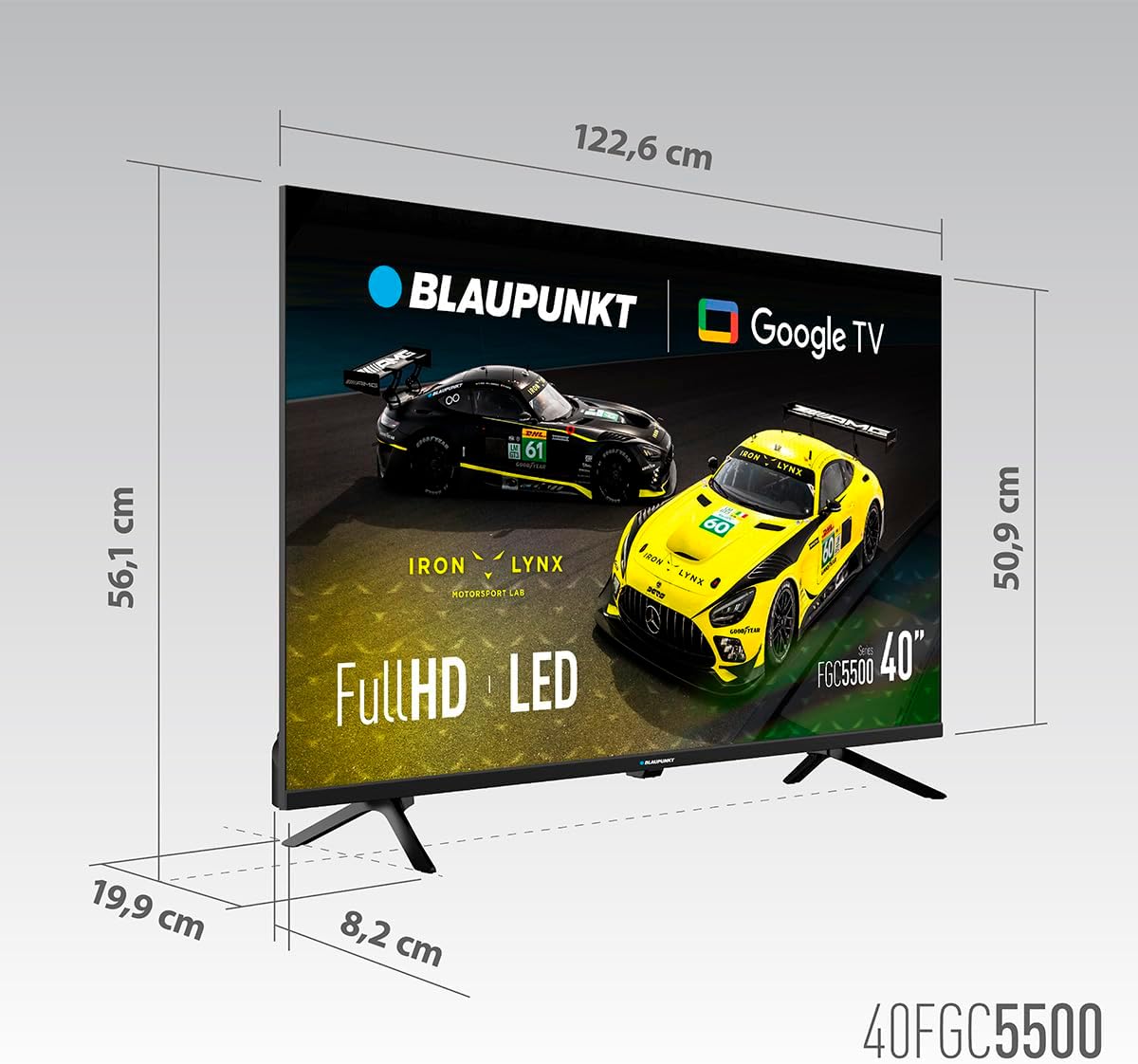
Dimensional diagram of the Blaupunkt 40FGC5500S 40-inch Full HD Google TV, showing its width, height, and depth.
| Característica | Detall |
|---|---|
| Marca | Blaupunkt |
| Nom del model | 40FGC5500S |
| Mida de la pantalla | 40 polzades (102 centímetres) |
| Tecnologia de visualització | LED |
| Tipus de visualització | VA |
| Resolució | 1920 x 1080 píxels (Full HD) |
| Freqüència d'actualització | 60 Hz |
| Sistema operatiu | Google TV |
| Connectivitat | Bluetooth 5.0, Ethernet, HDMI (3 ports), USB (2 ports), Wi-Fi 2T2R, 3.5mm Audio |
| Potència de sortida d'àudio | 16 watts (total) |
| Característiques especials | Built-in Speaker, Chromecast, Sleep Timer, Wide Viewing Angle, HDR |
| Compatibilitat de muntatge | VESA 200x200 mm (Wall Mount, Table Stand) |
| Dimensions del producte (LxWxH) | 89.3 x 19.9 x 56.1 cm |
| Pes del producte | 5.6 kg |
| Classificació d'eficiència energètica | F |
Garantia i Suport
Informació de la garantia
For detailed warranty information, please refer to the warranty card included with your product or visit the official Blaupunkt weblloc. La garantia normalment cobreix els defectes de fabricació durant un període especificat a partir de la data de compra.
Atenció al client
If you require technical assistance, have questions about your product, or need to report a fault, please contact Blaupunkt customer support. Contact details can usually be found on the official Blaupunkt weblloc web o a la documentació que s'inclou amb el televisor.


