1. Producte acabatview
The MCHOSE UT98 is a compact wireless mechanical keyboard designed for gaming and everyday use. It features a tri-mode connection, hot-swappable switches, a gasket structure for enhanced typing feel, and customizable RGB lighting.

Característiques principals:
- Connexió trimodal: Bluetooth 5.0, 2.4GHz Wireless, and USB-C Wired.
- Intercanviable en calent: Compatible with 3-pin and 5-pin mechanical switches.
- Estructura de muntatge de junta: Five layers of dampening material for a stable and quiet typing experience.
- RGB personalitzable: 16 million colors with various effects via MCHOSE HUB.
- Maneta integrada: For instant mute, precise volume control, and other functions.
- Llarga vida útil de la bateria: Bateria integrada de 8000 mAh per a un ús prolongat.
2. Contingut del paquet
Si us plau, assegureu-vos que tots els articles estiguin presents en desempaquetar:
- MCHOSE UT98 Wireless Mechanical Keyboard
- Extractor de tecla i interruptor
- Cable USB (USB-A a USB-C)
- 2.4GHz Wireless Receiver (stored within the keyboard)
- 2 x Replace Switches
- Funda antipols
- Manual d'usuari (aquest document)

3. Configuració i connectivitat
3.1 Engegada/apagada
Locate the power switch on the side of the keyboard. Slide it to the 'ON' position to power on the keyboard. Slide it to 'OFF' to power off.
3.2 Connexió trimodal
The UT98 supports three connection modes: 2.4GHz Wireless, Bluetooth 5.0, and USB-C Wired. A switch on the left side of the keyboard allows you to select the desired mode.

Mode sense fil de 2.4 GHz:
- Locate the 2.4GHz wireless receiver. It is stored in a magnetic compartment on the side of the keyboard. Press the 'PRESS' button to release it.
- Connecteu el receptor de 2.4 GHz a un port USB disponible de l'ordinador.
- Slide the mode switch on the keyboard to the 2.4GHz wireless icon.
- El teclat s'hauria de connectar automàticament.
Mode Bluetooth 5.0:
- Slide the mode switch on the keyboard to the Bluetooth icon.
- On your device (PC, laptop, smartphone, tablet), go to Bluetooth settings and search for new devices.
- Select "MCHOSE UT98" from the list of available devices to pair.
- The keyboard can connect to up to 3 devices and easily switch between them using FN + key combinations (refer to the user manual for specific key combinations).
Mode amb cable USB-C:
- Connecteu el cable USB-C proporcionat al port USB-C del teclat.
- Connecteu l'altre extrem del cable USB-C a un port USB disponible de l'ordinador.
- Slide the mode switch on the keyboard to the USB icon.
- The keyboard will function in wired mode and charge simultaneously.
3.3 Compatibilitat amb SO
The keyboard is optimized for both macOS and Windows. Use the following FN key combinations to switch between operating system layouts:
- FN + Q: Android
- FN + W: Windows
- FN + R: iOS
- FN + E: Mac

4. Instruccions de funcionament
4.1 Funcions dels botons
The integrated knob provides quick control over audio:
- Rotate Up: Volum +
- Rotate Down: Volum -
- Push Down: Silencia/Activa el silenci
4.2 Control d'il·luminació RGB
The UT98 features vibrant soft light RGB with 16 million customizable colors. You can fine-tune brightness, effects, and reactive modes.
- Canvia el mode RGB: Use FN + specific keys (refer to the included handy guide for exact combinations).
- Change Solid Color: Use FN + Tab.
- Change Pattern: Use FN + Backspace.
Note: The keycaps are non-shine-through, so the backlight will shine around the keys but not through the characters.
4.3 MCHOSE HUB Software
For advanced customization, download the MCHOSE HUB software. This allows you to:
- Crear i assignar macros.
- Customize key assignments.
- Set rhythm-based lighting effects.
- Configure various lighting modes.
5. Manteniment
5.1 Neteja
Regularly clean your keyboard to maintain performance and appearance. Use a soft, dry cloth to wipe down the surface. For deeper cleaning, you may remove keycaps.
5.2 Commutadors intercanviables en calent
The UT98 features hot-swappable PCB sockets, allowing you to change switches without soldering. Use the provided keycap and switch puller:
- Traieu suaument la tapa de les tecles amb l'extractor.
- Feu servir l'extractor d'interruptors per subjectar amb cura l'interruptor i estireu-lo cap amunt.
- Align the pins of the new switch with the holes on the PCB and press down firmly until it clicks into place.
- Substitueix la tapa de les tecles.

5.3 Switch Options
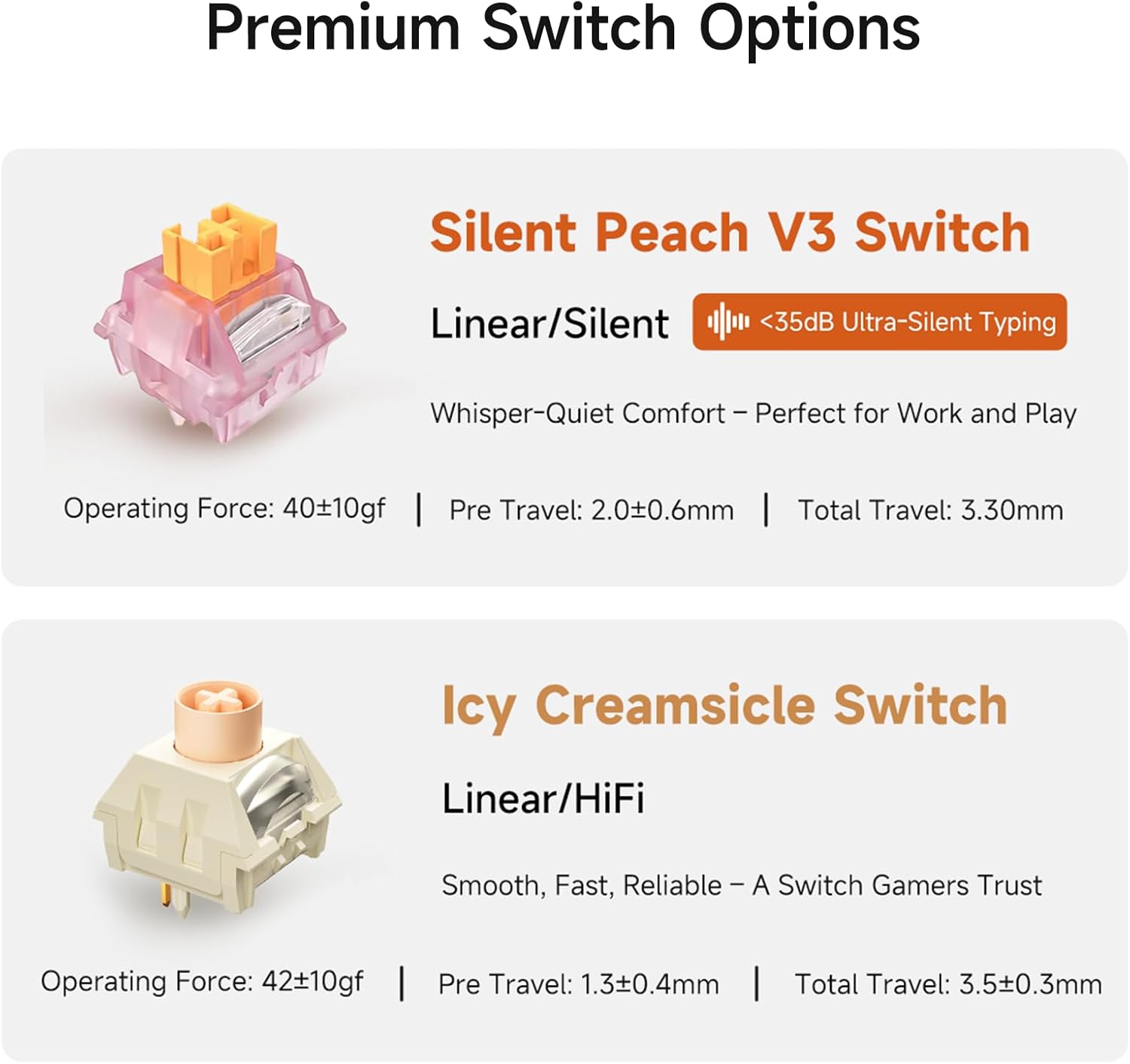
The UT98 offers premium switch options for different typing preferences:
- Silent Peach V3 Switch: Linear/Silent (<35dB Ultra-Silent Typing). Operating Force: 40±10gf, Pre Travel: 2.0±0.6mm, Total Travel: 3.30mm.
- Icy Creamsicle Switch: Linear/HiFi. Operating Force: 42±10gf, Pre Travel: 1.3±0.4mm, Total Travel: 3.5±0.3mm.
6. Solució De Problemes
If you encounter any issues with your MCHOSE UT98 keyboard, please try the following:
- Sense conexió: Ensure the mode switch is set correctly (2.4GHz, BT, or USB). For 2.4GHz, check if the dongle is properly inserted. For Bluetooth, ensure the keyboard is paired and within range. For wired, check the USB-C cable connection.
- RGB no funciona: Verify the keyboard is powered on. Use FN key combinations to cycle through lighting modes or adjust brightness. Check MCHOSE HUB software settings.
- Les tecles no responen: Ensure the keyboard is powered on and connected. If specific keys are not working, try re-seating or replacing the switch using the provided tools.
- Problemes de bateria: Charge the keyboard using the USB-C cable. If battery life is significantly shorter than expected, contact support.
7. Especificacions
| Característica | Detall |
|---|---|
| Marca | MCHOSE |
| Número de model | UT98 |
| Dimensions del producte | 15 cm de llargada x 5 cm d'amplada x 2 cm d'alçada (15 x 5 x 2 cm) |
| Pes de l'article | 40.7 lliures |
| Tecnologia de connectivitat | Sense fil de 2.4 GHz, BT5.0, USB-C |
| Descripció del teclat | Mecànica |
| Característiques especials | Backlit, Customizable Display Keys, Ergonomic, Hot-Swappable, Rechargeable |
| Suport de color de retroil·luminació del teclat | RGB |
| Bateries | 1 bateria no estàndard (inclosa) |
| Capacitat de la bateria | 8000mAh (up to 500 hours battery life) |
| Dispositius compatibles | Consola de jocs, ordinador portàtil, PC, telèfon intel·ligent, tauleta |
| Data de primera disponibilitat | 11 de setembre de 2025 |
8. Garantia i Suport
For warranty information and technical support, please refer to the official MCHOSE website or contact MCHOSE customer service directly. Keep your purchase receipt for warranty claims.
Additional support and resources may be available through the MCHOSE HUB software and online community.


