1. Informació important de seguretat
- No exposeu l'altaveu a temperatures extremes ni a la llum solar directa durant períodes prolongats.
- Keep the speaker away from heat sources, sharp objects, and corrosive materials.
- Do not disassemble, repair, or modify the speaker yourself. Contact qualified service personnel if needed.
- Assegureu-vos que la tapa del port de càrrega estigui ben tancada quan utilitzeu l'altaveu a prop de l'aigua per mantenir la seva classificació d'impermeabilitat IPX7.
- Feu servir només el cable de càrrega proporcionat o un cable USB-C certificat per carregar.
2. Contingut del paquet
- 1 x OHAYO X10 Max Bluetooth Speaker (White)
- 1 x USB-C Charging Cable (charging plug not contained)
- 1 cable AUX de 3.5 mm
- 1 x Manual d'usuari
- 1 x cordó
3. Producte acabatview
The OHAYO X10 Max is a versatile portable Bluetooth speaker designed for high-quality audio and durability. It features a powerful 25W sound output with active bass, IPX7 waterproofing, and a long-lasting 24-hour battery. Enjoy dynamic sound with colorful RGB lighting effects, dual pairing for stereo sound, and multiple input modes.
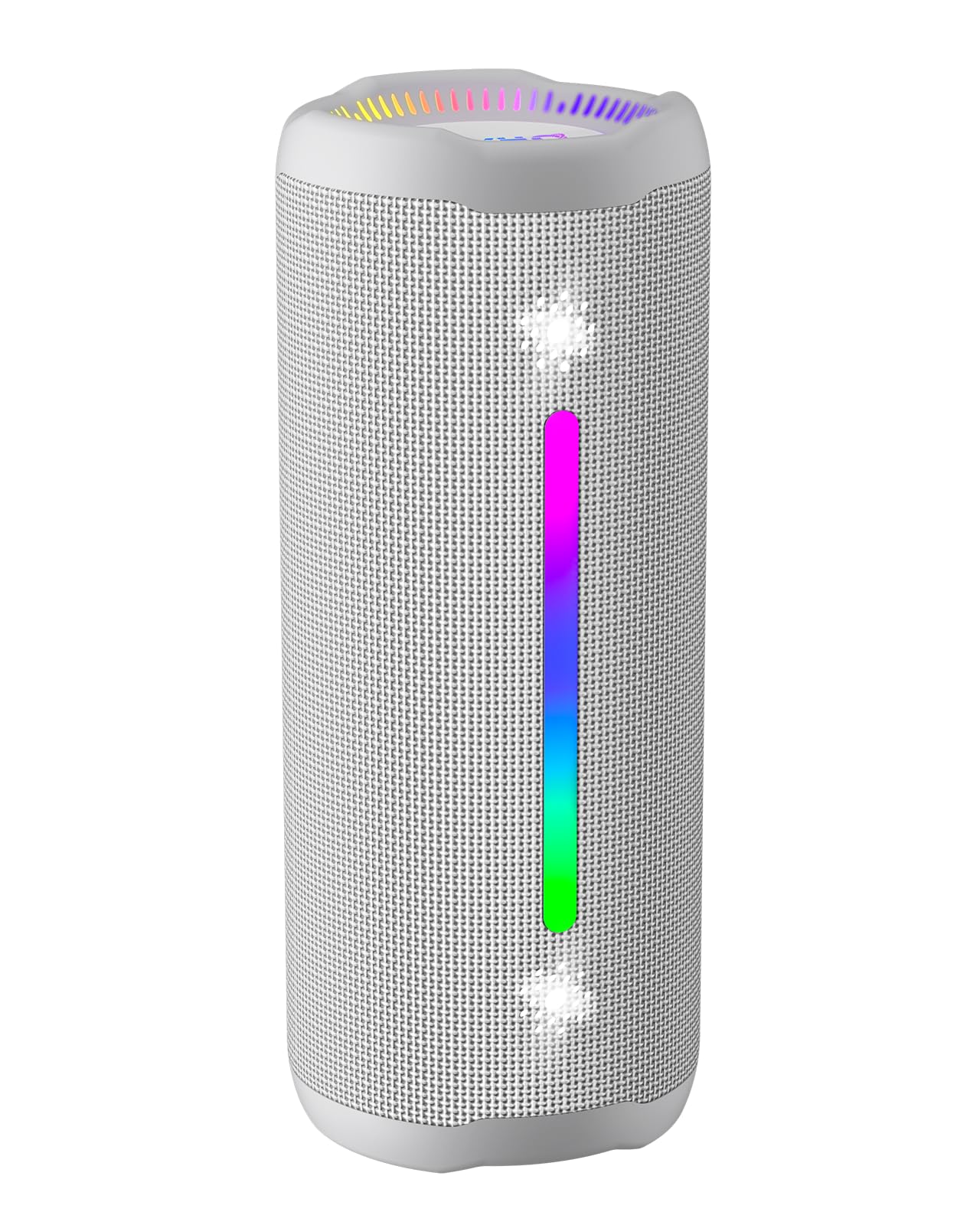
Figure 3.1: OHAYO X10 Max Bluetooth Speaker (White)

Figure 3.2: OHAYO X10 Max Bluetooth Speaker - Fully upgraded from appearance to performance.

Figure 3.3: 25W Deep Bass Sound - Independent channel design for accurate audio performance.

Figure 3.4: 6 Dazzling RGB Light Effects - Syncs with music for an immersive experience.

Figure 3.5: IPX7 Waterproof - Highly sealed design for use in various environments.

Figure 3.6: 24H Ultra-Long Battery Life - 6600mAh battery for extended playback.
4. Controls i indicadors
The OHAYO X10 Max features intuitive controls for easy operation.

Figure 4.1: Control Panel and Ports
- Botó d'encesa: Press and hold to power on/off. Short press to switch between input modes (Bluetooth, AUX, TF Card, USB-Audio).
- Pujar volum (>): Premeu curt per augmentar el volum. Premeu llargament per passar a la següent pista.
- Baixar volum (<): Premeu curt per baixar el volum. Premeu llargament per anar a la pista anterior.
- Botó de baix: Press to activate/deactivate Bass Boost mode.
- Botó Reproduir/Pausa/Trucada: Premeu curt per reproduir/pausar música. Premeu curt per contestar/finalitzar trucades. Premeu llargament per rebutjar trucades. Premeu dues vegades per activar l'assistent de veu.
- Llums indicadores de bateria: Four LED lights indicate battery level.
- Tira de llum RGB: Displays various colorful lighting effects.
- Port de càrrega (USB-C): Per carregar l'altaveu.
- Port d'entrada AUX: Per a connexió d'àudio amb cable.
- Ranura per a targetes TF: For playing music directly from a MicroSD card.
5. Configuració
5.1 Càrrega de l'altaveu
Before first use, fully charge the speaker. Connect the provided USB-C charging cable to the speaker's charging port and the other end to a 5V/2A USB power adapter (not included). The battery indicator lights will blink during charging and remain steady when fully charged.
5.2 Engegada/apagada
Press and hold the Power button for approximately 3 seconds to turn the speaker on or off. A voice prompt will confirm the action.
5.3 Vinculació Bluetooth
- Turn on the speaker. It will automatically enter Bluetooth pairing mode, indicated by a blinking blue LED.
- Activa el Bluetooth al teu dispositiu (telèfon intel·ligent, tauleta, etc.).
- Cerca "X10 Max" in your device's Bluetooth list and select it to connect.
- Un cop connectat, un missatge de veu confirmarà l'emparellament correcte.
5.4 Emparellatge estèreo sense fil veritable (TWS)
To achieve a true wireless stereo experience, you can pair two OHAYO X10 Max speakers together.

Figura 5.1: Emparellatge estèreo sense fil veritable
- Ensure both X10 Max speakers are powered on and not connected to any other Bluetooth device.
- En un altaveu (aquest serà l'altaveu principal), premeu dues vegades el botó d'engegada. Entrarà en mode d'emparellament TWS.
- The two speakers will automatically connect to each other. A voice prompt will confirm successful TWS pairing.
- Ara, connecteu el dispositiu a l'altaveu principal mitjançant Bluetooth tal com es descriu a la secció 5.3.
5.5 Connecting via AUX
Use the provided 3.5mm AUX cable to connect the speaker to devices without Bluetooth capability.
Figure 5.2: 4 Input Modes - Including AUX, TF, and USB-Audio.
- Connect one end of the AUX cable to the speaker's AUX-in port.
- Connecteu l'altre extrem a la sortida d'àudio del vostre dispositiu.
- The speaker will automatically switch to AUX mode. If not, short press the Power button to cycle through modes until AUX mode is activated.
5.6 Ús de la targeta TF
Insert a MicroSD (TF) card with MP3/WAV/FLAC/WMA audio files into the TF card slot. The speaker will automatically switch to TF card mode and begin playback. Short press the Power button to cycle through modes if needed.
5.7 Using USB-Audio
Connect the speaker to a computer using the USB-C cable. The speaker can function as an external audio output device for your computer. Short press the Power button to cycle through modes if needed.
6. Instruccions de funcionament
6.1 Reproducció de música
- Reproduir/pausa: Short press the Play/Pause/Call button.
- Control de volum: Short press the Volume Up (>) or Volume Down (<) buttons.
- Pista següent: Long press the Volume Up (>) button.
- Pista anterior: Long press the Volume Down (<) button.
6.2 Funció de reforç de greus
Press the 'BASS' button to activate or deactivate the enhanced bass mode. This feature provides deeper and richer low frequencies for a more impactful audio experience.
6.3 modes de llum RGB
The speaker features dynamic RGB lighting. The lights will automatically sync with the music beat. To turn the lights on/off, refer to the specific control instructions in your quick start guide or experiment with the mode button if available.
6.4 Trucades de mans lliures
When connected via Bluetooth to your smartphone, the speaker can be used for hands-free calls.

Figura 6.1: Funció de trucades de mans lliures
- Respondre/Finalitzar la trucada: Short press the Play/Pause/Call button.
- Rebutja la trucada: Long press the Play/Pause/Call button.
- Activa l'Assistent de veu: Double press the Play/Pause/Call button.
7. Manteniment
- Neteja: Netegeu l'altaveu amb un suau, damp tela. No utilitzeu productes químics aggressivs ni netejadors abrasius.
- Emmagatzematge: Guardeu l'altaveu en un lloc fresc i sec, allunyat de la llum solar directa i de temperatures extremes quan no l'utilitzeu durant períodes prolongats.
- Cura de la bateria: Per allargar la durada de la bateria, carregueu l'altaveu almenys un cop cada tres mesos si no l'utilitzeu regularment.
8. Solució De Problemes
| Problema | Causa possible | Solució |
|---|---|---|
| L'altaveu no s'encén. | Bateria baixa. | Carregueu l'altaveu completament. |
| No es pot emparellar per Bluetooth. | L'altaveu no està en mode d'emparellament; el Bluetooth del dispositiu està desactivat; massa lluny del dispositiu. | Ensure speaker is in pairing mode (blinking blue LED). Turn on device Bluetooth. Move device closer to speaker (within 10 meters). |
| Sense so o amb un volum baix. | Volum massa baix a l'altaveu o al dispositiu; mode d'entrada incorrecte. | Increase volume on both speaker and device. Check if the correct input mode (Bluetooth, AUX, TF) is selected. |
| L'emparellament TWS ha fallat. | Speakers too far apart; one speaker already connected to another device. | Ensure speakers are close to each other. Disconnect any existing Bluetooth connections before TWS pairing. |
| Distorsió del so. | Volum massa alt; bateria baixa. | Baixa el volum. Carrega l'altaveu. |
9. Especificacions
| Característica | Especificació |
|---|---|
| Nom del model | X10 màx |
| Versió Bluetooth | 5.3 |
| Tecnologia de comunicació sense fils | Bluetooth |
| Potència de sortida màxima dels altaveus | 35 Watts (25W effective) |
| Capacitat de la bateria | 6600 mAh |
| Hora de joc | Up to 24 hours (varies with volume and light use) |
| Nivell de resistència a l'aigua | IPX7 (impermeable) |
| Entrada Voltage | 5 volts (CC) |
| Resposta de freqüència | 20 kHz |
| Ràtio senyal / soroll | 80 dB |
| Tipus de controlador d'àudio | Conductor dinàmic |
| Diàmetre del woofer | 75 mil·límetres |
| Diàmetre del Tweeter | 26 mil·límetres |
| Dimensions del producte | 2.95 "P x 2.95" W x 7.28" H |
| Pes de l'article | 450 grams (15.9 unces) |
| Material | Acrilonitril butadiè estirè (ABS), alumini |
| Mètode de control | Pulsador |
| Característiques especials | Bass Boost, AUX, Hi-Res Audio, 24-Hour Playtime, IPX7 Waterproof, TF Card Port, Dual Passive Radiators, Hands-free, True Wireless Stereo Pairing, Shockproof |
10. Garantia i Suport
The OHAYO X10 Max Bluetooth Speaker comes with an extended warranty. For specific warranty details and to register your product, please refer to the information provided in your quick start guide or contact OHAYO customer support.
For technical support or customer service inquiries, please contact OHAYO Direct. Contact information may be found in your product packaging or on the official OHAYO weblloc.
11. Vídeo oficial del producte
Video 11.1: Official OHAYO Portable Bluetooth Speaker overview by OHAYO Direct. This video highlights key features and design elements of the speaker.


