1. Acabatview
The Dell Pro 24 All-in-One QC24251 Desktop Computer is a versatile and compact computing solution designed for productivity and multimedia. It integrates all essential computer components into a single, sleek 23.8-inch Full HD touchscreen display, minimizing clutter and maximizing workspace efficiency. This model features a powerful 14th Generation Intel Core i5-14500T processor, ample 32GB DDR5 RAM, and a fast 1TB NVMe SSD, ensuring smooth performance for various tasks. It comes pre-installed with Windows 11 Pro, offering advanced features for business and personal use.
Key features include a vibrant 23.8" Full HD (1920x1080) IPS Multi-Touch Display, integrated Intel UHD Graphics, and a convenient pop-up Full HD HDR Camera for enhanced video conferencing. The system also boasts integrated stereo speakers for clear audio and a range of connectivity options including DisplayPort 1.4a, multiple USB ports (including USB 3.2 Gen 2 with PowerShare and USB-C 3.2 Gen 2), and Gigabit Ethernet.
2. Què hi ha a la caixa
Upon unpacking your Dell Pro 24 All-in-One QC24251, please ensure all the following items are present:
- Dell Pro 24 All-in-One QC24251 Desktop Computer
- Teclat
- Ratolí
- Adaptador de A / C
- Guia de configuració ràpida

Figure 2.1: Dell Pro 24 All-in-One Desktop Computer with its accompanying keyboard and mouse.
3. Instruccions de configuració
- Desempaquetar el sistema: Carefully remove the Dell Pro 24 All-in-One computer and all accessories from the packaging. Place the computer on a stable, flat surface.
- Connecteu el teclat i el ratolí: Connect the included keyboard and mouse to the available USB ports on the rear of the computer.
- Connecteu l'adaptador d'alimentació: Plug the A/C adapter into the power port on the back of the computer, then plug the other end into a wall outlet.
- Encès: Press the power button, usually located on the side or bottom bezel of the display. The computer will boot up and guide you through the initial Windows 11 Pro setup process.
- Configuració inicial de Windows: Follow the on-screen instructions to configure Windows 11 Pro, including language, region, network connection, and user account creation.
4. Operating the Computer
4.1. Pantalla i pantalla tàctil
The 23.8-inch Full HD IPS display offers vibrant visuals and wide viewing angles. It is a multi-touch screen, allowing for intuitive interaction with Windows 11 Pro using gestures such as tapping, swiping, pinching, and zooming directly on the screen.
4.2. Pop-Up Weblleva
The integrated Full HD HDR webcam is designed for privacy and convenience. It is located at the top of the display and can be manually extended or retracted. To use the webcam, gently press on its top edge to make it pop up. To retract it, push it back down until it clicks into place. The High Dynamic Range (HDR) technology automatically adjusts clarity for optimal video quality during calls.
4.3. Integrated Audio
The Dell Pro 24 features integrated stereo speakers for clear audio output. For private listening, connect a headset to the side-facing 3.5mm audio jack.
4.4. Ports i connectivitat
The computer provides a variety of ports for connecting peripherals and external devices:
- DisplayPort 1.4a: Per connectar un monitor extern.
- Headphones/Mic Combo Jack: Per a l'entrada/sortida d'àudio.
- LAN (Gigabit Ethernet): Per a la connexió de xarxa amb cable.
- USB 3.2 Gen 2 (PowerShare): High-speed USB port with power delivery for charging devices even when the computer is off.
- USB 2.0 (SmartPower On): Standard USB ports with SmartPower On feature.
- USB 3.2 Gen 1: Standard high-speed USB ports.
- USB-C 3.2 Gen 2: Versatile high-speed USB-C port.
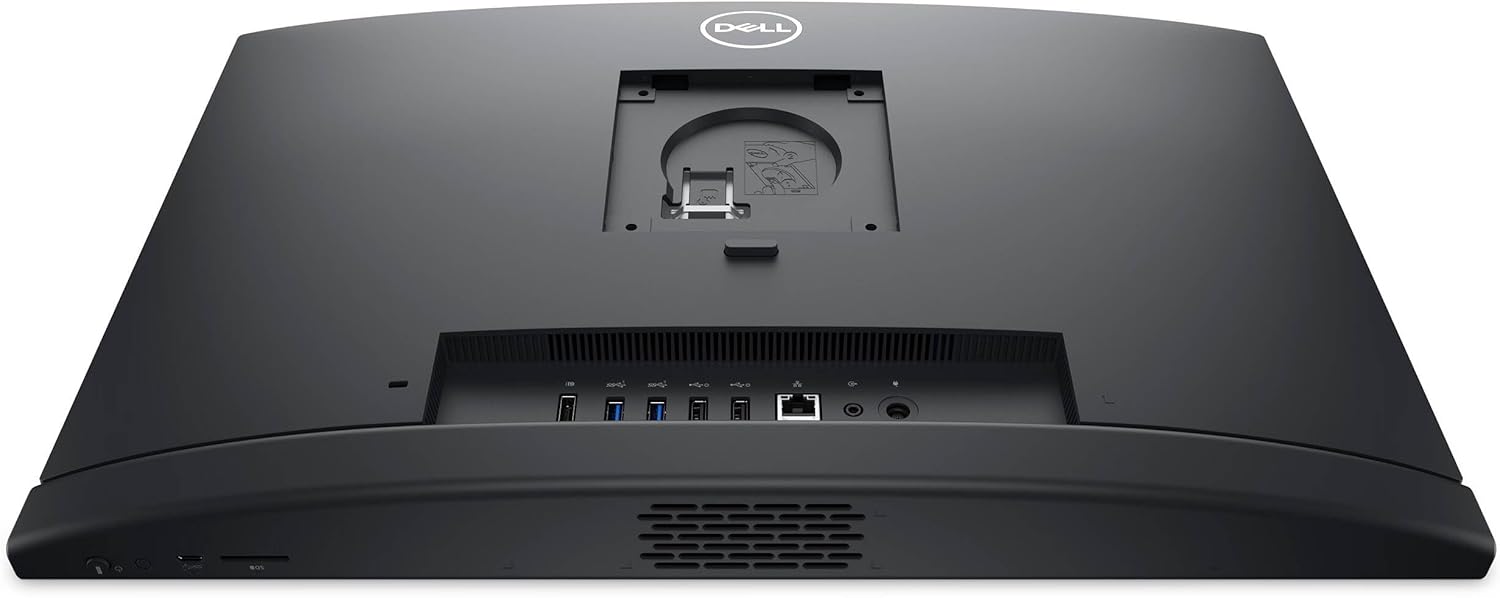
Figura 4.1: posterior view illustrating the available ports for connectivity.
5. Especificacions
| Característica | Detall |
|---|---|
| Processador | 14th Generation Intel Core i5-14500T (14-Core, up to 4.80 GHz) |
| RAM | 32 GB DDR5 4800 MHz |
| Emmagatzematge | Unitat d'estat sòlid M.2 PCIe NVMe d'1 TB |
| Mostra | 23.8" Full HD (1920x1080) IPS Multi-Touch Display |
| Gràfics | Gràfics Intel UHD |
| Sistema operatiu | Windows 11 Pro (64 bits) |
| Weblleva | Pop-up Full HD HDR Camera |
| Àudio | High Definition Audio, Integrated Stereo Speakers |
| Ports | 1x DisplayPort 1.4a, 1x Headphones/Mic, 1x LAN (Gigabit Ethernet), 1x USB 3.2 Gen 2 (PowerShare), 2x USB 2.0 (SmartPower On), 2x USB 3.2 Gen 1, 1x USB-C 3.2 Gen 2 |
| Connectivitat sense fil | 802.11ax, Bluetooth |
| Seguretat | TPM 2.0 Security Chip |
| Dimensions (LxWxH) | 21.3 x 2.3 x 13.9 polzades |
| Pes | 12.37 lliures |
6. Manteniment
To ensure the longevity and optimal performance of your Dell Pro 24 All-in-One computer, regular maintenance is recommended:
- Neteja: Feu servir un drap suau i sense borrissol per netejar la pantalla i les superfícies exteriors. Per a la pantalla, es pot utilitzar un netejador de pantalles especialitzat. Eviteu productes químics agressius.
- Actualitzacions de programari: Regularly update your Windows operating system and drivers to ensure security and performance enhancements.
- Eliminació de pols: Periodically clean the vents to prevent dust buildup, which can affect cooling and performance. Use compressed air for this purpose.
- Còpia de seguretat de dades: Fes còpies de seguretat de les dades importants regularment en un disc dur extern o en un emmagatzematge al núvol per evitar la pèrdua de dades.
7. Solució De Problemes
If you encounter issues with your Dell Pro 24 All-in-One, try the following basic troubleshooting steps:
- Sense energia: Ensure the power adapter is securely connected to both the computer and a working wall outlet. Try a different outlet if necessary.
- Problemes de visualització: If the screen is blank, ensure the computer is powered on. If an external monitor is connected, try disconnecting it to see if the internal display works.
- Perifèric no funciona: If a keyboard, mouse, or other USB device is not responding, try connecting it to a different USB port. Ensure drivers are up to date.
- Rendiment lent: Close unnecessary applications, check for malware, and ensure sufficient free storage space on your SSD.
- Restauració del sistema: Windows 11 Pro offers system restore options that can revert your computer to a previous working state without affecting your personal files.
For more complex issues, refer to the Dell support weblloc o contacteu amb el servei d'atenció al client.
8. Garantia i Suport
The Dell Pro 24 All-in-One QC24251 Desktop Computer comes with a 2-Year Warranty by Techno Intelligence & Free Tech SupportAquesta garantia cobreix defectes de fabricació i fallades de maquinari en condicions d'ús normals.
Additionally, Dell offers various protection plans for extended coverage and enhanced support:
- Pla de protecció de 3 anys: Provides extended coverage for your device.
- Protecció completa: A comprehensive plan that covers all eligible past and future purchases, available on a monthly subscription basis.
For warranty claims, technical assistance, or to inquire about protection plans, please visit the official Dell support weblloc o poseu-vos en contacte amb el seu servei d'atenció al client.


