1. Introducció
The OTTOCAST MINI Slim is a compact wireless adapter designed to convert your vehicle's existing wired CarPlay and Android Auto systems into wireless functionality. This device simplifies your in-car connectivity, eliminating the need for physical cable connections to your smartphone.
By enabling wireless access to navigation, music, communication, and other applications directly on your car's display, the MINI Slim enhances driving convenience and efficiency. It also contributes to preserving your smartphone's battery life by removing the constant need for wired charging during use.
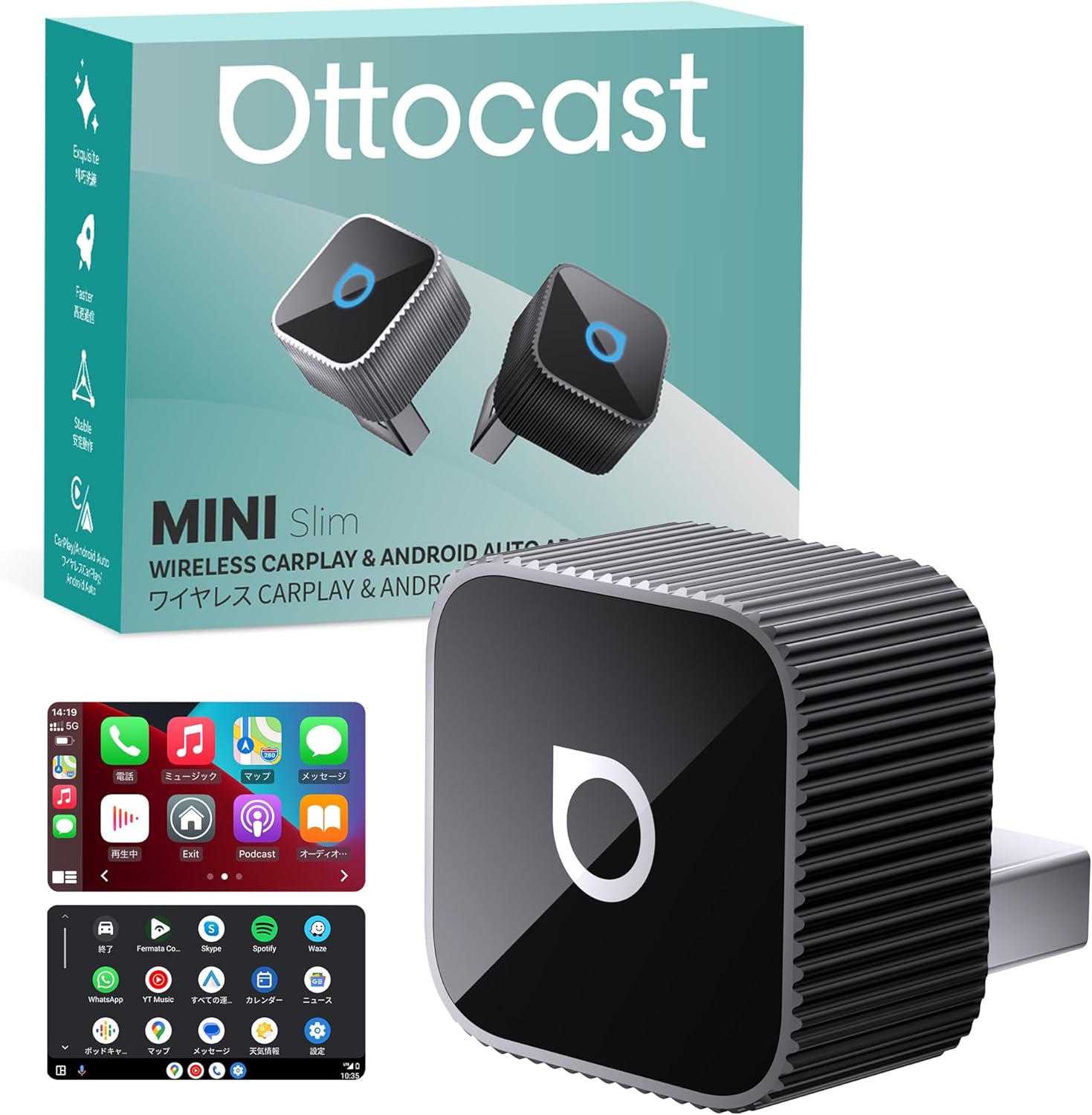
Image 1.1: OTTOCAST MINI Slim adapter, packaging, and a car display demonstrating wireless CarPlay.
2. Producte acabatview
2.1 Característiques clau
- Wireless Conversion: Transforms wired CarPlay and Android Auto into wireless connections.
- Disseny compacte: Ultra-small dimensions (20.7 x 20.7 x 23.5 mm) and lightweight (30g) for discreet integration.
- Connectivitat estable: Equipped with Dual WiFi (2.4GHz + 5GHz) and Bluetooth 5.0 for reliable and fast communication.
- Reconnexió automàtica: Features smart memory to automatically reconnect within 5 seconds after initial pairing, supporting up to two smartphones.
- Suport de control per veu: Compatible with voice assistants like Siri and Google Assistant for hands-free operation.
- Integració d'aplicacions: Supports various applications including navigation (Google Maps, Apple Maps, NAVITIME), music streaming (Spotify, LINE MUSIC, Amazon Music), and messaging (LINE).
- Dissipació de calor eficient: Constructed with an aluminum alloy body for high thermal conductivity, ensuring stable performance over extended use.
- Certificacions de seguretat: TELEC certified (220-JP7656) and includes multiple protection systems against overvoltage, sobrecorrent, curtcircuit i sobreescalfament.
2.2 Contingut del paquet
Si us plau, assegureu-vos que tots els articles estiguin presents en desempaquetar:
- OTTOCAST MINI Slim Main Unit
- USB Type-A to Type-C Conversion Adapter
- Manual d'usuari

Image 2.1: Visual representation of the OTTOCAST MINI Slim package contents and safety certifications.
3. Instruccions de configuració
Follow these simple steps to set up your OTTOCAST MINI Slim adapter:
- Connecteu l'adaptador: Plug the OTTOCAST MINI Slim into your car's USB port. Ensure it is securely inserted.
- Espereu la visualització: After plugging in, wait for the connection user interface to appear on your car's display.
- Emparella amb telèfon intel·ligent: On your smartphone, enable both Wi-Fi and Bluetooth. Cerca Bluetooth devices and select "CAR2-OOOO" (the specific name may vary slightly) to pair.
Once paired, the system will automatically connect in subsequent uses, typically within 5 seconds of starting your vehicle, provided your smartphone's Wi-Fi and Bluetooth are enabled.

Image 3.1: Step-by-step guide for initial setup and pairing.

Image 3.2: Illustration of the automatic connection process upon vehicle startup.
4. Instruccions de funcionament
The OTTOCAST MINI Slim allows you to control your CarPlay or Android Auto interface using various methods, maintaining the original functionality of your vehicle's system.
4.1 Mètodes de control
- Funcionament de la pantalla tàctil: Interact directly with the car's display using touch gestures, similar to your smartphone.
- Controls del volant: Utilize your vehicle's built-in steering wheel buttons for functions like music playback, call management, and volume adjustment.
- Control de veu: Activate Siri (for CarPlay) or Google Assistant (for Android Auto) by saying "Hey Siri" or "OK Google" to perform tasks hands-free, such as getting directions, making calls, or playing music.
- Control del botó: If your vehicle is equipped with a control knob, you can use it to navigate the interface without diverting your gaze from the road.

Image 4.1: Demonstrating touch, steering wheel, voice, and knob controls.
4.2 Supported Applications
Enjoy a wide range of applications wirelessly on your car's large screen:
- Navegació: Google Maps, Apple Maps, NAVITIME
- Música: Spotify, LINE MUSIC, Amazon Music
- Comunicació: Phone calls, Messages, LINE
- Altres: Radiko, Audible, and other CarPlay/Android Auto compatible apps.

Imatge 4.2: Ex.amples of supported applications on the car's display.
5. Compatibilitat
The OTTOCAST MINI Slim is designed for broad compatibility, but certain requirements must be met.
5.1 Smartphone Requirements
- Dispositius iOS: iOS 10 o posterior.
- Dispositius Android: Android OS 11 or later, including some Samsung and Google smartphones.
5.2 Vehicle Requirements
The adapter is compatible with over 98% of vehicles equipped with factory-wired CarPlay or Android Auto. Please note the following:
- Your vehicle must have a factory-installed wired CarPlay or Android Auto system. Wireless-only CarPlay/Android Auto systems are not compatible.
- Your vehicle must have a communication-enabled USB port (Type-A or Type-C).
- Your vehicle's audio display must be touch panel compatible.
- Vehicles incompatibles: BMW and MINI vehicles are not supported.
Supported car brands include, but are not limited to: Audi, Benz, Porsche, VW, Kia, Honda, Nissan, Ford, Lexus, Toyota, Volvo, Cadillac, Chevrolet, Citroen, and Peugeot.

Imatge 5.1: acabatview of compatible car brands and smartphone OS versions.
5.3 Comprovació de compatibilitat
Before purchase, it is highly recommended to verify your vehicle and smartphone compatibility. You can use the following resources:
- Visit the official compatibility checker: https://check.adaptermanual.com/AMZ/
- Check for CarPlay or Android Auto icons in your car's UI to confirm wired system presence.
- Consult your car dealer for confirmation.

Image 5.2: Scan this QR code to access the online compatibility checker.

Image 5.3: Visual guide to compatibility requirements.

Image 5.4: How to identify wired CarPlay/Android Auto in your vehicle's interface.
6. Manteniment
To ensure the longevity and optimal performance of your OTTOCAST MINI Slim adapter, follow these general maintenance guidelines:
- Mantenir sec: Eviteu exposar el dispositiu a humitat o líquids.
- Netegeu suaument: Feu servir un drap suau i sec per netejar el dispositiu. No utilitzeu productes químics agressius ni materials abrasius.
- Eviteu temperatures extremes: Do not expose the device to extremely high or low temperatures, as this can affect its internal components.
- Emmagatzematge adequat: Quan no l'utilitzeu durant períodes prolongats, guardeu el dispositiu en un lloc fresc i sec.
7. Solució De Problemes
If you encounter issues with your OTTOCAST MINI Slim, refer to the following common problems and solutions:
- Connection Issues (Initial Setup):
Ensure the adapter is fully inserted into the USB port. Verify that your smartphone's Wi-Fi and Bluetooth are both enabled and that you are attempting to pair with the correct device name ("CAR2-OOOO"). Restarting your car's infotainment system or the adapter itself may resolve temporary glitches. - Frequent Disconnections or Lag:
The MINI Slim is designed for stable communication using Dual WiFi and Bluetooth 5.0. If you experience frequent disconnections or significant lag, ensure there are no other devices causing wireless interference in the vehicle. Try restarting both the adapter and your smartphone. Ensure your car's USB port provides stable power. - Audio Skipping or Interruption:
This can sometimes occur due to wireless interference or a weak signal. Ensure your phone is close to the adapter and there are no physical obstructions. If the issue persists, check for firmware updates (see FOTA Update section below). - Adaptador no reconegut pel cotxe:
Confirm your vehicle has a factory-wired CarPlay or Android Auto system and a communication-enabled USB port. Some USB ports are for charging only. Refer to your car's manual or consult your dealer. - FOTA (Firmware Over-The-Air) Update:
Regularly check for and install firmware updates to ensure optimal performance and compatibility. To update, connect your iPhone to the adapter's Wi-Fi and enter "192.168.1.101" in your browser. For Android devices, refer to the detailed instructions in the user manual.

Image 7.1: FOTA update interface for maintaining optimal device performance.
8. Especificacions
| Número de model | CP88 |
| Dimensions | 20.7 x 20.7 x 23.5 mm |
| Pes | 30 g |
| Material | Aliatge d'alumini |
| Connectivitat | USB (Wired to car), Dual WiFi (2.4GHz + 5GHz), Bluetooth 5.0 (Wireless to phone) |
| Característiques sense fil | Wireless CarPlay, Wireless Android Auto |
| Tipus de controlador | Touch, Voice, Knob, Touch Panel, Steering Wheel Control |
| Dispositius compatibles | Car Navigation Systems, Smartphones (iOS 10+, Android 11+) |
| Color | Negre |
| UPC | 725414685550 |
| Certificacions | TELEC (220-JP7656) |
9. Garantia i Suport
OTTOCAST is committed to providing high-quality products and excellent customer service. The OTTOCAST MINI Slim comes with comprehensive support and warranty coverage.
9.1 Informació de la garantia
Your OTTOCAST MINI Slim adapter is covered by a garantia d'un any des de la data de compra. Aquesta garantia cobreix defectes de fabricació i avaries en condicions d'ús normal.
9.2 Atenció al client
If you have any questions regarding the use, setup, or troubleshooting of your device, please do not hesitate to contact our customer support team. We are dedicated to assisting you and ensuring a satisfactory user experience.
In the event of a product malfunction covered under warranty, we offer free exchanges. Please contact our support team for assistance with warranty claims or any other inquiries.

Image 9.1: OTTOCAST's commitment to product quality and customer satisfaction.


