1. Introducció
This user manual provides comprehensive instructions for the installation, operation, and maintenance of your NIVIAN NVS-MINICURTAIN-WR-KIT WiFi Roller Shutter Controller. This device is designed to integrate motorized blinds and awnings into your smart home system, offering control via the Tuya Smart app, an included RF remote, and voice assistants like Amazon Alexa and Google Assistant. Please read this manual thoroughly before use to ensure proper functionality and safety.
2. Informació de seguretat
- Instal·lació elèctrica: Installation should only be performed by a qualified electrician or a person with sufficient knowledge of electrical systems. Ensure the main power supply is disconnected before installation.
- Voltage Compatibilitat: Comproveu que la font d'alimentació voltage matches the device's specifications (100-240V AC, 50/60Hz).
- Protecció de sobrecàrrega: Do not exceed the maximum current rating of 3A. The device includes overvoltagprotecció.
- Seguretat del material: The device is constructed with flame-retardant materials for enhanced safety.
- Medi ambient: No exposeu el dispositiu a la humitat, temperatures extremes ni ambients corrosius.
- Nens i animals de companyia: Mantingueu el dispositiu i els seus components fora de l'abast dels nens i les mascotes.
3. Contingut del paquet
El paquet ha de contenir els elements següents:
- NIVIAN NVS-MINICURTAIN-WR-KIT WiFi Roller Shutter Controller
- Comandament a distància RF
- Manual d'usuari (aquest document)
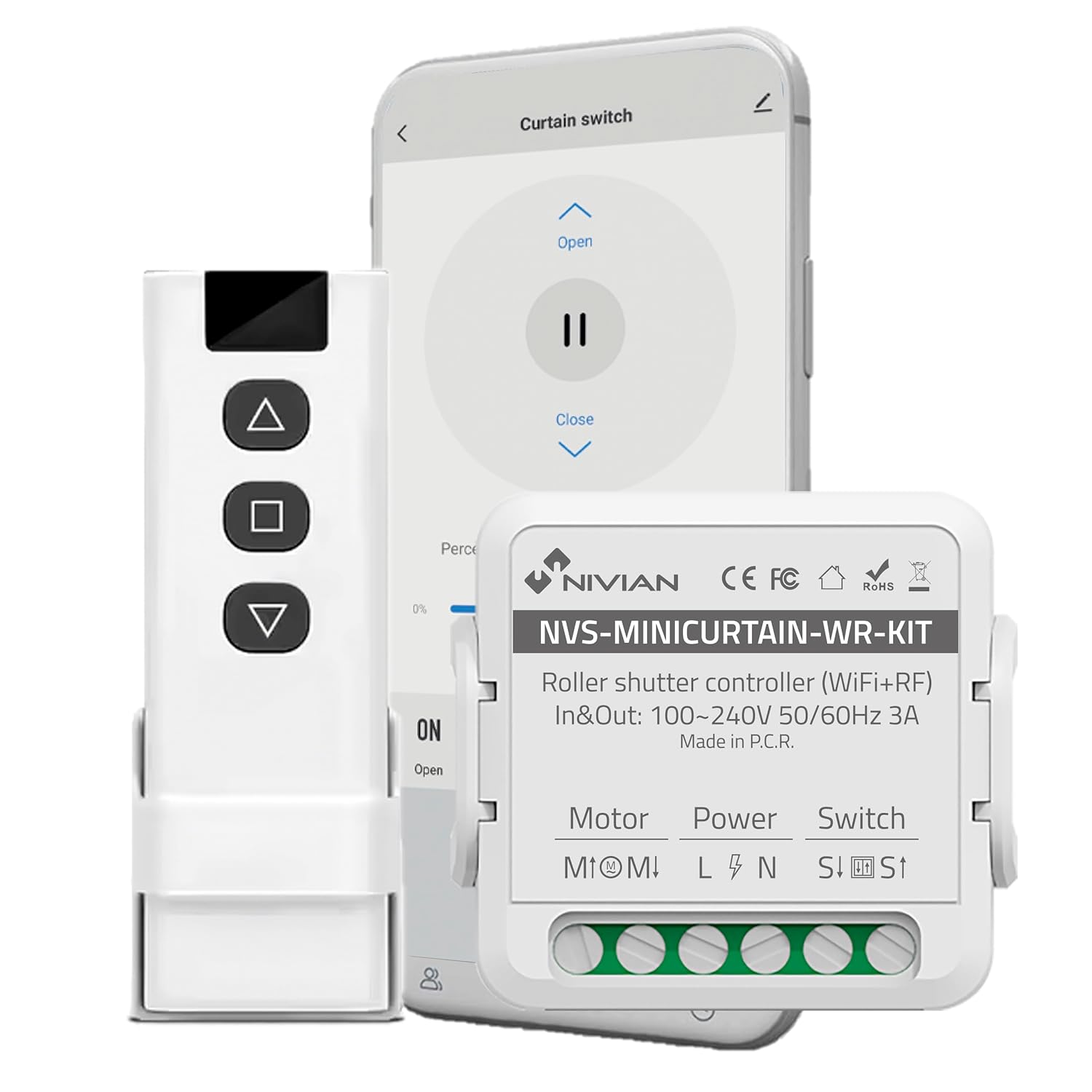
Image 3.1: Contents of the NIVIAN NVS-MINICURTAIN-WR-KIT package, showing the smart controller, RF remote, and a smartphone interface.
4. Producte acabatview
The NIVIAN NVS-MINICURTAIN-WR-KIT is a compact smart switch designed to control motorized roller shutters and awnings. It integrates WiFi connectivity for app control and RF for the included remote. Key features include:
- Connectivitat WiFi: Control via Tuya Smart app from anywhere.
- Control remot RF: Convenient local control with the included RF remote.
- Control de veu: Compatible amb Amazon Alexa i Google Assistant.
- Programació i temporitzadors: Automate opening and closing times.
- Smart Scenarios: Create custom automation rules based on conditions.
- Monitorització energètica: Track power consumption of connected motors.
- Disseny compacte: Easily integrates behind existing wall switches.

Imatge 4.1: acabatview of the controller's features and compatibility.
5. Configuració i instal·lació
5.1 Esquema de cablejat
Before proceeding with installation, ensure the main power supply to the circuit is turned OFF at the breaker. This device is designed to be installed behind an existing manual wall switch for motorized blinds/awnings. The controller has terminals for Motor (M1, M2), Power (L, N), and Switch (S1, S2).

Imatge 5.1: Ex.ample of the controller installed with an existing wall switch.
- Desconnecteu l'alimentació: Turn off the main power supply to the circuit at your home's electrical panel.
- Cablejat d'accés: Remove the existing wall switch plate and switch to access the wiring.
- Connect Motor Wires: Connect the motor's UP and DOWN wires to the M1 and M2 terminals on the controller.
- Connecteu els cables d'alimentació: Connect the Live (L) and Neutral (N) wires from your power supply to the L and N terminals on the controller.
- Connect Switch Wires: Connect the wires from your existing manual wall switch to the S1 and S2 terminals on the controller.
- Dispositiu segur: Carefully place the controller inside the wall box, ensuring no wires are pinched. Reinstall the wall switch and plate.
- Restaura l'alimentació: Turn the main power supply back ON.
5.2 App Pairing (Tuya Smart)
- Descarregar l'aplicació: Download the "Tuya Smart" or "Smart Life" app from your smartphone's app store (iOS/Android).
- Registra't/Inici de sessió: Obre l'aplicació i registra't per obtenir un compte nou o inicia la sessió si ja en tens un.
- Introduïu el mode de vinculació: Power on the controller. The indicator light on the controller should blink rapidly (usually 2 times per second) to indicate it's in pairing mode. If not, press and hold the reset button (or the manual switch for 5-10 seconds) until it blinks rapidly.
- Afegeix un dispositiu: In the Tuya Smart app, tap the "+" icon in the top right corner to add a device. Select "Curtain Switch" or "Curtain Module" from the device list.
- Connecteu-vos a WiFi: Follow the on-screen instructions to connect the device to your 2.4GHz WiFi network. Enter your WiFi password.
- Finalització: Once connected, the device will appear in your app. You can rename it for easier identification.
5.3 Emparellament remot RF
The included RF remote control is pre-paired with the controller. If you need to re-pair or pair additional RF remotes:
- Introduïu el mode de vinculació: Briefly press the pairing button on the controller (or press the manual switch 4 times quickly). The indicator light will blink slowly.
- Premeu el botó del comandament a distància: Within 5 seconds, press any button on the RF remote you wish to pair.
- Confirmació: The controller's indicator light will stop blinking, confirming successful pairing.
6. Instruccions de funcionament
The NIVIAN controller offers multiple ways to operate your motorized blinds or awnings:

Image 6.1: Multiple control modes for the roller shutter controller.
6.1 Control de l'aplicació intel·ligent Tuya
- Open the Tuya Smart app and select your roller shutter device.
- You will see options to "Open," "Close," or "Pause" the blinds.
- Un per centtage slider allows you to set the opening/closing position precisely.

Image 6.2: Controlling roller shutters via the Tuya Smart app.
Control remot RF 6.2
- Use the "Up" button to open the blinds.
- Use the "Down" button to close the blinds.
- Use the "Stop/Pause" button to halt the blinds at any desired position.
6.3 Voice Control (Alexa/Google Assistant)
To enable voice control, link your Tuya Smart account to Amazon Alexa or Google Assistant through their respective apps. Once linked, you can use commands such as:
- "Alexa, open [Device Name] blinds."
- "Hey Google, close [Device Name] blinds."
- "Alexa, set [Device Name] blinds to 50%."
6.4 Control manual de l'interruptor de paret
The existing manual wall switch connected to the controller will continue to function normally, allowing for traditional physical control of your blinds.
7. Funcions intel·ligents i automatització
7.1 Programació i temporitzadors
Within the Tuya Smart app, you can set schedules for your blinds to open or close at specific times on chosen days. This is ideal for daily routines or simulating presence when away.
7.2 Smart Scenarios
Create custom automation rules (scenarios) in the Tuya Smart app. These can be triggered by various conditions:
- Canvis meteorològics: Automatically close blinds if the weather forecast predicts strong sun or rain.
- Location Changes: Open blinds when you arrive home.
- Hora del dia: Adjust blinds based on sunrise/sunset.
- Estat del dispositiu: Integrate with other smart devices (e.g., close blinds when a smart light turns on).

Image 7.1: Creating smart home automation scenarios.

Image 7.2: Simulating presence by raising and lowering blinds remotely.
7.3 Monitorització energètica
The controller provides energy consumption reports and graphs within the Tuya Smart app, allowing you to monitor and manage the power usage of your connected motors.
8. Manteniment
- Neteja: Feu servir un drap sec i suau per netejar el dispositiu. No utilitzeu productes químics agressius ni netejadors abrasius.
- Actualitzacions de firmware: Periodically check the Tuya Smart app for available firmware updates to ensure optimal performance and security.
- Battery Replacement (RF Remote): If the RF remote's range or responsiveness decreases, replace its battery (type usually CR2032, check remote for specifics).
9. Solució De Problemes
| Problema | Causa possible | Solució |
|---|---|---|
| El dispositiu no s'emparella amb l'aplicació. | Incorrect WiFi password, 5GHz WiFi network, device not in pairing mode. | Ensure correct 2.4GHz WiFi password. Confirm device indicator is blinking rapidly. Reset device and try pairing again. |
| Blinds not responding to app/remote. | No power to controller, incorrect wiring, RF remote battery low, WiFi disconnected. | Check power supply. Verify wiring connections. Replace RF remote battery. Check WiFi connection in app. |
| Blinds move in the wrong direction. | Motor wires (M1/M2) are reversed. | Disconnect power and swap the M1 and M2 motor wires. |
| El control per veu no funciona. | Tuya account not linked to Alexa/Google, incorrect device name, internet connectivity issues. | Ensure Tuya account is linked. Use the exact device name. Check internet connection. |
10. Especificacions
| Número de model | NVS-MINICURTAIN-WR-KIT |
| Vol d'entrada/sortidatage | 100-240V AC, 50/60Hz |
| Corrent nominal | 3A |
| Connectivitat sense fil | WiFi 2.4GHz, RF |
| Mode de funcionament | ON-OFF-ON |
| Tipus de contacte | Normalment obert |
| Tipus de connector | Connectar-se |
| Tipus de canvi | Pulsador |
| Tipus de terminal | Cargol |
| Material | Acrilonitril butadiè estirè (ABS) |
| Dimensions (L x A x A) | 40 x 40 x 20 mm |
| Pes | 70 g |
| Origen | Xina |
11. Garantia i Suport
NIVIAN products are designed for reliability and performance. For warranty information, technical support, or to access additional resources, please visit the official NIVIAN weblloc o contacteu amb el servei d'atenció al client.