1. Introducció
Thank you for choosing the LOEWE Leo Wireless Headphones. These premium headphones are designed to deliver an exceptional audio experience with advanced features such as Hi-Res Audio, adaptive noise cancellation, and real-time voice translation. This manual provides essential information for setting up, operating, and maintaining your headphones to ensure optimal performance and longevity.
2. Contingut del paquet
Abans d'utilitzar-lo, comproveu que tots els elements estiguin presents al paquet:
- LOEWE Leo Wireless Headphones
- Cable de càrrega USB-C
- AUX to USB-C Audio Cable
- Estoig de transport de cuir
- Maletí de transport dur
- Cable Pouch
- Manual d'usuari (aquest document)
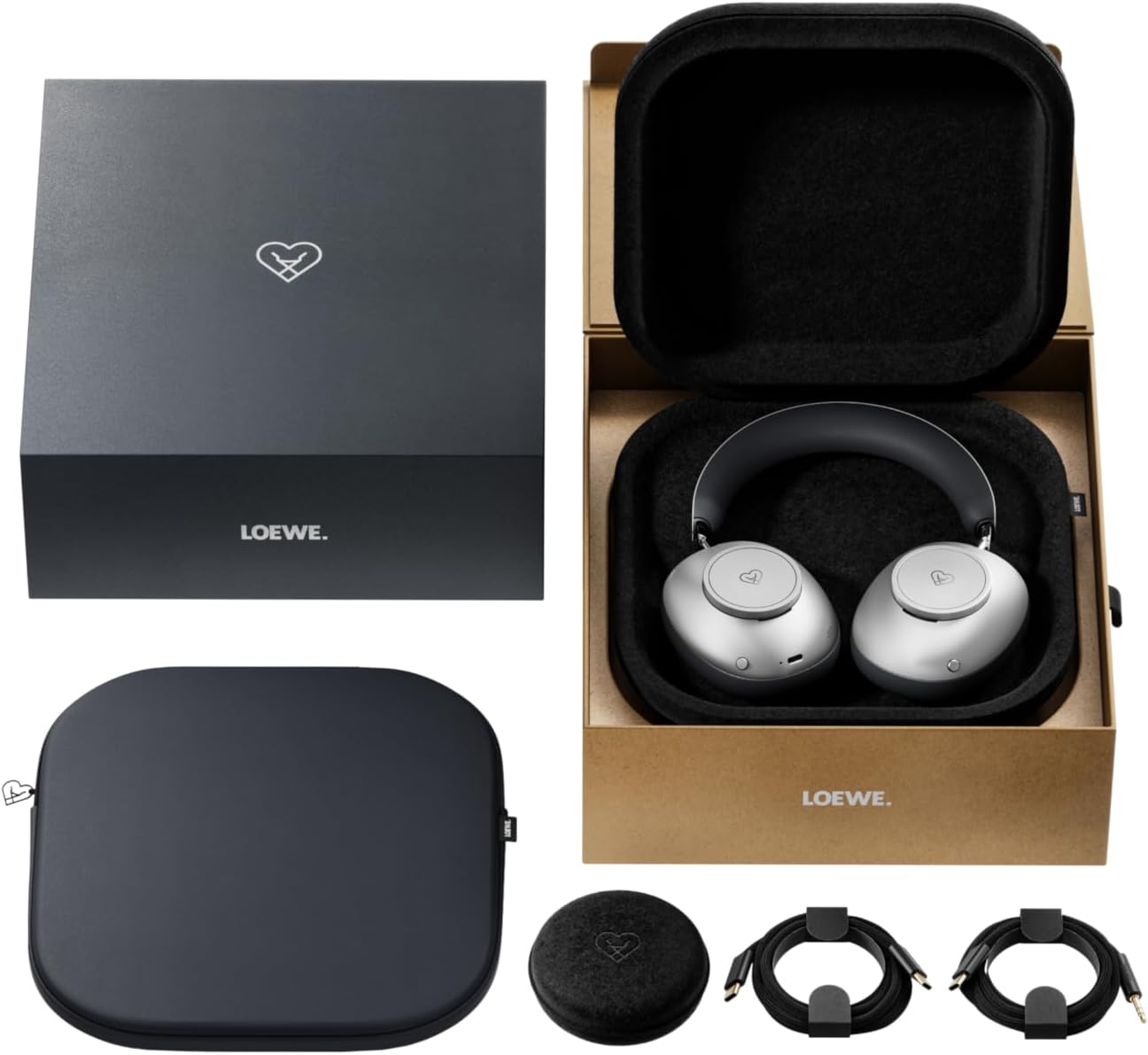
Image: The LOEWE Leo Wireless Headphones package contents, showing the headphones, USB-C cable, AUX cable, leather case, hard case, and cable pouch.
3. Producte acabatview
Familiarize yourself with the physical components and controls of your LOEWE Leo headphones.

Imatge: Frontal view of the LOEWE Leo Wireless Headphones, showcasinels auriculars i la diadema.
3.1. Controls i ports
The headphones feature intuitive controls for easy operation:
- Dials de control: Two precision-crafted rotary wheels for volume adjustment and navigation.
- Botons d'acció: Dedicated buttons for playback control, ANC modes, and voice translation activation.
- Port USB-C: Per a càrrega i connexió d'àudio amb cable.
- Jack de 3.5 mm: For traditional wired audio connection.

Imatge: Detallada view of the earcup, highlighting the control dial, USB-C port, and 3.5mm audio jack.
4. Primers passos
4.1. Càrrega dels auriculars
Before first use, fully charge your LOEWE Leo headphones. A full charge provides up to 65 hours of continuous playback.
- Connecteu el cable de càrrega USB-C subministrat al port USB-C dels auriculars.
- Connecteu l'altre extrem del cable a un adaptador de corrent USB compatible (no inclòs) o al port USB d'un ordinador.
- The LED indicator on the headphones will show the charging status. It will typically turn off or change color once fully charged.
4.2. Encendre/apagar
- Per encendre: Premeu i manteniu premut el botó d'engegada durant aproximadament 3 segons fins que l'indicador LED s'encengui.
- Per apagar: Premeu i manteniu premut el botó d'engegada durant aproximadament 3 segons fins que l'indicador LED s'apagui.
4.3. Emparellament Bluetooth
The LOEWE Leo headphones utilize Bluetooth Low Energy (BLE) for faster pairing and reduced power consumption.
- Assegureu-vos que els auriculars estiguin apagats.
- Press and hold the Power button for approximately 5 seconds until the LED indicator flashes rapidly, indicating pairing mode.
- Al dispositiu (telèfon intel·ligent, tauleta, ordinador), activeu el Bluetooth i cerqueu els dispositius disponibles.
- Select "LOEWE Leo" from the list of found devices.
- Un cop connectat, l'indicador LED deixarà de parpellejar i es mantindrà de color blau continu.
4.4. Connexió per cable
For a wired audio experience, use the supplied AUX to USB-C cable.
- Connect the USB-C end of the AUX cable to the headphones.
- Connect the 3.5mm end of the AUX cable to your audio source's 3.5mm jack.
- Els auriculars canviaran automàticament al mode amb cable.
5. Ús dels auriculars
5.1. Audio Playback and Volume Control
Use the control dials and action buttons for managing your audio:
- Pujar/baixar el volum: Rotate the designated control dial.
- Reproduir/pausa: Press the central action button once.
- Pista següent: Double-press the central action button.
- Pista anterior: Triple-press the central action button.

Image: Close-up of the earcup's control dial, used for volume and navigation.
5.2. Adaptive Noise Cancellation (ANC)
The LOEWE Leo features advanced adaptive noise cancellation that continuously analyzes your environment and adjusts in real-time.
- Activar/Desactivar ANC: Press the dedicated ANC button once.
- Mode de transparència: Press the ANC button twice to allow ambient sounds to pass through, enhancing situational awareness.

Image: Illustration of the adaptive noise cancellation feature, depicting sound wave management.
5.3. Real-time Voice Translation
Communicate across language barriers with the integrated real-time voice translation feature.
- Ensure your headphones are connected to a device with internet access and the LOEWE companion app installed.
- Activate the translation feature via the dedicated button or the companion app.
- Speak into the headphone's microphone. The translated audio will be played back in real-time.

Image: Earcup detail showing the microphone for voice input and the 'leo' icon, representing the real-time translation function.
5.4. Dolby Atmos and Spatial Audio
Experience immersive sound with Dolby Atmos and spatial audio support. This feature is automatically enabled when compatible content is played through a connected device that supports these audio technologies.
6. Manteniment i cura
6.1. Neteja
- Netegeu els auriculars amb un drap suau, sec i sense borrissol.
- No utilitzeu netejadors abrasius, alcohol ni dissolvents químics.
- Keep moisture away from openings.
6.2. Cura de la bateria
- Eviteu descarregar completament la bateria amb freqüència.
- Store the headphones in a cool, dry place when not in use for extended periods.
- The battery is user-replaceable, contributing to the product's longevity.
6.3. Disseny modular
The LOEWE Leo headphones feature a durable modular design with replaceable components, such as ear cushions and headbands. This design allows for easy replacement of worn parts, extending the product's lifespan.

Image: The modular construction of the LOEWE Leo headphones, showing detachable earcups and headband for maintenance or replacement.
7. Solució De Problemes
If you encounter issues with your LOEWE Leo headphones, refer to the following common solutions:
- Sense energia: Assegureu-vos que els auriculars estiguin completament carregats. Connecteu-los a una font d'alimentació amb el cable USB-C.
- Sense so:
- Comproveu el nivell de volum tant dels auriculars com del dispositiu connectat.
- Ensure the headphones are properly paired via Bluetooth or the AUX cable is securely connected.
- Prova de reiniciar tant els auriculars com el dispositiu font d'àudio.
- Desconnexió Bluetooth:
- Assegureu-vos que els auriculars estiguin dins de l'abast del Bluetooth del dispositiu (normalment 10 metres).
- Disable and re-enable Bluetooth on your device, then attempt to re-pair.
- Clear the LOEWE Leo from your device's Bluetooth history and pair again.
- ANC no funciona eficaçment:
- Ensure the earcups form a good seal around your ears. Adjust the fit if necessary.
- Verify that ANC is activated.
- Voice Translation Issues:
- Check your device's internet connection.
- Ensure the LOEWE companion app is up-to-date and configured correctly.
- Parla clar i a un ritme moderat.
If problems persist, please contact LOEWE customer support.
8. Especificacions
| Característica | Descripció |
|---|---|
| Nom del model | Leo |
| Número de model | 64641J10 |
| Tecnologia de connectivitat | Wireless (Bluetooth), Wired |
| Comunicació sense fils | Bluetooth de baix consum (BLE) |
| Característiques de so | Hi-Res Audio, Dolby Atmos, Spatial Audio |
| Cancel·lació de soroll | Adaptive Noise Reduction (ANC) |
| Característiques especials | Real-time Voice Translation, Modular Design with Replaceable Components |
| Durada de la bateria | Fins a 65 hores (aprox.) |
| Tipus de control | Button Control, Rotary Dials |
| Dispositius compatibles | Cellular Phone, Tablet, Computer, Laptop |
| Pes | 3 Kilograms (product weight as listed, may include packaging) |
9. Garantia i Suport
9.1. Garantia del fabricant
The LOEWE Leo Wireless Headphones come with a Garantia del fabricant de 2 anysAquesta garantia cobreix els defectes de materials i de fabricació en condicions d'ús normal. Si us plau, conserveu el comprovant de compra per a reclamacions de garantia.
For specific terms and conditions of the warranty, please refer to the warranty card included in your product packaging or visit the official LOEWE weblloc.
9.2. Atenció al client
For technical assistance, troubleshooting, or warranty inquiries, please contact LOEWE customer support through their official weblloc web o la informació de contacte que es proporciona a la documentació del producte.
Recursos en línia: Visit the official LOEWE weblloc web per a preguntes freqüents, actualitzacions de programari i recursos de suport addicionals.


