1. Introducció
This manual provides essential information for the safe and effective operation of your Magcubic HY350Max Android 14 Mini Projector. Please read it thoroughly before use and retain it for future reference.

Image 1.1: Magcubic HY350Max Mini Projector and included remote control.
Vídeo 1.1: Un overview of the Magcubic Mini Projector's features and design.
2. Configuració
2.1 Desembalatge i col·locació inicial
Carefully remove all components from the packaging. Place the projector on a stable, flat surface. Ensure adequate ventilation around the device.
2.2 Connexió d'alimentació
Connect the provided power adapter to the projector's power input and then to a suitable electrical outlet.
2.3 Automatic Adjustments (Auto Focus & Keystone Correction)
The HY350Max features intelligent auto-focus, 6D keystone correction, auto obstacle avoidance, and auto screen alignment. Upon power-on or movement, the projector will automatically adjust the image for optimal clarity and shape. For distances exceeding 2.5 meters, manual focus adjustment via the remote control may be necessary.

Image 2.1: The projector's automatic focus, keystone correction, obstacle avoidance, and screen alignment features.
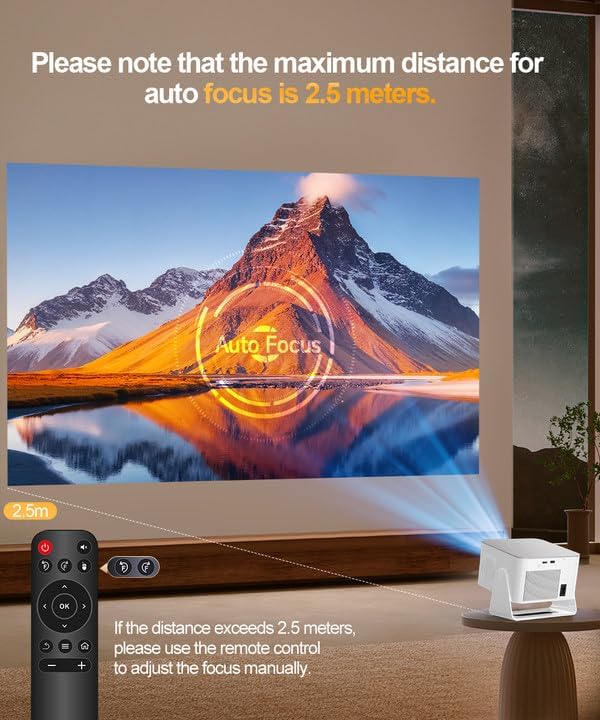
Image 2.2: Note on the maximum distance for auto-focus (2.5 meters) and manual adjustment beyond this range.
Video 2.1: A demonstration of the projector's easy setup process, including automatic adjustments.
3. Instruccions de funcionament
3.1 Encès/Apagat
Premeu el botó d'engegada del projector o del comandament a distància per encendre o apagar el dispositiu.
3.2 Navigation with Air Mouse Remote
The included remote control features an Air Mouse function for intuitive navigation. Point the remote at the screen to move the cursor and select options. Traditional button navigation is also available.

Image 3.1: The Android 14 interface with various apps and the Air Mouse remote in use.
3.3 Opcions de connectivitat
The projector offers multiple ways to connect to your devices:
- Wi-Fi 6: For ultra-fast and stable wireless streaming.
- Bluetooth 5.4: Connect external audio devices like speakers or headphones.
- Port HDMI: Connect laptops, PCs, gaming consoles (Switch, PS5), TV sticks, and other HDMI-enabled devices.
- Port USB: Connect USB drives, smartphones, tablets, or a mouse for additional input.

Imatge 3.2: acabatview of wired (HDMI) and wireless (Wi-Fi, Bluetooth) connectivity options.
3.4 Smart Features (Android 14 OS)
The projector runs on Android 14 OS, providing access to a wide range of applications and streaming services directly from the device. Navigate through the 'My Apps' or 'Store' sections to find and install desired applications.
3.5 Projection Modes and Placement
The projector's 180-degree rotatable design allows for versatile placement and projection onto various surfaces, including walls and ceilings.
- Ús de taula: Place the projector on a flat surface in front of the projection area.
- Muntatge de trípode: Utilize the tripod screw hole for stable positioning.
- Muntatge al sostre: Mount the projector to the ceiling for overhead projection.
- Side Projection: The 180-degree adjustment allows for projection from various angles, including side walls.

Image 3.3: The projector's portable design and 180-degree rotation for flexible projection.

Image 3.4: Recommended throw ratio and screen sizes for tabletop, ceiling, and tripod mounts.
Vídeo 3.1: Una breu introduccióview demonstrating the projector's ability to project onto a ceiling.
3.6 Sortida d'àudio
The projector includes built-in 15W Hi-Fi stereo speakers. For enhanced audio, connect external Bluetooth speakers or use the 3.5mm audio output jack.
4. Manteniment
Un manteniment regular garanteix un rendiment òptim i una llarga vida útil del projector.
- Neteja de lents: Feu servir un drap suau i sense borrissol dissenyat específicament per a lents òptiques per netejar suaument la lent del projector. Eviteu materials abrasius o productes químics agressius.
- Ventilació: Ensure the projector's ventilation ports are clear of obstructions to prevent overheating. Do not block air inlets or outlets.
- Emmagatzematge: Quan no l'utilitzeu, guardeu el projector en un lloc fresc i sec, allunyat de la llum solar directa i de temperatures extremes.
5. Solució De Problemes
Si teniu problemes amb el projector, consulteu les solucions habituals següents:
- Sense imatge/Mala qualitat d'imatge:
- Comproveu la connexió d'alimentació i assegureu-vos que el projector estigui encès.
- Verify input source selection (HDMI, USB, Wi-Fi).
- Adjust focus manually if the auto-focus is not sufficient (especially beyond 2.5m).
- Assegureu-vos que la superfície de projecció sigui plana i lliure d'obstacles.
- Check for sufficient ambient light conditions; performance is best in darker environments.
- Sense so/So baix:
- Adjust volume on the projector and connected devices.
- Check Bluetooth connection if using external speakers.
- Ensure internal speakers are not muted.
- Problemes de connectivitat (Wi-Fi/Bluetooth):
- Ensure Wi-Fi and Bluetooth are enabled in settings.
- Restart the projector and your connected device.
- Comproveu la intensitat del senyal Wi-Fi.
6. Especificacions

Image 6.1: Key features of the Magcubic HY350Max projector.
| Característica | Detall |
|---|---|
| Marca | Magcúbic |
| Número de model | HY350MAX |
| Resolució de visualització | Native 1920 x 1080 (1080P) |
| Suport en vídeo | 4K & 8K Supported |
| Brillantor | 600 lúmens ANSI |
| Sistema operatiu | Android 14 |
| RAM/ROM | 2 GB de RAM / 16 GB de ROM |
| Connectivitat | Wi-Fi 6, Bluetooth 5.4, HDMI, USB |
| Àudio | Built-in 15W Hi-Fi Stereo Speakers |
| Característiques especials | Auto Focus, 6D Keystone Correction, Auto Obstacle Avoidance, Auto Screen Alignment, 180° Rotatable Design, Air Mouse Remote |
| Pes de l'article | 3.08 lbs (Net Weight) / 3.85 lbs (Item Weight) |
| Dimensions | 7.2" x 8.7" x 4.3" (with base) |
7. Garantia i Suport
Magcubic is committed to providing excellent customer service.
- Atenció al client: 24-hour live customer support is available for assistance.
- Garantia de devolució: A 30-day return guarantee is provided.
- Suport tècnic: Lifetime technical support is included with your purchase.
For further assistance, please refer to the contact information provided with your product packaging or visit the official Magcubic weblloc.


