1. Introducció
Thank you for choosing the Eureka N6 Plus Robot Vacuum Cleaner. This manual provides essential information for the safe operation, maintenance, and troubleshooting of your device. Please read it thoroughly before use and keep it for future reference. The Eureka N6 Plus combines powerful suction, intelligent navigation, and convenient app control to deliver an efficient and effortless cleaning experience for modern homes.
2. Instruccions de seguretat
Per reduir el risc de lesions o danys, llegiu i seguiu totes les precaucions de seguretat.
- Aquest aparell el poden utilitzar nens a partir de 8 anys i persones amb capacitats físiques, sensorials o mentals reduïdes o amb manca d'experiència i coneixements si han rebut supervisió o instruccions sobre l'ús de l'aparell d'una manera segura i entenen els perills que comporta. .
- No permeteu que els nens juguin amb l'aparell. La neteja i el manteniment no els poden fer els nens sense supervisió.
- Feu servir només l'adaptador de corrent i la base de càrrega originals proporcionats pel fabricant.
- Do not use the robot to pick up large objects, sharp debris, liquids, or burning/smoking materials.
- Ensure the robot operates on stable, level surfaces. Avoid operating near stairs or elevated areas without proper barriers.
- Mantingueu els cabells, la roba solta, els dits i totes les parts del cos lluny de les obertures i les parts mòbils.
- Do not immerse the robot or its charging base in water or other liquids.
- Before cleaning or performing maintenance, ensure the robot is turned off and disconnected from the power supply.
- Guardeu el robot en un lloc sec i fresc quan no l'utilitzeu.
3. Contingut del paquet
Verifiqueu que tots els components siguin presents i en bon estat en desembalar-los.
- Eureka N6 Plus Robot Vacuum Cleaner
- Self-emptying Charging Base
- Adaptador d'alimentació
- Manual d'instruccions
4. Producte acabatview
Familiarize yourself with the main components of your Eureka N6 Plus robot vacuum cleaner and its self-emptying base.
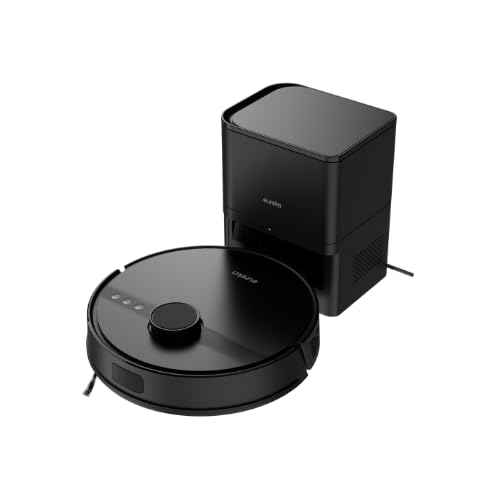
Image 4.1: Eureka N6 Plus Robot Vacuum Cleaner with its self-emptying base and a smartphone displaying the control app interface. The robot is dark grey with a central button, and the base is a matching dark grey tower.

Imatge 4.2: De dalt a baix view of the Eureka N6 Plus Robot Vacuum Cleaner, highlighting the integrated water tank for mopping functionality. The robot is black with a central LiDAR sensor and control buttons.
Components del robot:
- Sensor LiDAR: Per a una navegació i cartografia precises.
- Botons de control: Engegada/Inici, Inici/Recàrrega.
- Cubell d'escombraries/dipòsit d'aigua: Integrated for vacuuming and mopping.
- Raspalls laterals: Per escombrar les deixalles de les vores i les cantonades.
- Pinzell principal: Anti-tangle design for effective cleaning.
- Sensors de penya-segats: To prevent falls from stairs.
- Contactes de càrrega: For connection to the charging base.
Self-Emptying Charging Base:
- Compartiment de la bossa de pols: Houses the 2.5-liter disposable dust bag.
- Base de càrrega: Where the robot returns to charge and empty its dustbin.
- Indicador d'alimentació: Mostra l'estat de càrrega.
5. Configuració
5.1 Col·locació de la base de càrrega
- Place the self-emptying charging base against a wall in an open area.
- Ensure there is at least 0.5 meters (1.6 feet) of clear space on both sides and 1.5 meters (4.9 feet) in front of the base.
- Connecteu l'adaptador de corrent a la base de càrrega i endolleu-lo a una presa de corrent.
- Ensure the power cable is neatly arranged to prevent the robot from tangling.
5.2 Càrrega inicial
- Col·loca el robot a la base de càrrega. Assegura't que els contactes de càrrega del robot estiguin alineats amb els de la base.
- The robot will automatically begin charging. Allow it to fully charge before its first use (approximately 4-6 hours). The indicator light on the robot will change to indicate a full charge.
5.3 Connexió a l'aplicació
- Download the "Eureka Robot" app from your smartphone's app store (available for iOS and Android).
- Obriu l'aplicació i creeu un compte.
- Follow the in-app instructions to add your Eureka N6 Plus robot. This typically involves connecting to the robot's Wi-Fi hotspot temporarily and then connecting it to your home Wi-Fi network.
- Once connected, you can control the robot, schedule cleanings, adjust settings, and view cleaning maps from your smartphone.
6. Instruccions de funcionament
6.1 Inici d'un cicle de neteja
- Inici manual: Press the Power/Start button on the robot once. The robot will begin cleaning in Auto mode.
- Inici de l'aplicació: Open the "Eureka Robot" app, select your device, and tap the 'Start' or 'Clean' button. You can also select specific cleaning modes or areas.
6.2 Stopping/Pausing a Cleaning Cycle
- Press the Power/Start button on the robot once to pause. Press again to resume.
- Use the 'Pause' or 'Stop' button in the app.
6.3 Tornada a la base de càrrega
- Premeu el botó Inici/Recàrrega del robot.
- Use the 'Recharge' or 'Dock' button in the app. The robot will automatically return to its charging base.
6.4 Funció de fregar
The Eureka N6 Plus features a simultaneous vacuuming and mopping function.
- Fill the integrated water tank with clean water. Do not use detergents or cleaning solutions not approved for robot vacuums.
- Attach the mopping pad securely.
- In the app, you can select the desired water flow level (three adjustable levels) suitable for different hard floor types.
- The robot will vacuum and mop simultaneously.
6.5 Control de l'assistent de veu
The Eureka N6 Plus supports voice control via Alexa and Google Assistant.
- Enable the "Eureka Robot" skill/action in your Alexa or Google Home app.
- Link your Eureka Robot account.
- Use commands such as "Alexa, tell Eureka Robot to start cleaning" or "Hey Google, ask Eureka Robot to go home."
7. Manteniment
Un manteniment regular garanteix un rendiment òptim i allarga la vida útil del teu robot aspirador.
7.1 Self-Emptying Dust Bag (Base)
- The 2.5-liter dust bag in the self-emptying base should be replaced when full. The app will notify you.
- Open the top cover of the charging base, remove the full bag, and insert a new one.
7.2 Cubell de pols i filtre del robot
- Even with the self-emptying feature, it is recommended to periodically check and manually empty the robot's internal dustbin.
- Clean the HEPA filter regularly by tapping it to remove dust. Replace the filter every 3-6 months, depending on usage. Do not wash the HEPA filter with water.
7.3 Raspall principal i raspalls laterals
- Pinzell principal: Traieu la coberta del raspall principal i aixequeu el raspall. Feu servir l'eina de neteja per eliminar els cabells i les restes enredades al voltant del raspall.
- Raspalls laterals: Check side brushes for wear or damage. Remove any tangled hair. Replace if bristles are bent or missing.
7.4 Sensors i contactes de càrrega
- Wipe all sensors (cliff sensors, wall sensors, LiDAR sensor window) and charging contacts on both the robot and the base with a clean, dry cloth.
7.5 Water Tank and Mopping Pad
- Després de cada sessió de fregada, buideu l'aigua restant del dipòsit.
- Clean the mopping pad thoroughly and allow it to air dry before storing.
8. Solució De Problemes
If you encounter issues with your Eureka N6 Plus, refer to the following common problems and solutions.
| Problema | Causa possible | Solució |
|---|---|---|
| El robot no s'encén | Bateria baixa; Botó d'engegada no premut; Robot encallat. | Carregueu el robot; premeu i manteniu premut el botó d'engegada; elimineu qualsevol obstrucció. |
| Robot cannot find charging base | Base obstructed; Base not powered; Robot too far. | Ensure clear space around base; Check power connection; Manually place robot near base. |
| Mal rendiment de neteja | Full dustbin/dust bag; Clogged filter; Tangled brushes. | Empty dustbin/replace dust bag; Clean/replace filter; Clean main and side brushes. |
| Problemes de connexió de l'aplicació | Incorrect Wi-Fi password; Router too far; Robot offline. | Verify Wi-Fi credentials; Move robot closer to router; Restart robot and router. |
| El robot s'enganxa sovint | Obstacles on floor; Dark surfaces triggering cliff sensors. | Clear cables, toys, and small objects; Use no-go zones in app for problematic areas. |
9. Especificacions
Detailed technical specifications for the Eureka N6 Plus Robot Vacuum Cleaner.
| Característica | Especificació |
|---|---|
| Marca | EUREKA |
| Nom del model | N6 Plus Black |
| Dimensions (L x A x A) | 35L x 35W x 41.1H cm |
| Pes de l'article | 5.5 quilos |
| Tipus de bateria | Ió de liti |
| Voltage | 14.4 Volts |
| Durada de la bateria | Up to 120 minutes (continuous cleaning) |
| Potència d'aspiració | Approximately 5000 Pa |
| Capacitat de la bossa de pols (base) | 2.5 litres |
| Tipus de filtre | HEPA |
| Tipus de navegació | Sensor LiDAR |
| Mètode de control | Control d'aplicacions, control per veu (Alexa, Assistent de Google) |
| Característiques especials | Self-emptying base, Simultaneous vacuuming and mopping, Anti-tangle brush, Three adjustable water levels |
| Superfícies recomanades | Tots els tipus de sòl |
10. Garantia i Suport
10.1 Informació de la garantia
The Eureka N6 Plus Robot Vacuum Cleaner comes with a manufacturer's warranty. Please refer to the warranty card included in your package for specific terms and conditions. Spare parts availability in the EU is guaranteed for 3 years.
10.2 Atenció al client
For technical assistance, warranty claims, or general inquiries, please contact Eureka customer support through the following channels:
- Weblloc: Visit the official Eureka weblloc web per a preguntes freqüents i recursos de suport.
- Correu electrònic: Refer to your warranty card or the Eureka weblloc web per obtenir l'adreça de correu electrònic d'assistència adequada.
- Telèfon: Contact numbers for your region can be found on the Eureka weblloc.
Please have your model number (N6 Plus Black) and purchase information ready when contacting support.


