1. Introducció
This manual provides instructions for the installation, operation, and maintenance of your Bewinner ARC Adapter Signal HD Interface Multimedia Converter. This device is designed to extract audio from an HDMI ARC signal, providing versatile sound output options for an enhanced home audio experience.
2. Producte acabatview
2.1 Contingut del paquet
- 1 x Bewinner ARC Adapter
- Cable d’alimentació 1 x USB
- 1 x Manual d'usuari
2.2 Característiques
- Versatile Sound Output: Supports multiple audio output interfaces including SPDIF, Coaxial, and RCA (L/R) to connect your TV to external speakers or audio systems.
- Alt rendiment Ampmés viu: Equipped with an integrated sound amplifier for clearer and more powerful audio output, suitable for both music and movies.
- Automatic Signal Mute: Features an automatic signal mute function to reduce interference noise and ensure smooth audio reproduction.
- Àmplia compatibilitat: Supports various audio sampling rates up to 192kHz, ensuring compatibility with a broad range of audio formats.
- Construcció duradora: Housed in an aluminum alloy casing for stability and long-lasting performance in diverse operating environments.
2.3 Disseny del dispositiu

Figura 1: Front and Back Panel Layout. The front panel includes DC 5V power input, SPDIF optical output, Coaxial output, and RCA L/R audio outputs. The back panel features a 3.5mm headphone jack, Power LED, ON/OFF switch, and ARC IN HDMI port.

Figura 2: En angle view of the adapter, highlighting the SPDIF, Coaxial, and RCA (L/R) output ports.
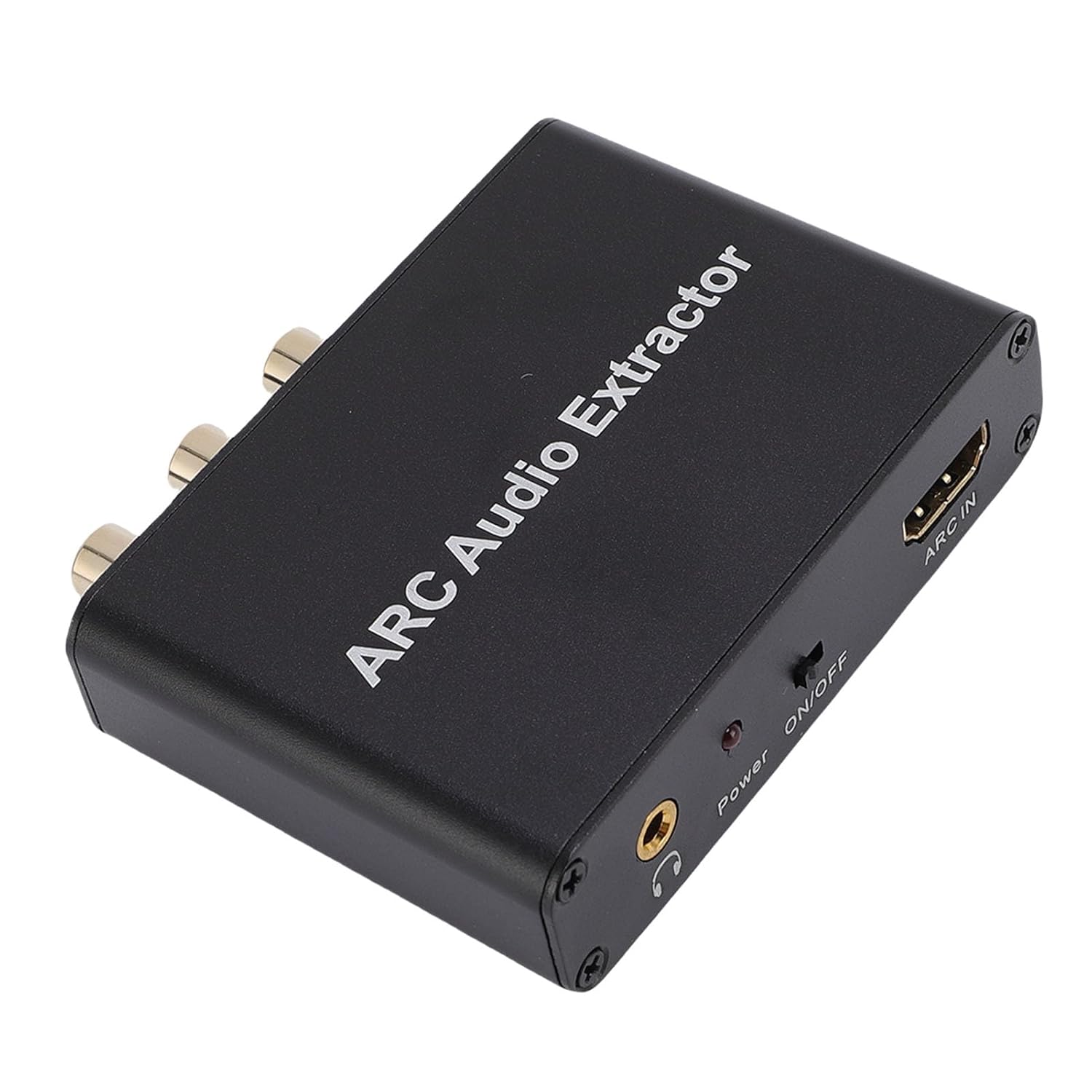
Figura 3: En angle view of the adapter, showing the ARC IN HDMI port, 3.5mm headphone jack, Power LED, and ON/OFF switch.
3. Configuració
Follow these steps to set up your ARC Adapter:
- Connectar l'alimentació: Connect the provided USB power cable to the DC 5V port on the adapter and plug the other end into a suitable USB power source (e.g., TV USB port, USB wall adapter).
- Connect TV ARC: Use an HDMI cable (not included) to connect the HDMI ARC output port of your television to the "ARC IN" port on the Bewinner adapter. Ensure your TV's HDMI port supports ARC (Audio Return Channel).
- Connecta la sortida d'àudio: Choose one of the following audio output options to connect to your external audio system (soundbar, amplifier, speakers, headphones):
- SPDIF Optical: Connect an optical cable from the "SPDIF" port on the adapter to your audio receiver.
- Coaxial: Connect a coaxial cable from the "Coaxial" port on the adapter to your audio receiver.
- RCA (L/R): Connect RCA cables from the "L" (white) and "R" (red) ports on the adapter to the corresponding analog audio inputs on your amplifier o altaveus actius.
- Presa d'auriculars de 3.5 mm: Connect headphones or a 3.5mm audio cable to the headphone jack for direct audio output.
- Encès: Flip the ON/OFF switch to the "ON" position. The Power LED indicator will illuminate.
- Configure TV Audio: Access your TV's audio settings and ensure that the audio output is set to the HDMI ARC port you are using and that ARC functionality is enabled. You may also need to select the appropriate audio format (e.g., PCM, Bitstream) depending on your audio system's capabilities.
4. Instruccions de funcionament
Once the adapter is properly connected and powered on, it operates automatically. Audio from your TV's ARC channel will be extracted and output through the selected audio ports.
- Automatic Signal Mute: The adapter features an automatic signal mute function. If no audio signal is detected from the TV's ARC port, the output will automatically mute to prevent unwanted noise. Audio will resume when a signal is present.
- Suport amb el format d'àudio: The adapter supports various audio formats and sampling rates up to 192kHz. For optimal performance, ensure your TV's audio output settings are compatible with your connected audio system.
- Control de potència: Use the ON/OFF switch to power the adapter on or off as needed.
5. Manteniment
- Neteja: Feu servir un drap suau i sec per netejar l'adaptador. No utilitzeu netejadors líquids ni aerosols.
- Medi ambient: Operate the device within the specified environmental conditions:
- Operating Temperature: -10 to +55 °C (14 to 131 °F)
- Storage Temperature: -20 to +60 °C (-4 to 140 °F)
- Humitat de funcionament: 10-90% RH (sense condensació)
- Humitat d'emmagatzematge: 5-95% RH (sense condensació)
- Col·locació: Place the adapter on a stable, flat surface away from direct sunlight, heat sources, and excessive moisture.
6. Solució De Problemes
| Problema | Causa possible | Solució |
|---|---|---|
| Sense sortida de so. |
|
|
| So distorsionat o de mala qualitat. |
|
|
| El LED d'alimentació està apagat. |
|
|
7. Especificacions
| Característica | Detall |
|---|---|
| Número de model | Bewinneryzatpi72xv |
| Material | Aliatge d'alumini |
| Entrada | HDMI ARC |
| Interfícies de sortida | SPDIF (Optical), Coaxial, RCA (L/R), 3.5mm Headphone Jack |
| Màx. Corrent de funcionament | 65 mA |
| Suportà SampTarifes de llenguatge | Fins a 192 kHz |
| Temperatura de funcionament | -10 a +55 °C (14 a 131 °F) |
| Temperatura d'emmagatzematge | -20 a +60 °C (-4 a 140 °F) |
| Humitat de funcionament | 10-90% HR (sense condensació) |
| Humitat d'emmagatzematge | 5-95% HR (sense condensació) |
| Dimensions del paquet | 5.91 x 3.94 x 0.79 polzades |
| Pes de l'article | 4.6 unces |
8. Garantia i Suport
Bewinner products are designed for reliability and performance. For any warranty claims, technical support, or product inquiries, please refer to the contact information provided with your purchase or visit the official Bewinner weblloc web. Si us plau, conserveu el comprovant de compra per al servei de garantia.
