1. Producte acabatview
The Mars Gaming MC-3TCORELCD is an ATX gaming case designed for PC enthusiasts. It features an integrated 7.2-inch IPS screen, triple removable tempered glass panels, and a dual-chamber structure for efficient cable management and optimized airflow. This manual provides instructions for assembly, operation, and maintenance of the MC-3TCORELCD case.

Figure 1: Mars Gaming MC-3TCORELCD ATX Gaming Case.
2. Configuració i instal·lació
This section details the steps for installing your components into the MC-3TCORELCD case.
2.1 Preparació del cas
- Traieu els panells laterals: The MC-3TCORELCD features triple tempered glass panels that are removable without screws. Carefully detach the front, side, and central panels to access the interior.
- Kit d'accessoris: Locate the accessory kit containing screws, cable ties, and other mounting hardware.

Figure 2: Panoramic view with removable triple tempered glass for easy access.
2.2 Instal·lació de la placa base
The case supports ATX, MicroATX, and Mini-ITX motherboards, including those with inverted connectors.
- Instal·leu separadors: Ensure the correct standoffs are installed for your motherboard form factor.
- Muntar la placa base: Carefully place the motherboard onto the standoffs and secure it with the provided screws.
2.3 Instal·lació de la unitat
The case provides internal bays for storage devices.
- Disc dur de 3.5 polzades: Up to 2x 3.5" HDDs can be installed.
- SSD de 2.5 polzades: Up to 3x 2.5" SSDs can be installed.
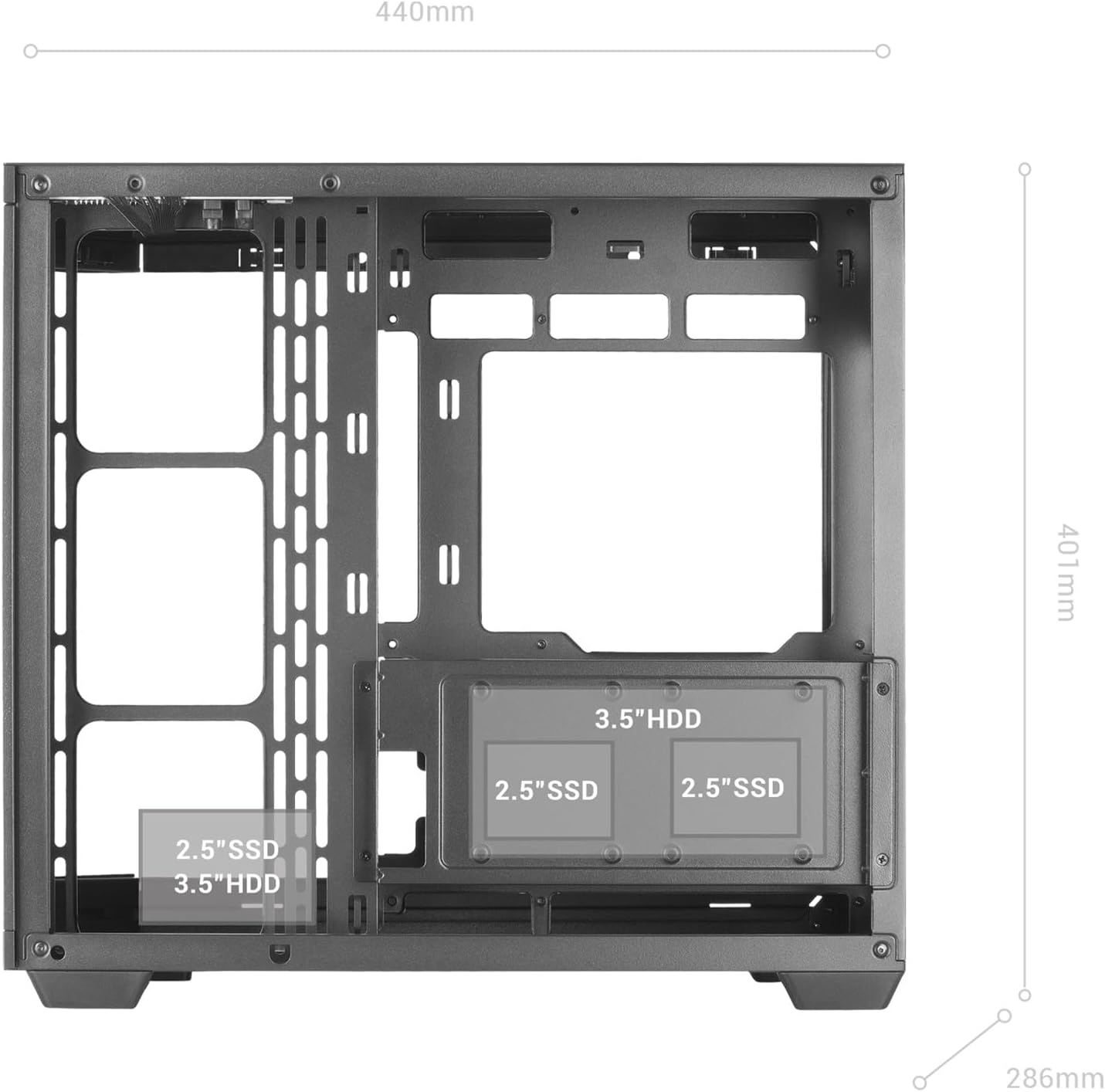
Figure 3: Internal layout indicating drive bay positions.
2.4 Power Supply and Cable Management
The dual-chamber design facilitates clean cable routing.
- Instal·leu la font d'alimentació: Mount your ATX power supply in the designated bottom-mount area.
- Cables de ruta: Utilize the dual-chamber structure to route cables behind the motherboard tray, minimizing clutter and improving airflow.

Figure 4: Double side chamber for efficient cable management.
2.5 Instal·lació del sistema de refrigeració
The case supports extensive air and liquid cooling solutions.
- Fans: Install up to 10x 120mm fans or a combination of 7x 120mm and 2x 140mm fans.
- Refrigeració líquida: Supports liquid cooling radiators up to 360mm.

Figure 5: Liquid cooling and fan installation options.
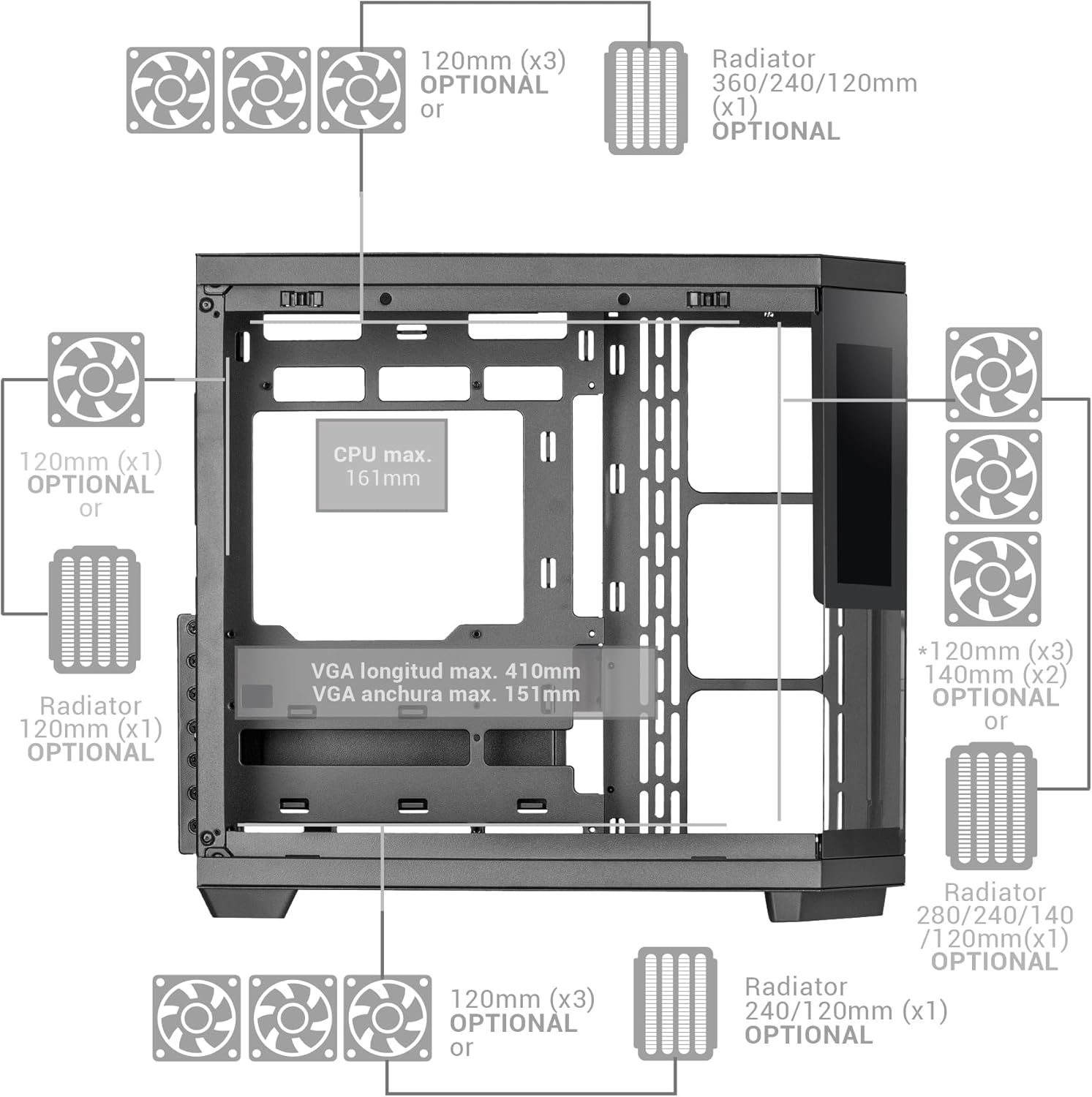
Figure 6: Detailed fan and radiator compatibility diagram.
2.6 Top Panel Connectivity
Connect the front panel headers from your motherboard to the corresponding ports on the case's top panel.
- Port USB-C
- Port USB 3.0
- Port USB 2.0
- HD Audio + Microphone Jacks

Figure 7: Top panel connectivity ports.
3. Operating the IPS Screen
The integrated 7.2-inch IPS screen allows for real-time system monitoring and custom visual displays.
- Instal·lació de programari: Install the dedicated control software for the IPS screen (refer to the manufacturer's website for download).
- Connectivitat: Ensure the screen is properly connected to your motherboard or graphics card as per the installation guide.
- Personalització: Use the software to display system telemetry (temperatures, usage), custom images, animations, or videos.

Figure 8: Customizable 7.2-inch IPS screen in operation.
4. Manteniment
Regular maintenance ensures optimal performance and longevity of your PC case.
- Filtres de pols: The case includes two magnetic dust filters. Regularly remove and clean these filters to prevent dust buildup and maintain efficient airflow.
- Neteja interior: With the removable tempered glass panels, the interior is easily accessible for cleaning. Use compressed air to remove dust from components and a soft, dry cloth for surfaces.
- Panells de vidre: Clean tempered glass panels with a microfiber cloth and a glass cleaner suitable for electronics.
5. Solució De Problemes
Aquesta secció tracta problemes comuns que podeu trobar.
- Flux d'aire deficient: Ensure all fan positions are utilized effectively and dust filters are clean. Verify that cables are managed to not obstruct airflow.
- IPS Screen Not Displaying: Check all cable connections to the motherboard/graphics card. Ensure the control software is installed and running correctly. Consult the software's troubleshooting guide.
- Problemes d'ajustament dels components: Refer to the specifications for maximum component dimensions (GPU length, CPU cooler height). Ensure components are correctly seated and secured.
6. Especificacions
| Característica | Detall |
|---|---|
| Marca | Mars Gaming |
| Nom del model | MC3TCORELCD |
| Color | Negre |
| Tipus de cas | Torre mitja |
| Material | Vidre temperat |
| Compatibilitat amb la placa base | ATX, Micro ATX, Mini ITX |
| Badies d'unitats internes | 2 x HDD de 3.5" / 3 x SSD de 2.5" |
| Longitud màxima de la GPU | 410 mm |
| Amplada màxima de la GPU | 151 mm |
| Alçada màxima del refrigerador de la CPU | 161 mm |
| Capacitat del ventilador | Fins a 10 x 120 mm o 7 x 120 mm + 2 x 140 mm |
| Suport de refrigeració líquida | Radiadors de fins a 360 mm |
| Tipus de muntatge de la font d'alimentació | Bottom Mount (ATX) |
| Mètode de refrigeració | Aire |
| Característiques especials | Dust filter, 7.2" IPS Customizable Screen, Triple Removable Tempered Glass, Dual Chamber Structure |
| Top Panel Connectivity | USB-C, USB 3.0, USB 2.0, HD Audio + Mic |
| Pes de l'article | 6.58 quilos |
7. Informació de la garantia
Aquest producte ve amb un Garantia del fabricant de 3 anys. Please retain your proof of purchase for warranty claims. For detailed terms and conditions, refer to the official Mars Gaming weblloc o contacteu amb el servei d'atenció al client.
8. Suport
For further assistance, technical support, or to download the latest drivers and software for the IPS screen, please visit the official Mars Gaming weblloc:
You may also contact Mars Gaming customer service through the contact information provided on their weblloc.


