1. Introducció
Welcome to the user manual for your new Fire-Boltt Clickk Smartwatch. This device is designed to enhance your daily life with its advanced features, including a vibrant AMOLED display, integrated front camera, Nano SIM support for standalone communication, and comprehensive health and fitness tracking capabilities. This manual provides essential information for setting up, operating, and maintaining your smartwatch.
2. Contingut del paquet
Si us plau, verifiqueu que tots els elements siguin presents al vostre paquet:
- Fire-Boltt Clickk Smartwatch
- Cable de càrrega
- Manual d'usuari (aquest document)
3. Guia de configuració
3.1. Càrrega del rellotge intel·ligent
Before initial use, fully charge your Fire-Boltt Clickk Smartwatch.
- Connecteu el cable de càrrega proporcionat al port de càrrega de la part posterior del rellotge intel·ligent.
- Connecteu l'altre extrem del cable de càrrega a a Adaptador d'alimentació USB 5V 1A (not included). Using adapters with higher voltage o amperage may damage the device.
- The smartwatch display will indicate charging status. A full charge typically takes approximately 2.5 hours.
Note: The smartwatch has a 1000 mAh battery. Ensure proper charging practices to maintain battery health.
3.2. Nano SIM Card Installation
The Fire-Boltt Clickk Smartwatch supports a Nano SIM card for standalone calling and network connectivity.
- Locate the SIM card tray on the side of the smartwatch.
- Carefully insert the Nano SIM card into the tray, ensuring the correct orientation as indicated on the tray.
- Gently push the tray back into the smartwatch until it clicks into place.
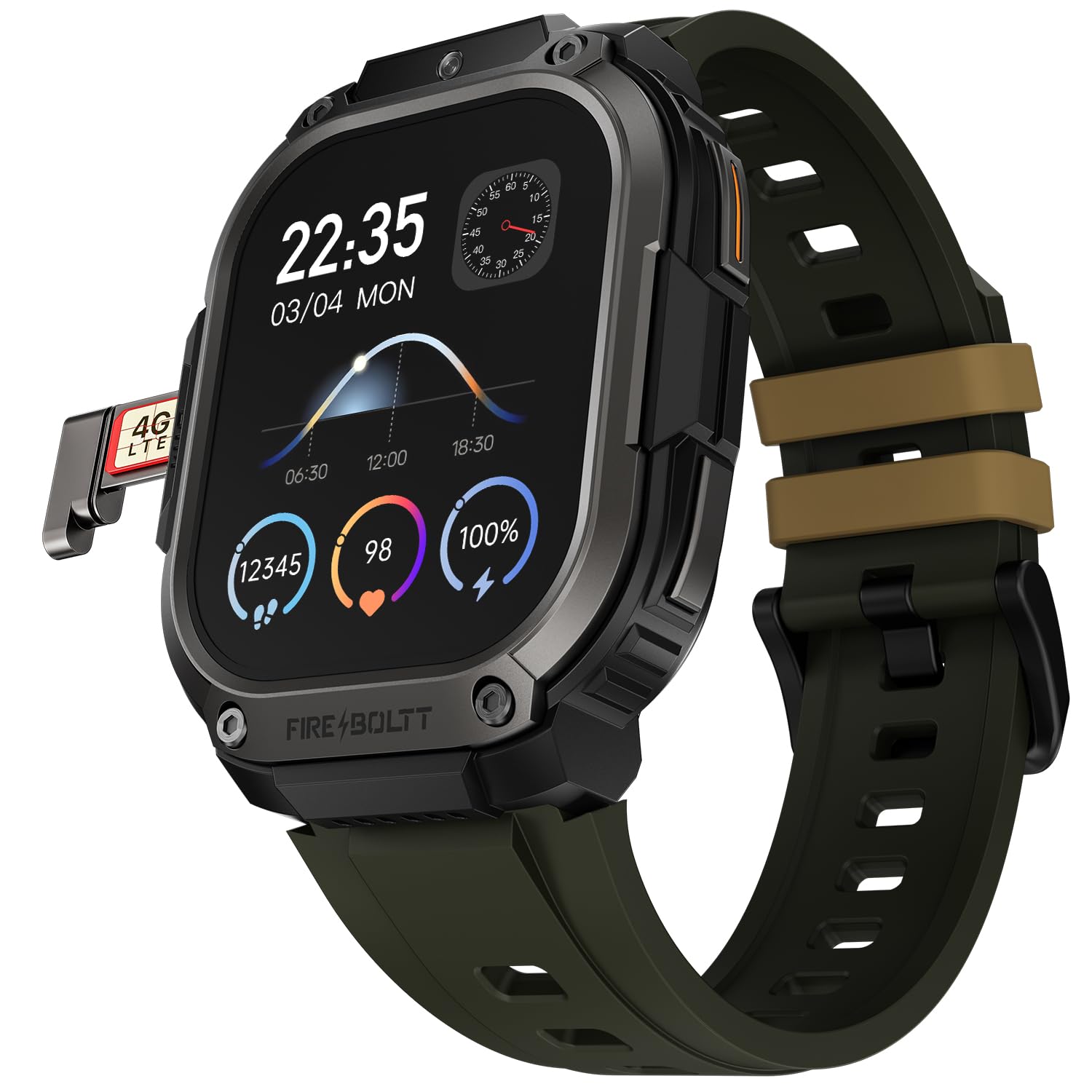
Imatge 1: The Fire-Boltt Clickk Smartwatch displaying its 54.1mm AMOLED screen and the Nano SIM card tray partially ejected on the left side, showing a "4G LTE" SIM card. The watch face shows time (22:35), date (03/04 MON), and various health metrics like steps, heart rate, and battery percentage.
3.3. Encès / apagat
- Per encendre: Press and hold the power button (usually on the side) until the Fire-Boltt logo appears.
- Per apagar: Mantingueu premut el botó d'engegada i, a continuació, seleccioneu "Apagar" a la pantalla o navegueu fins al menú de configuració i trieu "Apagar".
3.4. App Pairing (Bluetooth Connection)
To unlock the full potential of your smartwatch, pair it with the official Fire-Boltt application on your smartphone.
- Download the official Fire-Boltt app from your smartphone's app store (Google Play Store for Android, Apple App Store for iOS).
- Assegureu-vos que el Bluetooth estigui activat al telèfon intel·ligent i al rellotge intel·ligent.
- Open the Fire-Boltt app, create an account or log in, and follow the on-screen instructions to add your device.
- Select "Fire-Boltt Clickk" from the list of available devices in the app and confirm the pairing request on both your phone and smartwatch.
4. Com fer funcionar el rellotge intel·ligent
4.1. Navegació bàsica
- Pantalla tàctil: Swipe left, right, up, or down to navigate through menus and widgets on the 2.12-inch AMOLED display. Tap to select items.
- Botons laterals: Use the physical buttons on the side for quick access to functions like power on/off, back, or app shortcuts.
4.2. Fer i rebre trucades
- Trucades per Bluetooth: When paired with your smartphone, you can make and receive calls directly from your smartwatch using Bluetooth.
- Standalone Calling: With a Nano SIM card installed, the smartwatch can function as a standalone phone, allowing you to make and receive calls independently.
4.3. Using the Front Camera
The Fire-Boltt Clickk features a built-in 2 MP front camera.
- Accediu a l'aplicació de la càmera des del menú principal.
- Use the camera for taking selfies or participating in video calls directly from your wrist.
4.4. Seguiment de la salut i la forma física
Your smartwatch is equipped with advanced sensors for comprehensive health monitoring.
- Monitorització de la freqüència cardíaca: Controla contínuament la teva freqüència cardíaca durant tot el dia.
- SpO₂ Tracking: Controla els nivells d'oxigen a la sang.
- HRV: Heart Rate Variability tracking.
- Seguiment de l'activitat: Utilizes a 3-axis acceleration sensor to track steps, distance, and calories burned.
- Modes esportius: Select from multiple sports modes to accurately track various physical activities.
Totes les dades de salut poden ser viewed on the smartwatch and synchronized with the Fire-Boltt app for detailed analysis.
4.5. Notificacions i funcions intel·ligents
- Receive real-time notifications for calls, SMS, emails, and social media apps like WhatsApp directly on your wrist.
- The smartwatch supports Wi-Fi (802.11n) and built-in GPS for enhanced connectivity and location tracking.
5. Manteniment
5.1. Neteja del teu rellotge intel·ligent
To keep your smartwatch in optimal condition:
- Netegeu la pantalla i el cos amb un drap suau i sense borrissol.
- Eviteu utilitzar productes químics o materials abrasius.
- Assegureu-vos que els contactes de càrrega estiguin nets i secs abans de carregar.
5.2. Resistència a l'aigua
Information regarding specific water resistance ratings (e.g., IP67, 5ATM) is not provided. To prevent damage, avoid submerging the smartwatch in water or exposing it to high-pressure water jets.
6. Solució De Problemes
6.1. Problemes comuns i solucions
- El rellotge intel·ligent no s'encén: Ensure the device is fully charged using a 5V 1A adapter.
- La bateria es descarrega ràpidament:
- Redueix la brillantor de la pantalla.
- Limit background app usage.
- Disable unnecessary features like Wi-Fi or GPS when not in use.
- Ensure you are using the correct 5V 1A charger.
- No es pot emparellar amb el telèfon intel·ligent:
- Assegureu-vos que el Bluetooth estigui habilitat als dos dispositius.
- Reinicieu tant el rellotge intel·ligent com el telèfon intel·ligent.
- Make sure the Fire-Boltt app is updated to the latest version.
- Qualitat de trucada baixa: Ensure good network signal if using a SIM card. If using Bluetooth calling, ensure your phone has good signal and is within range.
Per obtenir més ajuda, consulteu la secció d'assistència o poseu-vos en contacte amb el servei d'atenció al client.
7. Especificacions
| Característica | Detall |
|---|---|
| Marca | Fire-Boltt |
| Número de model | 221BSWAAY#3 |
| Mida de la pantalla | 54.1 mm (2.12 polzades) |
| Tipus de visualització | AMOLED |
| Resolució | 410 x 502 píxels |
| Càmera frontal | 2 MP |
| Suport SIM | Nano SIM |
| Capacitat de la bateria | 1000 mAh (ió de liti) |
| Connectivitat | Bluetooth, Wi-Fi (802.11n), GPS (Built-in) |
| Seguiment de la salut | Heart Rate, SpO₂, HRV, 3-axis acceleration sensor |
| Dispositius compatibles | Smartphone |
| Pes de l'article | 46 g |
| Maquinari de muntatge | Cable de càrrega |
8. Garantia i Suport
Your Fire-Boltt Clickk Smartwatch comes with a Garantia del fabricant de 1 anys des de la data de compra. Aquesta garantia cobreix els defectes de fabricació. Si us plau, conserveu el comprovant de compra per a reclamacions de garantia.
For technical support, warranty claims, or further inquiries, please visit the official Fire-Boltt weblloc web o poseu-vos en contacte amb el seu servei d'atenció al client. Podeu trobar més informació a Fire-Boltt Store on Amazon.


