Introducció
This manual provides detailed instructions for the SMAILWOLF RS8 Bluetooth Gaming Mouse. Designed for high performance, the RS8 offers precision, speed, and versatility for both gaming and daily computing tasks. Please read this manual thoroughly to ensure proper setup and operation of your device.
Key features of the SMAILWOLF RS8 include:
- 10,000 DPI Sensor: For maximum precision in high-performance scenarios.
- Taxa de sondeig de 1000 Hz: Ensures instantaneous and lag-free movements.
- Three Connection Modes: Bluetooth, 2.4GHz wireless, and USB wired for versatile connectivity.
- Ultra-Light Design: Ideal for extended gaming sessions without compromising agility.
- Bateria recarregable: Long-lasting battery for convenience and economy.
- Il·luminació RGB personalitzable: Enhances the gaming aesthetic with impressive light effects.
- Ergonomia avançada: Comfortable grip suitable for various hand sizes and gaming styles.
Contingut del paquet
Si us plau, verifiqueu que tots els elements següents estiguin inclosos al vostre paquet:
- SMAILWOLF RS8 Gaming Mouse
- Receptor sense fil USB de 2.4 GHz
- Cable de càrrega USB
- Manual d'usuari
Producte acabatview
Familiarize yourself with the components of your SMAILWOLF RS8 mouse.
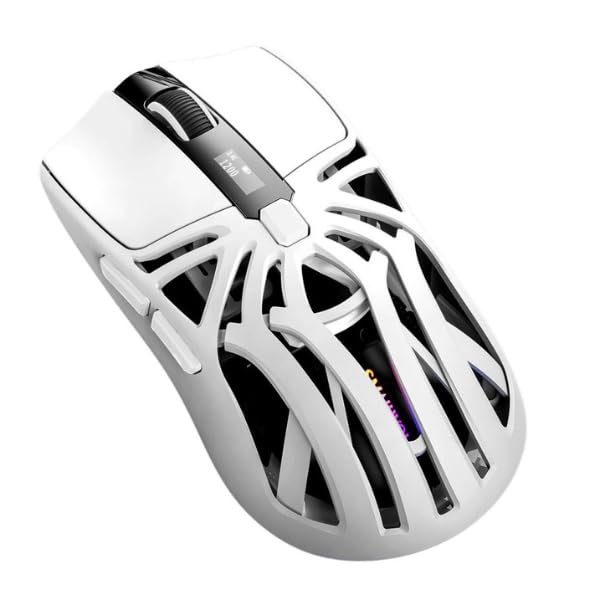
An image showing the SMAILWOLF RS8 Bluetooth Gaming Mouse in white. The mouse features an ergonomic design with multiple buttons and a scroll wheel, highlighting its sleek, lightweight profile.
The SMAILWOLF RS8 is equipped with an optical sensor, multiple programmable buttons (exact number not specified, but typical for gaming mice), a scroll wheel, and a mode switch for selecting connection types.
Configuració
1. Càrrega del ratolí
Before first use, it is recommended to fully charge the mouse. Connect the supplied USB charging cable to the mouse's charging port and the other end to a USB power source (e.g., computer USB port, USB wall adapter). The RGB lighting may indicate charging status (e.g., breathing effect, solid color). A full charge typically takes 2-3 hours.
2. Modes de connexió
The SMAILWOLF RS8 supports three connection methods:
2.1. Connexió sense fil de 2.4 GHz
- Locate the USB 2.4GHz wireless receiver, usually stored in a compartment on the underside of the mouse.
- Inseriu el receptor USB en un port USB disponible de l'ordinador.
- Turn on the mouse using the power switch located on the underside. Select the 2.4GHz mode (often indicated by a specific switch position or LED color).
- The mouse should automatically connect to your computer. If not, press the pairing button (if available) on the mouse.
2.2. Connexió Bluetooth
- Turn on the mouse using the power switch and select the Bluetooth mode. The mouse's LED indicator will typically flash, indicating it is in pairing mode.
- A l'ordinador o dispositiu, navega fins a la configuració de Bluetooth.
- Cerca new devices and select "SMAILWOLF RS8" from the list of available devices.
- Follow any on-screen prompts to complete the pairing process. The LED indicator on the mouse will become solid when successfully connected.
2.3. Connexió amb cable USB
- Connect the supplied USB charging cable directly from the mouse to an available USB port on your computer.
- The mouse will automatically switch to wired mode and begin charging. No drivers are typically required for basic functionality.
Instruccions de funcionament
Ajust de DPI
The SMAILWOLF RS8 features a dedicated DPI button (usually located behind the scroll wheel) to cycle through different sensitivity levels. Press this button to adjust the mouse's DPI (Dots Per Inch) on the fly. Each press will typically change the DPI setting, often indicated by a change in the mouse's LED color or a specific number of flashes. The mouse supports up to 10,000 DPI.
Control d'il·luminació RGB
The mouse features customizable RGB lighting. There may be a dedicated button (often on the underside or a side button combination) to cycle through various lighting effects and colors. Refer to the product's quick start guide or manufacturer's website for specific button combinations or software (if applicable) to customize RGB settings.
Botons programables
The SMAILWOLF RS8 is equipped with multiple buttons. While basic functions (left click, right click, scroll wheel) are standard, additional side buttons or top buttons may be programmable. For advanced customization and macro settings, refer to any specific software provided by the manufacturer (not included in this manual's scope).
Bateria i càrrega
The SMAILWOLF RS8 is powered by a built-in rechargeable battery. When the battery level is low, the mouse's indicator light may flash or change color. Connect the mouse using the USB charging cable to recharge. The mouse can be used while charging in wired mode.
- Eviteu exposar el ratolí a temperatures extremes.
- No intenteu substituir la bateria interna vosaltres mateixos. Poseu-vos en contacte amb el servei d'assistència si teniu problemes amb la bateria.
- Carregueu el ratolí regularment per mantenir la bateria en bon estat.
Manteniment
To ensure the longevity and optimal performance of your SMAILWOLF RS8 mouse, follow these maintenance guidelines:
- Neteja: Use a soft, dry, lint-free cloth to clean the mouse's surface. For stubborn dirt, slightly dampNetegeu el drap amb aigua o una solució de neteja suau. Eviteu utilitzar productes químics agressius o materials abrasius.
- Cura del sensor: Mantingueu el sensor òptic de la part inferior del ratolí net i lliure de pols o restes per garantir un seguiment precís.
- Emmagatzematge: Quan no l'utilitzeu durant períodes prolongats, guardeu el ratolí en un lloc fresc i sec, allunyat de la llum solar directa i de temperatures extremes.
- Eviteu les gotes: Protect the mouse from drops and impacts, which can damage internal components.
Resolució de problemes
If you encounter issues with your SMAILWOLF RS8 mouse, refer to the following common solutions:
- El ratolí no respon:
- Assegureu-vos que el ratolí estigui encès.
- Comproveu el nivell de la bateria i carregueu si cal.
- Verify the correct connection mode (2.4GHz, Bluetooth, or Wired) is selected.
- Per a 2.4 GHz, assegureu-vos que el receptor USB estigui ben connectat.
- For Bluetooth, ensure the device's Bluetooth is enabled and the mouse is paired. Try re-pairing.
- Try connecting via USB wired mode to rule out wireless issues.
- Lag or Disconnections:
- Assegureu-vos que el ratolí estigui completament carregat.
- Reduce interference by moving other wireless devices away from the receiver/mouse.
- Ensure the mouse is within the effective range of the receiver or Bluetooth device.
- Update your computer's USB or Bluetooth drivers.
- DPI or RGB Not Changing:
- Ensure you are pressing the correct buttons.
- Check if the mouse is in a mode that supports these features (e.g., some wired modes might have limited RGB).
- A factory reset (if available, check manufacturer's website) might resolve software glitches.
Especificacions
| Marca | SMAILWOLF (Generic) |
| Model | RS8 |
| Fabricant | HYPEDFLOW |
| Sensor de DPI | Optical, up to 10,000 DPI |
| Taxa de votació | 1000 Hz |
| Tecnologia de connexió | Bluetooth, 2.4GHz Wireless, USB Wired (Tri-mode) |
| Dispositius compatibles | Ordinador personal |
| Sistema operatiu | Windows (and other OS compatible with Bluetooth/USB) |
| Material | Plàstic |
| Orientació de la mà | D'acord |
| Color | Blanc |
| Pes del producte | 49 g |
| Dimensions del producte | Approximately 12 x 6.5 cm (Length x Width) |
| Font d'alimentació | Rechargeable Battery (Non-standard battery type) |
| Característiques especials | Bluetooth Tri-mode, RGB Lighting, Ultra-light Design |
Garantia i Suport
Garantia del fabricant: The provided information indicates that a manufacturer's warranty is not applicable for this product. Please refer to your retailer's return and warranty policies for details regarding purchases.
For further assistance or inquiries not covered in this manual, please contact your point of purchase or refer to the manufacturer's official website for updated support information.


