1. Introducció
The Black Shark Wireless Gaming Headset Goblin X8 offers a versatile audio experience for gamers across multiple platforms. Featuring tri-mode connectivity (2.4GHz wireless, Bluetooth 6.0, and wired 3.5mm audio), 7.1 virtual surround sound, and a noise-canceling microphone, this headset is designed for immersive gameplay and clear communication. Its ergonomic design ensures comfort during extended use, complemented by a long-lasting battery.
2. Què hi ha a la caixa
- Black Shark BS-X8 Gaming Headset
- Wireless Dongle (USB & USB-C)
- Cable d'àudio de 3.5 mm
- Cable de càrrega USB-C
- Manual d'usuari

3. Característiques del producte
3.1 Tri-Mode Connectivity & Ultra-Low Latency
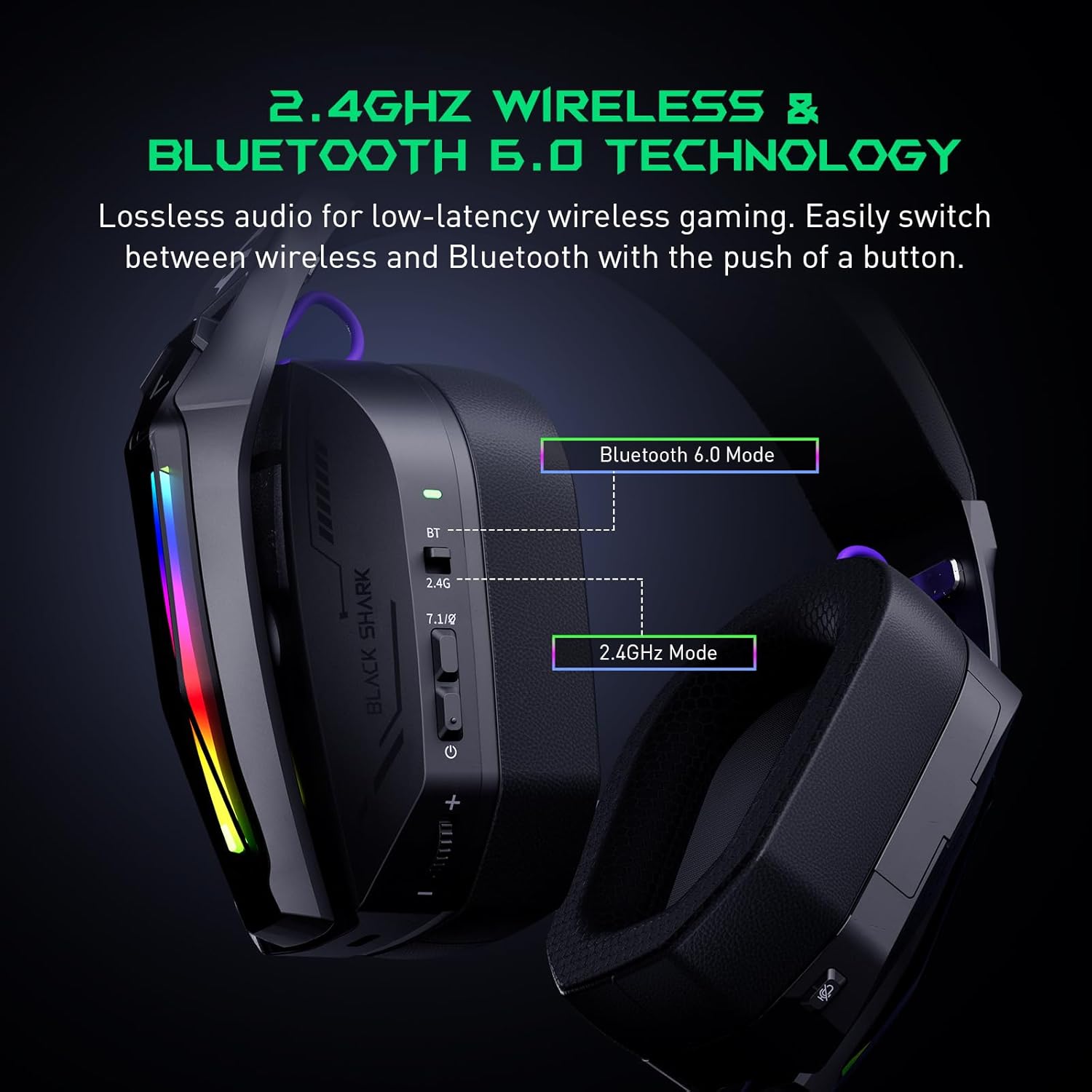
The Goblin X8 offers three connection methods: 2.4GHz wireless (via USB/Type-C dongle), Bluetooth 6.0, and a wired 3.5mm audio connection. The 2.4GHz mode provides ultra-low latency (under 20ms), ideal for competitive gaming. Bluetooth 6.0 ensures stable connectivity with under 30ms delay.


So envoltant virtual 3.2 7.1
Equipped with 40mm magnetic neodymium drivers and 2.4GHz lossless wireless technology, the headset delivers virtual 7.1 surround sound. This expands the audio dynamic range, providing exceptional scene reproduction and an immersive 3D sound experience in games.

3.3 Micròfon amb cancel·lació de soroll
The 120° adjustable, high-sensitivity microphone features omnidirectional noise cancellation technology. This effectively suppresses background noise, ensuring clear voice capture for communication during games or chats. It includes a one-touch mic mute switch for convenience.

3.4 Compatibilitat àmplia
This headset is compatible with a broad range of gaming devices, including PC, PS4, PS5, Switch, Xbox, laptops, tablets, TVs, iPads, and mobile phones, thanks to its triple-mode connectivity.

3.5 Ergonomic Design & Comfort
Designed for all-day comfort, the headset features an adjustable, ergonomic headband and breathable protein leather ear cups. This design reduces pressure and heat, preventing fatigue during long gaming sessions.
3.6 Bateria de llarga durada
The gaming headphones offer up to 40 hours of battery life for continuous use without RGB lights. With RGB lights on, the battery lasts for 20 hours. A low battery alert is provided when voltage baixa per sota dels 3.2V.

4. Controls i indicadors
The headset features intuitive controls for easy management of audio and settings:
- Indicador d'estat: Mostra la connexió i l'estat de la bateria.
- 2.4G & Bluetooth Switching: Toggle between wireless modes.
- Virtual 7.1 Surround Sound On/Off: Activate or deactivate surround sound.
- Botó d'encesa: Encén/apaga els auriculars.
- Roda de volum: Ajusta el volum de l'àudio.
- Port de càrrega USB-C: Per carregar els auriculars.
- Botó de silenci del micròfon: Silencia o activa el micròfon.
- Hidden 2.4G USB Dongle: Stores the wireless dongle securely.

5. Configuració
Connexió sense fil 5.1 de 2.4 GHz
- Locate the hidden 2.4G USB dongle on the headset.
- Plug the USB-A or USB-C end of the dongle into your PC, PS4, PS5, or Switch.
- Slide the connectivity switch on the headset to the '2.4G' position.
- Els auriculars es connectaran automàticament al dongle.
Connexió Bluetooth 5.2 6.0
- Slide the connectivity switch on the headset to the 'BT' (Bluetooth) position.
- On your device (smartphone, tablet, laptop), go to Bluetooth settings and search for 'Black Shark Goblin X8'.
- Select the headset to pair and connect.
5.3 Wired 3.5mm Audio Connection
- Connect one end of the included 3.5mm audio cable to the headset's 3.5mm jack.
- Connect the other end to the 3.5mm audio port on your device (PC, PS4, PS5, Xbox controller, Switch, etc.).
- The headset will operate in wired mode.
6. Instruccions de funcionament
6.1 Encès/Apagat
- To power on, press and hold the Power Button until the status indicator lights up.
- To power off, press and hold the Power Button until the status indicator turns off.
6.2 Ajust de volum
- Rotate the Volume Wheel up to increase volume.
- Rotate the Volume Wheel down to decrease volume.
6.3 Ús del micròfon
- To use the microphone, gently pull it down from its hidden position on the earcup.
- To mute the microphone, press the Mic Mute Button. Press again to unmute.
- To store the microphone, push it back into its hidden slot.
So envoltant virtual 6.4 7.1
- Press the Virtual 7.1 Surround Sound On/Off button to toggle the surround sound feature.
6.5 efectes d'il·luminació RGB
- Double-press the Virtual 7.1 Surround Sound On/Off button to turn the RGB lights on or off.
7. Manteniment
- Mantingueu els auriculars nets netejant-los amb un drap suau i sec.
- Eviteu exposar els auriculars a temperatures extremes, humitat o llum solar directa.
- Do not attempt to disassemble or repair the headset yourself. Contact customer support for assistance.
- Guardeu els auriculars en un lloc segur per evitar que es facin malbé quan no els feu servir.
8. Solució De Problemes
8.1 No Sound/Poor Sound Quality
- Ensure the headset is powered on and properly connected (2.4GHz dongle, Bluetooth, or 3.5mm cable).
- Comproveu els nivells de volum tant dels auriculars com del dispositiu connectat.
- If using 2.4GHz wireless, ensure the dongle is securely plugged in and the headset is in 2.4G mode.
- If using Bluetooth, ensure the headset is paired and connected in your device's Bluetooth settings.
- Test with a different audio source or device to rule out device-specific issues.
8.2 El micròfon no funciona
- Ensure the microphone is pulled down and not muted (check the Mic Mute Button).
- Verifiqueu la configuració d'entrada de micròfon al dispositiu connectat.
- Some devices (e.g., Nintendo Switch in 2.4GHz mode) may have limitations on microphone usage. Refer to the device's manual.
8.3 Problemes de connectivitat
- For 2.4GHz, ensure the dongle is within range and there are no major obstructions.
- For Bluetooth, ensure the headset is in pairing mode and your device's Bluetooth is enabled. Try unpairing and re-pairing.
- Assegureu-vos que els auriculars estiguin completament carregats.
9. Especificacions
| Característica | Especificació |
|---|---|
| Nom del model | Goblin X8 (BS-X8) |
| Tecnologia de connectivitat | Wired, Wireless (2.4GHz, Bluetooth 6.0) |
| Tipus de controlador d'àudio | Conductor dinàmic |
| Mida del controlador d'àudio | 40 mil·límetres |
| Latència d'àudio | 20 Milliseconds (2.4GHz) |
| Versió Bluetooth | 6.0 |
| Interval Bluetooth | 10 metres |
| Durada de la bateria | 40 Hours (lights off), 20 Hours (lights on) |
| Temps de càrrega | 3 hores |
| Micròfon | Noise Cancelling, 120° Adjustable |
| Característiques especials | Surround Sound, Volume Control, Rechargeable Battery |
| Dispositius compatibles | PC, PS4, PS5, Switch, Xbox, Laptops, Tablets, TVs, iPads, Mobile Phones |
| Pes de l'article | 325 grams (11.5 unces) |
10. Garantia i Suport
For warranty information, technical support, or service inquiries, please refer to the official Black Shark weblloc web o contacteu directament amb el servei d'atenció al client. Conserveu el rebut de compra per a reclamacions de garantia.


