1. Introducció
Welcome to the NIMO N179 17-inch Laptop user manual. This guide provides essential information for setting up, operating, maintaining, and troubleshooting your new laptop. The NIMO N179 is designed for versatile use, offering a large display, powerful AMD Ryzen 7 7735HS processor with Radeon 680M graphics, 16GB DDR5 RAM, and a 512GB NVMe SSD for efficient performance in business, study, and light gaming applications.
2. Què hi ha a la caixa
Si us plau, comproveu el contingut del paquet per assegurar-vos que hi hagi tots els elements:
- 1 x Portàtil NIMO N179
- 1 x Carregador ràpid tipus C 100 W PD
- 1 x Manual d'usuari (aquest document)
- Windows 11 Home (pre-installed)
- Informació de garantia (2 anys de garantia, 90 dies de devolució)
3. Guia de configuració
Follow these steps to set up your NIMO N179 laptop for the first time.
3.1 Càrrega inicial
Before first use, it is recommended to fully charge your laptop. Connect the provided 100W Type-C PD Fast Charger to the laptop's Type-C port and a power outlet. The charging indicator light will illuminate.
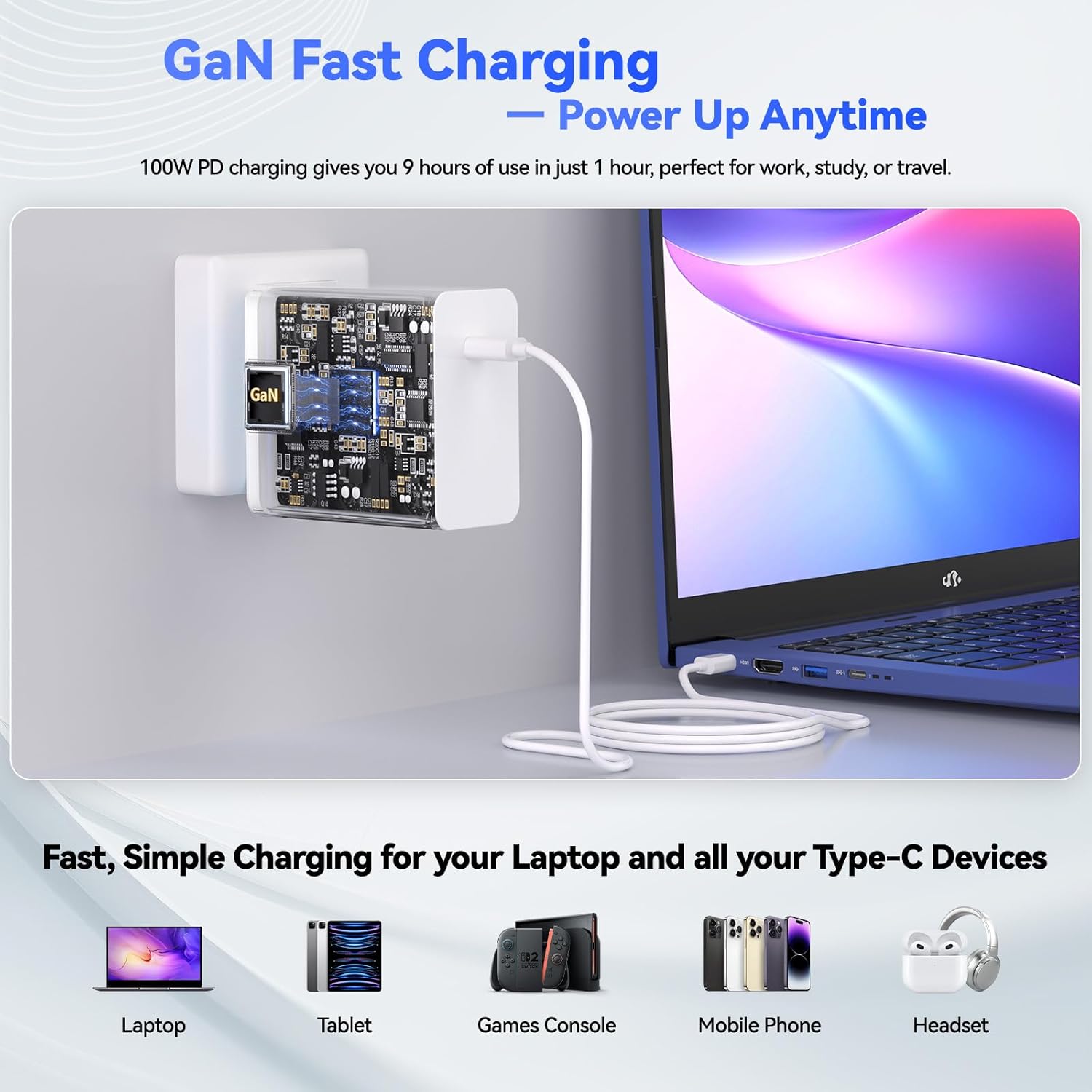
Figure 3.1: Connecting the 100W Type-C PD Fast Charger to the NIMO N179 laptop.
3.2 Encès
Open the laptop lid and press the power button, usually located on the top right of the keyboard or side panel. The laptop will boot up, and you will be guided through the Windows 11 initial setup process.
3.3 Configuració del Windows 11
Follow the on-screen instructions to configure Windows 11. This includes selecting your region, keyboard layout, connecting to a Wi-Fi network, and creating a user account. Ensure you have your Wi-Fi password ready.
4. Instruccions de funcionament
This section details the primary functions and features of your NIMO N179 laptop.
4.1 Visualització i elements visuals
The NIMO N179 features an immersive 17.3-inch Full HD (1920 x 1080 pixels) display. This large screen provides ample workspace for multitasking and an enhanced viewexperiència per a diverses aplicacions.

Figure 4.1: The 17.3-inch Full HD display offers a broad visual experience for productivity.
4.2 Processador i rendiment
Your laptop is equipped with an AMD Ryzen 7 7735HS processor (8 cores, 16 threads) and integrated AMD Radeon 680M graphics. This combination delivers responsive performance for demanding applications, creative tasks, and light gaming.

Figure 4.2: The AMD Ryzen 7 7735HS processor provides robust performance.

Figure 4.3: AMD Radeon 680M graphics for gaming and creative work.
4.3 Memòria i emmagatzematge
The laptop includes 16GB of DDR5 RAM for efficient multitasking and a 512GB NVMe SSD for fast boot times and quick application loading. The storage is designed for rapid data access.
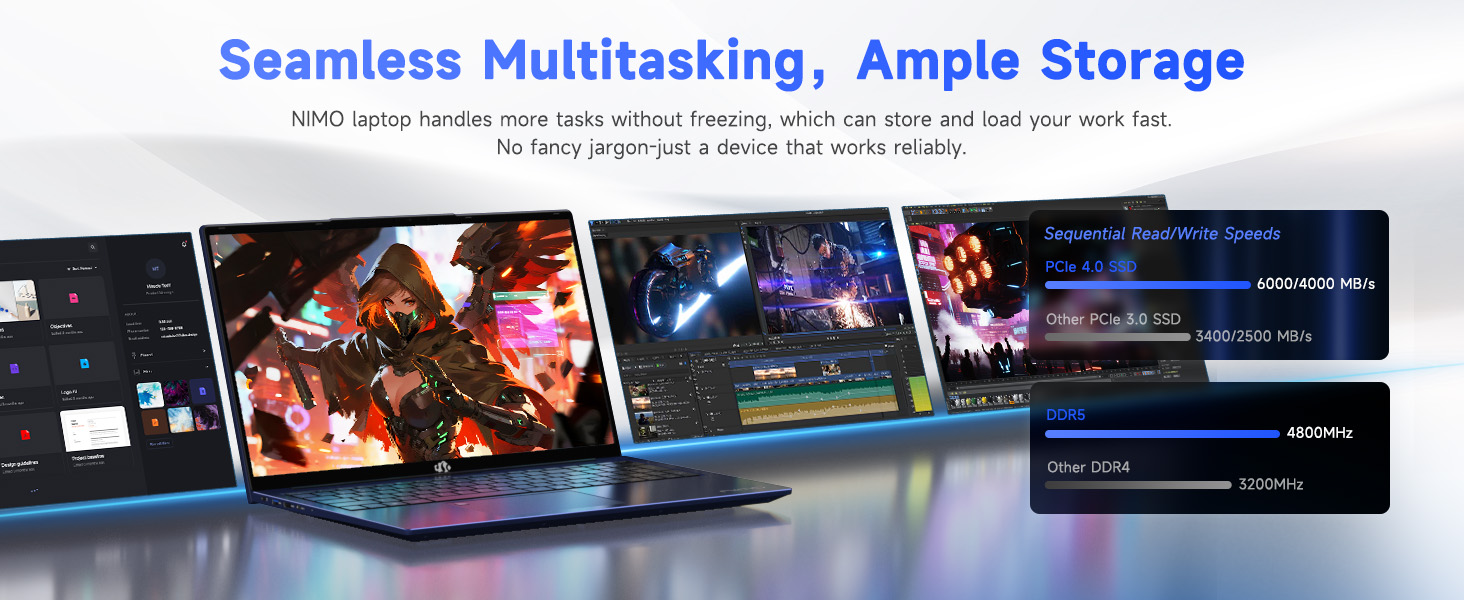
Figure 4.4: High-speed DDR5 memory and NVMe SSD for seamless operation.
4.4 Connectivitat
The NIMO N179 supports Wi-Fi 6E for faster and more stable wireless connections, and Bluetooth 5.2 for connecting wireless peripherals. It also features multiple ports for external devices:
- USB 3.2 Gen1 ports
- Port USB 2.0
- Type-C Gen2 (multifunction) ports
- Port HDMI 2.0
- Jack d'àudio
- Lector de targetes SD
- Ranura de bloqueig Kensington

Figura 4.5: Mésview of laptop ports for various connections.

Figure 4.6: Wi-Fi 6E provides advanced wireless connectivity.
4.5 Security and Comfort Features
The laptop integrates several features for security and user comfort:
- WebObturador de privacitat de la càmera: A physical slider to cover the webcam when not in use, ensuring privacy.
- Reconeixement d'empremtes digitals: For secure and quick login.
- Teclat retroil·luminat: Allows for comfortable typing in low-light conditions. Press F9 to cycle through backlight settings (temporary light, constant light, off).
- Teclat numèric: A dedicated numeric keypad for enhanced data entry efficiency.

Figure 4.7: Fingerprint unlock and backlit keyboard for security and comfort.

Figura 4.8: Detallada view of security and comfort features.
5. Manteniment
Proper maintenance ensures the longevity and optimal performance of your NIMO N179 laptop.
5.1 Neteja
- Feu servir un drap suau i sense borrissol per netejar la pantalla i les superfícies exteriors.
- Per a marques difícils, lleugerament dampNetegeu el drap amb aigua o un netejador de pantalles. Eviteu productes químics agressius.
- Regularly clean the keyboard with compressed air to remove dust and debris.
5.2 Cura de la bateria
The laptop is equipped with a 58Wh battery. To maximize battery life:
- Eviteu temperatures extremes.
- No deixeu el portàtil completament carregat o completament descarregat durant períodes prolongats.
- Per a l'emmagatzematge a llarg termini, carregueu la bateria al 50-60%.

Figure 5.1: Battery features and charging efficiency.
5.3 Actualitzacions de programari
Regularly update your Windows operating system and drivers to ensure optimal performance, security, and compatibility. You can check for updates via Windows Settings.
5.4 Sistema de refrigeració
The NIMO N179 features an efficient cooling system to maintain performance. Ensure the vents are not obstructed to allow proper airflow.

Figure 5.2: Internal cooling system for sustained performance.
6. Solució De Problemes
This section addresses common issues you might encounter with your NIMO N179 laptop.
6.1 Sense alimentació / El portàtil no s'encén
- Assegureu-vos que l'adaptador de corrent estigui connectat correctament tant al portàtil com a una presa de corrent que funcioni.
- Verifiqueu que la presa de corrent funciona connectant-hi un altre dispositiu.
- Si la bateria està completament esgotada, el portàtil pot trigar uns minuts a carregar-se abans que es pugui engegar.
6.2 Problemes de connectivitat Wi-Fi
- Comproveu si el Wi-Fi està habilitat a la configuració de Windows.
- Reinicieu el router i el mòdem.
- Assegureu-vos que esteu dins de l'abast de la vostra xarxa Wi-Fi i que heu introduït la contrasenya correcta.
- Actualitza els controladors Wi-Fi a través del Gestor de dispositius.
- If issues persist, try restarting the network adapter via Windows Network Settings.
6.3 Keyboard Backlight Not Working
- Premeu el botó F9 key to cycle through the backlight settings (off, temporary, constant).
- Ensure your laptop's power settings are not configured to disable the backlight to save power.
6.4 Fingerprint Reader Issues
- Ensure your finger is clean and dry when using the sensor.
- Re-register your fingerprint in Windows Settings if you experience consistent issues.
- Update fingerprint reader drivers.
6.5 Alentiment o bloqueig del sistema
- Tanca les aplicacions innecessàries que s'executen en segon pla.
- Consulteu el Gestor de tasques per veure si hi ha processos que consumeixen molta CPU o RAM.
- Ensure your system has sufficient free storage space on the SSD.
- Executeu una anàlisi de virus.
- Ensure the laptop's cooling vents are clear and not obstructed.
7. Especificacions
Detailed technical specifications for the NIMO N179 laptop:
| Característica | Detall |
|---|---|
| Nom del model | NIMO N179 |
| Mida de la pantalla | 17.3 polzades |
| Resolució de pantalla | 1920 x 1080 píxels (Full HD) |
| Processador | AMD Ryzen 7 7735HS (8 nuclis, 16 fils de treball, fins a 4.75 GHz) |
| Coprocessador gràfic | AMD Radeon 680M (integrada) |
| RAM | 16 GB de DDR5 (4800 MHz) |
| Disc dur | 512 GB SSD (NVMe, Solid State) |
| Sistema operatiu | Windows 11 Home |
| Tipus sense fil | Wi-Fi 6E (802.11a/b/g/n/ac), Bluetooth 5.2 |
| Ports | 1x USB 2.0, 4x USB 3.0 (Gen1), 2x Type-C Gen2 (Multifunction), 1x HDMI 2.0, 1x Audio Jack, 1x SD Card Reader, 1x Kensington Lock |
| Bateria | 58Wh Lithium Metal (up to 9.9 hours average battery life) |
| Carregador | 100W Type-C PD Fast Charger (GaN Technology) |
| Pes de l'article | 4.6 lliures |
| Dimensions del producte | 15.66 x 9.99 x 0.74 polzades |
| Característiques especials | Backlit Keyboard, Fingerprint Reader, HD Audio, Numeric Keypad, Webobturador de privadesa de la càmera |
8. Garantia i Suport
NIMO provides comprehensive support for your N179 laptop.
8.1 Informació de la garantia
El teu portàtil NIMO N179 inclou un 2 any de garantiaA més, un Política de devolució de 90 dies is offered from the date of purchase. Please retain your proof of purchase for warranty claims.
8.2 Atenció al client
For technical assistance or any inquiries, NIMO offers 24/7 online technical support. Refer to the contact information provided with your product packaging or visit the official NIMO support weblloc per obtenir més informació.


