Neoteck VC746A Digital TRMS Multimeter User Manual
Model: VC746A
1. Introducció
The Neoteck VC746A is a True RMS (TRMS) digital multimeter designed for accurate and reliable electrical measurements. Featuring a 6000-count display and auto-ranging capabilities, it is suitable for both professional electricians and home users. This manual provides detailed instructions for safe operation, setup, measurement functions, maintenance, and troubleshooting.
This multimeter can measure AC/DC voltage, AC/DC current, resistance, capacitance, frequency, duty cycle, temperature, diode, and continuity. It also includes advanced safety features such as Non-Contact Voltage (NCV) detection and Live wire testing.
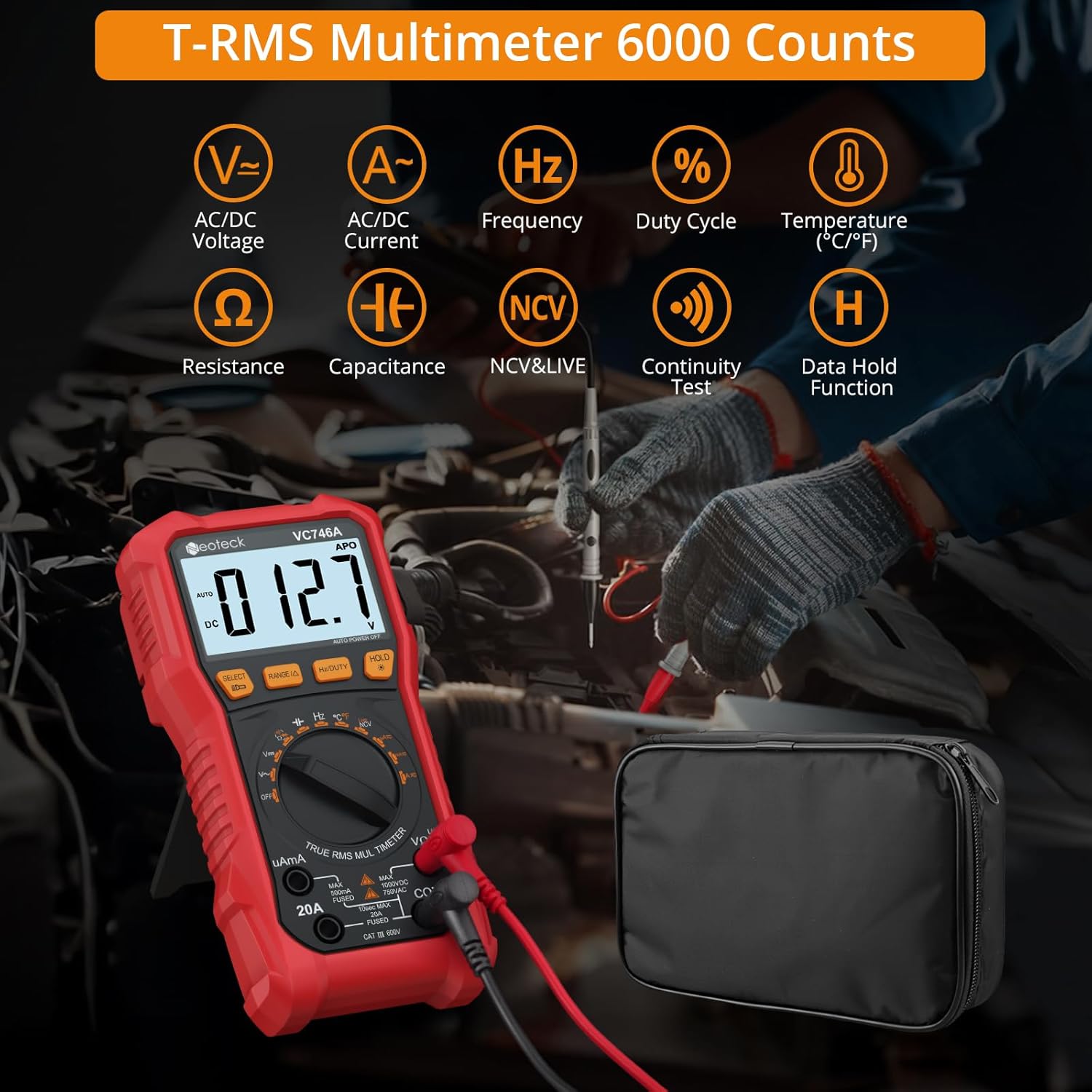
Figure 1.1: Neoteck VC746A Multimeter displaying its range of measurement capabilities including AC/DC Voltage, Current, Frequency, Duty Cycle, Temperature, Resistance, Capacitance, NCV & Live, Continuity Test, and Data Hold Function.
2. Informació de seguretat
To ensure safe operation and avoid electric shock or personal injury, please read all safety information carefully before using the multimeter. Always adhere to local and national safety codes.
- No supereu els valors d'entrada màxims per a cap funció.
- No utilitzeu el mesurador si aquest o els cables de prova semblen danyats.
- Aneu amb extrema precaució quan treballeu amb voltagper sobre de 30 V CA RMS, 42 V pic o 60 V CC. Aquests voltagsuposen un risc de xoc.
- Desconnecteu sempre els cables de prova del circuit abans de canviar les funcions.
- Assegureu-vos que s'hagin seleccionat la funció i el rang correctes per a la mesura.
- Utilitzeu el volum sense contactetage (NCV) detection and Live test features to identify live wires before making contact measurements. The multimeter provides visual warnings for high voltage.
- The device features double fuse protection. If a fuse blows, replace it with one of the specified type and rating.
- No feu funcionar el mesurador en entorns amb gasos, vapors o pols explosius.
- Mantingueu els dits darrere dels protectors de dits de les sondes de prova durant les mesures.

Figure 2.1: The multimeter's clear 3.5-inch backlit LCD display, showing a voltage warning icon to enhance safety during operation, especially in low-light conditions.

Figure 2.2: Demonstrating the Live & NCV (Non-Contact Voltage) safety detection feature, indicating the multimeter's ability to detect live wires without physical contact, providing sound and visual warnings.
3. Característiques del producte
The Neoteck VC746A Multimeter offers a range of features for versatile and accurate electrical testing:
- True RMS (TRMS) Measurement: Proporciona lectures precises per a formes d'ona no sinusoïdals.
- Visualització de 6000 comptes: High-resolution digital display for precise measurements.
- Classificació automàtica: Selecciona automàticament el rang de mesura adequat, simplificant el funcionament.
- Funcions de mesura integral: Mesures AC/DC Voltage, AC/DC Current (up to 20A), Resistance, Capacitance, Frequency, Duty Cycle, and Temperature.
- Prova de díodes i continuïtat: Essential functions for circuit diagnostics.
- Vol. Sense contactetagDetecció de e (NCV): Detecta AC voltage without physical contact, enhancing safety.
- Detecció de cables en fase: Identifies live wires for safe electrical work.
- Large Backlit LCD Screen: Ensures clear readability even in dimly lit environments.
- Llanterna integrada: Provides illumination for working in dark areas.
- Funció de retenció de dades: Congela la lectura mostrada per a un registre còmode.
- Kickstand and Pen Holder Design: Allows for hands-free operation and convenient storage of test leads.
- Protective Rubber Case: C duradorasing for enhanced protection against drops and impacts.
- Apagat automàtic: Conserva la durada de la bateria quan no s'utilitza.
- Indicador de bateria baixa: Alertes quan cal substituir les piles.

Figura 3.1: Un excésview of the Neoteck VC746A Multimeter's comprehensive capabilities, including Voltage, Current, Temperature, Diode, Duty Cycle, Frequency, Capacitance, Resistance, Continuity, TRMS 6000 Counts, Data Hold, and Flashlight.
4. Contingut del paquet
Verifiqueu que tots els elements siguin presents al vostre paquet:
- Neoteck VC746A Digital TRMS Multimeter
- Test Leads (1 pair)
- Sonda de temperatura
- Alligator Clips (1 pair)
- Tornavís
- AA Batteries (2 pcs)
- Bossa d'emmagatzematge
- Manual d'usuari (aquest document)

Figure 4.1: The complete package contents, including the Neoteck VC746A Multimeter, test leads, temperature probe, alligator clips, screwdriver, AA batteries, storage bag, and operation manual.

Figura 4.2: Primer pla view of the included accessories (test leads, alligator clips, temperature probe), the integrated pen holder design, the protective rubber case, and the foldable stand support for hands-free convenience.
5. Configuració
5.1 Instal·lació de la bateria
- Assegureu-vos que el multímetre estigui apagat.
- Localitzeu la tapa del compartiment de la bateria a la part posterior del multímetre.
- Feu servir el tornavís inclòs per afluixar el cargol que fixa la tapa de la bateria.
- Remove the cover and insert two AA batteries, observing the correct polarity (+/-).
- Torneu a col·locar la tapa de la bateria i premeu el cargol.
5.2 Connexió dels cables de prova
- Inseriu el cable de prova negre a la presa d'entrada "COM" (comú).
- Per a la majoria de volumstage, resistance, continuity, diode, capacitance, and frequency measurements, insert the red test lead into the "VΩHz" input jack.
- For current measurements (up to 600mA), insert the red test lead into the "uAmA" input jack.
- For high current measurements (up to 20A), insert the red test lead into the "20A" input jack.
6. Instruccions de funcionament
6.1 Funcionament general
- Encès/apagat: Rotate the rotary switch to the desired function to turn on the multimeter. Rotate to "OFF" to turn it off.
- Interval automàtic: The multimeter automatically selects the best measurement range. Press the "RANGE" button to switch to manual ranging if desired. Press again to return to auto-ranging.
- Conservació de dades: Premeu el botó "HOLD" per congelar la lectura actual a la pantalla. Premeu-lo de nou per alliberar-la.
- Retroiluminació/Llanterna: Press and hold the "HOLD" button to turn on the backlight. Press it again to turn on the flashlight. A third press turns off both.
- Selecció de la funció: For functions with multiple modes (e.g., AC/DC Voltage, Diode/Continuity), press the "SELECT" button to cycle through the modes.
6.2 Funcions de mesura
Always ensure the test leads are connected to the correct input jacks and the rotary switch is set to the appropriate function before making any measurements.
6.2.1 AC/DC VoltagMesura de e (V∼ / V—)
- Set the rotary switch to "V".
- Press "SELECT" to choose between AC (V∼) or DC (V—) voltage.
- Connecteu els cables de prova en paral·lel al circuit o component que s'està provant.
- Llegeix el voltage valor a la pantalla.
6.2.2 AC/DC Current Measurement (uA∼/—, mA∼/—, A∼/—)
- Set the rotary switch to "uAmA" or "20A" depending on the expected current.
- Press "SELECT" to choose between AC (∼) or DC (—) current.
- Important: Disconnect power to the circuit. Open the circuit where the current is to be measured. Connect the multimeter in series with the circuit.
- Apply power to the circuit. Read the current value on the display.
- After measurement, disconnect power, remove the multimeter, and restore the circuit.
6.2.3 Mesura de resistència (Ω)
- Set the rotary switch to "Ω".
- Ensure the circuit is de-energized and any capacitors are discharged.
- Connecteu els cables de prova al component que s'ha de mesurar.
- Llegiu el valor de resistència a la pantalla.
6.2.4 Capacitance Measurement (㎏)
- Set the rotary switch to "㎏".
- Assegureu-vos que el condensador estigui completament descarregat abans de connectar els cables de prova.
- Connecteu els cables de prova a través del condensador.
- Llegiu el valor de la capacitat a la pantalla.
6.2.5 Frequency (Hz) and Duty Cycle (%) Measurement
- Set the rotary switch to "Hz%".
- Press "SELECT" to toggle between Frequency (Hz) and Duty Cycle (%).
- Connect the test leads in parallel to the signal source.
- Llegiu el valor de freqüència o cicle de treball a la pantalla.
6.2.6 Mesura de temperatura (℃/℉)
- Set the rotary switch to "TEMP".
- Connect the temperature probe to the input jacks (red to VΩHz, black to COM).
- Place the tip of the temperature probe on the object or in the environment to be measured.
- Read the temperature value on the display. Press "SELECT" to switch between Celsius (℃) and Fahrenheit (℉).
6.2.7 Diode Test (→|—)
- Set the rotary switch to "→|—" (Diode/Continuity).
- Press "SELECT" to select the Diode Test function.
- Connecteu el cable de prova vermell a l'ànode i el cable de prova negre al càtode del díode.
- A forward voltage drop will be displayed. Reverse the leads; an open circuit (OL) should be displayed for a good diode.
6.2.8 Continuity Test (♪)
- Set the rotary switch to "→|—" (Diode/Continuity).
- Press "SELECT" to select the Continuity Test function.
- Connecteu els cables de prova a través del circuit o component.
- Si la resistència és inferior a aproximadament 50 Ω, sonarà el brunzidor, indicant continuïtat.
6.2.9 Vol. sense contactetage (NCV) Detecció
- Set the rotary switch to "NCV/LIVE".
- Press "SELECT" to select the NCV function.
- Move the top end of the multimeter near the conductor or outlet.
- The meter will beep and the NCV indicator light will flash with increasing frequency as it detects AC voltage.
6.2.10 Detecció de cables en fase
- Set the rotary switch to "NCV/LIVE".
- Press "SELECT" to select the LIVE function.
- Insert the red test lead into the live wire or socket hole. The black lead is not used for this test.
- The display will show "LIVE" and the meter will beep and flash if a live wire is detected.
7. Manteniment
7.1 Neteja
Netegeu el cas amb l'anunciamp drap i detergent suau. No utilitzeu abrasius ni dissolvents. Mantingueu els terminals d'entrada lliures de brutícia i humitat.
7.2 Substitució de la bateria
When the low battery indicator appears on the display, replace the batteries as described in Section 5.1. Always use two new AA batteries.
7.3 Canvi de fusibles
Si la funció de mesura de corrent falla, pot ser necessari substituir el fusible. Consulteu les especificacions per conèixer el tipus i la classificació correctes del fusible. La substitució del fusible només l'ha de realitzar personal qualificat.
7.4 Emmagatzematge
Si el multímetre no s'utilitza durant un període prolongat, traieu-ne les piles per evitar fuites. Guardeu el dispositiu en un lloc fresc i sec, allunyat de la llum solar directa i de temperatures extremes.
8. Solució De Problemes
| Problema | Causa possible | Solució |
|---|---|---|
| El mesurador no s'encén. | Piles gastades; instal·lació incorrecta de la bateria. | Canvieu les piles; comproveu la polaritat de les piles. |
| Es mostra "OL" (sobrecàrrega). | Input value exceeds selected range; Open circuit (for continuity/resistance). | Switch to a higher range (if in manual range); Check circuit connection. |
| Lectures inexactes. | Incorrect function selected; Poor test lead connection; External interference. | Verify function and range; Ensure secure connections; Move away from strong electromagnetic fields. |
| La mesura de corrent no funciona. | Blown fuse; Incorrect input jack. | Replace fuse (see Section 7.3); Ensure red lead is in "uAmA" or "20A" jack. |
| NCV/LIVE not detecting. | Weak signal; Shielded wires. | Ensure close proximity to conductor; NCV may not detect through thick insulation or metal conduits. |
9. Especificacions
| Paràmetre | Valor |
|---|---|
| Número de model | VC746A |
| Mostra | 6000 recomptes, LCD retroil·luminada |
| RMS veritable | Sí |
| Rang automàtic | Sí |
| DC Voltage | Fins a 1000V |
| Vol. ACtage | Fins a 750V |
| Corrent DC | Fins a 20A |
| Corrent alterna | Fins a 20A |
| Resistència | Sí |
| Capacitat | Sí |
| Freqüència | Sí |
| Cicle de treball | Sí |
| Temperatura | Yes (with included probe) |
| Prova de díode | Sí |
| Prova de continuïtat | Sí (amb brunzidor) |
| Detecció de NCV | Sí |
| Detecció de cable en directe | Sí |
| Font d'alimentació | 2 x piles AA |
| Dimensions (L x A x A) | 19 x 9.2 x 4.5 cm |
| Pes | 480 grams |
10. Garantia i Suport
Neoteck products are designed for reliability and performance. For warranty information or technical support, please refer to the contact details provided with your purchase or visit the official Neoteck weblloc web. Conserveu el rebut de compra com a comprovant de compra per a reclamacions de garantia.


