1. Introducció
The Audizio Desio is a versatile digital radio that combines classic aesthetics with modern audio technology. It features DAB, DAB+, and FM tuning for clear radio reception, along with Bluetooth 5.0 for wireless streaming, a USB port for media playback, and a 3.5mm AUX input for wired connections. The radio is equipped with a 2.4-inch color LCD display and integrated stereo speakers, making it suitable for various environments such as living rooms, kitchens, or bedrooms.
This manual provides detailed instructions for setting up, operating, and maintaining your Audizio Desio radio. Please read it thoroughly before use to ensure proper functionality and to maximize your listening experience.
2. Informació de seguretat
- Assegureu-vos que el vol de l'adaptador de correnttagcoincideix amb la teva font d'alimentació local abans de connectar-la.
- No exposeu la unitat a la pluja, la humitat o les temperatures extremes.
- Eviteu col·locar la unitat a prop de fonts de calor o sota la llum solar directa.
- No obriu la c.asing; demaneu totes les tasques de manteniment a personal qualificat.
- Mantingueu la unitat allunyada de camps magnètics forts.
- Netegeu la unitat només amb un drap suau i sec.
3. Contingut del paquet
Si us plau, comproveu que hi hagi tots els articles en desempaquetar:
- Audizio Desio DAB/DAB+/FM Radio
- Adaptador d'alimentació (DC 5V)
- Control remot
- Manual d'usuari
4. Controls i connexions
Controls del panell frontal
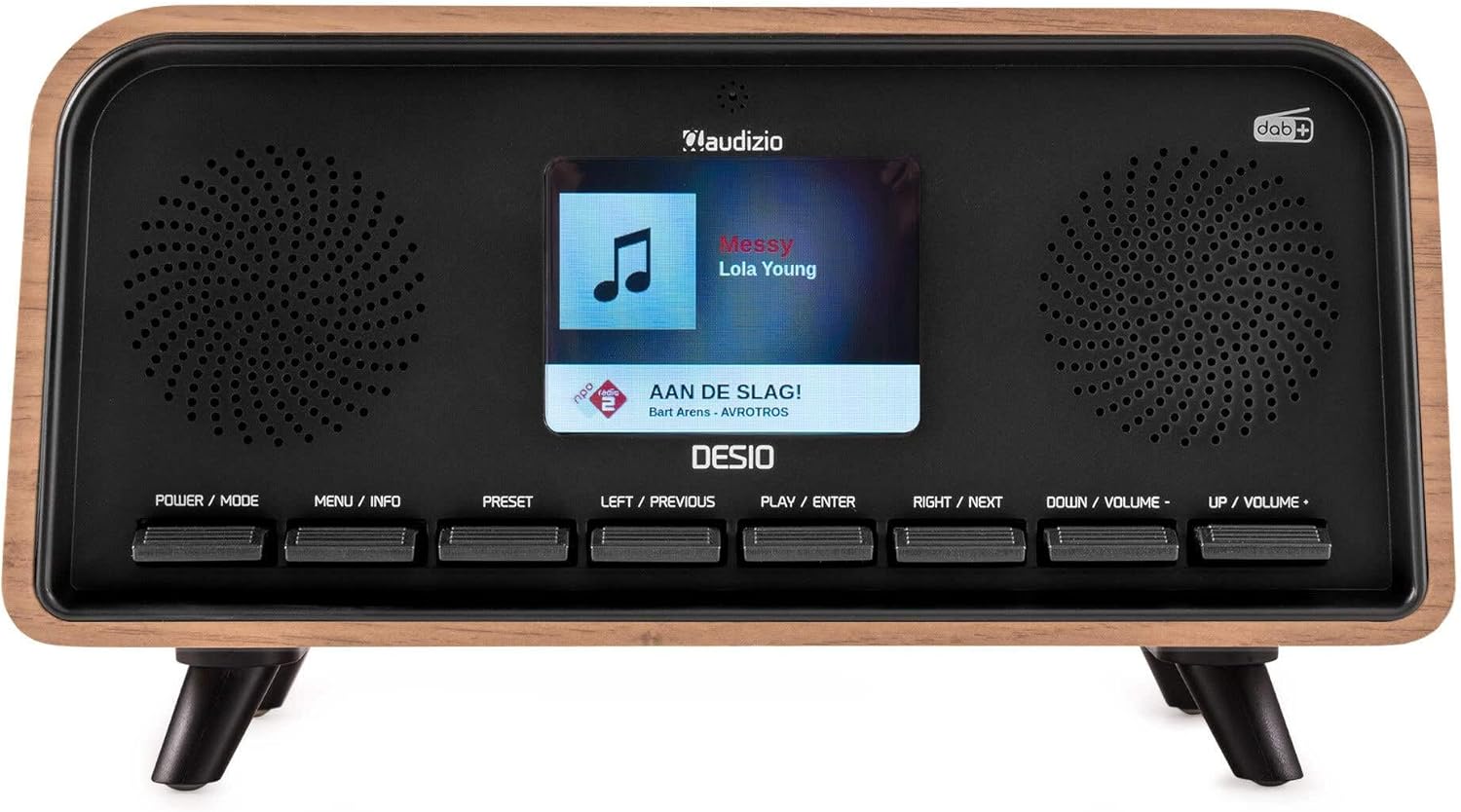
Davant view of the Audizio Desio radio, showing the display playing music with artist and track information. The control buttons are visible below the screen.
- POWER / MODE: Press to turn on/off. Press and hold to switch between DAB, FM, Bluetooth, USB, and AUX modes.
- MENU / INFO: Press to access menu options. In playback mode, press to cycle through information display.
- PRESET: Press to recall saved stations. Press and hold to save current station.
- LEFT / PREVIOUS: Navigate left in menus, or skip to previous track/station.
- PLAY / ENTER: Confirm selection in menus, or play/pause media.
- RIGHT / NEXT: Navigate right in menus, or skip to next track/station.
- DOWN / VOLUME -: Decrease volume, or navigate down in menus.
- UP / VOLUME +: Increase volume, or navigate up in menus.
Connexions del panell posterior
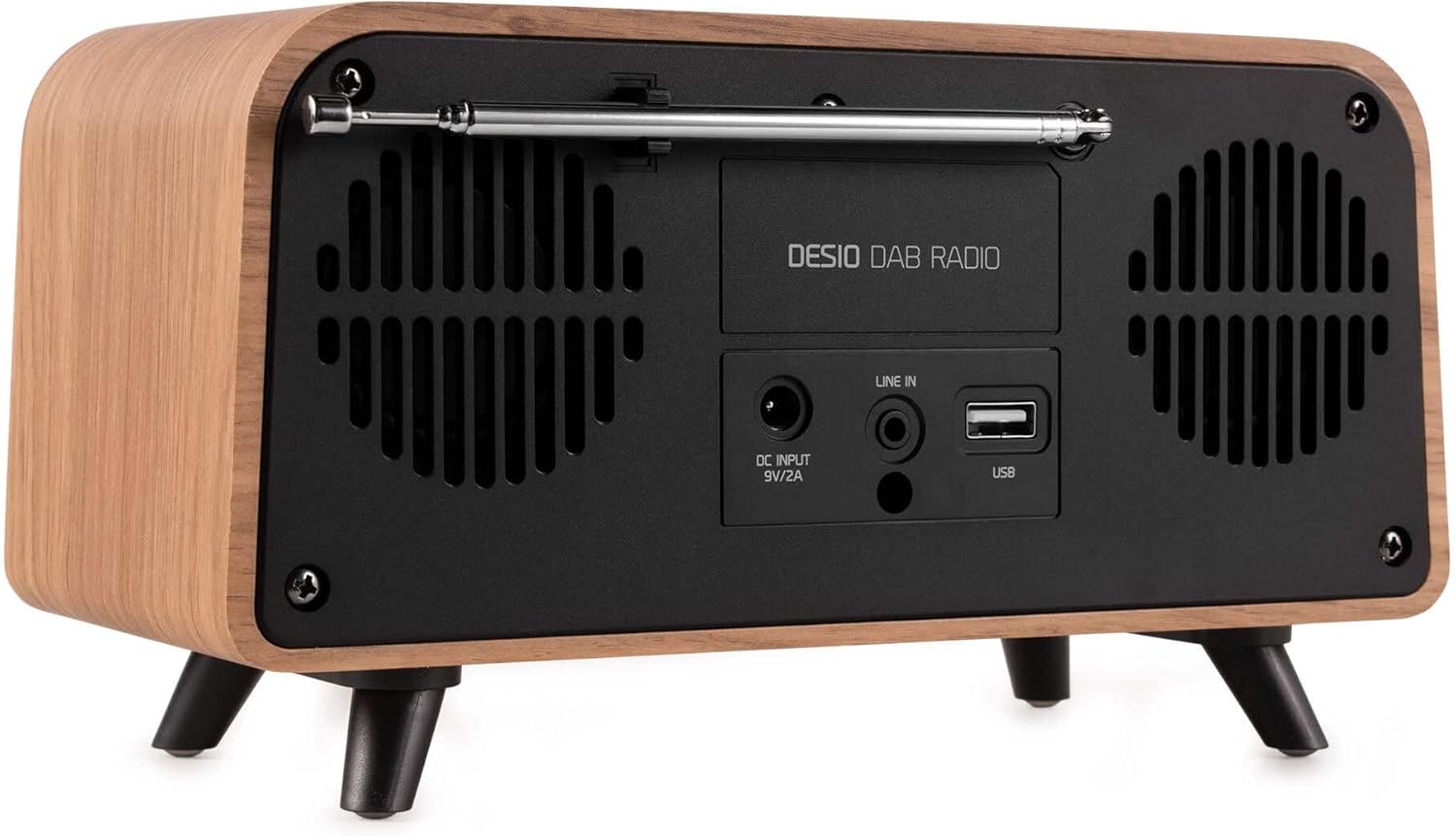
posterior view of the Audizio Desio radio, highlighting the DC INPUT 9V/2A, LINE IN (3.5mm AUX), and USB ports. The telescopic antenna is extended.
- DC INPUT 9V/2A: Connecteu aquí l'adaptador de corrent proporcionat.
- LINE IN (3.5mm AUX): Connecteu dispositius d'àudio externs amb un cable d'àudio de 3.5 mm.
- USB: Inseriu una unitat flash USB per reproduir MP3.
- Antena telescòpica: Extend fully for optimal DAB/DAB+ and FM reception.
5. Configuració inicial
- Connectar l'alimentació: Plug the provided DC 5V power adapter into the DC INPUT port on the rear of the radio, then plug the adapter into a wall outlet.
- Amplia l'antena: Fully extend the telescopic antenna located on the rear of the unit for best reception.
- Encès: Premeu el botó POTÈNCIA / MODE botó per encendre la ràdio.
- First-time DAB Scan: Upon first power-on, the radio will automatically perform a full scan for DAB/DAB+ stations. This may take a few minutes. The display will show the scanning progress.
- Establir hora/data: The time and date will usually be set automatically via DAB signal. If not, you can manually set them via the menu.
6. Instruccions de funcionament
6.1 Funcionament de la ràdio DAB/DAB+

Davant view of the Audizio Desio radio, displaying a DAB radio station ('NPO Klassiek') and current time.
- Select DAB Mode: Premeu el botó POTÈNCIA / MODE button repeatedly until 'DAB' is displayed.
- Scan for Stations: If no stations are found or you wish to rescan, press MENÚ / INFORMACIÓ, després utilitza LEFT / PREVIOUS or DRET / SEGÜENT to select 'Full Scan' and press PLAY / ENTER.
- Select Station: Utilitza el LEFT / PREVIOUS or DRET / SEGÜENT buttons to browse available stations. Press PLAY / ENTER per seleccionar una estació.
- Desa la configuració predeterminada: Per desar una emissora, manteniu premut el botó PRESET botó. Ús LEFT / PREVIOUS or DRET / SEGÜENT to choose a preset number (1-50), then press PLAY / ENTER per confirmar.
- Recuperació predeterminada: Per recuperar una emissora desada, premeu la tecla PRESET button (do not hold). Use LEFT / PREVIOUS or DRET / SEGÜENT to select the desired preset, then press PLAY / ENTER.

Davant view of the Audizio Desio radio, showing the 'Preset Recall' menu on the display, indicating empty preset slots.
6.2 Funcionament de la ràdio FM
- Seleccioneu el mode FM: Premeu el botó POTÈNCIA / MODE button repeatedly until 'FM' is displayed.
- Escaneig automàtic: Mantén premut PLAY / ENTER to automatically scan for and save available FM stations.
- Sintonització manual: Ús LEFT / PREVIOUS or DRET / SEGÜENT per ajustar amb precisió la freqüència.
- Save/Recall Presets: Follow the same procedure as for DAB radio (Section 6.1).
6.3 Bluetooth (BT) Operation

Davant view of the Audizio Desio radio, with the display showing 'BT' (Bluetooth) mode and 'Connected' status.
- Select BT Mode: Premeu el botó POTÈNCIA / MODE button repeatedly until 'BT' is displayed. The radio will enter pairing mode, indicated by a flashing Bluetooth icon.
- Parella el dispositiu: On your smartphone, tablet, or laptop, enable Bluetooth and search for available devices. Select 'Audizio Desio' from the list.
- Connectar: Once paired, the display will show 'Connected'. You can now stream audio from your device to the radio.
- Control de reproducció: Use your connected device or the radio's PLAY / ENTER, LEFT / PREVIOUS, i DRET / SEGÜENT botons per controlar la reproducció.
Reproducció USB 6.4

Davant view of the Audizio Desio radio, with the display showing 'USB' mode, current time, and details of an MP3 file s'està jugant.
- Inseriu una unitat USB: Insert a USB flash drive (formatted to FAT32) containing MP3 files into the USB port on the rear of the radio.
- Select USB Mode: Premeu el botó POTÈNCIA / MODE button repeatedly until 'USB' is displayed. The radio will automatically start playing the first compatible audio file.
- Navega Files: Ús LEFT / PREVIOUS or DRET / SEGÜENT to skip tracks. Press PLAY / ENTER per aturar/reprendre la reproducció.
6.5 Entrada AUX
- Connectar el dispositiu: Connect an external audio device (e.g., MP3 player, smartphone) to the 'LINE IN' (3.5mm AUX) port on the rear of the radio using a 3.5mm audio cable (not included).
- Seleccioneu el mode AUX: Premeu el botó POTÈNCIA / MODE premeu el botó repetidament fins que aparegui «AUX».
- Control de reproducció: Playback is controlled directly from your connected external device. Adjust volume using the radio's volume controls.
6.6 Funcions d'alarma i temporitzador
- Configuració d'alarmes: Accediu a la configuració de l'alarma mitjançant MENÚ / INFORMACIÓ button. You can set multiple alarms with customizable sources (DAB, FM, Buzzer), volume, and recurrence (daily, weekdays, weekends).
- Temporitzador de son: The sleep timer allows the radio to turn off automatically after a set period. Access this function via the MENÚ / INFORMACIÓ button and select the desired duration.
- Funció de posposar: When an alarm sounds, press any button (except Power) to activate the snooze function for a short period.
7. Manteniment
- Neteja: Use a soft, dry, lint-free cloth to clean the radio's surface. Do not use abrasive cleaners, waxes, or solvents.
- Cura de l'antena: Handle the telescopic antenna carefully to avoid bending or breaking.
- Emmagatzematge: If storing the radio for an extended period, disconnect it from the power supply and store it in a cool, dry place.
8. Solució De Problemes
| Problema | Causa possible | Solució |
|---|---|---|
| Sense poder | L'adaptador de corrent no està connectat o la presa de corrent està defectuosa. | Comproveu la connexió de l'adaptador de corrent i proveu una altra presa de corrent. |
| Mala recepció DAB/FM | Antena no completament estesa o zona de senyal deficient. | Fully extend the antenna. Try repositioning the radio. Perform a full scan. |
| Bluetooth no connectat | Radio not in BT mode, device not in pairing mode, or too far away. | Ensure radio is in BT mode. Put your device in pairing mode. Move device closer to the radio (within 10m). |
| La reproducció USB no funciona | USB drive not inserted correctly, unsupported file format, or drive not FAT32. | Reinsert USB drive. Ensure files are MP3. Check USB drive format (FAT32). |
| No hi ha so des de l'AUX | Radio not in AUX mode, cable faulty, or external device volume low. | Select AUX mode. Check 3.5mm cable. Increase volume on both radio and external device. |
9. Especificacions tècniques
- Marca: Audizio
- Model: Desio
- Tecnologia del sintonitzador: FM, DAB+
- Bluetooth: Version 5.0 (Range: 10m)
- Opcions de reproducció: Bluetooth, USB, 3.5mm AUX input
- Estacions preseleccionades: 50
- Visualització: LCD LCD en color de 2.4 polzades
- Funcions: Alarm, Sleep Timer, Snooze, Dimming, Week/Weekend Alarm
- Max Speaker Power: 30 watts
- Font d'alimentació: DC 5V (Power Adapter)
- Dimensions del producte (A x A x P): 32 x 16 x 18 cm
- Pes: 1.66 kg
10. Garantia i Suport
This product comes with a standard manufacturer's warranty. For detailed warranty terms and conditions, please refer to the documentation provided at the time of purchase or contact your retailer.
For technical support, troubleshooting assistance, or service inquiries, please contact the Audizio customer support team or your local dealer. Please have your product model number (Desio) and purchase information ready when contacting support.


