1. Introducció
The Dell P2725QE 4K UHD 27" Computer Monitor is designed to enhance your workflow with clarity, comfort, and control. This display serves as a productivity partner for professionals requiring high performance and simplicity. Featuring 4K detail, ergonomic flexibility, and an integrated USB-C hub, it transforms your workspace into an efficient creative station. Whether you are analyzing data, creating visual content, or participating in virtual meetings, every aspect of this monitor is engineered to maintain sharp focus and inspire your work environment.
2. Què hi ha a la caixa
Upon unboxing your Dell P2725QE monitor, you should find the following items:
- 1 x Dell P2725QE 27" 4K UHD USB Type-C Hub Monitor
- 1 x cable d'alimentació CA
- 1 x DisplayPort to DisplayPort 1.4 Cable
- 1 x USB-C to C Cable
- 1 x Cable USB tipus C a tipus A
- 1 x Diginerds Cleaning Kit
3. Instruccions de configuració
3.1. Muntatge físic
Carefully remove all components from the packaging. Attach the monitor stand to the back of the display panel. Ensure it is securely fastened. The stand is designed for easy assembly and provides robust support.
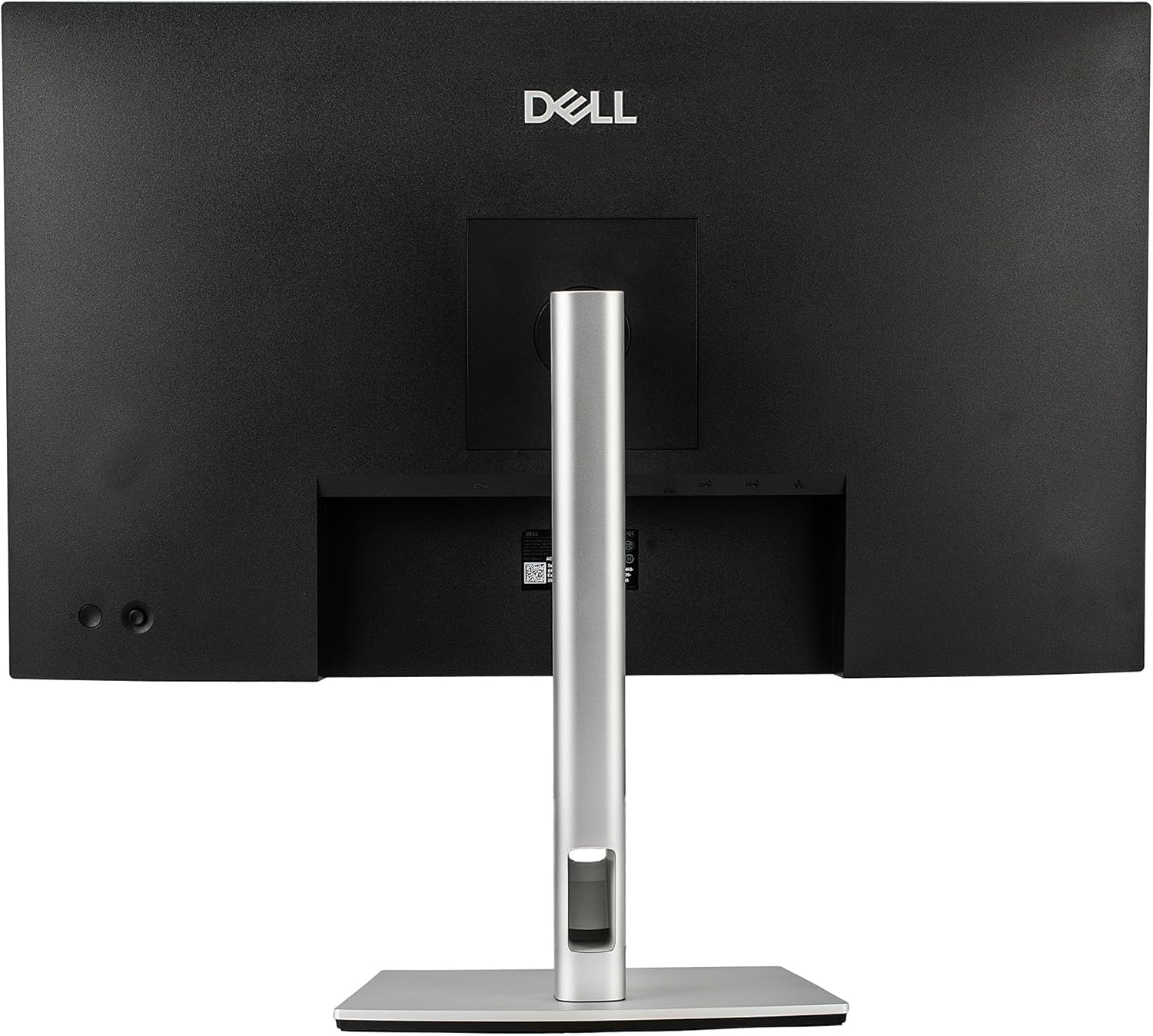
Imatge: Part posterior view of the Dell P2725QE monitor with the adjustable stand securely attached.

Imatge: Side profile of the Dell P2725QE monitor resting on its adjustable stand, showcasing el seu disseny prim.
3.2. Cables de connexió
Connect the necessary cables to your monitor and computer. The Dell P2725QE features a versatile USB-C connection that provides 90W power delivery, data transfer, and video output through a single cable. Alternatively, you can use the DisplayPort or HDMI connections for video input.
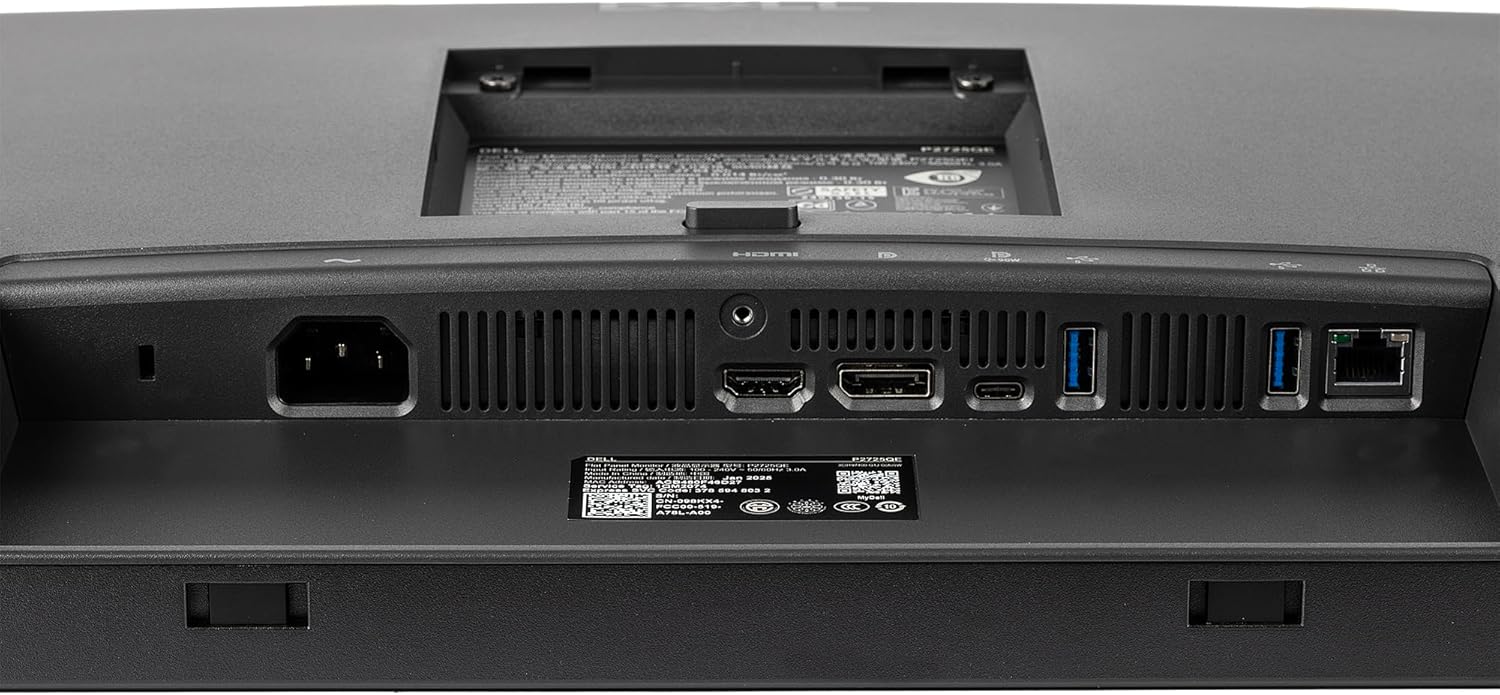
Imatge: Una imatge detallada view of the input/output ports on the back of the Dell P2725QE monitor, including USB-C, HDMI, and DisplayPort.
4. Instruccions de funcionament
4.1. Encès / apagat
Premeu el botó d'engegada que es troba al monitor per engegar-lo o apagar-lo. L'indicador lluminós d'engegada s'il·luminarà quan el monitor estigui actiu.
4.2. Ajustar la configuració de la pantalla
You can adjust various display settings such as brightness, contrast, and color modes directly through the monitor's on-screen display (OSD) menu. Navigate the OSD using the buttons or joystick (if present) on the monitor. For advanced control, Dell provides software that allows you to adjust these settings directly from your connected Mac or Windows PC without needing to physically interact with the monitor buttons.
4.3. Ajustaments ergonòmics
The adjustable stand allows for personalized viewing comfort. You can:
- Inclinació: Ajusta l'angle vertical de la pantalla.
- Girar: Gira la pantalla horitzontalment.
- Pivot: Rotate the screen 90 degrees for portrait mode.
- Ajust d'alçada: Puja o baixa la pantalla al teu nivell preferit.

Image: The Dell P2725QE monitor displayed at an angle, illustrating its ability to tilt and swivel for ergonomic viewing.
5. Característiques clau
- Claredat 4K UHD: Experience breathtaking 4K UHD clarity on a 27-inch IPS panel, delivering true-to-life color accuracy, deep contrast, and wide viewing angles. Ideal for creative professionals and productivity-focused users.
- Integrated USB-C Hub: Simplify your workspace with an all-in-one USB-C connection providing 90W power delivery, data transfer, and video output through a single cable. Perfect for charging laptops or connecting modern devices without clutter.
- Dell ComfortView A més: Work comfortably for longer hours with Dell’s ComfortView Plus low blue light technology. This feature reduces eye strain while maintaining vivid colors and accurate contrast, ensuring an optimal viewexperiència.
- Suport ergonòmic ajustable: The stand supports tilt, swivel, pivot, and height adjustments, allowing for personalized comfort and workflow flexibility.
6. Especificacions
| Característica | Valor |
|---|---|
| Dimensions del producte | 7 x 27 x 21 polzades |
| Pes de l'article | 21.3 lliures |
| Fabricant | Dell |
| ASIN | B0FWRY1WX2 |
| Número de model de l'article | P2725QE_EDIIV_1V |
| Mida de la pantalla de peu | 27 polzades |
| Relació d'aspecte | 4:3 |
| Resolució | 3840 x 2160 |
| Marca | Dell |
| Mida de la pantalla | 27 polzades |
| Resolució | 4K UHD 2160p |
| Descripció de la superfície de la pantalla | brillant |
7. Solució De Problemes
If you encounter any issues with your Dell P2725QE monitor, please refer to the following general troubleshooting steps:
- Sense energia: Assegureu-vos que el cable d'alimentació estigui connectat correctament tant al monitor com a una presa de corrent que funcioni. Comproveu l'indicador lluminós d'engegada.
- Sense senyal: Verify that the video cable (USB-C, DisplayPort, or HDMI) is correctly connected to both the monitor and your computer. Ensure your computer's display output is enabled and set to the correct input source on the monitor.
- Problemes de visualització: If the display is blurry, flickering, or has incorrect colors, try adjusting the monitor's resolution and refresh rate through your computer's display settings. You can also reset the monitor to its factory default settings via the OSD menu.
- USB-C Connectivity Problems: If the USB-C connection is not providing power, video, or data, ensure your computer's USB-C port supports these functions (DisplayPort Alt Mode and Power Delivery). Try using a different USB-C cable.
- Problemes de programari: If using Dell's display management software, ensure it is up-to-date. Reinstalling the software may resolve conflicts.
For more detailed troubleshooting, please consult the full user manual available on the Dell support weblloc.
8. Manteniment
To ensure the longevity and optimal performance of your Dell P2725QE monitor, follow these maintenance guidelines:
- Neteja de la pantalla: Use the provided Diginerds Cleaning Kit or a soft, lint-free cloth lightly dampened with a non-abrasive, ammonia-free cleaner specifically designed for display screens. Avoid spraying liquid directly onto the screen.
- Neteja de la Casing: Netegeu el monitor casinNetegeu amb un drap suau i sec. Eviteu productes químics agressius o materials abrasius.
- Ventilació: Assegureu-vos que les obertures de ventilació del monitor no estiguin bloquejades per evitar el sobreescalfament.
- Emmagatzematge: Quan no l'utilitzeu durant períodes prolongats, guardeu el monitor en un lloc fresc i sec, allunyat de la llum solar directa i de temperatures extremes.
9. Garantia i Suport
Your Dell P2725QE monitor may be eligible for extended protection plans. Please refer to your purchase documentation for details on available plans and their coverage. For technical support, warranty claims, or to access the latest drivers and documentation, please visit the official Dell support website or contact Dell customer service.
- Plans de protecció: Optional 4-Year Protection Plan and Complete Protect monthly plan are available.
- Política de devolució: Typically 30 days for refund/replacement.


