Introducció
Welcome to the LIGE EF18-E Smartwatch user manual. This guide provides detailed instructions on how to set up, operate, and maintain your new smartwatch. Please read this manual thoroughly to ensure optimal performance and longevity of your device.
Contingut del paquet
En desempaquetar, comproveu que hi hagi tots els elements següents:
- 1 x LIGE EF18-E Smartwatch
- 1 corretja d'acer inoxidable
- 2 x Silicone Straps (AK75, AK85)
- 1 x cable de càrrega USB
- 1 x cable de càrrega tipus C
- 1 x Strap Adjustment Tool (for stainless steel strap)
- 1 x Manual d'usuari (aquest document)

Image: LIGE EF18-E Smartwatch and its accessories, including three straps and two charging cables.
Producte acabatview
The LIGE EF18-E Smartwatch features a robust design with a 1.7-inch Ultra HD display and a powerful LED flashlight. Familiarize yourself with the watch's components:
- Visualització: 1.7-inch IPS Ultra HD touch screen (360x360 resolution) for clear visuals.
- Botons: Two physical buttons for navigation and function access.
- Llanterna LED: Integrated on the side for illumination.
- Sensors: Located on the rear for health monitoring (heart rate, blood oxygen, sleep).
- Ports de càrrega: Magnetic charging contacts on the rear.

Imatge: Frontal view of the LIGE EF18-E Smartwatch, showcasing its 1.7-inch Ultra HD display with vibrant colors and sharp details.
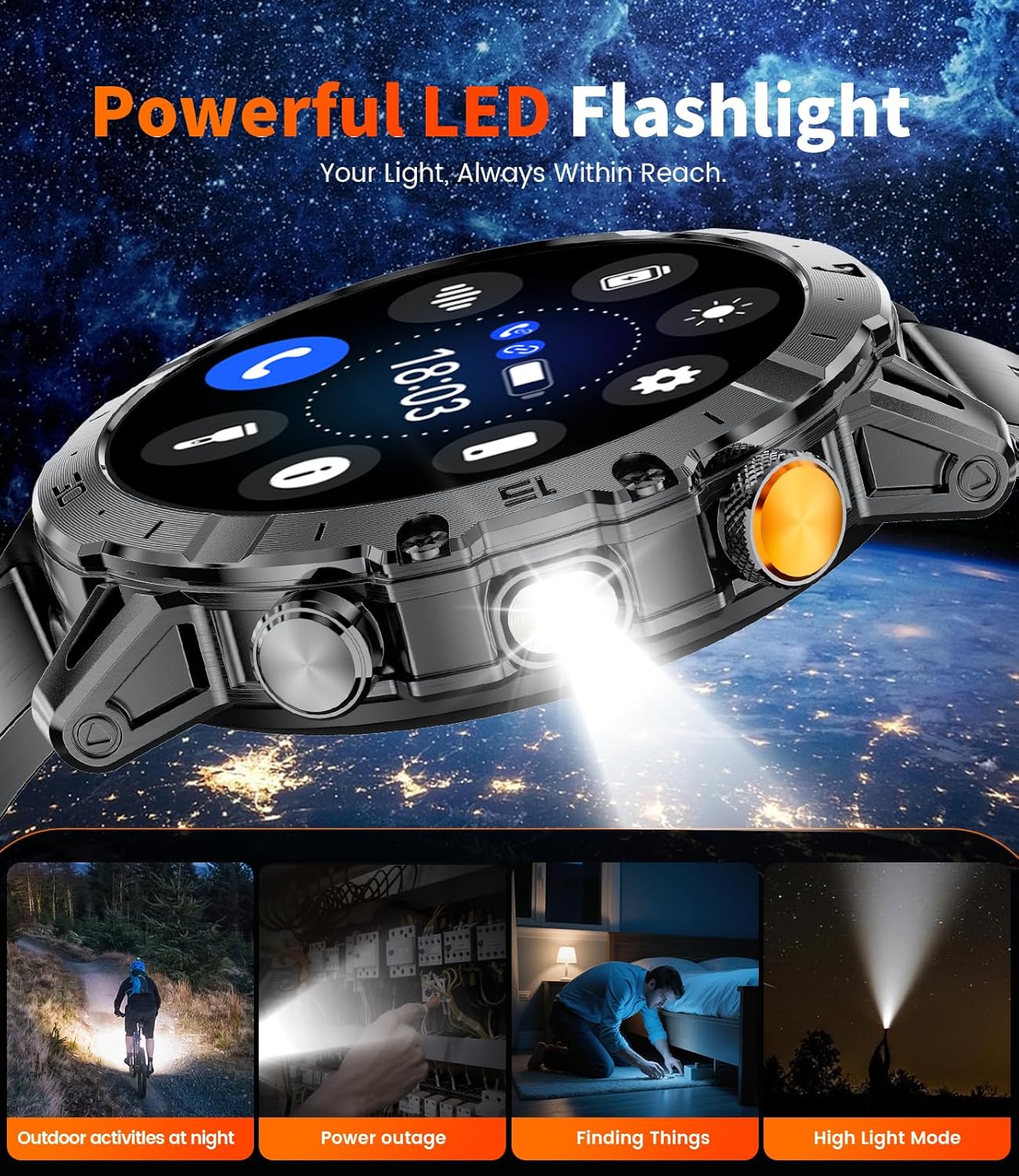
Imatge: Lateral view of the LIGE EF18-E Smartwatch, highlighting the powerful LED flashlight feature.
Configuració
1. Càrrega del rellotge intel·ligent
Before first use, fully charge your smartwatch. Connect one of the provided charging cables (USB or Type-C) to a power source and attach the magnetic end to the charging contacts on the back of the watch. The watch will display a charging indicator. A full charge typically takes approximately 2.5 hours.

Image: The LIGE EF18-E Smartwatch connected to its magnetic charging cable, illustrating the charging process.
2. Instal·lació de l'aplicació i emparellament de dispositius
To unlock all features, download the "Fitcloudpro" app on your smartphone (compatible with Android 5.1+ and iOS 9.0+).
- Download "Fitcloudpro" from the App Store (iOS) or Google Play (Android).
- Activa el Bluetooth al teu telèfon.
- Open the "Fitcloudpro" app and follow the on-screen instructions to add your device.
- Select "EF18" from the list of available devices to pair.
- Confirma la sol·licitud d'emparellament tant al telèfon com al rellotge intel·ligent.
- Allow the smartwatch to display notifications when prompted by the app.
- Ensure Bluetooth call and app notifications are enabled within the app settings for full functionality.

Image: Visual guide demonstrating the pairing process between the LIGE EF18-E Smartwatch and a smartphone using the Fitcloudpro application.
3. Instal·lació i ajust de la corretja
The smartwatch comes with three interchangeable straps. To change a strap, locate the quick-release pins on the underside of the strap where it connects to the watch body. Slide the pin to detach the strap. To attach a new strap, align the pin with the holes on the watch body and slide the pin into place until it clicks securely.
For the stainless steel strap, use the provided adjustment tool to remove or add links for a comfortable fit. Ensure the strap is snug but not too tight for accurate health monitoring.
Instruccions de funcionament
1. Navegació bàsica
- Pantalla tàctil: Llisca esquerra/dreta, amunt/avall per navegar pels menús i les funcions. Toca per seleccionar.
- Botó superior: Typically used to return to the home screen or activate/deactivate the display.
- Botó inferior: Customizable shortcut button. By default, it may open a specific function like sports modes or health monitoring.
- Aixecar per despertar: The display can be set to turn on automatically when you raise your wrist.
2. Esferes de rellotge
The LIGE EF18-E offers over 200 watch faces. To change the watch face, long-press the current watch face on the screen, then swipe left or right to browse available options. Tap to select. You can also customize watch faces and upload images via the "Fitcloudpro" app.

Image: A selection of over 200 personalized watch faces available for the LIGE EF18-E Smartwatch, demonstrating customization options.
3. Trucades i notificacions per Bluetooth
Once paired with your smartphone, you can manage calls and receive notifications directly on your watch.
- Fer/respondre trucades: Use the integrated speaker and microphone to make, answer, or end calls.
- Alertes de missatges: Receive notifications from SMS, Facebook, WhatsApp, Twitter, TikTok, and other apps. You can enable or disable this feature in the "Fitcloudpro" app.

Image: The LIGE EF18-E Smartwatch showing its Bluetooth calling interface and various smart notifications from social media and messaging apps.
4. Llanterna LED
Activate the powerful side-mounted LED flashlight for illumination in dark environments. This feature is useful for outdoor activities, power outages, or finding items in low light. The flashlight has a lighting range of 6-8 meters.

Image: The LIGE EF18-E Smartwatch with its integrated LED flashlight shining brightly, useful for various situations.
5. Modes esportius
The smartwatch supports over 100 sports modes, including running, cycling, walking, hiking, fitness, yoga, and HIIT. Select your desired activity to track steps, workout time, and calories burned. All fitness data is stored in the "Fitcloudpro" app, allowing you to monitor progress and set personalized goals.

Image: The LIGE EF18-E Smartwatch interface showing different sports modes and real-time exercise data, such as steps, calories, and heart rate.
6. Monitorització de la salut
The EF18-E smartwatch provides comprehensive health monitoring features:
- Freqüència cardíaca: Controla contínuament la freqüència cardíaca durant tot el dia.
- Oxigen en sang (SpO2): Automatically detects and records your blood oxygen saturation.
- Seguiment del son: Monitors your sleep patterns, including deep sleep, light sleep, and awake times, to help improve sleep quality.

Image: The LIGE EF18-E Smartwatch showing its health monitoring capabilities, including heart rate, blood oxygen levels, and detailed sleep analysis.
7. Altres característiques
The smartwatch includes several additional useful functions:
- Assistent de veu: Access your phone's voice assistant directly from the watch.
- Control de música: Controla la reproducció de música al teu telèfon intel·ligent.
- Control de la càmera: Fes servir el rellotge com a disparador remot per a la càmera del telèfon.
- Pronòstic del temps: Rep actualitzacions meteorològiques en temps real.
- Alarm Clock, Stopwatch, Timer: Eines essencials de gestió del temps.
- Sedentary & Water Reminder: Prompts to move or drink water.
- Cerca el telèfon: Ajuda a localitzar el telèfon intel·ligent emparellat.
- Calculadora: Funcions aritmètiques bàsiques.

Image: The LIGE EF18-E Smartwatch showcasing its diverse range of utility features, including weather updates, remote photography, and a calculator.
Manteniment
- Neteja: Wipe the watch screen and body with a soft, dry cloth. For stubborn dirt, use a slightly damp drap i sabó suau, i després eixugueu-ho bé. Eviteu productes químics agressius.
- Resistència a l'aigua: The smartwatch is 5ATM waterproof, suitable for swimming and showering. Avoid hot water, saunas, or diving, as extreme temperatures and high-pressure water can compromise the seal. Do not operate buttons underwater.
- Cura de la bateria: To prolong battery life, avoid fully discharging the watch frequently. Charge it regularly. Store the watch in a cool, dry place when not in use for extended periods.
- Temperatura: The watch is designed to operate in extreme conditions from -40°C to 70°C. However, prolonged exposure to extreme temperatures can affect battery performance and device longevity.

Image: The LIGE EF18-E Smartwatch highlighting its robust, military-grade construction, including dustproof, anti-impact, and 5ATM waterproof features.
Resolució de problemes
| Problema | Solució |
|---|---|
| El rellotge no s'encén | Assegura't que el rellotge estigui completament carregat. Connecta'l al carregador i espera uns minuts abans d'intentar encendre'l. |
| No es pot emparellar amb el telèfon |
|
| No s'han rebut notificacions |
|
| Dades de salut inexactes | Ensure the watch is worn snugly on your wrist, not too loose or too tight. Clean the sensors regularly. Avoid excessive movement during measurements. Note that this device is not a medical instrument. |
| Durada de la bateria curta | Reduce screen brightness, shorten screen-on time, disable unnecessary notifications, and limit continuous health monitoring if not required. |
Especificacions
| Característica | Detall |
|---|---|
| Número de model | EF18-E |
| Mida de la pantalla | 1.7 Inches Ultra HD IPS |
| Resolució | 360 x 360 píxels |
| Capacitat de la bateria | Polímer de liti de 1000 mAh |
| Temps de càrrega | Aprox. 2.5 hores |
| Durada de la bateria (ús típic) | Fins a més de 30 dies |
| Temps d'espera | Fins a més de 50 dies |
| Resistència a l'aigua | 5ATM |
| Connectivitat | Bluetooth 5.0 |
| Sistema operatiu | Wear OS 1.5 |
| Capacitat d'emmagatzematge de memòria | 256 MB |
| Compatibilitat | Android 5.1+/iOS 9.0+ |
| Característiques especials | LED Flashlight, Bluetooth Call, 100+ Sports Modes, Heart Rate Monitor, Blood Oxygen Monitor, Sleep Tracker, Voice Assistant, Music/Camera Control, Weather, Alarm, Stopwatch, Timer, Sedentary/Water Reminder, Find Phone, Calculator. |
| Pes de l'article | 1 Grams (0.035 ounces) - Note: This seems unusually low and might be a data error, but it's from the source. |
| Temperatura de funcionament | -40°C to 70°C (Military-Grade Quality) |
Garantia i Suport
LIGE provides a 365-day after-sales service for the EF18-E Smartwatch. If you encounter any issues or have questions regarding your device, please contact LIGE customer support. They aim to provide a satisfactory response within 24 hours.
For further assistance, refer to the "Service Support" section within the "Fitcloudpro" application.