1. Introducció
Thank you for choosing the Vixic D210S Label Maker. This handheld label maker is designed for ease of use, offering a variety of fonts, symbols, and frames to create custom labels for organization, crafting, and more. Its durable, waterproof tapes ensure long-lasting results for both indoor and outdoor applications. This manual provides detailed instructions for setup, operation, maintenance, and troubleshooting to help you get the most out of your device.
2. Contingut del paquet
Si us plau, verifiqueu que tots els elements que s'enumeren a continuació estiguin inclosos al vostre paquet:
- Vixic D210S Label Maker (Pink)
- 4 x Laminated Label Tapes (Black on White, 0.47 inch x 26.2 feet / 12mm x 8m each)
- 1 x Storage Case (External size: 8.7" x 6.7" x 3.9")
- 1 x cable d'alimentació USB-C
- 1 x Charger Block

Image: The Vixic storage case, designed to hold the label maker, up to 8 label tapes, 6 AAA batteries, a USB-C cable, and a charger block, ensuring all accessories are organized and protected.
3. Producte acabatview
Familiarize yourself with the components of your Vixic D210S Label Maker:

Imatge: Una clara view of the Vixic D210S label maker's top panel, highlighting the display screen, full QWERTY keyboard, and dedicated function buttons for size, font, width, barcode, history, menu, feed, escape, and OK.

Image: This image illustrates the label maker's QWERTY keyboard for direct input and points out the integrated manual cutter on the side, eliminating the need for external scissors.
Característiques principals:
- Teclat QWERTY: For intuitive and efficient text input.
- Pantalla fàcil de llegir: Displays text and settings clearly.
- Built-in Manual Cutter: For clean and precise label cutting after printing.
- Alimentació USB-C: Convenient charging and power supply.
- Multiple Fonts, Symbols, and Frames: Over 800 symbols, 100 frames, and 16 fonts for customization.
- Barcode Printing: Supports printing of various barcode types.
4. Configuració
4.1. Alimentació del dispositiu
- Connect the provided USB-C cable to the label maker's USB-C port.
- Plug the other end of the USB-C cable into the charger block, then into a power outlet.
- Alternatively, the device can be powered by 6 AAA batteries (not included). Open the battery compartment on the back and insert the batteries according to the polarity indicators.
4.2. Installing Label Tape
- Ensure the label maker is powered off.
- Open the tape compartment cover located on the back or side of the device.
- Insert the label tape cassette with the tape end facing the tape exit slot. Ensure it clicks into place securely.
- Gently pull a small length of tape through the exit slot to ensure it is properly aligned.
- Tanqueu la tapa del compartiment de la cinta.
5. Instruccions de funcionament
5.1. Basic Operation (3 Steps)
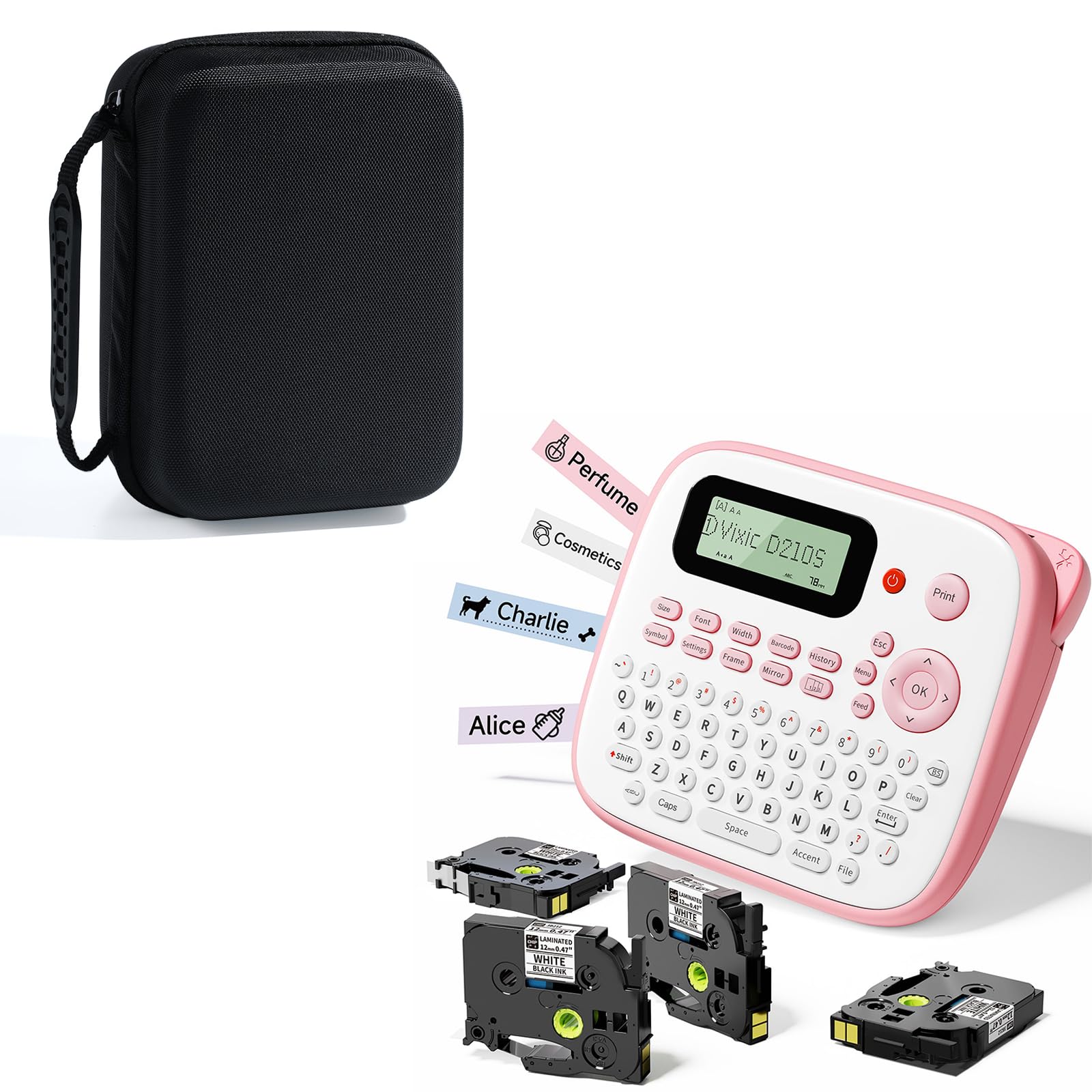
Image: A visual guide demonstrating the three fundamental steps for operating the label maker: powering it on, entering text using the keyboard, and initiating the print command.
- Pas 1: Enceneu - Premeu el botó Poder button (usually marked with a power symbol) to turn on the label maker.
- Step 2: Keyboard Input - Use the QWERTY keyboard to type your desired text. The text will appear on the screen.
- Pas 3: imprimir - Premeu el botó Imprimeix button to print your label.
5.2. Text Editing and Customization
The D210S offers extensive customization options:
- Tipus de lletra: Premeu el botó Font button to cycle through 16 different font styles.
- Mida: Utilitza el Mida button to adjust text size (Large, Medium, Small).
- Símbols: Access over 800 pre-designed symbols by pressing the Símbol botó.
- Marcs: Choose from over 100 frames using the Marc button to add decorative borders to your labels.
- Codis de barres: The label maker supports printing various barcode types. Refer to the on-screen menu for options.
- Múltiples línies: You can print up to 4 lines of text on a single label. Use the appropriate function key (e.g., Entra or a dedicated multi-line button) to add new lines.
- Mirror Printing: Utilitza el Mirall function for specific applications like iron-on labels.
- Història: El Història button allows you to recall previously printed labels.
5.3. Printing and Cutting
- After entering and customizing your text, press the Imprimeix botó.
- The label will feed out of the tape exit slot.
- Once printing is complete, use the built-in manual cutter on the side of the device to cleanly cut the label. Press the cutter lever firmly.
6. Label Tape Features
The Vixic D210S uses BZ laminated tapes, engineered for durability and versatility:

Image: This graphic highlights the robust properties of Vixic BZ laminated tapes, including resistance to water, UV light, extreme temperatures, friction, and chemicals. It also emphasizes their inkless, eco-friendly nature and a 10-year storage lifespan.
- 7-Layer Lamination Technology: Ensures exceptional durability and longevity, up to 10 years.
- Impermeable: Resistant to water, making them suitable for wet environments.
- Protecció UV: Prevents fading from sun exposure.
- Resistència a la temperatura: Withstands a wide range of temperatures, suitable for freezer to microwave applications.
- Abrasion and Friction Resistance: Labels remain clear even with frequent handling.
- Resistència química: Maintains integrity when exposed to various chemicals.
- Inkless & Eco-friendly: Utilizes thermal transfer technology, requiring no ink cartridges.
7. Manteniment
7.1. Cleaning the Label Maker
- Assegureu-vos que el dispositiu estigui apagat i desconnectat abans de netejar-lo.
- Feu servir un drap suau i sec per netejar l'exterior de l'etiquetadora.
- If necessary, use a cotton swab lightly dampened with rubbing alcohol to clean the print head and tape path. Allow to dry completely before use.
- No utilitzeu netejadors abrasius ni dissolvents.
7.2. Emmagatzematge
- Store the label maker and tapes in a cool, dry place away from direct sunlight and extreme temperatures.
- The included storage case provides excellent protection against dust, scratches, and minor impacts.

Image: This composite image illustrates the protective qualities of the Vixic case, highlighting its shock-proof hard EVA shell, stress-resistant nylon exterior, and semi-waterproof design to safeguard the label maker from damage.

Imatge: Una imatge detallada view of the Vixic label maker storage case's interior, featuring a movable adhesive strap that allows for a custom, secure fit for the label maker, preventing movement and potential damage during transport.

Image: This image highlights the design features of the Vixic case, including a smooth, snag-free zipper for easy access and an ergonomic silicone-reinforced handle for comfortable carrying.
8. Solució De Problemes
If you encounter issues with your Vixic D210S Label Maker, please refer to the following common problems and solutions:
| Problema | Causa possible | Solució |
|---|---|---|
| El dispositiu no s'encén. | Low battery or power connection issue. | Ensure USB-C cable is securely connected and plugged into a working power source. If using batteries, replace them with fresh ones. |
| Sense impressió o impressió tènue. | Tape not installed correctly, print head dirty, or tape exhausted. | Check tape installation. Clean the print head with a cotton swab. Replace the tape cassette if empty. |
| Tape jam. | Incorrect tape installation or foreign object. | Power off the device. Open the tape compartment and carefully remove any jammed tape. Reinstall tape correctly. |
| Cutter not working. | Tape not fully extended or cutter mechanism obstructed. | Ensure the label has fully exited the slot before attempting to cut. Check for any debris obstructing the cutter. |
| Screen display issues. | Software glitch or low power. | Try restarting the device. Ensure adequate power supply. |
9. Especificacions
- Model: Vixic D210S
- Font d'alimentació: USB-C (included cable and charger block) or 6 x AAA batteries (not included)
- Amplada de cinta compatible: 0.47 mm
- Tipus de cinta: Vixic BZ Laminated Tapes
- Visualització: Pantalla LCD de fàcil lectura
- Teclat: QWERTY layout
- Personalització: 16 fonts, 800+ symbols, 100+ frames, up to 4 lines of text, barcode printing
- Tallador: Built-in manual cutter
- Case External Dimensions: 8.7" x 6.7" x 3.9" (22.1 cm x 17 cm x 9.9 cm)
10. Informació de seguretat
- Keep the label maker away from water and high humidity.
- No exposeu el dispositiu a la llum solar directa ni a temperatures extremes.
- Eviteu deixar caure o sotmetre el dispositiu a forts impactes.
- Do not attempt to disassemble or repair the label maker yourself. Contact customer support for assistance.
- Mantenir fora de l'abast dels nens.
- Use only Vixic brand label tapes for optimal performance and to prevent damage.
11. Garantia i Suport
Vixic products are designed for quality and reliability. For warranty information, technical support, or any questions regarding your D210S Label Maker, please refer to the contact information provided with your purchase or visit the official Vixic weblloc.


