1. Introducció
The Thermal Master P1 is a compact, high-resolution thermal camera designed for use with Type-C Android and iOS devices. It provides advanced thermal imaging capabilities for various applications, including home inspections, electrical diagnostics, HVAC maintenance, and general temperature analysis. This manual provides essential information for setting up, operating, and maintaining your P1 thermal camera.

Image: Thermal Master P1 in use for professional inspection.
2. Què hi ha a la caixa
Upon unboxing your Thermal Master P1, please ensure all the following items are present:
- P1 Thermal Camera for Type-C Device
- Zipper Case
- 50cm Extensive Cable
- Guia d'inici ràpid

Image: Packaging contents of the Thermal Master P1.
3. Configuració
3.1 Compatibilitat de dispositius
The Thermal Master P1 is designed for universal Type-C connectivity, compatible with Android, iOS (USB-C models), and Windows devices. The plug is extended by 2mm to ensure compatibility with most phone cases.

Image: Universal Type-C compatibility with various devices.
3.2 Instal·lació de l'aplicació
To operate the Thermal Master P1, download the "Temp Master" application from the Apple App Store or Google Play Store. No sign-up is required for immediate use.

Image: Temp Master App availability on App Store and Google Play.
3.3 Connexió de la càmera
Simply plug the P1 thermal camera into your device's Type-C port. The camera is powered directly by your device, requiring no external batteries. For extended reach or difficult angles, use the included 50cm extension cable.

Image: P1 Thermal Camera connected to a smartphone.

Image: Extension cable and extended Type-C connector for flexible use.
4. Instruccions de funcionament
4.1 Thermal Imaging Basics
The P1 features a 320x240 Super IR Resolution, enhanced by Thermal Master X³ algorithms from a native 160x120 resolution. A 25Hz refresh rate ensures smooth, real-time thermal imaging. It detects temperature changes as small as 0.04°C with an accuracy of ±2°C/±3.6°F, covering a wide temperature range from -4°F to 1112°F (-20°C to 600°C).
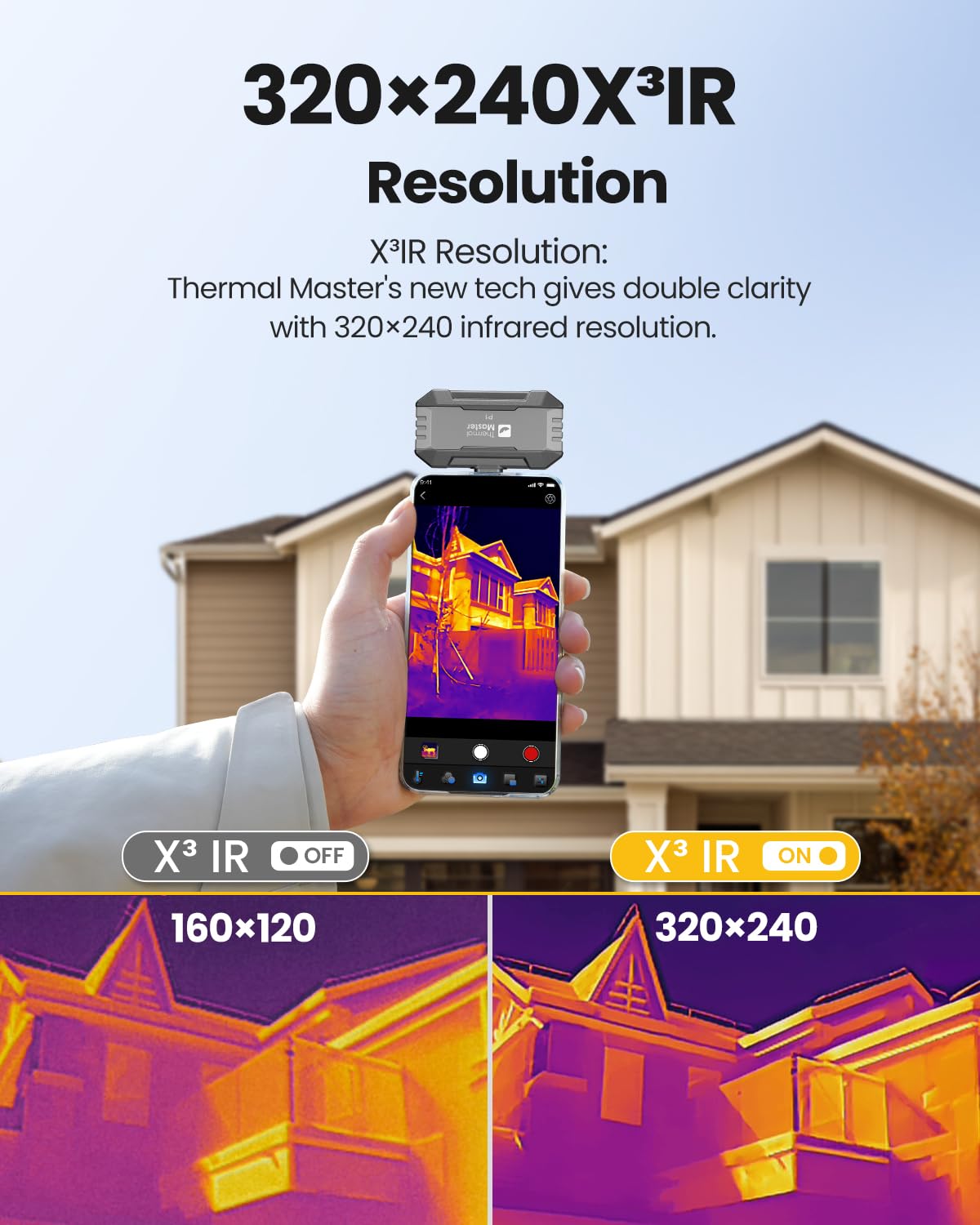
Image: Enhanced 320x240 IR Resolution for clearer details.

Image: Precision temperature measurement capabilities.
4.2 Característiques de l'aplicació
The Temp Master app provides a suite of tools for comprehensive thermal analysis:
- Zoom digital 15x: Use a two-finger slide on the screen to zoom in from 1x to 15x for detailed inspections.
- Temperature Measurement Tools: Utilize point, line, area, and circle tools to precisely measure temperatures.
- 12-Color Palettes: Select from various color palettes (e.g., White Hot, Black Hot, Iron Red, Rainbow) to highlight temperature differences effectively.
- Imatge en imatge (PIP): Compare thermal and visible images side-by-side with adjustable size and transparency for accurate positioning.
- Control d'imatge: Adjust brightness, contrast, isotherm scale, mirror, and rotation for optimal viewing.
- Alarma de temperatura alta/baixa: Set alarms for critical temperature thresholds.
- Automatic Temperature Point Tracking: Automatically locate and track hot and cold spots.
- Captura: Supports capturing photos and videos directly to your device's gallery. Images can be re-edited, palettes changed, and temperature points added post-capture.
- Professional Data Analysis: Generate detailed, organized reports from your thermal data.

Image: 15x Digital Zoom in action.

Image: High-Low Temperature Alarm and 12-Color Palettes.

Image: Free Professional Data Analysis feature.
4.3 Aplicacions
The P1 thermal camera is suitable for a variety of applications:
- Home Inspections (e.g., detecting water leaks, insulation gaps)
- Electrical Issues (e.g., identifying overheating components)
- HVAC Maintenance (e.g., checking airflow, duct leaks)
- Diagnòstic d'automoció

Image: Diverse applications of the Thermal Master P1.
4.4 Vídeos oficials de productes
Video: User Guide for Thermal Master P1. This video provides a visual walkthrough of the P1's features and basic operation.
Video: Thermal Master P1, the Repair Master. This video showcases the P1's utility in repair and diagnostic scenarios.
5. Manteniment
To ensure the longevity and optimal performance of your Thermal Master P1 camera, follow these general maintenance guidelines:
- Keep the camera lens clean and free from dust or debris. Use a soft, lint-free cloth for cleaning.
- Store the camera in its provided zipper case when not in use to protect it from physical damage.
- Eviteu exposar la càmera a temperatures extremes o a la llum solar directa durant períodes prolongats.
- No intenteu desmuntar ni reparar el dispositiu vosaltres mateixos, ja que això anul·larà la garantia.
6. Solució De Problemes
Here are some common questions and solutions for the Thermal Master P1:
- Q1: Why is the Temp Master app not responding when plugged in?
A: Verify that "OTG" is enabled in your phone's Settings. On most phones, OTG is enabled by default. Install the Temp Master app and grant all required permissions. For iPhone 14 and earlier models, you must use an adapter that is MFi-certified and supports OTG. If issues persist, contact our after-sales team. - Q2: What should I do in the event of a blurry screen?
A: Refresh the images by tapping the Shutter icon. - Q3: Can the camera detect objects under water or outside windows?
A: No. Thermal imaging detects surface-level heat, which is blocked or reflected by water, glass, and fabrics. - Q4: Why do I always hear a 'click' sound?
A: This is the shutter sound of the thermal camera, designed to maintain image clarity. You can temporarily disable it by following: Setting > Image Setting > Automatic shutter.
7. Especificacions
| Característica | Detall |
|---|---|
| Resolució IR | 320×240 (enhanced from 160×120) |
| Freqüència d'actualització | 25 Hz |
| Precisió | ± 2 ° C / ± 3.6 ° F. |
| Interval de temperatura | -4 °F a 1112 °F (-20 °C a 600 °C) |
| Sensibilitat tèrmica (NETD) | 0.04°C (<40mK) |
| Zoom digital | 15x |
| Camp de View (FOV) | 52°x39° |
| Connectivitat | Universal Type-C (Android, iOS USB-C, Windows) |
| Font d'alimentació | Device-powered (No batteries needed) |
| Consum d'energia | 0.32W |
| Extended Connector | 2mm for case compatibility |
| Dimensions | 4.96 x 4.13 x 2.12 polzades |
| Pes | 3.99 unces |
8. Garantia i Suport
Thermal Master is committed to providing reliable products and excellent customer service. The P1 thermal camera comes with:
- Devolucions gratuïtes de 30 dies: Per a la teva tranquil·litat.
- 2-Year No-Hassle Replacement: For any quality problems.
- Suport tècnic de tota la vida: Professional technical support and solutions are available.
Each thermal camera undergoes over 100 rigorous pre-delivery inspections to ensure durability and quality.

Image: Thermal Master customer support and warranty information.


