1. Producte acabatview
The TCL FLIP 4 5G (T440W) is a compact flip phone designed for essential communication and ease of use. It features dual displays, a tactile keypad, and 5G connectivity for reliable performance.
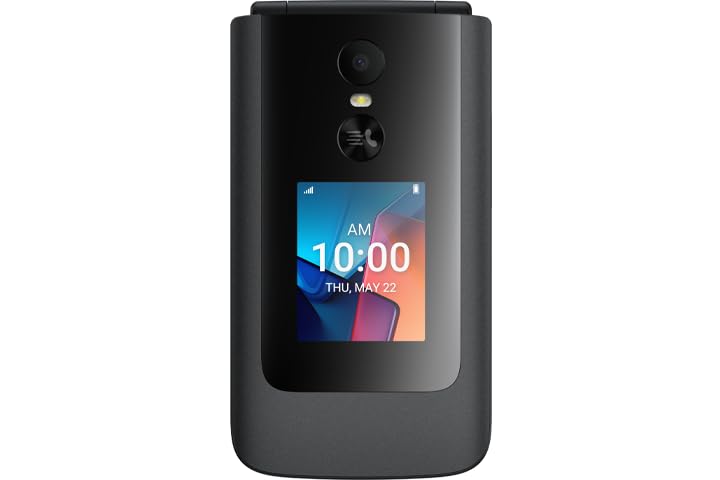
Image: TCL FLIP 4 5G phone in the open position, displaying the internal screen and the physical keypad.
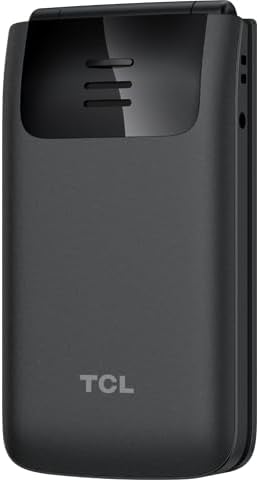
Image: TCL FLIP 4 5G phone in the closed position, showing the external display and the TCL branding on the back.
Característiques principals:
- Pantalla dual: 1.77-inch external display for notifications and a 3.2-inch internal display.
- Tactile Keypad: Large buttons and dedicated shortcut keys for easy navigation.
- Connectivitat 5G: Reliable high-speed network access.
- KaiOS Operating System: User-friendly interface with essential applications.
- Càmera de 5 MP: Per capturar fotos i vídeos.
- Veu HD: Claritat de trucada millorada.
2. Què hi ha a la caixa
Verifiqueu que tots els elements siguin presents a l'embalatge del producte:
- TCL FLIP 4 5G Phone (T440W)
- Bateria
- Carregador
3. Configuració
3.1. Inserció de la targeta SIM i la bateria
- Open the Phone: Gently open the phone to access the battery compartment.
- Treure la contraportada: Locate the notch on the side or bottom of the phone and carefully pry off the back cover.
- Insereix la targeta SIM: Locate the SIM card slot. Insert your Nano-SIM card with the gold contacts facing down and the cut corner aligned as shown in the diagram (refer to phone's internal markings).
- Insereix la bateria: Align the battery contacts with the phone's contacts and gently press the battery into place.
- Substituïu la coberta posterior: Align the back cover and press firmly around the edges until it clicks securely into place.
3.2. Carregant la bateria
- Connecta el carregador: Connecteu el carregador a una presa de corrent.
- Connecta't al telèfon: Connect the charger cable to the charging port on the side of the phone.
- Indicador de càrrega: The phone will display a charging indicator on both the internal and external screens. Allow the phone to charge fully before first use.
3.3. Encès / apagat
- Encès: Manteniu premut el botó Engegar/Finalitzar trucada button until the phone vibrates and the screen lights up.
- Apagar: Manteniu premut el botó Engegar/Finalitzar trucada i, a continuació, seleccioneu "Apaga" de les opcions que apareixen a la pantalla.
3.4. Configuració inicial
Upon first power-on, follow the on-screen prompts to configure basic settings such as language, date and time, and network preferences.
4. Instruccions de funcionament
4.1. Navegació bàsica
- Tecla de navegació: Use the central navigation key (up, down, left, right) to scroll through menus and options.
- Botó D'acord: Premeu el centre OK botó per confirmar les seleccions.
- Tecles programades: The keys directly below the screen (left and right) perform functions indicated by the text above them, which change depending on the context.
- Tecla Enrere/Esborrar: Utilitza el Enrere key (often indicated by an arrow) to return to the previous screen or delete characters.
4.2. Fer i rebre trucades
- Fer una trucada: Introduïu el número de telèfon amb el teclat numèric i premeu la tecla Truca botó (icona verda del telèfon).
- Respondre una trucada: Quan soni el telèfon, premeu la tecla Truca botó.
- Finalització d'una trucada: Premeu el botó Engegar/Finalitzar trucada botó (icona vermella del telèfon).
4.3. Enviament i recepció de missatges
- Access Messages: Navegueu fins a l'aplicació "Missatges" des del menú principal.
- Compose New Message: Select "New Message" or "Compose" and enter the recipient's number and your message using the keypad.
- Enviar missatge: Press the appropriate soft key to send the message.
4.4. Ús de la càmera
- Càmera oberta: Access the "Camera" application from the main menu or via a shortcut key.
- Fes una foto: Frame your shot and press the OK botó per capturar.
- Grava vídeo: Switch to video mode within the camera app and press OK per iniciar / aturar la gravació.
4.5. Connectivitat
- Xarxa 5G: The phone automatically connects to the available 5G network. Ensure your SIM card supports 5G and your plan includes 5G access.
- Wi-Fi: To connect to Wi-Fi, go to "Settings" > "Network & Connectivity" > "Wi-Fi". Select an available network and enter the password if required.
5. Manteniment
5.1. Neteja del dispositiu
- Feu servir un drap suau i sense borrissol per netejar la pantalla i la carcassa del telèfon.
- Eviteu utilitzar productes químics agressius, netejadors abrasius o aerosols.
- Ensure the phone is powered off and unplugged before cleaning.
5.2. Cura de la bateria
- Use only the original TCL charger and battery provided with the device.
- Eviteu exposar el telèfon a temperatures extremes.
- No perforeu, desmunteu ni modifiqueu la bateria.
5.3. Actualitzacions de programari
Periodically check for software updates to ensure your phone has the latest features and security enhancements. Go to "Settings" > "Device" > "Software Update" to check for and install updates.
6. Solució De Problemes
If you encounter issues with your TCL FLIP 4 5G, refer to the following common solutions:
6.1. El telèfon no s'encén
- Assegureu-vos que la bateria estigui ben inserida i carregada.
- Connect the phone to the charger and wait a few minutes before attempting to power on again.
- If the issue persists, perform a soft reset by removing and reinserting the battery, then try powering on.
6.2. Mala qualitat de trucada
- Check your network signal strength. Move to an area with better reception.
- Assegureu-vos que el micròfon i l'altaveu no estiguin obstruïts.
- Reinicieu el telèfon.
6.3. Unable to Connect to Wi-Fi
- Ensure Wi-Fi is enabled on your phone.
- Verifiqueu que la contrasenya del Wi-Fi sigui correcta.
- Restart your Wi-Fi router and the phone.
7. Especificacions
| Característica | Detall |
|---|---|
| Número de model | T440W |
| Sistema operatiu | KaiOS |
| Internal Display Size | 3.2 polzades |
| Mida de la pantalla externa | 1.77 polzades |
| RAM | 2 GB |
| Capacitat d'emmagatzematge | 32 GB |
| Càmera | 5 MP |
| Capacitat de la bateria | 3000 mAh |
| Connectivitat | 5G |
| Dimensions (paquet) | 5 x 3 x 2 polzades |
| Pes | 6.4 unces |
8. Garantia i Suport
8.1. Garantia del producte
TCL products are covered by a limited manufacturer's warranty. Please refer to the warranty card included in your product packaging or visit the official TCL weblloc web per obtenir informació detallada sobre els termes i condicions de garantia específics de la vostra regió.
8.2. Atenció al client
For further assistance, technical support, or service inquiries, please contact TCL customer support. You can find contact information on the official TCL weblloc web o a través de la secció d'assistència de la configuració del dispositiu.
Assistència en línia: www.tcl.com/us/en/support


